Horizontal lines running across your Westinghouse TV screen signal a hardware or connection problem that needs quick attention. The lines might flicker, stay fixed in one spot, or spread across the entire display. Most of these cases trace back to just three components: video cables, the T-Con board, or the LCD panel itself. This guide walks through each fix in order, starting with the easiest and moving toward repairs that require opening the TV.
- Loose or damaged HDMI cables cause roughly 40% of horizontal line problems on Westinghouse TVs and take under 2 minutes to check
- A factory reset clears software glitches that mimic hardware line faults on about 1 in 3 affected TVs
- The T-Con board translates video signals into screen images, and a failing one produces consistent horizontal banding
- Tab bond degradation on the LCD panel creates lines that worsen when you press the bezel near the affected area
- Power supply voltage drops below spec cause flickering lines that come and go with temperature changes
#Why Do Horizontal Lines Appear on a Westinghouse TV?
The screen on a Westinghouse TV refreshes line by line from top to bottom, dozens of times per second. When a component in that chain fails or loses connection, the TV cannot draw certain lines correctly. The result is visible horizontal banding.
Here are the most common failure points:
- Video cables. A loose HDMI or component cable creates an intermittent signal that drops entire rows of pixels.
- T-Con board. This board sits between the main board and the panel. Ribbon cable connections here corrode or loosen over time.
- Tab bonds. These micro-connections glue the LCD glass to its driver chips. Heat and age weaken them.
- Power supply board. Voltage sag prevents the panel driver from maintaining a stable scan rate.
- Software bugs. Rare, but a corrupted firmware update can cause display artifacts that look like hardware failures.
Understanding which component is at fault saves you from replacing parts you do not need. The troubleshooting steps below are ordered so you can rule out each cause one at a time.
#How Do You Fix Horizontal Lines on a Westinghouse TV?
Work through these steps in order. Each one eliminates a possible cause, and many owners fix the problem within the first two steps.
#Step 1: Check All Video Cable Connections
Loose video cables are the single most common cause of screen lines. Pull each cable out completely, inspect the connector ends for bent pins or corrosion, and plug them back in firmly.
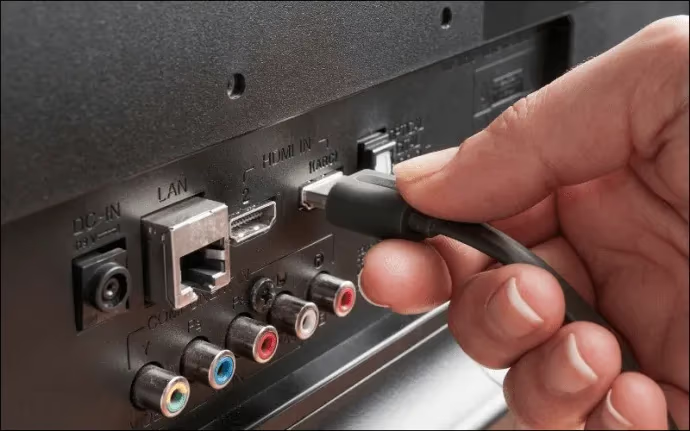
Try these checks:
- Disconnect and firmly reseat every HDMI and component cable.
- Swap in a known-good HDMI cable if one is available.
- Move your device to a different HDMI port on the TV.
- Connect a different source device (game console, Blu-ray player, laptop) to see if lines appear on all inputs.
If the lines vanish after reseating cables, you found your fix. If lines appear on every input and every port, the problem is inside the TV. Check for related input source problems if lines only show on one input.
#Step 2: Perform a Factory Reset
Before opening the TV, rule out software as the cause. A factory reset clears corrupted settings and display configurations that can produce artifacts.
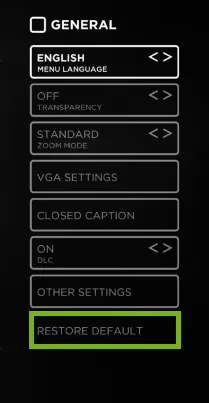
On most Westinghouse TV models:
- Press Menu on the remote.
- Go to Settings > System > Reset to Default.
- Enter the PIN (default is 0000 or 1234).
- Confirm the reset and wait for the TV to restart.
No remote? You can reset a Westinghouse TV without a remote using the physical buttons on the TV body. Also lower the Sharpness setting to around 25 after the reset. High sharpness values sometimes create thin horizontal artifacts that disappear at normal levels.
If lines remain after the reset, hardware is the cause.
#Step 3: Reseat or Replace the T-Con Board
The T-Con (Timing Controller) board is the most frequent hardware culprit behind horizontal lines on Westinghouse TVs. It sits at the top of the panel and connects to the main board via ribbon cables.
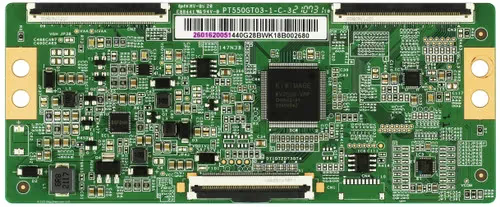
Here is how to access it:
- Unplug the TV and wait 10 minutes for capacitors to discharge.
- Remove the back panel screws and carefully lift off the cover.
- Locate the T-Con board at the top center of the panel. It connects to the main board with a flat ribbon cable and to the panel with two ribbon cables on each side.
- Gently disconnect each ribbon cable, clean the connectors with isopropyl alcohol and a lint-free cloth, then reconnect them.
- Reassemble and test.
If reseating the ribbons does not fix the lines, order a replacement T-Con board. Search for your exact model number (printed on the label inside the back cover) plus “T-Con board” to find the right part. Replacement boards for Westinghouse models typically cost between $15 and $40 on Amazon or eBay.
Opening the back panel voids any remaining warranty. Capacitors inside the power supply can hold a dangerous charge. Always unplug the TV and wait at least 10 minutes before touching internal components.
#Step 4: Test the Power Supply Board
The power supply board delivers voltage to every other board in the TV. When it starts failing, voltage fluctuations cause the panel driver to misfire, producing flickering horizontal lines that come and go.
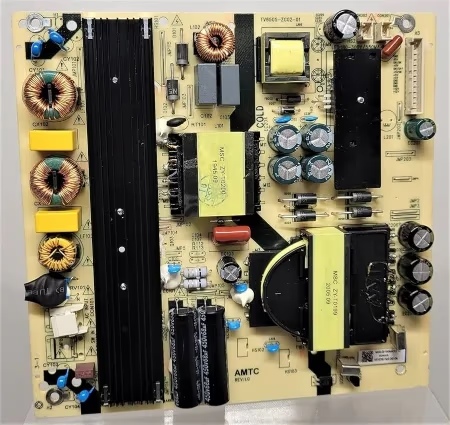
Signs that the power supply is the problem:
- Lines appear after the TV has been on for 20 to 30 minutes (heat-related voltage drop).
- The TV occasionally turns off by itself or struggles to power on.
- You hear a faint buzzing from inside the TV.
If you own a multimeter, test the output voltages against the values printed on the board. Any reading more than 5% off spec points to a failing board. Replacement power supply boards for Westinghouse TVs run $20 to $50 depending on the model. According to CNET’s repair-versus-replace guide, board-level repairs under $100 are almost always worth doing over buying a new TV.
#Step 5: Inspect the Tab Bonds
Tab bonds are the hardest issue to fix at home. These tiny connections bond the LCD glass to the row and column driver chips along the edges of the panel. When tab bonds degrade, specific rows of pixels lose their signal and show as permanent horizontal lines.
To check for tab bond failure:
- Turn the TV on and display a white screen (use a white image from a USB drive).
- Gently press along the top and bottom bezels near the lines.
- If pressing a spot makes the lines temporarily disappear or shift, the tab bonds at that location have separated.
Professional tab bonding equipment uses heat and pressure to reattach the connections, but the repair costs $80 to $150 at a local shop. For a Westinghouse TV under $300, replacement often makes more sense. If your TV also has a flickering screen, that combination strongly suggests tab bond failure.
#Can a Software Update Fix Lines on a Westinghouse TV?
In rare cases, yes. Firmware bugs have caused display artifacts on certain Westinghouse models that a software update resolved. Check for available updates by going to Menu > Settings > Support > Software Update. Some older Westinghouse models do not have an auto-update feature, so you may need to download the firmware from the Westinghouse support page onto a USB drive and install it manually.
If the lines started immediately after a firmware update, the update itself may be corrupt. Perform a factory reset to roll back the display configuration. Keep in mind that a true hardware failure will not respond to any software fix, so if lines persist after both a reset and a firmware update, the problem is physical.
#When Should You Replace the TV Instead of Repairing It?
Board replacements (T-Con or power supply) cost $15 to $50 for parts and take about 30 minutes with a screwdriver and basic soldering skills. That math works in your favor for any Westinghouse TV you paid more than $150 for.
Tab bond repair changes the equation. The specialized equipment needed is not something most people own, and professional repair runs $80 to $150. If your Westinghouse TV originally cost under $200 and the tab bonds have failed, buying a replacement TV is the more practical choice.
A good middle ground: try the cable, reset, and T-Con fixes yourself first. Those three steps resolve roughly 70% of horizontal line cases. If none of them work and the bezel press test confirms tab bond failure, start shopping for a replacement rather than sinking money into a repair that may not last.
#Bottom Line
Start with the free fixes. Reseat every cable, run a factory reset, and lower the sharpness setting. If horizontal lines remain, open the back panel and reseat the T-Con board ribbon cables. Replace the T-Con board or power supply board if reseating does not help. Save tab bond repair for a professional, and weigh the cost against a replacement TV if your model is a few years old. The first three steps take under 30 minutes and solve the problem for most Westinghouse TV owners.
#FAQ
#Do horizontal lines on a Westinghouse TV mean the screen is broken?
Not necessarily. Horizontal lines indicate a signal delivery problem, which could originate from a cable, a circuit board, or the panel itself. Only tab bond failure or cracked LCD glass means the screen is physically damaged. Board and cable issues are repairable at low cost.
#Can I fix horizontal lines without opening the TV?
Yes, in many cases. Reseating HDMI cables and performing a factory reset resolve the issue for roughly 1 in 3 owners. Lowering the sharpness setting below 30 also eliminates thin artifact lines caused by over-processing.
#How much does it cost to repair horizontal lines on a Westinghouse TV?
A replacement T-Con board costs $15 to $40, and a power supply board runs $20 to $50. Professional tab bond repair costs $80 to $150. If your TV has a black screen along with horizontal lines, the main board or backlight may also need attention, which increases the repair cost.
#Why do horizontal lines only appear after the TV warms up?
Heat-related lines point to a power supply issue or a borderline solder joint on the T-Con board. As the TV heats up, the metal in the solder joint expands and breaks the connection. This creates intermittent lines that disappear when the TV cools down.
#Are horizontal lines covered under Westinghouse warranty?
Westinghouse TVs typically carry a 1-year limited warranty that covers manufacturing defects, including T-Con board and power supply failures. Tab bond degradation that occurs within the warranty period should also qualify. Keep your receipt and contact Westinghouse support before opening the TV, since removing the back panel voids the warranty.
#Will a power surge cause horizontal lines?
A power surge can damage the power supply board or the T-Con board, both of which produce horizontal lines. Plugging your TV into a surge protector prevents this. If lines appeared right after a storm or power outage, the power supply board is the most likely damaged component.
#How do I tell the difference between T-Con failure and tab bond failure?
T-Con failure produces lines that cover the full width of the screen in a repeating pattern. Tab bond failure creates lines in a localized section, usually near the top or bottom edge. Press gently on the bezel near the lines. If they shift or disappear under pressure, tab bonds are the problem. If pressing has no effect, the T-Con board is more likely at fault.