Ice hockey is enjoyed by sports lovers across the world. As games heat up, fans want to stream their favorite National Hockey League (NHL) matches directly onto the big screen. With Chromecast, NHL action can be cast onto any TV for an exciting, immersive viewing experience. This guide covers multiple methods for streaming NHL games from various devices onto Chromecast-connected televisions. Whether you want to cast NHL directly from an Android, iPhone, iPad, PC or Mac, this tutorial has you covered.
- NHL app supports Chromecast natively on both Android and iOS for one-tap casting to your TV
- Chrome and Edge browsers let you cast the NHL website from any PC or Mac in just a few clicks
- fuboTV includes NHL Network and Center Ice as a cable-free alternative for live game streaming
- VPN services bypass local blackouts by changing your virtual location outside the broadcast territory
- 5 GHz Wi-Fi and 25 Mbps speeds are recommended for buffer-free NHL streaming on Chromecast
#Overview of Ways to Cast and Stream NHL Games on Chromecast
There are several ways hockey fans can watch NHL games on the TV via Chromecast:
-
Cast the NHL app from an Android phone or iPhone
-
Stream NHL website on Chromecast using Google Chrome browser on a laptop or desktop
-
Use Microsoft Edge browser on a PC to cast NHL to the TV
-
Cast NHL using AirPlay mirroring from an iPhone, iPad
-
Stream live NHL games with the fuboTV app on Chromecast
-
Use a VPN service to watch region-restricted NHL content
Later sections explore these methods in more detail. First, let’s go over the prerequisites.
#What Do You Need Before Streaming NHL on Chromecast?
Before casting NHL games from various devices, make sure that:
-
You have a Chromecast streaming stick connected to your TV, or a smart TV with built-in Chromecast support.
-
Your Chromecast and the streaming device are connected to the same Wi-Fi network.
-
You have an active NHL subscription like NHL TV or an official NHL streaming package.
-
The accompanying app, browser or VPN is updated to the latest version for smooth casting.
Now let’s get into the step-by-step guides for streaming NHL games on the television using a Chromecast device across various platforms.
#How Do You Cast NHL Games from an Android Phone to Chromecast?
Android users can cast NHL action directly from their phones onto the TV by using the official NHL app available on the Google Play Store.
#Steps to Cast NHL from Android Phones:
-
Install the NHL app on your Android phone.
-
Log in to the NHL app using your subscription account credentials.
-
Play a live NHL game stream or video in the Android app.
-
Tap the Cast button visible at the top.
-
Select your Chromecast device name from the device list.
-
The stream will now play on your Chromecast connected TV.
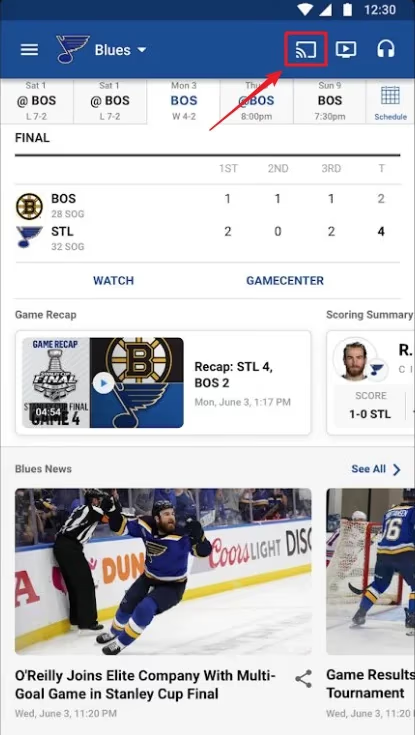
The NHL Android app works well with Chromecasts for a smooth NHL games casting experience. You can also cast your full Android screen using the Google Home app.
#How to Cast NHL from an iPhone to TV
Like Android, iPhone users can also cast live NHL action onto the big screen using the NHL app available on the Apple App Store.
#Here Is How to Chromecast NHL from iPhone:
-
Download and install the official NHL app on your iPhone.
-
Sign in using your NHL.TV subscription credentials.
-
Play a live NHL game or saved video in the iOS app.
-
Tap the AirPlay icon visible at the top right.
-
Select your Chromecast device.
-
The NHL stream will now cast to your TV.
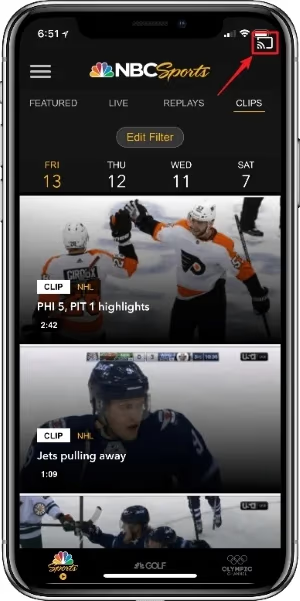
The NHL iOS app allows iPhone users to stream live matches onto the television using AirPlay and Chromecast. You can also cast Disney+ from your iPhone to Chromecast for more streaming options.
#How to Cast NHL Website from PC to Chromecast
If you want to stream live out-of-market NHL games from the official NHL website to your Chromecast, here are the steps:
#Steps to Cast NHL Website to Chromecast with Google Chrome:
-
Open Google Chrome browser on your Windows PC/Mac.
-
Go to nhl.com and log into your NHL account.
-
Play a live game video on the NHL website.
-
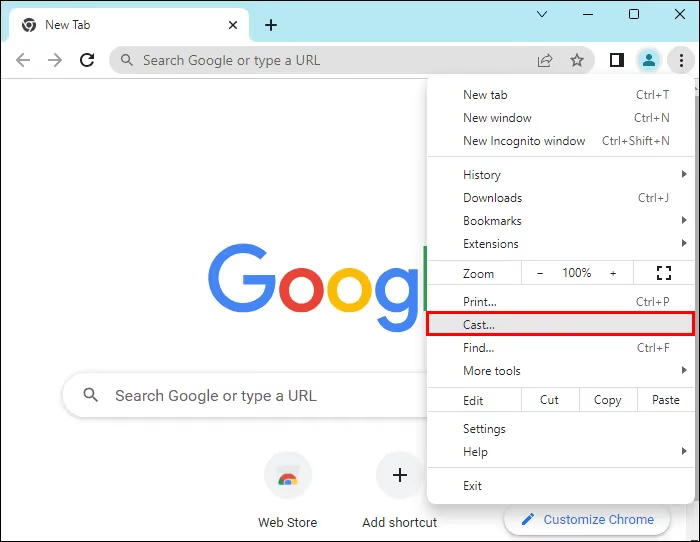
Click on the Chrome menu button at the top right.
-
Select the Cast option from the drop-down.
-
Choose your Chromecast device.
-
Select Cast tab and the NHL website will start streaming on your television.
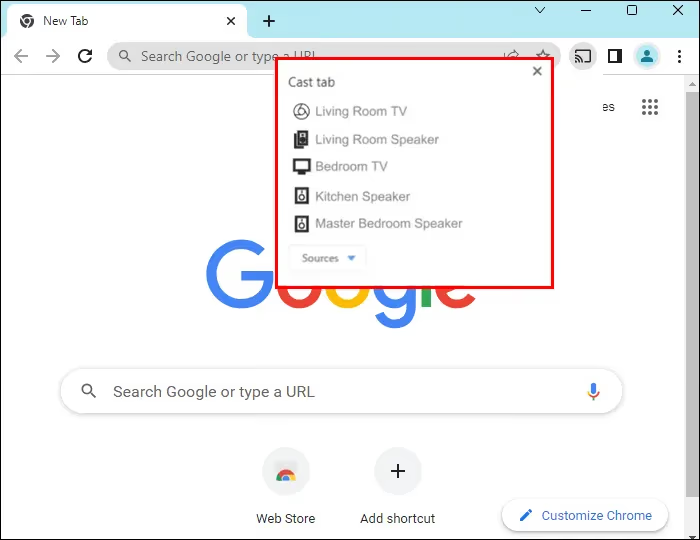
You can also cast the entire desktop for viewing the NHL website video feed.
Google Chrome allows NHL fans to cast live games from the NHL website onto their television with Chromecast in a few simple steps.
#How to Cast Microsoft Edge to TV for Streaming NHL
Don’t have Google Chrome? You can also use Microsoft Edge browser to cast the NHL website from your Windows 10 or 11 computer to a Chromecast-connected television.
#Here Are the Steps for Casting NHL Edge to Chromecast:
-
Connect your PC and Chromecast to the same Wi-Fi.
-
Visit nhl.com on Microsoft Edge and sign in.
-
Play a live NHL game video.
-
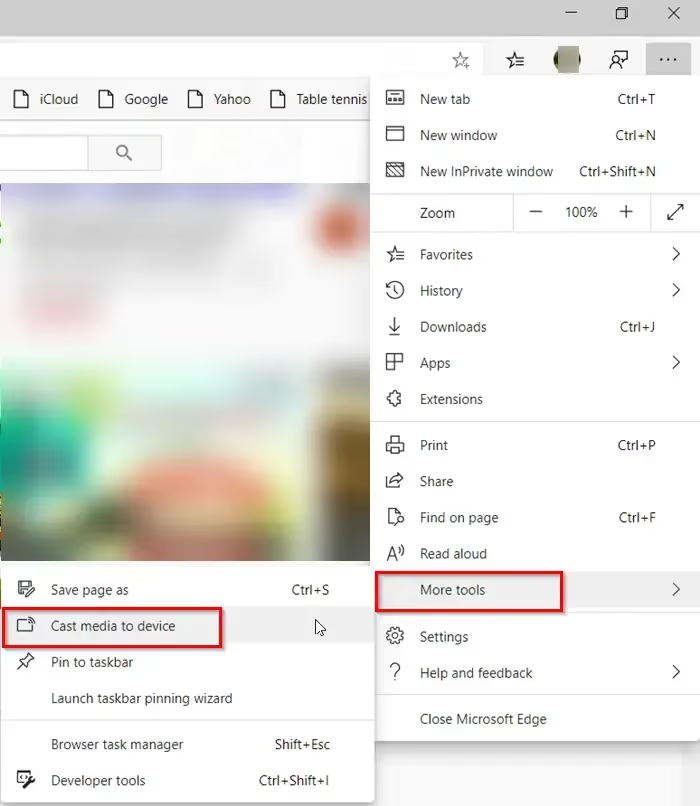
Click on the Settings and More button represented by three dots.
-
Select “Cast media to device”.
-
Choose your Chromecast device name.
-
Click the “Cast tab” option.
-
The NHL website will start streaming on your TV.
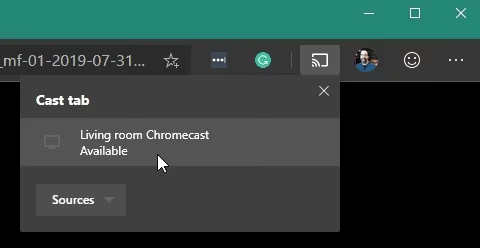
Similar to Google Chrome, Microsoft Edge allows casting the NHL website video player to a Chromecast device so fans can enjoy games on the big screen.
#How to Stream NHL with fuboTV App and Chromecast
Along with the official NHL app and website, there is another way to stream live out-of-market NHL games on a Chromecast-connected TV: install the fuboTV app.
fuboTV is a live streaming service that includes NHL Network and NHL Center Ice packages as part of its offerings.
Follow these instructions to watch NHL via fuboTV on Chromecast:
-
Get fuboTV subscription which includes NHL Network & NHL Center Ice.
-
Download and install fuboTV app on your iPhone, Android or Roku devices.
-
Log into the app using your subscription details.
-
Play any live NHL game stream.
-
Tap the Cast icon to select Chromecast device.
-
The NHL stream from fuboTV will start playing on your television.
The fuboTV app provides a cable-free way to tune into NHL games on Chromecast without any hassle.
#Tips for Avoiding NHL Game Blackouts on Chromecast
NHL blackouts can prevent fans living in local markets from watching their favorite teams on NHL.TV and Center Ice packages. Here are some tips to work around local NHL game streaming restrictions:
-
Use a VPN service like NordVPN to change your virtual location outside the broadcast territory when connected to Wi-Fi
-
Cast out-of-market games only instead of local team matches
-
Subscribe to regional sports networks (RSN) that have local broadcasting rights
-
Watch national NHL games airing on ESPN, TNT that are not geo-blocked
#Pros and Cons of Streaming NHL on Chromecast
Benefits of watching NHL games on a Chromecast device:
-
Simple streaming setup with easy connections
-
Cast NHL from phone, tablet or computer to TV without extra cables
-
Built-in Chromecast integration with NHL apps
-
Low one-time cost for an affordable Chromecast stick
-
Clear picture quality without cable boxes
Drawbacks include:
-
Requires reliable high-speed internet
-
NHL subscriptions can get expensive
-
Potential streaming lag or buffering issues. If you experience this with NHL, try streaming ESPN on Chromecast which may have smoother performance.
-
Local blackout restrictions still apply
#Expert Tips for Smooth NHL Streaming on Chromecast
Chromecast fans and avid NHL streaming enthusiasts recommend these tips:
-
Connect Chromecast and your phone/tablet/laptop to a 5 GHz Wi-Fi network instead of 2.4 GHz for faster streaming speeds without interruptions.
-
If experiencing buffering issues, try pausing then playing the stream instead of disconnecting and reconnecting.
-
Position your Chromecast device to get the best Wi-Fi signals, especially if the router is far away.
-
Upgrade internet speeds up to 25 Mbps by contacting your ISP to help ensure smooth streaming.
#FAQ
#Does the NHL app work on Chromecast?
Yes, the NHL app on both Android and iOS has built-in Chromecast support. Tap the Cast button while watching any live game, select your Chromecast, and the stream starts playing on your TV within seconds.
#Can I watch NHL games on Google TV?
Install the NHL app directly on Google TV to stream live matches. You can also cast the NHL website video player from Chrome on your phone or computer as an alternative.
#What apps support NHL streaming on Chromecast?
The official NHL app, fuboTV with NHL Center Ice, and ESPN+ all support casting to Chromecast. You can also cast browser tabs showing the NHL website from Google Chrome or Microsoft Edge for the same result.
#How do I fix Chromecast issues with the NHL app?
Start by updating both the Chromecast firmware and the NHL app to their latest versions. If problems persist, check your internet speed and restart your router. Factory resetting the Chromecast is a last resort that fixes most stubborn casting issues.
#Why are local NHL games blacked out on Center Ice?
Local games are blacked out to protect the licensed broadcast rights of regional sports networks covering those teams. These RSNs pay for exclusive local broadcast access in specific geographic territories, so Center Ice cannot air those games in the same area.
#Can I use a VPN to bypass NHL blackouts on Chromecast?
A VPN like NordVPN changes your virtual location outside the blacked-out broadcast territory. Connect to a server in a different region before opening the NHL app or website, and the local blackout restriction no longer applies.
#What internet speed do I need for NHL on Chromecast?
A minimum of 15 Mbps is needed for standard HD streaming, while 25 Mbps or higher is recommended for a buffer-free experience. Connect to your router’s 5 GHz band rather than 2.4 GHz for the most stable connection during live games.
#Bottom Line
With this guide, hockey lovers can now cast and stream live NHL games onto their Chromecast-connected big screen TVs using compatible phones, tablets, web browsers or casting applications.
Whether it is the thrill of watching a nail-biting Stanley Cup Playoffs match or streaming Sky Sports on Chromecast to catch Premier League soccer, this media streaming device makes it simple to enjoy sports on the television.
Just make sure your devices are connected to a fast Wi-Fi network, have the necessary subscriptions or apps installed with up-to-date casting functionality to enjoy an uninterrupted viewing experience.
With Chromecast, gone are the days of staring at small phone screens to catch NHL action. Now you can stream it bigger, better and louder onto the television. Let the games begin!
#More Chromecast Guides
Want to stream baseball on the big screen too? Read our guide on watching MLB TV on Chromecast.
All done watching? Learn how to properly turn off your Chromecast when not in use to conserve energy.