Newsmax is available on Roku as a dedicated channel, and installing it takes under two minutes. This guide walks through four ways to get the network on your Roku, including the official app, live TV services, screen mirroring, and free alternatives.
- Newsmax has a dedicated Roku channel that you can install directly from the Roku Channel Store at no cost
- Newsmax Plus costs $4.99/month or $49.99/year and unlocks exclusive shows beyond the standard live feed
- Live TV services like Sling TV and DirecTV Stream carry Newsmax as part of their channel lineups on Roku
- Screen mirroring from a phone or tablet works as a backup when the Roku app has issues or isn’t loading
- Free viewing is still possible through Pluto TV and Xumo, though content selection is more limited than the full channel
#How Do You Add the Newsmax Channel on Roku?
The fastest way to watch Newsmax is through the official Roku channel. Here’s the process:

- Press the Home button on your Roku remote.
- Scroll down and select Streaming Channels.
- Select Search Channels and type “Newsmax” using the on-screen keyboard.
- Choose Newsmax from the results.
- Click Add Channel to install it.
- Select Go to Channel to launch.
The download takes about 30 seconds on most connections. Once installed, the channel appears on your home screen alongside your other apps like Disney+ and YouTube.
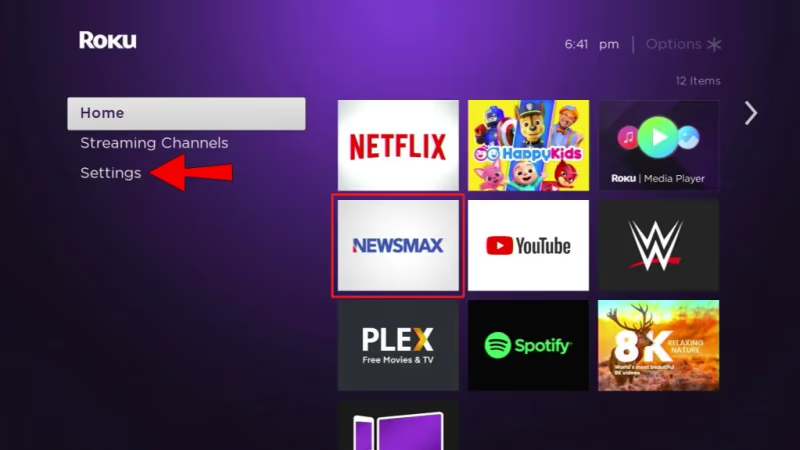
You’ll see a mix of free clips and Newsmax Plus content when you open the app. Free users can watch the live feed during certain hours, but most on-demand shows require a subscription.
#What Does Newsmax Plus Include?
Newsmax launched its paid subscription tier, Newsmax Plus, in November 2023. The standard live news feed had been free for years before that change.
Pricing breaks down like this:
| Plan | Cost | Free Trial |
|---|---|---|
| Monthly | $4.99/month | 15 days |
| Annual | $49.99/year | 15 days |
The paid tier gives you access to exclusive shows, on-demand replays of live programs, and the full 24/7 live stream without interruptions. Standard free access still exists but is limited to select clips and scheduled free windows.
Worth noting: Newsmax Plus works across devices. One subscription covers your Roku, phone, tablet, and computer. You sign in with the same account everywhere.
#How to Watch Newsmax Through Live TV Services on Roku
If you already subscribe to a live TV streaming service, you may already have Newsmax included. This is a solid option if you want Newsmax bundled with other news channels like Fox News, MSNBC, and NBC.
#Sling TV
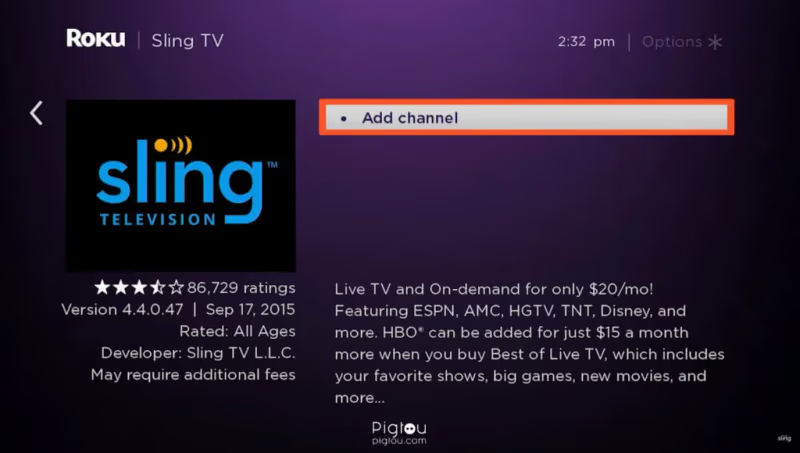
Sling TV carries Newsmax in its News Extra add-on package. The base Sling Blue plan starts at $40/month, and News Extra adds $6/month. You get Newsmax alongside other news networks in one app.
#DirecTV Stream
DirecTV Stream includes Newsmax in its Entertainment package and above. Plans start at $79.99/month. It’s pricier than Sling TV, but you get a larger channel lineup that includes local broadcast stations.
#fuboTV
fuboTV added Newsmax to its channel lineup. The Pro plan starts at $79.99/month with over 190 channels. If you’re already a fuboTV subscriber, check your channel guide for Newsmax.
All three services have Roku apps. Install the one you subscribe to, sign in, and navigate to Newsmax in the live TV guide.
#Screen Mirroring Newsmax to Your Roku
Screen mirroring sends whatever is on your phone or tablet screen directly to your Roku. This method works well if the Roku Newsmax app isn’t loading or if you prefer watching through the mobile app.
Setup steps:
- Connect your Roku and phone to the same Wi-Fi network.
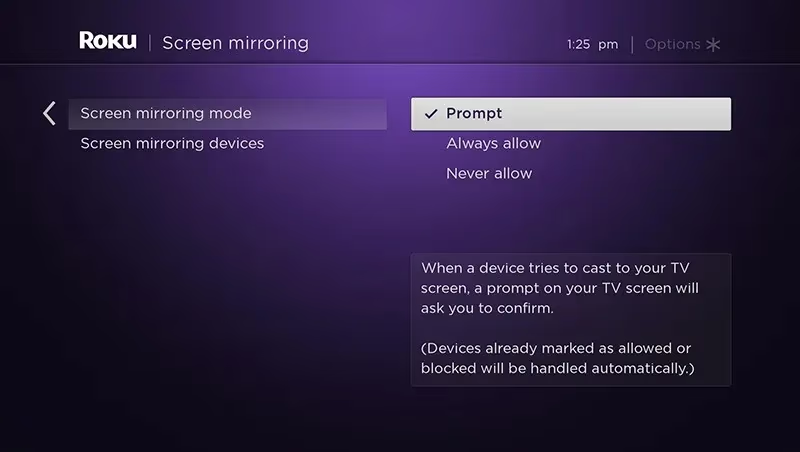
- On your Roku, go to Settings > System > Screen mirroring and set it to Prompt or Always allow.
- On Android, open Quick Settings and tap Cast or Smart View. On iPhone, open Control Center and tap Screen Mirroring.
- Select your Roku from the device list.
- Open the Newsmax app on your phone.
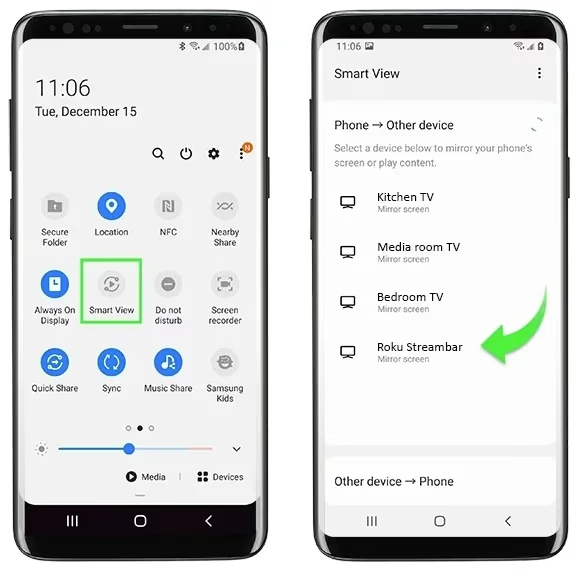
Your phone screen will appear on the TV in real time. Keep in mind that screen mirroring uses more battery than casting, and you can’t use your phone for other tasks while mirroring. For a detailed walkthrough on Android mirroring, check our guide on mirroring Android to Roku.
#Free Alternatives to the Newsmax Channel
Not ready to pay for Newsmax Plus? These free options carry some Newsmax content on Roku:
Pluto TV has a Newsmax channel in its free, ad-supported lineup. The content is curated rather than a full live simulcast, but it covers major news segments and clips. No account or subscription required.
Xumo also streams select Newsmax programming for free. Like Pluto TV, the selection is limited compared to the full Newsmax channel or paid subscription.
The Roku Channel occasionally features Newsmax clips in its free news section. It’s hit or miss, but worth checking if you already browse The Roku Channel regularly.
The trade-off with free options is that you won’t get the complete live feed or on-demand show library. For breaking news coverage and full episodes of opinion programming, Newsmax Plus or a live TV service is the way to go.
#Troubleshooting Newsmax on Roku
If the Newsmax app won’t load, freezes, or shows errors, run through these fixes in order:
Check your internet speed. Newsmax recommends at least 5 Mbps for smooth streaming. Run a speed test from Settings > Network > Check connection on your Roku.
Restart your Roku. Go to Settings > System > System restart. This clears temporary files and refreshes the operating system. A restart fixes most app crashes.
Remove and reinstall the Newsmax channel. Highlight the Newsmax channel on your home screen, press the Star (*) button, and select Remove channel. Then add it again from the Channel Store. This forces a fresh install with the latest version.
Update your Roku OS. Go to Settings > System > Software update > Check now. Running outdated firmware can cause app compatibility issues. Roku pushes updates automatically, but checking manually ensures you’re current.
Try a different method. If the Roku app is completely broken, use screen mirroring or a live TV service as a temporary workaround until Newsmax pushes a fix. Check the Roku support page for known outages.
#Bottom Line
The Newsmax Roku channel is the most direct path to watching the network on your TV. Install it from the Channel Store, sign up for Newsmax Plus if you want full access, and you’re set. Live TV services like Sling TV and DirecTV Stream offer Newsmax bundled with dozens of other channels if you want a cable-replacement package. Free options through Pluto TV and Xumo give you limited Newsmax content at no cost. And screen mirroring from your phone works as a reliable backup for any situation.
#Frequently Asked Questions
#Is there a Newsmax app for Roku?
Yes, Newsmax has an official Roku app in the Channel Store. Search for “Newsmax” and add it to your device. The app is free to install, though full access to all content requires a Newsmax Plus subscription at $4.99/month.
#Can you still watch Newsmax for free on Roku?
Limited free content is available through the Newsmax Roku app, Pluto TV, and Xumo. The free tier includes select clips and scheduled live windows, but most on-demand shows and the uninterrupted 24/7 live stream are behind the Newsmax Plus paywall since November 2023.
#Why did Newsmax switch to a paid model?
Newsmax Media introduced Newsmax Plus to generate subscription revenue and fund exclusive programming. The move followed industry trends where several previously free cable news alternatives began charging for content. The 15-day free trial lets you test the service before committing.
#Does Sling TV carry Newsmax?
Sling TV includes Newsmax in its News Extra add-on, which costs $6/month on top of a Sling Blue or Orange base plan. This bundles Newsmax with other news networks in the Sling TV app on Roku.
#How do I fix Newsmax buffering on Roku?
Start by checking your internet speed through Roku’s built-in network test under Settings. You need at least 5 Mbps for stable streaming. If speed is fine, restart your Roku, then remove and reinstall the Newsmax channel to clear any corrupted data.
#Can I screen mirror Newsmax from iPhone to Roku?
iPhones can mirror to Roku devices that support AirPlay. Go to your Roku’s Settings > Apple AirPlay and HomeKit, enable AirPlay, then use Screen Mirroring from your iPhone’s Control Center. Both devices must be on the same Wi-Fi network for it to work.
#What channels are similar to Newsmax on Roku?
Fox News, NewsNation, One America News (OAN), and Right Side Broadcasting Network cover similar ground on Roku. For broader news coverage, CBS News, ABC News, and BBC News are all available as free channels in the Roku Channel Store.
#Is Newsmax Plus worth the subscription cost?
At $4.99/month, Newsmax Plus is one of the more affordable news subscriptions. It makes sense if you watch Newsmax daily and want on-demand access to shows like Greg Kelly Reports and Eric Bolling The Balance. Casual viewers can get by with the free tier and Pluto TV clips.