Want to access all your favorite BBC shows on your Apple TV? This step-by-step guide covers everything you need to know to watch BBC iPlayer on Apple TV models in 2026.
- BBC iPlayer app works on Apple TV 4th generation and later running tvOS 12.0 or above
- AirPlay mirroring is the workaround for older models including 2nd and 3rd generation Apple TVs
- A VPN with UK servers is required outside Britain to bypass BBC iPlayer geo-restrictions
- ExpressVPN and NordVPN are the top choices for reliable iPlayer access with fast streaming speeds
- Ethernet connections outperform Wi-Fi for stable, high-quality BBC iPlayer streaming on Apple TV
#Which Apple TV Models Support BBC iPlayer?
The BBC iPlayer app is officially available on 4th generation or later Apple TV models running tvOS 12.0 and above. This includes:
-
Apple TV 4K (2021 and 2022)
-
Apple TV HD (2016 and 2022)
-
Apple TV 4K (2017, 2019)
Older Apple TVs cannot directly install BBC iPlayer. However, you can use AirPlay mirroring as an alternative streaming method on 2nd and 3rd generation models. Learn more about using an AirPlay TV adapter for older TVs.
#How Do You Download and Install BBC iPlayer?
Downloading the free BBC iPlayer app is easy:
- On your Apple TV home screen, open the App Store.
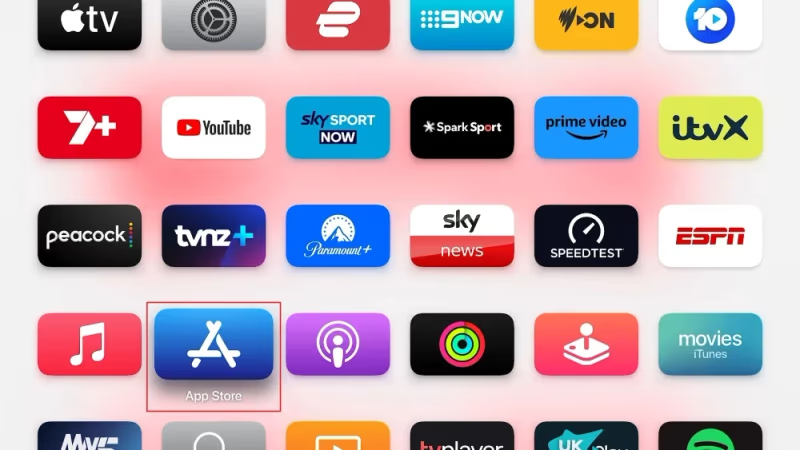
- Search for “BBC iPlayer”.
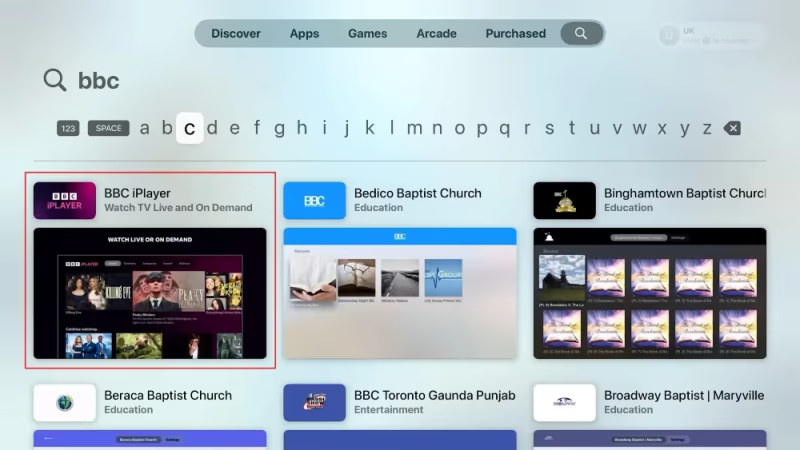
- Select the BBC iPlayer app and click “Get”.
This will install the app on your Apple TV.
#Activating Your BBC iPlayer Account
To start streaming shows, you’ll need to activate BBC iPlayer by:
-
Opening the BBC iPlayer app on your Apple TV.
-
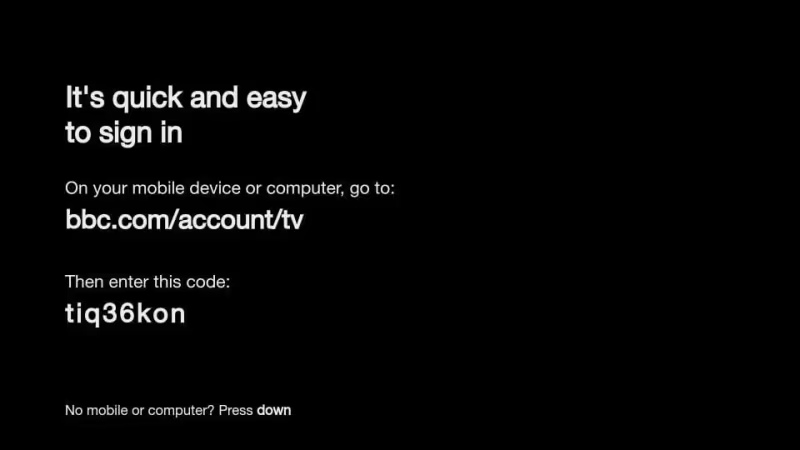
Clicking “Sign In”. An 8-digit code appears.

-
On your phone, go to https://account.bbc.com/tvcode.
-
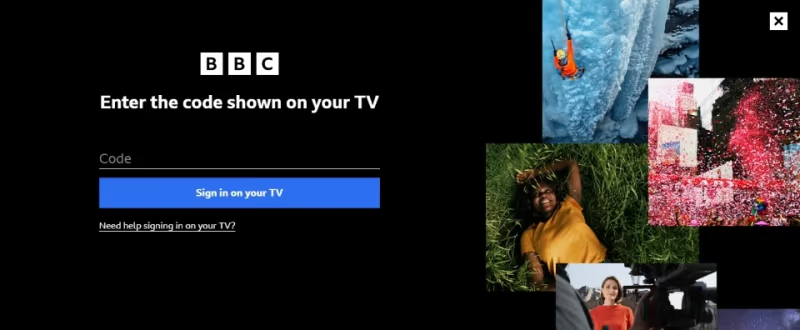
Enter the 8-digit code and click “Sign In”.
- Select a show to stream on your Apple TV!
#How Can You Watch BBC iPlayer on Older Apple TVs?
Don’t have a newer Apple TV model? Use AirPlay mirroring instead:
#From an iPhone/iPad
-
Connect your iPhone/iPad and Apple TV to the same Wi-Fi.
-
Get the BBC iPlayer mobile app. Log in.
-
Start playing a video and tap the AirPlay icon.
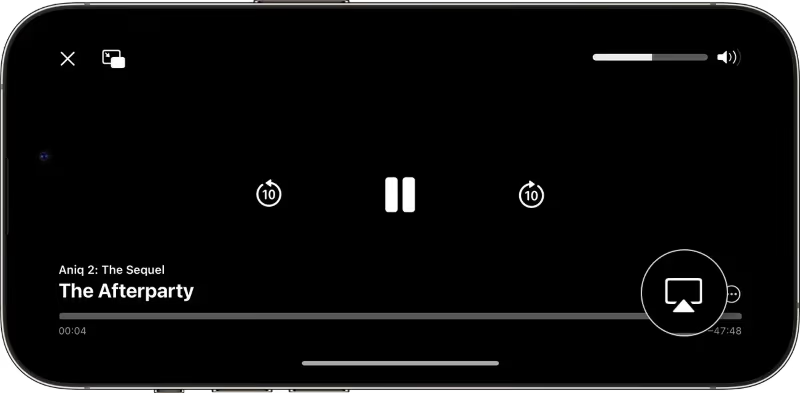
- Select your Apple TV to start streaming.
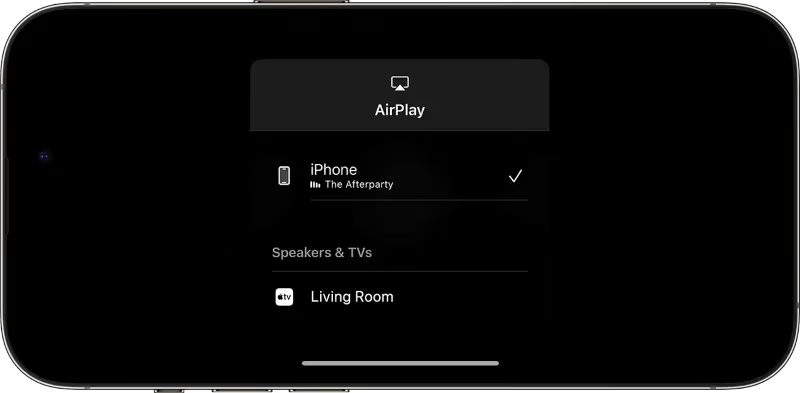
- If AirPlay is not showing, try these fixes for AirPlay not appearing.
#From a Mac
-
Visit www.bbc.co.uk/iplayer in Safari. Pick a show.
-
Open Control Center and select Screen Mirroring.
-
Choose your Apple TV. The video will now stream.
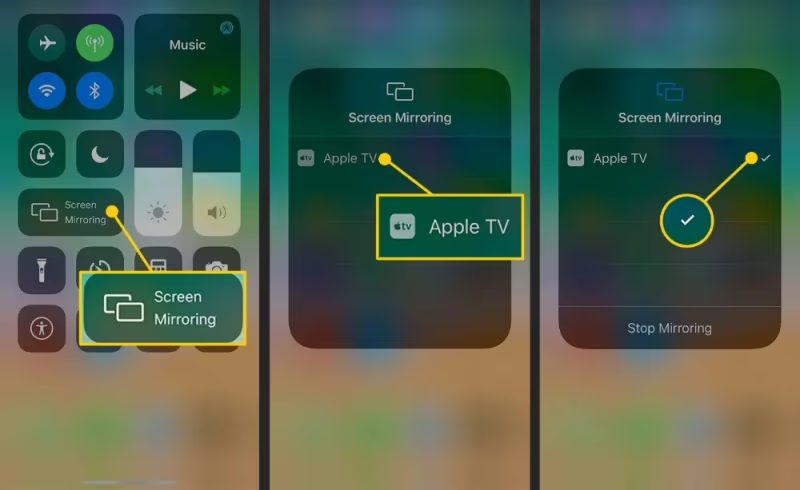
AirPlay also works on other devices like Amazon Fire Stick, Insignia TVs, Vizio TVs, and Roku TVs. It’s great for screen mirroring apps like TikTok and ESPN.
AirPlay is not quite as smooth as the native app, but it gives older Apple TVs BBC iPlayer access. If you run into issues, here are some tips for fixing AirPlay disconnecting.
#Unblocking BBC iPlayer Abroad
BBC iPlayer is restricted to UK IP addresses. If travelling or living overseas, you’ll see an error message when trying to play videos.
To access all BBC iPlayer content worldwide, use a VPN service to get a UK IP address:
The best BBC iPlayer VPNs in 2026 include:
-
ExpressVPN — Fast speeds, reliable access, easy-to-use apps. Our #1 choice.
-
NordVPN — Strong UK servers with plans starting under $4/month.
To set up your VPN for BBC iPlayer on Apple TV:
-
Choose a VPN service and create an account.
-
Install the VPN app on your Apple TV or router.
-
Connect to a UK VPN server location.
-
Launch BBC iPlayer. It will now work overseas!
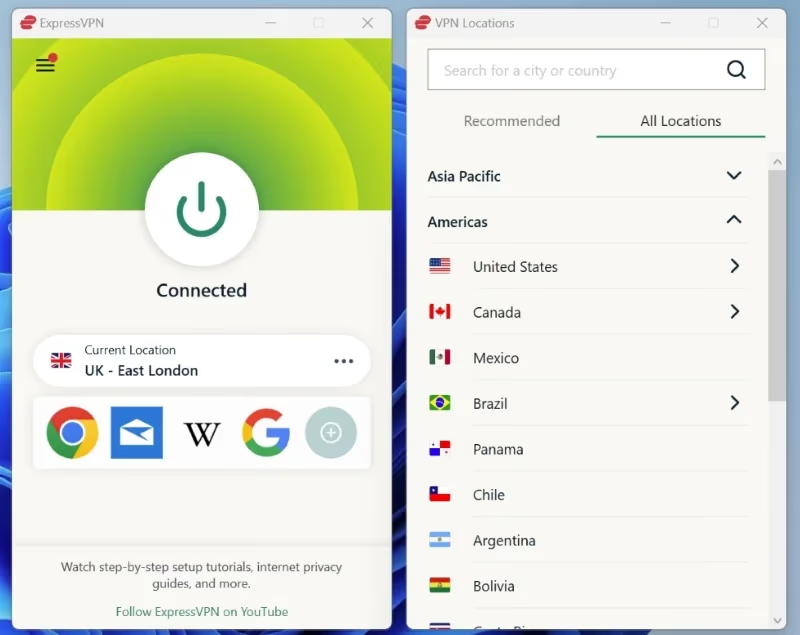
Using a fast, reliable VPN lets you watch BBC iPlayer on Apple TV from anywhere, without interruptions.
#Tips for Better Streaming
To improve streaming quality for BBC iPlayer on your Apple TV, try these tips:
-
Use Ethernet over Wi-Fi for faster, more stable connections.
-
If available, select the 4K stream for higher video quality.
-
Turn subtitles/closed captions on or off in BBC iPlayer settings.
-
Restart your Apple TV to clear any app cache issues.
-
Consider upgrading your internet plan to boost streaming speeds.
With the right setup, you can enjoy smooth BBC iPlayer streaming on Apple TV models old and new.
#Bottom Line
Accessing BBC iPlayer on your Apple TV is straightforward with this guide. Stream hit shows free on new Apple TV boxes using the BBC app. Use AirPlay as an alternative on older models.
A quality VPN service lets you unblock BBC iPlayer abroad with fast UK servers and great apps.
Now you can watch BBC iPlayer on Apple TV from anywhere. Enjoy!
#FAQ
#Can I get BBC iPlayer on an older Apple TV?
Yes, but not through the app directly. Apple TV 2nd and 3rd generation models don’t support the BBC iPlayer app. You can use AirPlay mirroring from an iPhone, iPad, or Mac to stream BBC iPlayer content to these older models instead.
#Do I need a BBC account to watch iPlayer on Apple TV?
You do need a free BBC account. After downloading the app, sign in using the 8-digit activation code displayed on your TV screen. Enter this code at bbc.com/tvcode on your phone or computer to link your account.
#Why is BBC iPlayer not working on my Apple TV?
The most common reason is geo-restriction. BBC iPlayer only works with UK IP addresses, so viewers outside Britain need a VPN. Other causes include outdated tvOS software, a weak internet connection, or the app needing a reinstall.
#Which VPN works best for BBC iPlayer?
ExpressVPN is the most reliable option for unblocking BBC iPlayer, thanks to its fast UK servers and consistent access. NordVPN is a strong alternative with competitive pricing. Both offer apps that work on Apple TV and routers.
#Can I use AirPlay to stream BBC iPlayer to Apple TV?
Yes. Open BBC iPlayer on your iPhone, iPad, or Mac, start playing a video, and tap the AirPlay icon to send it to your Apple TV. Both devices need to be on the same Wi-Fi network for AirPlay to work.
#Is BBC iPlayer free to use on Apple TV?
BBC iPlayer is completely free. You don’t need a UK TV licence to create an account or download the app, though the BBC asks UK residents to have one. There are no subscription fees or in-app purchases.
#Does BBC iPlayer support 4K streaming on Apple TV?
BBC iPlayer offers select content in 4K UHD on Apple TV 4K models. Not all shows are available in 4K, but major BBC dramas and events often get the UHD treatment. Make sure your internet speed is at least 40 Mbps for stable 4K playback.
#How do I fix buffering when streaming BBC iPlayer?
Switch from Wi-Fi to a wired Ethernet connection for more stable speeds. Close other apps running on your Apple TV to free up resources. If using a VPN, try connecting to a different UK server, as some servers carry less traffic and perform better.