Want to watch your favorite ABC shows, local news, and live sports on your Apple TV? With the right apps and subscriptions, streaming ABC on Apple TV is easy. This guide covers all your options to access ABC programming on Apple TV models in 2026.
By the end, you’ll have the confidence to stream live and on-demand ABC content on your Apple TV.
- ABC app requires a TV provider login — cable, satellite, or live TV streaming credentials unlock full live and on-demand access
- AirPlay mirrors ABC from iPhone or Mac — works on older Apple TV models without App Store access
- Hulu + Live TV starts at $76.99/month — includes ABC plus 95+ other channels with unlimited cloud DVR
- YouTube TV offers ABC at $72.99/month — 100+ channels and unlimited DVR storage included
- A VPN unlocks ABC abroad — services like ExpressVPN and NordVPN bypass geo-restrictions for under $15/month
#What Is ABC and What Does It Offer?

ABC (American Broadcasting Company) is one of the “Big Three” traditional broadcast television networks in the United States. Owned by Disney, it offers a variety of popular shows and programming:
-
Local ABC affiliate news
-
Nationally televised ABC News shows
-
Popular primetime series like Grey’s Anatomy, The Bachelor, black-ish
-
Live sports like NBA games and NCAA football
-
Annual award shows like the Academy Awards
-
Family friendly shows and movies
With an ABC app available on Apple TV, you can stream all this content on your television.
But first, you’ll need to understand the limitations and requirements around accessing ABC on Apple TV models.
#How Do ABC Streaming Options on Apple TV Compare?
There are a few ways to stream ABC programming on an Apple TV box. Here’s an at-a-glance comparison:
| Streaming Method | Description | Requirements |
|---|---|---|
| ABC App | Official app to watch live & on-demand ABC content | Active cable/live TV subscription for full access |
| AirPlay | Wirelessly mirror iPhone, iPad or Mac screen to Apple TV | ABC app on iOS/Mac device, Apple TV with AirPlay support |
| Streaming Services | Hulu, YouTube TV, others offer live & VOD ABC access | Paid streaming service subscription |
The simplest approach is using the ABC app, but it requires TV provider credentials for full functionality.
Alternatives like AirPlay or streaming packages give you more flexibility but cost extra monthly fees.
Now let’s explore these ABC streaming options in more detail.
#How Do You Install and Use the ABC App?
The ABC app provides the most direct way to watch both live and on-demand shows from the network on your Apple TV.
You can’t just download the app and immediately access full ABC content. An active cable, satellite or live TV streaming subscription that includes ABC in its channel lineup is required for complete functionality.
If you have the right TV subscription, here are step-by-step instructions to install and configure the ABC app:
#1. Install the ABC App on Your Apple TV
First, make sure your Apple TV is connected to a stable, high-speed internet connection via Wi-Fi or Ethernet.
On the home screen select the App Store application then search for “ABC” to locate the app. Download and install it.
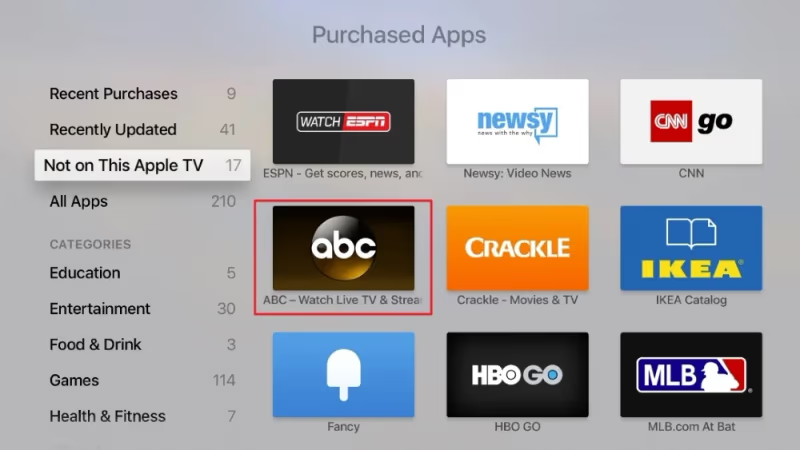
The ABC app supports Apple TV HD and 4K models. Older units may not work.
#2. Activate ABC with Your TV Provider
With the ABC app installed, launch it from the Apple TV home screen.
You’ll now need to activate it by signing in through your TV provider. Supported providers include:
-
DirecTV
-
Dish
-
Hulu + Live TV
-
YouTube TV
-
Xfinity
-
Verizon Fios
-
Spectrum
-
Optimum
-
AT&T TV
-
TVision
-
Plus over 100 smaller local cable companies
Select your TV provider from the list. If prompted, allow the app to access your location to confirm eligibility.
A unique activation code will display on screen. Have this code handy for the next step.
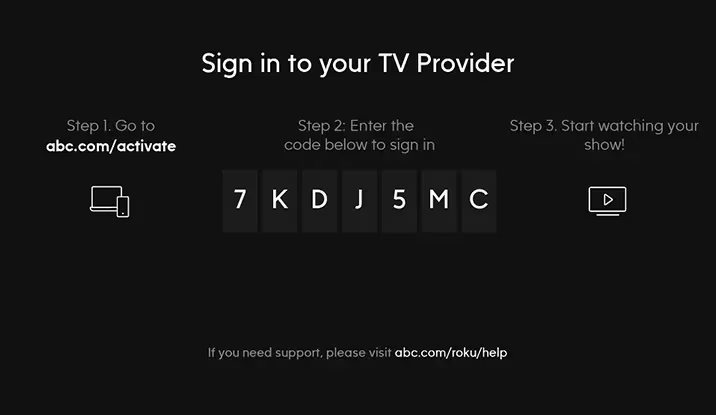
Now in your web browser visit abc.com/activate and enter the generated code when prompted.
Finally, sign in with your TV provider username and password.
Note: If activation does not work immediately, you may need to wait several hours for the linking process to your TV account to finalize on ABC’s end before content unlocks.
#3. Stream ABC Live or On-Demand
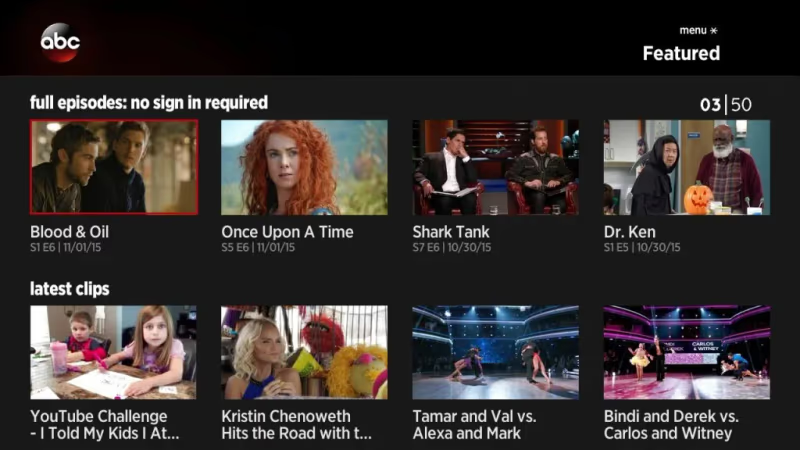
With successful activation, you can now stream live ABC programming as it airs based on your location and TV subscription package.
An on-demand library with current seasons of ABC shows is also now available. Stream over Wi-Fi or for offline viewing.
By installing the ABC app and entering your TV credentials, enjoying ABC live or on-demand on Apple TV is straightforward.
But what if you want to watch without a traditional pay TV subscription? Keep reading…
#Using AirPlay to Mirror ABC from iPhone & Mac
If you own an older Apple TV without access to an App Store for downloading the ABC app directly, AirPlay screen mirroring is your main option for watching ABC.
AirPlay also works with newer Apple TV models if desired. As long as your iPhone, iPad, or Mac has the ABC app installed, you can wirelessly mirror that screen display to Apple TV.
Here’s how to use AirPlay to view ABC:
On Your iPhone or iPad:
-
Install the ABC app from the iOS App Store
-
Play an ABC video from within the app
-
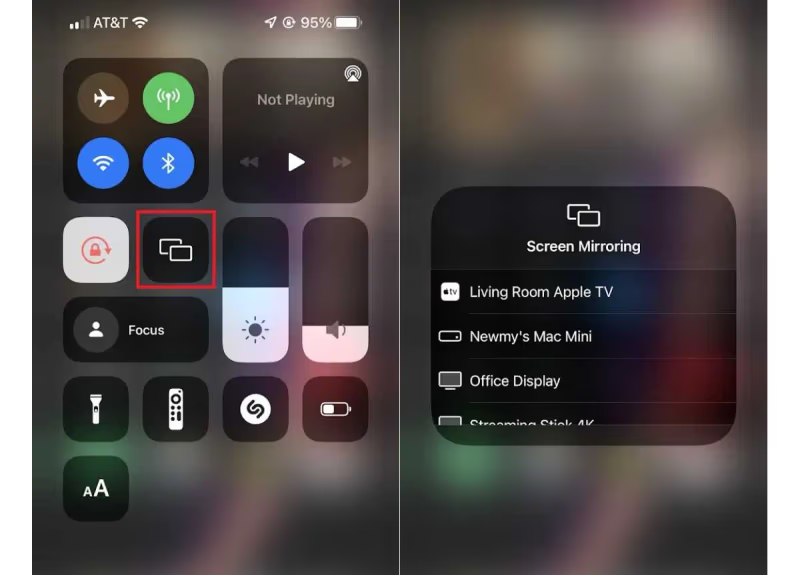
Swipe down from the top to reveal Control Center
-
Tap Screen Mirroring then select your Apple TV
-
iPhone or iPad screen now displays on TV
On Your Mac:
-
Install ABC app for Mac or visit abc.com
-
Play ABC content you want to mirror
-
Click the Control Center icon in the menu bar
-
Click Connect To then your Apple TV
-
Mac screen with ABC now appears on Apple TV
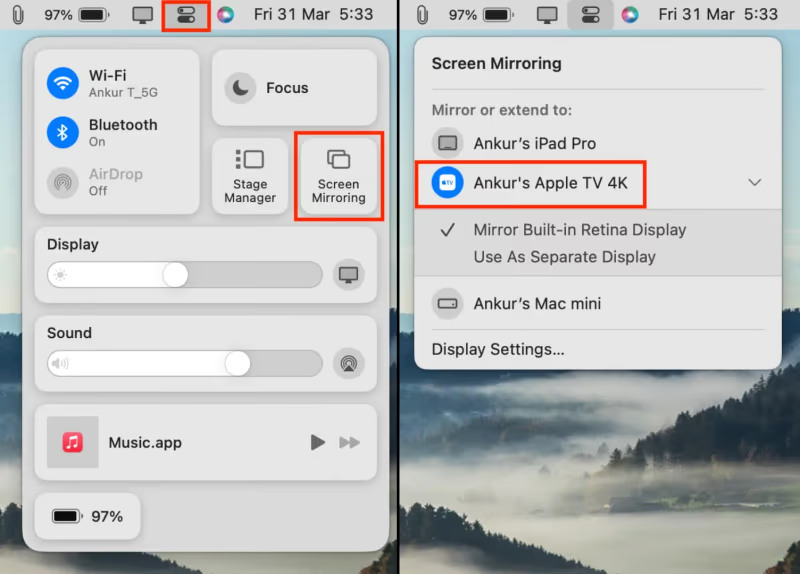
Via AirPlay, you can stream any live or on-demand ABC content from the web or ABC apps for iOS/MacOS onto your home television.
Just note AirPlay streams remain tethered to the mirroring device, plus video performance depends on your internet speeds for smooth streaming.
Consider AirPlay when:
-
You have an older Apple TV without app access
-
Want flexible ad-hoc streaming from mobile devices
AirPlay not working? A few quick tips:
-
Ensure all devices on same Wi-Fi
-
Restart any devices having issues
-
Update Apple TV & iOS software
-
Temporarily disable firewalls
-
Reset Apple TV network settings
Still struggling? Consult official Apple AirPlay troubleshooting guide for next steps.
#What Are the Best ABC Alternatives Without Cable?
The previous methods all require a traditional cable or streaming TV subscription for full access to ABC live or on-demand programming.
If you’ve cut the cord, several streaming TV providers offer ABC as part of their channel bundles without a cable contract.
These over-the-top streaming packages provide live local ABC affiliates and on-demand show libraries so you can still watch top ABC programming like live NBA games on Apple TV.
Here are the main services offering ABC access without cable:
| Streamer | Price | Notable Perks | Link |
|---|---|---|---|
| Hulu + Live TV | $76.99/month | 95+ channels, unlimited cloud DVR included | Go to Hulu |
| YouTube TV | $72.99/month | 100+ channels, unlimited DVR | Go to YouTube TV |
| fuboTV | $79.99/month | 190+ channels, 1000 hr DVR | Go to fuboTV |
| DirecTV Stream | $69.99/month | 90+ channels, 20 hour DVR | Go to DirecTV |
After signing up:
-
Download the corresponding app on your Apple TV
-
Sign into your subscription account to activate
-
Find ABC programming in the app’s channel guide or on-demand section
So without a traditional TV package, these streaming platforms give you options for live and on-demand ABC streaming on Apple TV.
Compare packages across devices, accounts, and budgets to pick your best fit.
Most offer limited time trials to test the ABC streaming experience risk-free!
Legally, ABC does require some form of TV subscription for access to live streams or current programming.
A digital TV antenna can pick up ABC over-the-air signals depending on your location, providing free access to live shows. Picture quality varies and on-demand libraries are limited though.
Select ABC shows older than the current season only may be available through ad-supported platforms like Pluto TV, Peacock or Crackle. But again, no guarantees for your area or desired programming.
So realistically, subscriptions are needed to reliably watch ABC new releases on Apple TV. Consider trying discounted offers from Hulu or YouTube TV if costs are a concern.
Consider also checking out the affordable Philo TV streaming service on Apple TV which includes channels like AMC, Discovery, Nickelodeon and more for just $25/month.
#Watching ABC on Apple TV Abroad
By default, the ABC app and even third-party streaming subscriptions only grant access to ABC programming when you are physically located within the United States.
If you want to watch ABC abroad, a VPN (Virtual Private Network) allows you to virtually relocate back to the U.S. to regain access.
Here are the basic steps to use a VPN router like ExpressVPN or NordVPN for unlocking ABC:
-
Sign up for a reputable VPN service with U.S. servers
-
Download and install the VPN app on Apple TV
-
Connect to a US-based server once launched
-
The ABC app or your streaming account will now work abroad!
By funneling your internet traffic through encrypted tunnels and IP addresses in the US, VPNs fool geo-blocks allowing you to watch ABC internationally on an Apple TV.
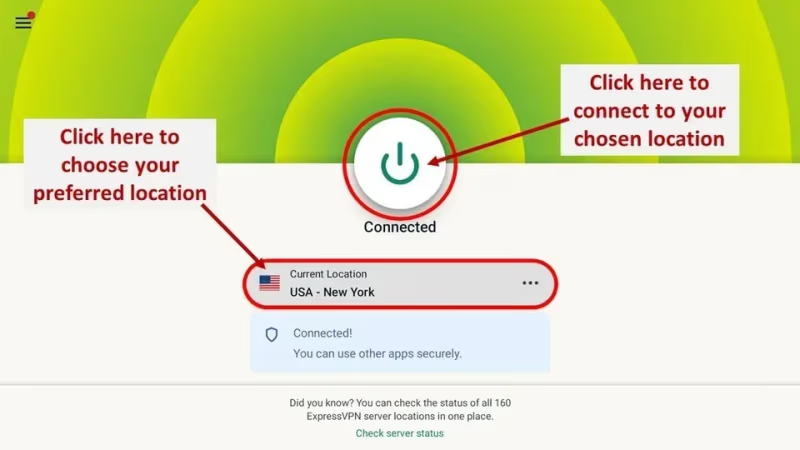
Reliable VPNs cost under $15 monthly but let you travel anywhere and still feel right at home for watching ABC, ESPN, Disney+, and more!
My top 3 VPN suggestions to access ABC abroad on Apple TV:
-
ExpressVPN: Fast speeds, great reliability, easy-to-use apps, works with all major streaming platforms.
-
NordVPN: Strong global servers, unlimited bandwidth, allows P2P traffic, unblocks Disney+ abroad too.
-
Surfshark: Budget-friendly option but still solid performance for streaming & security.
All offer 30 day money back guarantees as well, making them risk-free options for unlocking ABC on Apple TV internationally!
#Troubleshooting ABC Streaming Problems
Despite best intentions, hiccups happen with live streaming sometimes.
Here are some common ABC streaming issues and quick troubleshooting fixes:
Can’t find the ABC app in Apple TV App Store?
-
Update your Apple TV system software
-
ABC app only works on 4th gen or newer Apple TV hardware
ABC activation code not working?
-
Double check credentials entered
-
Try reloading code & resigning in
-
Wait up to 24 hours for activation to process after linking
AirPlay ABC stream is glitchy or low quality:
-
ABC app requires minimum 5 Mbps internet speeds
-
Restart mirroring device and Apple TV box
-
Move devices closer to router for better Wi-Fi signal
-
Consider upgrading internet plan speeds
ABC streaming expires while traveling abroad:
-
Connect your Apple TV to a recommended VPN with US-based servers
-
This grants access by tricking geo-restrictions
Still troubleshooting? Consult Apple Support direct for Apple TV or the ABC Viewer Services contact page for further assistance.
#FAQ
#Does Apple TV offer ABC for free?
No, Apple TV hardware does not include any live TV or ABC access without separate subscriptions. You need either a cable/satellite login for the ABC app or a paid streaming service like Hulu + Live TV or YouTube TV to watch ABC content.
#Can I watch ABC on Apple TV without cable?
Yes, streaming providers like Hulu + Live TV and YouTube TV provide ABC live and on-demand without cable packages. These services start around $70/month and include dozens of other channels along with cloud DVR features.
#Does Apple TV Channels or Apple TV+ include live ABC?
Apple’s own streaming options do not currently support live ABC feeds. Apple TV+ is a separate subscription focused on Apple original content, not traditional broadcast networks like ABC.
#Does the Spectrum TV app work on Apple TV?
Yes, the Spectrum TV app allows Spectrum internet customers to stream live ABC on Apple TV without renting cable boxes. You still need an active Spectrum TV subscription that includes your local ABC affiliate.
#Can I use AirPlay to watch ABC if my Wi-Fi is slow?
AirPlay requires minimum speeds around 5+ Mbps for smooth streaming. With slower connections expect buffering and choppiness, so consider connecting your Apple TV via Ethernet for a more stable experience.
#What Apple TV models support the ABC app?
The ABC app is available on Apple TV HD (4th generation) and Apple TV 4K models. Older Apple TV units (1st through 3rd generation) do not have App Store access, so you would need to use AirPlay as an alternative.
#How do I watch ABC on Apple TV while traveling outside the US?
You can use a VPN service like ExpressVPN or NordVPN to connect through a US-based server, which tricks ABC into thinking you are located in the United States. Most reputable VPN services cost under $15/month and offer 30-day money-back guarantees.
#Is there a free way to watch ABC on Apple TV?
There is no fully free method to stream ABC through Apple TV apps. However, a digital TV antenna connected to a separate tuner can pick up ABC over-the-air broadcasts for free, and some older ABC shows appear on ad-supported platforms like Pluto TV or Peacock.
#Bottom Line
Streaming ABC on your Apple TV comes down to three main paths: the ABC app with a TV provider login, AirPlay mirroring from your iPhone or Mac, or a live TV streaming service like Hulu + Live TV or YouTube TV.
For most viewers, a live TV streaming subscription offers the best balance of ABC access, extra channels, and DVR features without a cable contract. If you already pay for cable or satellite, the ABC app gives you direct access at no extra cost.
Try a free trial from Hulu or YouTube TV to test ABC streaming on your Apple TV before committing to a monthly plan.