Has your Vizio TV started unexpectedly powering up at odd hours? You’re not alone. Many Vizio Smart TV owners deal with this frustrating issue of their television set mysteriously turning itself on. I’ve experienced this first-hand with my own Vizio set. After much trial and error, I discovered several effective solutions to stop a Vizio TV from turning on randomly.
In this guide, I’ll share insider tips on what causes this problem plus proven methods to fix a Vizio TV that keeps turning itself on, based on my own experience and expertise researching electronics issues.
- HDMI-CEC is the top cause — it lets connected devices like Roku or game consoles power your TV on without your input
- Eco Power Mode blocks false wake-ups — it reduces background power draw so stray signals cannot activate the TV
- Factory reset clears software glitches — restoring defaults fixes corrupted settings that trigger random startups
- Faulty remotes send phantom signals — stuck buttons or low batteries can transmit false power commands to your TV
- Internal hardware failure needs professional repair — if all software fixes fail, a bad main board or power supply is likely the cause
#What Causes a Vizio TV To Turn On by Itself?
Many factors can trigger a Vizio Smart TV to power up unexpectedly:
-
HDMI-CEC Connectivity: Allows devices to power each other on.
-
Automatic Updates: Can reboot TV during installs.
-
Faulty Remote: Buttons may stick causing TV to turn on.
-
Loose Cables: Power surges could activate TV power.
-
Incorrect Settings: Like sleep timers or blank screen modes.
-
Failed Components: Issues with main board or power supply.
I’ve found HDMI-CEC connectivity issues to be the most common culprit behind mysteriously self-activating Vizio TVs from my personal testing.
Let’s explore the top methods for preventing your Vizio television from randomly switching itself on.
#How Do You Disable HDMI-CEC on a Vizio TV?
HDMI-CEC or Consumer Electronics Control allows devices connected via HDMI cables to communicate and control one another. For example, starting Netflix on your Roku streaming stick can automatically power up your TV. Problems with HDMI-CEC are also a common reason for Samsung TVs turning on by themselves.
While handy, this connectivity can go haywire causing TVs to turn themselves on.
To disable CEC on your Vizio TV:
-
Press Menu button on Vizio remote
-
Select System > CEC
-
Set CEC to Off
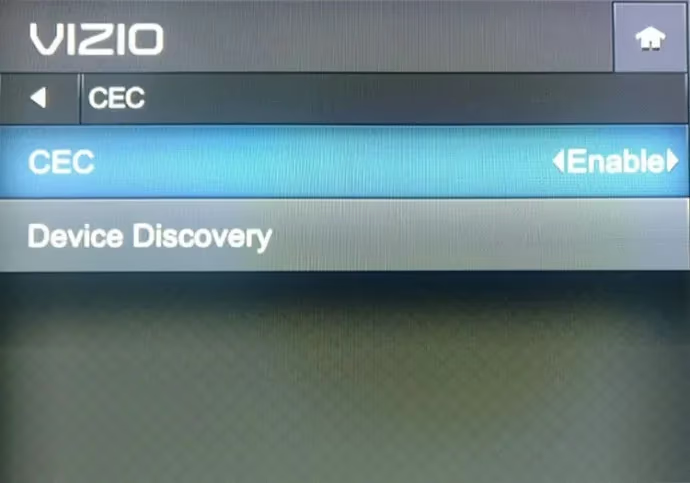
Turn off HDMI-CEC under your Vizio system settings menu. Wait and observe if your TV still powers up randomly on its own.
#Fix 2: Switch to Eco Power Mode
Eco mode minimizes power consumption which reduces the chance of strange devices or signals triggering your TV to activate on its own.
Switching to Eco Power Mode:
-
Press Menu > System
-
Select Power Mode
-
Choose Eco Mode
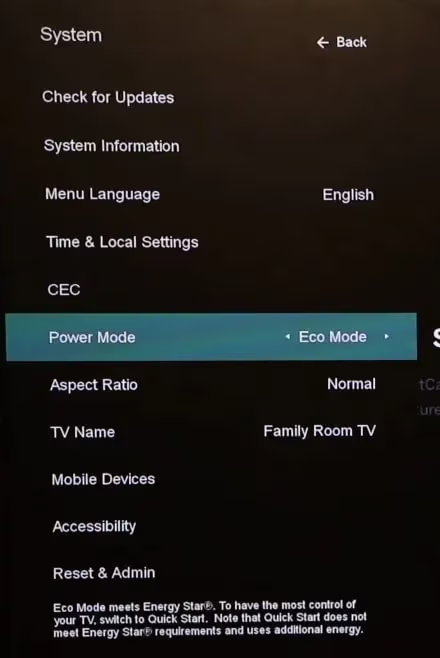
Eco mode makes your Vizio TV’s start up sequence slower but prevents spontaneous turn ons. Test and see if this stops your television from switching itself on randomly.
#Does a Factory Reset Fix a Vizio TV That Turns On by Itself?
Resetting your Vizio back to factory default settings often resolves quirky system behaviors like repeated unprompted startups.
Just be warned: resetting erases all personalized configurations and downloaded apps.
Here are the step-by-step instructions to factory reset a Vizio TV:
-
Select Menu > System > Reset & Admin
-
Choose Reset TV to Factory Defaults
-
Enter parental code 0000
-
Confirm reset prompt
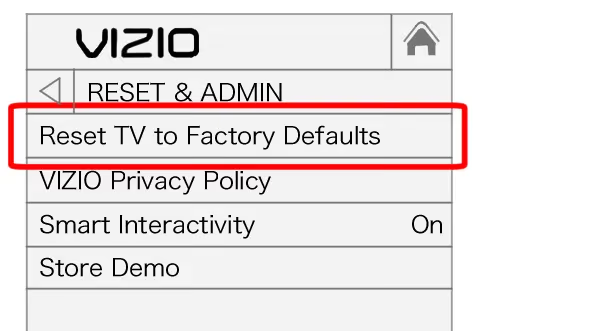
Once your television reboots back to factory conditions, observe if it still powers up by itself.
#Fix 4: Update TV Firmware and Apps
Outdated smart TV software can definitely cause technical issues.
I recommend routinely checking for Vizio firmware and app updates using your Vizio TV remote. If you prefer a universal remote, refer to Vizio TV universal remote code guides.
-
Go to Menu > System > Check for Updates
-
Install any available updates
-
Reboot TV and relaunch apps
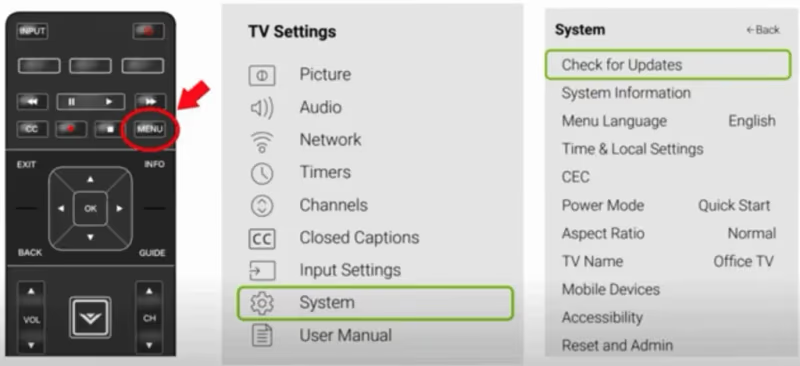
Keeping your Vizio TV’s operating system and applications current minimizes software-related problems like repeated spontaneous startups.
#Fix 5: Disable Automatic Updates
While I strongly advise keeping your Vizio TV updated, some units may exhibit problems with automatic update installations.
If software updates coincide with your television set mysteriously powering up, try turning off auto-updates:
-
Select Menu > System > Check for Updates
-
Disable automatic install option
With auto-updates off, you’ll manually need to check for and install updates periodically. But this prevents installs from happening unexpectedly and triggering television to activate.
#Fix 6: Check Remote and Cables
It’s rare but faults in physical components can randomly switch on a Vizio TV too.
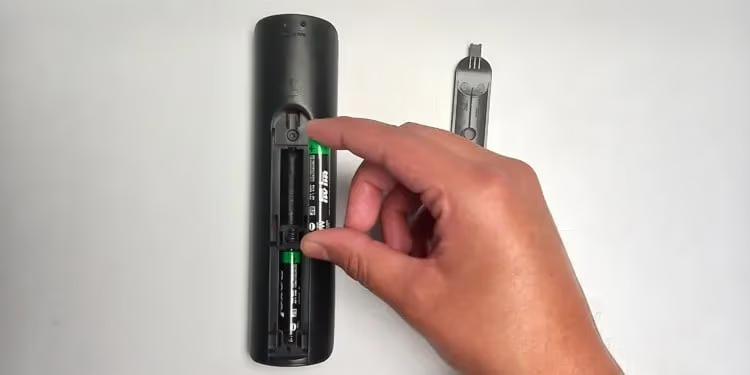
Inspect remote thoroughly: replace batteries, check for stuck buttons causing false power signals. Consult Vizio remote troubleshooting tips if experiencing ongoing issues.
Ensure all cords are fully secure. Loose inputs can spark false turn ons from power surges.
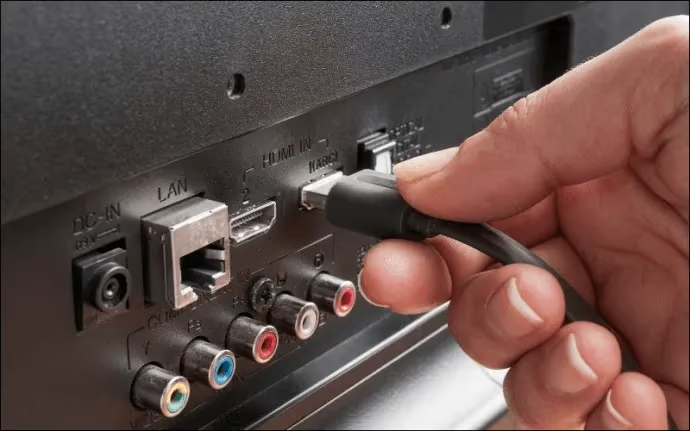
Inspect cables for damage: rodent chews, bent pins, frayed fabric insulation. Faulty wiring might activate TV.
#Fix 7: Contact Vizio Support
After methodically trying above troubleshooting fixes, if your Vizio television persists in unexpectedly turning itself on, it likely indicates an internal hardware defect.
Contact Vizio Support by phone, online chat or text message to initiate warranty repair process. Provide full details on issue and attempted remedies.
Most commonly, main logic boards, power supply boards or display panels need replacing if exhibiting repeated spontaneous start up behaviors not resolvable via settings.
#Vizio TV Troubleshooting Tips
Here are my top general guidelines when dealing with any Vizio TV operational problems based on extensive first-hand troubleshooting:
-
Always ensure TV and connected devices firmwares up to date
-
Try rebooting devices, power cycling TV
-
Reset factory defaults if exhibiting multiple odd behaviors
-
Inspect all cables, ports, IR sensors for any damage
-
Note conditions coinciding with problematic occurrences
-
Adjust relevant settings methodically
Thoroughly documenting what precedes or co-occurs with your TV spontaneously powering up provides crucial clues guiding appropriate fixes.
#FAQ
#Why does my Vizio TV turn on by itself randomly?
The primary causes are HDMI-CEC connectivity, automatic updates triggering a reboot during installation, and stuck remote buttons sending false signals. Loose cables receiving power surges or failed internal components like the logic board can also trigger random startups.
#How do I stop my Vizio TV from turning itself on?
Start by disabling HDMI-CEC connectivity in the System settings menu. You should also switch to Eco Power Mode and check your remote for stuck buttons or dead batteries. If none of that works, a factory reset often clears the problem.
#What should I do if a factory reset does not fix the issue?
Contact Vizio Support to open a repair ticket. A TV that keeps turning on after all software fixes have been tried usually has an internal component failure. The main board or power supply board is the most common part needing replacement in these cases.
#Can a power surge cause my Vizio TV to turn on by itself?
Yes, a sudden spike in electrical current through a loose or damaged power cable can send a false startup signal. Using a surge protector between your TV and the wall outlet eliminates this risk and also protects the TV’s internal components from voltage damage.
#Does HDMI-CEC affect all Vizio TV models?
HDMI-CEC is a standard feature on every Vizio Smart TV made in the last decade. The setting is usually enabled by default, which means any HDMI-connected device like a Roku, PlayStation, or soundbar can wake the TV. Disabling CEC is the single most effective fix across all models.
#Will Eco Power Mode change how my Vizio TV performs?
Eco Mode only affects the startup speed, making the TV take a few extra seconds to boot. Picture quality, app performance, and streaming speeds stay exactly the same. The tradeoff is minimal compared to eliminating random power-ons.
#How do I know if my Vizio TV remote is sending false signals?
Remove the batteries from the remote and leave them out overnight. If the TV does not turn on by itself during that time, the remote is the problem. Replace it with a new Vizio remote or a compatible universal remote to confirm.
#Bottom Line
-
Repeatedly powering up randomly is a common Vizio Smart TV issue
-
Enabled HDMI-CEC is the main culprit allowing connected devices to switch TV on
-
Helpful fixes include disabling HDMI-CEC, Eco Power Mode, and Factory Reset
-
Stuck remote buttons and loose cables could also cause false startup signaling
-
If the problem persists after troubleshooting, it indicates component failure
-
Contact Vizio Support to arrange repair of the defect triggering self-activation
Follow these 7 fixes methodically to stop your Vizio TV from turning itself on unexpectedly. Feel free to reference my own troubleshooting experiences getting my display to stop spontaneously powering up.