Getting great sound from your Vizio TV is key to an immersive home theater experience. While Vizio TVs have decent built-in speakers, adding an external speaker system via the optical audio out port takes sound quality to the next level. Here is what you need to know about making optical audio connections from your Vizio TV.
- Optical audio out transmits digital sound including 2-channel PCM, Dolby Digital 5.1, and DTS surround through a single TOSLINK cable
- TOSLINK cables maintain signal quality up to 30 feet with zero electromagnetic interference or signal degradation
- Optical does not support Dolby Atmos so connect via HDMI ARC or eARC for object-based 3D audio formats
- Setup takes under 5 minutes by plugging the cable into both devices, selecting optical input, and adjusting volume
- CEC lets you control volume from one remote after enabling HDMI-CEC on your Vizio TV to sync with optical-connected speakers
#What Is Optical Audio Out on a Vizio TV?
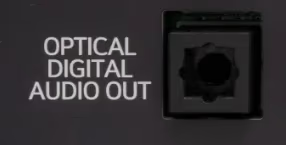
The optical audio out port on Vizio TVs lets you connect an external speaker system using an optical or TOSLINK cable. This fiber optic connection transmits uncompressed digital audio from your smart TV to audio devices like soundbars, A/V receivers, stereo systems, and powered speakers.
Optical audio ports may also be labeled S/PDIF, TOSLINK, or Digital Audio Out on the back of your Vizio TV. The interface uses red light to send digital sound signals through plastic fiber optic cables with specialized TOSLINK connectors.
Optical cables support up to 5.1 surround sound channels, making them a strong fit for Dolby Digital and DTS speaker setups. While optical doesn’t offer as much bandwidth as HDMI, it’s a reliable way to get high-quality audio from your Vizio SmartCast TV.
#Why Use the Optical Out Port for Audio?
There are several key reasons to use your Vizio TV’s optical audio out instead of built-in speakers or analog connections:
Supports Surround Sound. Optical cables can transmit up to 5.1 discrete surround sound channels. This lets external audio systems like Samsung surround sound speakers take full advantage of Dolby and DTS soundtracks from Blu-ray discs and streaming services.
Better Sound Quality. Digital optical audio delivers better clarity and dynamic range compared to analog connections. There’s no signal degradation with optical.
Long Cable Runs. TOSLINK cables maintain full sound quality up to about 30 feet. No need to place equipment right next to the TV.
Cable Locks In Securely. Optical connectors tightly latch in place, preventing friction from disrupting audio signals.
Isolates TV Sound. Free from electromagnetic interference that can occur with RCA analog and even HDMI to some extent.
Single Cable Solution. One TOSLINK handles all audio channels. No separate cables needed for multi-channel surround.
Wide Compatibility. External speakers, receivers, preamp/processors, and other AV gear support TOSLINK input.
Optical audio out unlocks your Vizio TV’s full sonic potential while making setup easy. It’s the best choice for surround soundbars and 5.1 home theater systems.
#How Do You Find the Optical Out Port on a Vizio TV?
While it’s easy to use, actually finding the optical audio out port can be tricky. Some Vizio TV models tuck TOSLINK connections out of plain view.
Here are a few tips for locating optical out on your Vizio:
Check Next to HDMI. Optical audio ports are typically grouped with HDMI and other A/V inputs on the rear panel.
Look for Digital Audio Out Label. May also be marked as S/PDIF, TOSLINK, or Optical Out.
Examine Back Panel Diagram. Manuals have diagrams showing where ports are located even if they’re hard to spot on the TV itself.
Feel Around Edges. Optical jacks are often found on the far left or right sides and can’t be seen head-on.
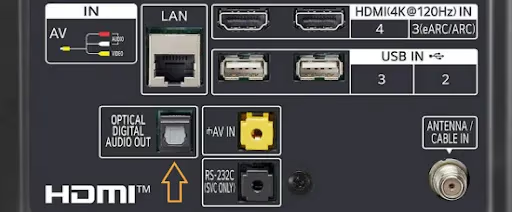
Once located, connect your TOSLINK cable making sure it clicks securely in place. Having trouble finding optical out? Grab your Vizio manual or contact Vizio support for assistance.
#Connecting Speakers via Optical Cable
Hooking up an external audio system to utilize your TV’s optical out is straightforward once you locate the port:
#What You’ll Need
-
Vizio TV with optical audio out
-
External speaker system (soundbar, AV receiver, etc.) with optical input
#Step-by-Step Instructions
-
Turn off both Vizio TV and external speakers.
-
Insert one end of optical cable into the optical out port on TV.
-
Connect other end of TOSLINK cable to optical input on speaker system.
-
Power on connected devices and select optical input if prompted.
-
Enable optical/SPDIF signals in TV audio settings if needed.
-
Adjust speaker system volume to your preferred listening level.
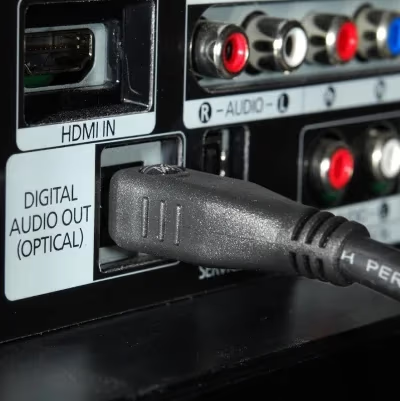
That’s all there is to it. Keep reading for configuration tips to get the best quality sound.
#Optical vs HDMI ARC: Which Is Better for Audio?
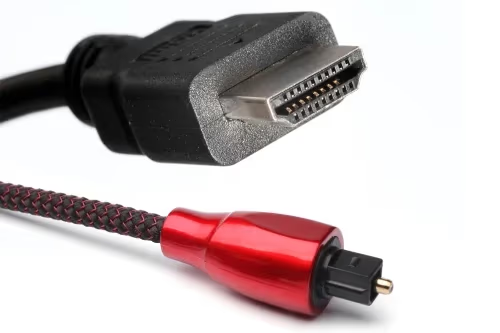
Vizio TV optical and HDMI ARC outputs both transmit digital audio to external equipment like soundbars and A/V receivers. But there are important technical differences.
HDMI ARC stands for Audio Return Channel, allowing 2-way audio signals between TV and speakers over a single HDMI cable. ARC handles high bandwidth lossless surround sound like Dolby TrueHD and DTS:X in addition to core formats.
Optical is limited to standard Dolby Digital, DTS, and 2-channel PCM. No data compression but maxes out at 24-bit/192kHz bandwidth. Multi-channel LPCM and lossless audio get downmixed to dual-channel DTS or Dolby Digital output.
While HDMI ARC offers higher resolution sound, the optical connection has plenty of bandwidth for crisp multi-channel audio from most TV, streaming, and disc sources.
Optical is more widely compatible with older AV gear as well. For most real-world listening, users are unlikely to notice audio quality differences between optical and HDMI ARC soundbars or speaker systems.
Both HDMI and optical outputs capably drive Dolby and DTS equipped audio devices. Base your connection choice on equipment capabilities and available ports.
#How Do You Fix Optical Audio Problems on a Vizio TV?
Occasional hiccups can stem from loose TOSLINK connections, incompatible audio modes, incorrect input selection, or faulty cables. Here are quick fixes for common optical audio problems:
No Sound or Audio Dropouts. Ensure optical cables on both ends are fully inserted. Switch inputs, toggle TV audio options. Replace the cable if issues persist. For more audio troubleshooting, see our guide on Vizio TV no sound.
Sound Intermittent. TOSLINK ports may be dusty or obstructed. Use pressurized air to clean, then reconnect the cable firmly.
Distorted Sound. Change audio format to PCM and enable or disable Dolby Digital options. Check speaker configuration in your receiver’s settings.
Volume Control Not Working. Enable HDMI-CEC (Consumer Electronics Control) to control external device volume through the Vizio TV remote. This syncs volume buttons between TV and external audio system.
Still having optical audio issues? Contact Vizio support at (844) 254-8088 for tailored troubleshooting assistance.
#Bottom Line
Hooking up an external multi-channel speaker system using the optical output transforms Vizio TV viewing into a much better audio experience. Optical audio out connections provide uncompressed 2.0 PCM and 5.1 Dolby Digital/DTS surround, work with a wider range of devices than HDMI ARC, and set up in minutes with a single TOSLINK cable.
Connect your Vizio soundbar, A/V receiver, or powered speakers to optical out and enjoy the upgrade. If you run into audio issues after connecting, try resetting your Vizio sound bar to restore default settings.
#FAQ
#Does optical audio out support Dolby Atmos on Vizio TVs?
No. Optical bandwidth maxes out at Dolby Digital 5.1 channel sound. To get object-based 3D audio like Dolby Atmos, you need to connect your AV receiver or soundbar via HDMI ARC or eARC instead.
#What is the difference between optical and RCA audio?
Optical is a digital signal that supports 2-channel PCM stereo or 5.1 surround sound. RCA uses analog signals limited to standard 2.0 stereo without surround processing. Optical also avoids electromagnetic interference that can degrade analog RCA connections over longer cable runs.
#Why would you use optical instead of HDMI ARC?
If your HDMI ports are already in use, optical is a solid way to add surround sound with core Dolby and DTS formats. Optical isolation also eliminates signal contamination from nearby electronics. Older receivers and soundbars may only have optical input, making it the only digital audio option.
#What speaker systems work with Vizio optical out?
Vizio optical outputs are compatible with virtually all external audio devices that have a TOSLINK input. This includes soundbars, bookshelf speaker pairs, AV receivers, stereo preamp/processors, theater-in-a-box systems, and powered speakers.
#How long can a TOSLINK optical cable be before losing quality?
Standard TOSLINK cables maintain full audio quality up to about 30 feet (10 meters). Beyond that length, the light signal can weaken and cause dropouts or distortion. For runs longer than 30 feet, look for premium cables with glass fiber cores rather than plastic.
#Can you control speaker volume through the Vizio TV remote with optical?
Yes, but you need to enable HDMI-CEC in your Vizio TV settings first. Once CEC is active, the TV remote’s volume buttons sync with the connected speaker system. Not all older receivers support CEC volume control, so check your device’s compatibility.
#Does Vizio optical out work with a wireless soundbar?
Not directly. The optical port requires a physical TOSLINK cable connection. Some wireless soundbar systems include a transmitter base that accepts optical input and then sends audio wirelessly to the soundbar itself. Check your soundbar’s documentation for supported input types.
#What audio formats does Vizio optical output support?
Vizio optical out supports 2-channel PCM stereo, Dolby Digital 5.1, and DTS 5.1 surround sound. It does not support higher-bandwidth formats like Dolby TrueHD, DTS-HD Master Audio, or Dolby Atmos. Those formats require an HDMI ARC or eARC connection.