Seeing vertical lines on your Vizio TV is frustrating, but the good news is there are several fixes you can try yourself before paying for expensive repairs. Below you’ll find the top 11 solutions to remove vertical lines from Vizio televisions.
- Power cycling fixes most software-related vertical lines — unplug the TV and hold the power button for 15 seconds to drain residual charge
- Loose or damaged HDMI cables are the most common culprit — reseat all connections and swap cables to isolate the issue
- T-Con board failures produce distinct line patterns — flickering lines point to ribbon cable problems while colored lines indicate gate driver failure
- Factory reset and firmware updates resolve software-triggered banding — check Settings > System for pending updates before opening the back panel
- Professional panel repair typically costs $150 or more — compare repair quotes against Black Friday deals on replacement TVs
#What Causes Vertical Lines on Vizio TVs?
Before jumping into the fixes, it helps to understand what causes vertical line issues in the first place:
-
Faulty T-Con board: The T-Con (timing controller) board translates signals and controls pixels on the screen. Issues like loose connectors or damage on this board can trigger vertical lines.
-
Software glitches: Bugs or firmware problems can manifest as line display issues. Resetting or updating the TV often resolves this.
-
Power problems: Inconsistent electricity leading to voltage fluctuations is a culprit. Surge protectors, faulty outlets or wiring can contribute to this.
-
Physical damage: Drops, hits or extreme temperatures may loosen cables and connections resulting in vertical lines or black screens.
-
Bad HDMI cables: Poorly connected or corroded HDMI cables can interfere with signals and cause lines.
With many potential causes, the key is trying different fixes until you isolate the reason.
#11 Fixes for Vertical Lines on Your Vizio Television
Follow these tips to remove annoying vertical lines from your Vizio TV:
#1. Power Cycle the Television
Start with the simple power recycling fix:
-
Unplug TV from power source.
-
Press and hold the power button for 10-15 seconds to drain any residual electricity.
-
Leave unplugged for at least 1 minute, up to an hour for full discharge.
-
Reconnect and turn back on to reboot fresh.
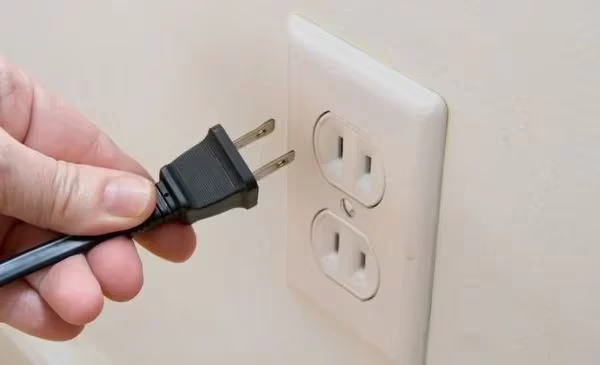
This clears any temporary glitches causing the lines.
#2. Try Different Power Sources
If lines reappear after cycling, try different power outlets in other rooms along with different surge protectors.
Voltage inconsistencies can manifest as vertical lines, so this checks for wiring issues.
#3. Eliminate Sources of Interference
Nearby gadgets like phones, Bluetooth speakers or baby monitors can cause signal interference. Unplug or remove potential sources within several feet of the TV.
#4. Check and Reseat HDMI Cables
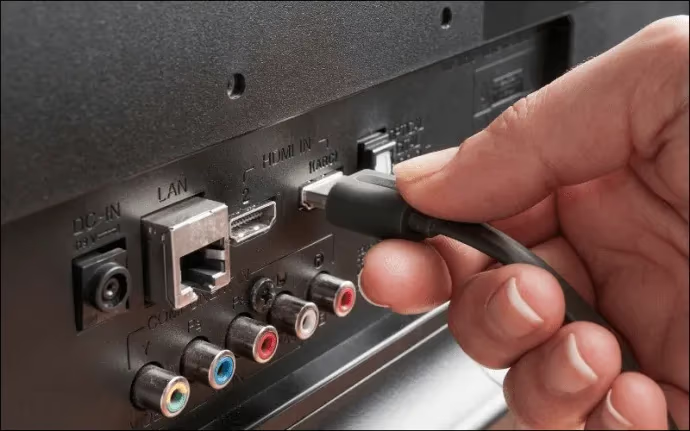
Carefully disconnect all HDMI inputs from back of television. Examine ends for dust or damage. If degraded, replace cable.
Re-insert cable ends firmly into ports to ensure full connection. Turn TV back on to check for lines. Retry other HDMI cables individually if the problem persists.
#5. Reset Your Vizio TV
Return television to factory default settings in case software glitches or changes are enabling the lines:
-
Select Reset & Admin from Settings menu.
-
Choose Reset TV to Factory Defaults option.
-
Follow prompts to complete hard reset.
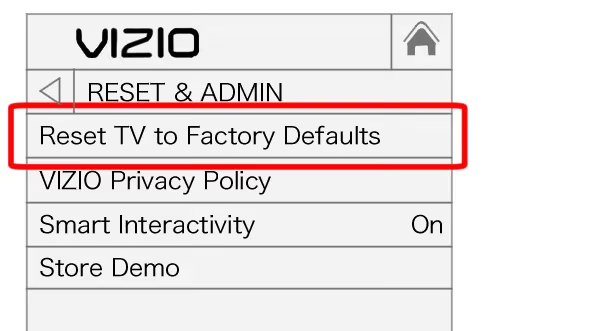
This erases all customizations but often fixes firmware issues.
#6. Update Vizio TV Firmware
Outdated firmware can also be the culprit. Select Check for Updates in the Settings > System menu.
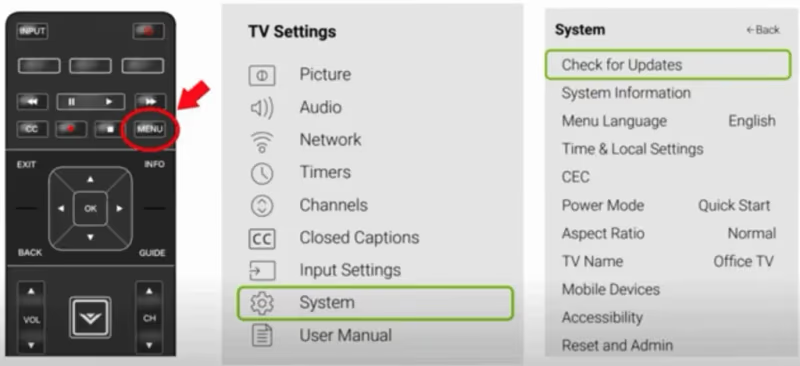
If available, install newest firmware update as instructed on screen.
#7. Inspect T-Con Board and Ribbon Cables
The T-Con board communicates critical imaging signals. Carefully open back panel to visually check:
-
Ribbon cables connecting T-Con board for secure connections
-
Pins for dust, damage or wear
-
T-Con board itself for blown capacitors or burnt spots
Clean connections and replace damaged cables/boards. Very carefully reseat all internal connections before closing.
#8. Use Non-Conductive Tape on T-Con Board
Another T-Con board trick is strategically placing small pieces of tape to block certain pins along ribbon cables. This can isolate faulty signals and restore the image.
Refer to online guides for diagrams on exact taping locations.
#9. Adjust Backlight Settings
For TVs with local dimming technology, vertical banding can appear after firmware updates alter tolerances.
Combat this by tweaking backlight, contrast, gamma and other display calibration controls until banding improves.

#10. Claim Warranty Coverage
If purchased recently, your Vizio television may still be under manufacturer warranty granting free repair services.
Contact Vizio support with your model details and receipt to inquire about coverage for your vertical line issue.
#11. Retain Professional TV Repair
For sets no longer covered or if DIY efforts fail, consider professional television repair:
-
Research highly reviewed local TV repair shops.
-
Describe issue over the phone – an expert can often diagnose problem area.
-
Ask about pricing guidelines for parts replacement. Panel repair starts around $150+.
-
Evaluate costs vs buying a new TV on Black Friday deals.
Though not ideal, repairs remain cheaper than full replacement in many cases.
#Why Do I See Vertical Colored Lines on My Vizio?
The specific color and nature of the vertical lines can indicate which component has failed:
-
Red, green or blue lines – Faulty LCD panel gate drivers
-
Wide bands after firmware updates – Imperfections with local dimming zones
-
Black vertical lines – Loose tab bonds connecting raw panel drivers
-
Flickering vertical lines – T-Con board ribbon cable/clock signal issues
#Bottom Line
-
First, power cycle the TV and try different power sources to check for voltage issues.
-
Eliminate interference, firmly reconnect HDMI and other cables.
-
Perform factory reset and firmware updates; customize display settings.
-
Open back panel to clean, reseat and replace damaged T-Con boards, ribbons.
-
Use non-conductive tape to block faulty T-Con board signals as a temporary fix.
-
Retain professionals for advanced repairs if vertical lines persist.
#Frequently Asked Questions
#What if colored vertical lines still show after factory resetting my Vizio TV?
Colored lines that survive a factory reset almost always point to hardware damage. The LCD panel’s gate drivers or tab bonds have likely failed and need physical replacement. Contact Vizio support or a certified repair technician to diagnose the specific component.
#Why does my Vizio TV have a single thin black vertical line?
A lone black line usually means an internal tab bond connecting the LCD pixel drivers has partially detached. Try squeezing the plastic bezel edges gently near the line to reseat the bond. If the line vanishes temporarily but comes back, you can apply adhesive tape inside the bezel to hold pressure on the connector permanently.
#Can vertical lines appear on only one half of the screen?
Yes, and this narrows the problem to one side’s T-Con ribbon cable. The T-Con board uses separate ribbon cables for each half of the display. Reseating or replacing the cable on the affected side usually restores the image.
#Do firmware updates cause vertical banding on Vizio TVs?
They can. Local dimming adjustments in firmware updates sometimes expose uniformity flaws that were previously hidden. Reducing backlight intensity, tweaking gamma, and adjusting contrast settings will often reduce or eliminate the banding without rolling back the update.
#How much does it cost to fix vertical lines on a Vizio TV?
Basic panel repair by a certified technician starts around $150. Mainboard replacements run $200 to $300 depending on the model. Compare those quotes against current sale prices on new Hisense or Vizio models before committing to a repair.
#Will a power surge cause vertical lines on my Vizio TV?
Power surges can damage the T-Con board or main logic board, which then produces vertical lines or other display artifacts. Plugging your TV into a quality surge protector prevents most surge-related damage. If lines appeared right after a storm or power outage, the T-Con board is the first component to inspect.
#Is it safe to open the back panel of my Vizio TV myself?
Opening the back panel is straightforward on most Vizio models, but you should unplug the TV and wait at least 30 minutes for capacitors to discharge. Avoid touching the main power supply board directly. If your TV is still under warranty, opening the panel will void coverage, so check your warranty status first.
#How do I tell if vertical lines are a screen issue or a signal issue?
Switch to a different input source or open the TV’s built-in menu. If lines appear on the menu screen with no external device connected, the problem is internal hardware. If lines only show on one specific HDMI input, the cable or source device is the likely cause.
#Bottom Line
Fixing those irritating vertical lines on your Vizio doesn’t require an immediate expensive LCD panel replacement if you methodically try the troubleshooting tips here first.
In many cases, something as minor as a loose HDMI cable connection is creating false vertical line artifacts.
Work through power cycling, cable checks, calibration changes and DIY electrical repairs before resorting to professional TV repair or replacement. With persistence, you can likely get your Vizio looking good as new again without breaking the bank!