Horizontal lines on a Toshiba TV screen can ruin your viewing experience fast. The good news is that most causes have straightforward fixes if you isolate the root cause step by step.
As a technician who has repaired hundreds of TVs, I’ve traced these lines back to faulty cables, aging components, software glitches, and electromagnetic interference. This guide walks you through 14 proven fixes, starting with quick checks before moving to component-level repairs.
- Loose HDMI or ribbon cables cause the majority of horizontal line issues on Toshiba TVs
- Power cycling for 60 seconds clears temporary software glitches that trigger display artifacts
- T-Con board failure is the most common hardware culprit and replacement boards cost $20-$50
- Factory reset resolves firmware-related display bugs on older Toshiba models
- Screen burn-in from static channel logos creates permanent faint lines that pixel refresher videos can reduce
#What Causes Horizontal Lines on Toshiba TVs?
Before jumping into the fixes, it helps to understand what typically causes visible lines across Toshiba television screens:
#Faulty or Loose Video Cables
Issues with damaged HDMI or antenna cables can show up as wavy horizontal artifacts and distorted pictures that appear like lines. Similarly, loose video connections between devices, ports and the TV can contribute to lines when input signal integrity is compromised.
#Dust and Debris Buildup
A surprisingly common source of TV display issues is plain old dust! Built up dust, dirt and debris – especially around ribbon cables and PCB components inside the TV chassis – can show up as lines and scrambled pictures. Good old spring cleaning does wonders.
#Software Glitches & Updates
Like any modern smart TVs filled with code, software bugs or outdated firmware on older Toshiba models can also be the surprising culprit behind horizontal lines. Resetting and updating the TV software often resolves these unpredictable issues.
#Backlight Failures
The LED strips that light up LCD televisions from behind the actual pixel layer are arranged vertically in columns behind the screen. When some LEDs die or disconnect, obvious bright lines show across the display.
#Burned-In Displays
Displaying the same 24/7 news or sports channels can literally burn their fixed graphics into your screen through pixel degradation, leaving faint horizontal lines at those locations long after you change the channel.
#T-Con Board Failure
The timing controller (T-Con) board coordinates everything being shown on your display. When this crucial component starts failing, scrambled lines and distortions commonly appear as it loses signal coordination ability.
#Loose Ribbon Cables
The flexible ribbon cables that connect key components like the T-Con board to the LCD screen are prone to work loose over years of heating and cooling cycles. Loosened video signal connections then cause all kinds of visual corruption.
#Nearby Electromagnetic Interference
Lastly, interference from nearby electronic devices through electromagnetic waves can disrupt digital video signals. This causes glitches like temporary buzzing lines and blocky pictures under the right conditions.
So in summary – horizontal lines on your treasured Toshiba television could stem from wiring problems, hardware failures, software issues or environmental interference.
Now let’s go through how to troubleshoot and fix the most common causes, starting from the basics before opening up your TV or ordering replacement parts.
#How Do You Fix Horizontal Lines on a Toshiba TV?
Here are 14 fixes to try when lines show up on your Toshiba TV screen:
#1. Check Video Input Connections
Since improperly connected devices often cause these symptoms, this is an easy fix to try first:
-
Inspect all video and antenna cables for damage
-
Reseat loose HDMI, component, coaxial and AV connectors at both ends
-
Try different cables if available to test signal integrity
-
Directly connect devices to TV ports to isolate issues
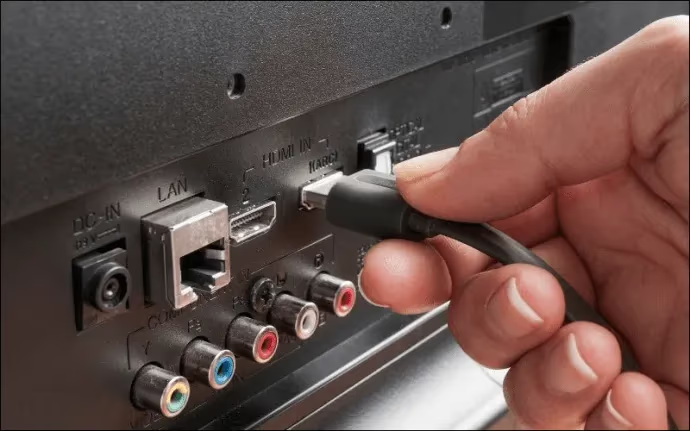
By methodically checking all video input connections you can identify and resolve dodgy cables contributing to those lines.
#2. Perform Factory Reset on Toshiba TV
Resetting the television fully erases any corrupted settings, glitches or outdated firmware:
-
Select Factory Reset function from Settings menu
-
Confirm when prompted to wipe OS and data
-
Allow TV to fully reboot and reconfigure
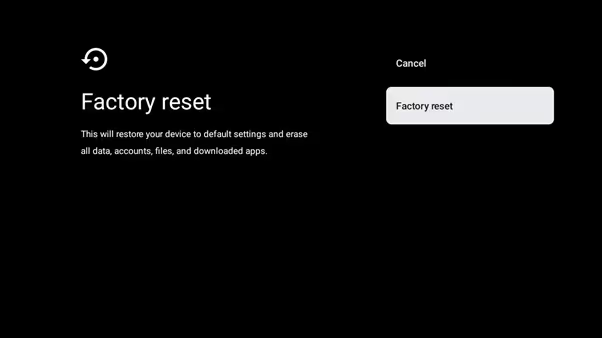
This factory data reset often resolves software-based display issues and upgrades firmware on older models. Reconfigure your inputs and apps after resetting.
#3. Power Cycle the Toshiba Television
Simply turning a malfunctioning TV off and on rarely clears underlying issues – so instead, force a cold reboot:
-
Unplug TV power cable from electrical outlet
-
Wait at least 60 seconds (2 minutes even better)
-
Reconnect power cable to reboot TV completely
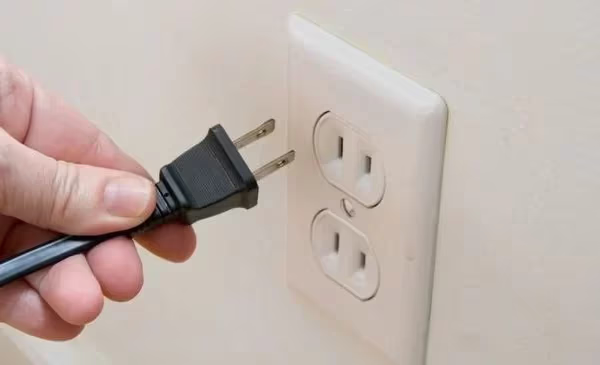
This power cycling forces all components to fully discharge and restart fresh. If the issue persists, take a look at troubleshooting Toshiba TV red light blinking and Toshiba TV flickering issues as well.
#4. Check for Screen Burn-In
Prominent 24/7 channel logos and static scoreboard overlays can get “burned in” to pixels with long term display – look closely for their faint outlines:
-
Display burn-in test pattern to easily check
-
Run pixel refresher videos overnight
-
Vary content shown to avoid further burn-in
Use varied content instead of prolonged static images to minimize screen burn going forward. Modern TVs include pixel shifting to reduce this risk.
#5. Replace Faulty HDMI Cables
Damaged or corroded HDMI connectors can cause all sorts of analogue video noise and signal loss:
-
Inspect existing HDMI wires for bent pins or corrosion
-
Purchase new High Speed HDMI cables if required
-
Consider upgrading to 48Gbps HDMI 2.1 cables for newer devices
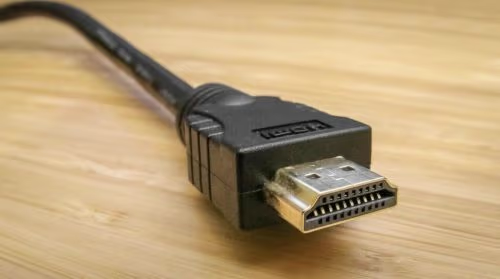
Swapping out suspect HDMI inputs for fresh wiring usually resolves lines from cable issues. See more on fixes for Toshiba TV HDMI problems.
#6. Open Case & Reseat Ribbon Cables
Loose internal wiring is harder to spot – carefully inspect:
-
Open rear case to access control boards
-
Locate & detach corrosion-prone ribbon cables
-
Clean ribbon cable connectors if needed
-
Re-seat each cable firmly
Doing so reforms flaky video signal connections from internal T-Con boards to the screen itself that generate lines.
#7. Replace Failing T-Con Board
The critical T-Con component manages screen signals – when it fails, chaos ensues:
-
Order correct replacement T-Con for the TV
-
Open chassis and locate existing T-Con PCB
-
Swap in replacement after disconnecting ribbons
-
Test operation before resealing case
Faulty T-Cons often display horizontal lines among other issues – replacement restores order.
#8. Upgrade Outdated Software
Some models like discontinued Toshibas still receive critical firmware updates:
-
Select Update option from Settings to download
-
Or visit Toshiba support site on a PC to get files
-
Apply updates via USB stick – avoid power disruption
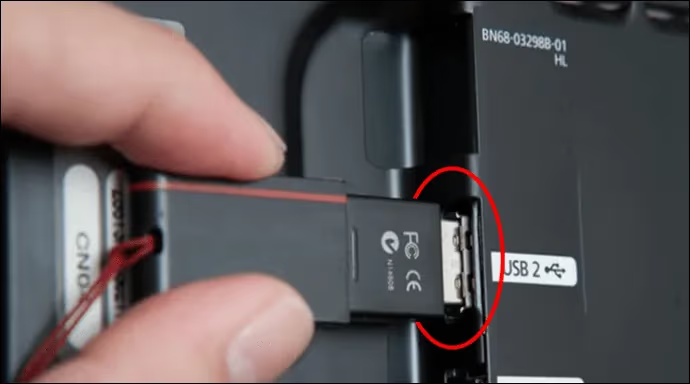
Updated software rectifies bugs that trigger display communication failures.
#9. Replace Backlight LED Strips
The precisely arranged LED backlights fail over time – replace strips:
-
Order correct LED array for exact TV model
-
Carefully open display and remove old strips
-
Install replacement backlights as per guide
-
Reconnect delicate display cables before reassembly
This restores lighting uniformity lost by dead LED zones causing bright lines on screen. It’s fiddly work best left to technicians.
#10. Attempt T-Con Ribbon Repairs
Rather than replace the entire T-Con board, targeted repairs may work:
-
Note which screen regions show lines then identify matching ribbon cable
-
Carefully unplug & reseat that specific ribbon
-
Inspect ribbon for damage possibly causing issues
-
Replace only faulty ribbon if needed based on symptom region
Sectioned ribbon fixes avoid replacing the entire T-Con module. Accurately mapping ribbons and lines guides troubleshooting.
#11. Rule Out Signal Interference
Nearby electrical devices can emit electromagnetic interference disrupting TVs through walls over 5-10 feet away:
-
Power off suspect devices like WiFi routers to test
-
Relocate cordless phones, baby monitors away from TV
-
Add signal filtering if needed – consider an shielded HDMI cable
-
Increase distance between electronics wherever possible
Isolate and suppress potential interference sources. This is especially common on certain models like Toshiba Fire TVs.
#12. Replace Severely Damaged Display Panel
If horizontal lines still persist across the entire disjointed screen, physical display damage could be causing havoc:
-
Carefully inspect panel for cracks under good lighting
-
Order replacement Toshiba TV display panel based on model
-
Skilled technician can switch out old and new display units
-
Special equipment needed – very delicate process
Panel repairs remain cost effective fixes over total TV replacement, extending useful lifespan. Gain perspective by checking Toshiba TV reliability against other brands first.
#13. Attempt DIY Component-Level Repairs
Those technically inclined can replace specific chips once correctly identified:
-
Learn to diagnose faults down to individual ICs
-
Order replacement kits for amplifier, processor chips
-
Meticulously solder/desolder chips under a microscope – not for novices
-
Use proper grounding and ESD gear to prevent damage
This micro-level troubleshooting demands advanced skills – otherwise leave it to the professionals. But it offers the most complete fixes available.
#14. Call Toshiba Support for Repairs
If all else fails, seek assistance from trained Toshiba TV technicians:
-
Contact Toshiba support online or call technicians
-
Detail issue history and troubleshooting steps attempted
-
Ask about feasible component-level repairs
-
Consider affordable extended warranty options
Describe any unusual OSD messages, sounds or smells from TV – every clue helps. Frontline software fixes may resolve issues before needing costly board-level repairs.
#Bottom Line
Start with the easiest fixes first: reseat cables, power cycle the TV, and check for software updates. If the lines persist, open the case to inspect ribbon cables and the T-Con board. Most horizontal line problems on Toshiba TVs trace back to one of these causes, and replacement parts are affordable compared to buying a new TV.
#Frequently Asked Questions
#Why does my Toshiba TV have horizontal lines across the screen?
Horizontal lines typically result from loose video cables, a failing T-Con board, or outdated firmware. Less common causes include backlight LED failure, screen burn-in from static images, and electromagnetic interference from nearby electronics. Running through basic cable checks and a power cycle will rule out the simplest causes.
#Can a power cycle fix horizontal lines on a Toshiba TV?
Yes, power cycling clears temporary software glitches that can cause display artifacts. Unplug the TV from the wall outlet, wait at least 60 seconds for all capacitors to discharge, then plug it back in. This forces every internal component to restart fresh, which resolves a surprising number of line issues.
#How much does it cost to replace a T-Con board on a Toshiba TV?
Replacement T-Con boards for Toshiba TVs generally run between $20 and $50 online. The swap itself takes about 30 minutes if you are comfortable opening the rear panel and disconnecting ribbon cables. Professional repair shops typically charge $80-$150 including the part and labor.
#Will a factory reset remove horizontal lines on my Toshiba TV?
A factory reset can fix lines caused by corrupted software settings or buggy firmware. It wipes all saved preferences, apps, and network settings back to out-of-the-box defaults. Keep in mind that you will need to reconfigure Wi-Fi, sign into streaming apps, and retune channels after the reset completes.
#How do I know if my Toshiba TV screen is burned in?
Screen burn-in appears as faint ghost images of channel logos, scoreboards, or menu bars that remain visible even when you change the input. Display a solid white or gray test pattern across the full screen to spot these outlines easily. Modern Toshiba models include pixel-shifting features that reduce burn-in risk over time.
#Can electromagnetic interference cause lines on a Toshiba TV?
Nearby devices like Wi-Fi routers, cordless phones, baby monitors, and microwaves emit electromagnetic waves that can disrupt video signals. Try powering off suspect devices one at a time to isolate the source. Moving the TV or the interfering device just a few feet apart often eliminates the problem entirely.
#Should I repair or replace a Toshiba TV with horizontal lines?
If the TV is under warranty, contact Toshiba support for a free repair or replacement. For out-of-warranty sets, compare the repair cost against the price of a new TV. Cable and T-Con fixes are almost always worth doing since parts cost under $50, but a cracked display panel usually makes replacement the better financial choice.
#Are horizontal lines on a Toshiba TV covered under warranty?
Toshiba’s standard warranty covers manufacturing defects, which includes T-Con board failures and backlight issues that cause horizontal lines. Physical damage like a cracked panel from impact is not covered. Check your purchase date and warranty terms on the Toshiba support website or your original receipt before scheduling a service call.