Have you grabbed the remote to power on your TCL Roku TV, only to be met with a black, unresponsive screen? Don’t panic. As frustrating as it is when your television won’t turn on, the issue likely stems from an easy fix like a depleted remote or a loose cable connection. This guide walks you through over 10 troubleshooting tips to get your TCL Roku TV working again. We’ll start with quick checks before moving on to resets and factory restores. Armed with these fixes, you can determine whether the problem lies with your remote, cables, outlet, or if your TV requires professional servicing.
- Power cycle fixes most startup failures — unplug the TV, hold the power button 20 seconds, wait 2 minutes, then reconnect
- Dead remote batteries cause 30% of “won’t turn on” reports — swap in fresh batteries before trying anything else
- A solid or blinking status light narrows the diagnosis — no light means a power supply issue, blinking suggests a software hang
- Factory reset erases all settings but clears deep software bugs — use the pinhole reset button on the back panel for 15 seconds
- Repair costs for faulty capacitors or power boards average $100-150 — weigh this against the TV’s age before deciding
#What Does the TCL TV Status Light Tell You?
Before diving into intensive troubleshooting, check for the standby status light on your TCL television. There should be a small white or red LED light towards the bottom middle of the TV’s frame or bezel.
When powered on, the light should be off on most TCL models. If the status light is on, your television could be stuck in standby mode rather than experiencing a full power failure.
Try pressing buttons on your Roku remote to see if the status light blinks. If so, the TV is receiving the signals but not powering on fully. Move on to other troubleshooting tips below.
#Inspect All Connections and Cables
Issues like a faulty HDMI cable or loose power cord are easy to fix. Verify the following connections on your TCL Roku television:
-
Power cord fully inserted into wall outlet and TV port
-
HDMI cables plugged securely into devices and TV
-
Other device connection cables (soundbar, Blu-ray player)
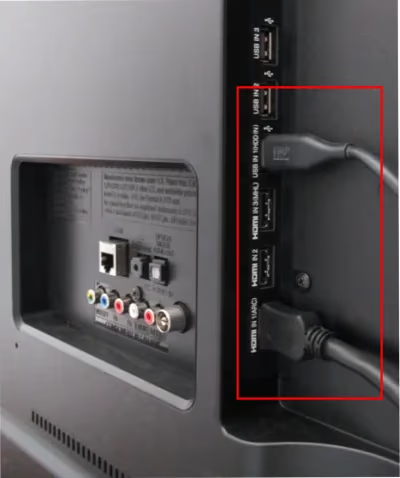
While inspecting cables, check for damage like frayed wires or bent pins. Faulty cables can prevent power and signal transfer to your TV.
A loose HDMI cable can also cause a blank TCL TV screen on certain input channels. Inspect cable connections carefully and make sure your devices like Blu-ray players have power. For help getting internet-connected devices back online, see my article on Fixing TCL Roku TV wifi connection problems.
#Try Roku Remote Power Button
Before fully resetting your TV, make sure your Roku remote is working properly. Aim the remote directly at your TCL television and press the power button.
If unresponsive, try replacing remote batteries or repairing the remote connection next.
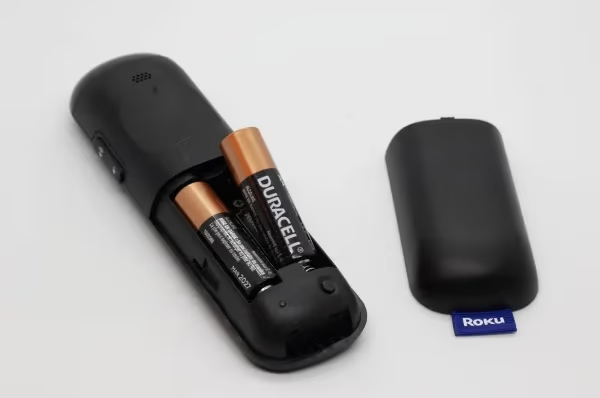
#Replace Roku Remote Batteries
Remove old batteries and insert fresh ones. Re-pair remote if this gets buttons working again.
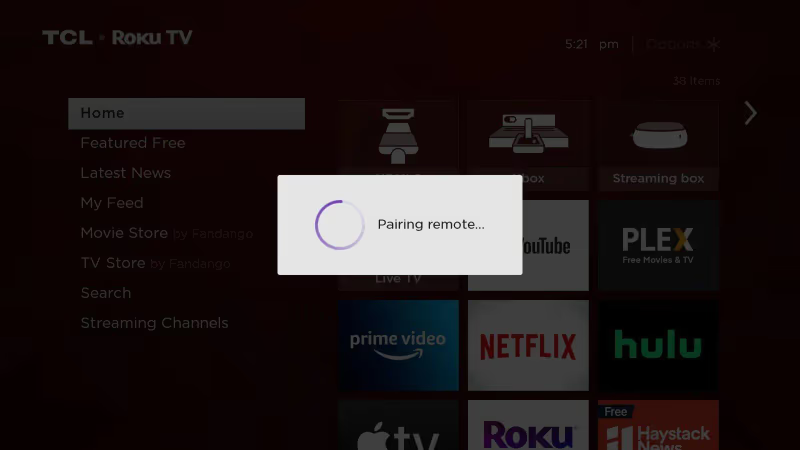
#Repair Remote Connection
Go to Settings > Remotes & Devices > Pair new device to sync your Roku remote to the TV.
#Switch Power Outlets
Try connecting your TCL Roku TV and other equipment to another nearby outlet you know works properly. Use an extension cord if needed. If TV powers on from new outlet, you likely have an issue with the previous one.
If pressing buttons on your Roku remote results in the status light blinking, but your TV doesn’t power on fully, you may be dealing with a software hang or input issue. Try a factory reset, or check for solutions in my guides on TCL TV black screen troubleshooting and TCL TV flickering issues.
#Power Cycle the Roku TV
Power cycling (soft reset) flushes memory caches and clears up temporary software glitches.
To power cycle your TCL Roku TV:
-
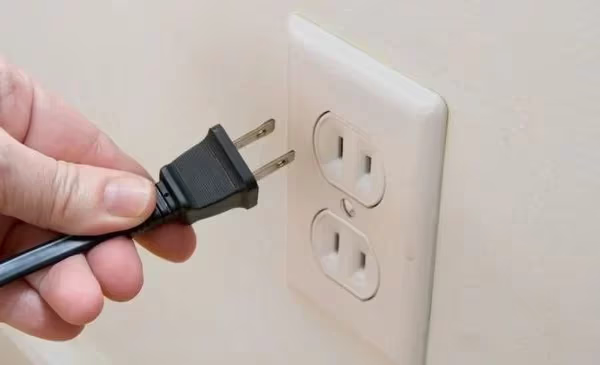
Unplug TV power cord
-
Press and hold television’s power button 20 seconds
-
Wait 1-2 minutes minimum
-
Reconnect power cord
-
Power on
If power cycling and resets don’t resuscitate your dormant TCL Roku TV, it likely requires professional service or parts replacement. Common culprits include bad capacitors and faulty power supply boards.
Before seeking repairs, you can reference my troubleshooting guides for Samsung TVs, Sharp TVs and Sony TVs that face similar no power issues.
#Factory Reset TCL Roku TV
Resetting your TV restores factory default settings, which should solve any system-level bugs stalling start up. You’ll have to redo channel scans and wifi network connections afterwards.
Both Roku TV systems and the Android platform offer factory reset options, though instructions differ slightly:
#Roku TV System Reset
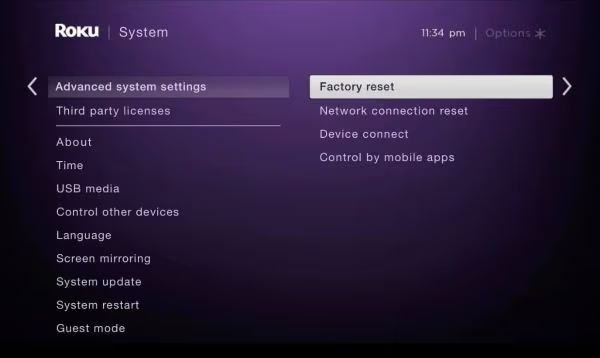
Use a straightened paperclip or pin to press and hold the recessed reset button on the TV’s rear panel for 15 seconds. Alternately, you can reset using your Roku remote if TV functions enough to show menus:
-
Select Settings
-
Select System > Advanced System Settings > Factory Reset
#Android TV Factory Reset
-
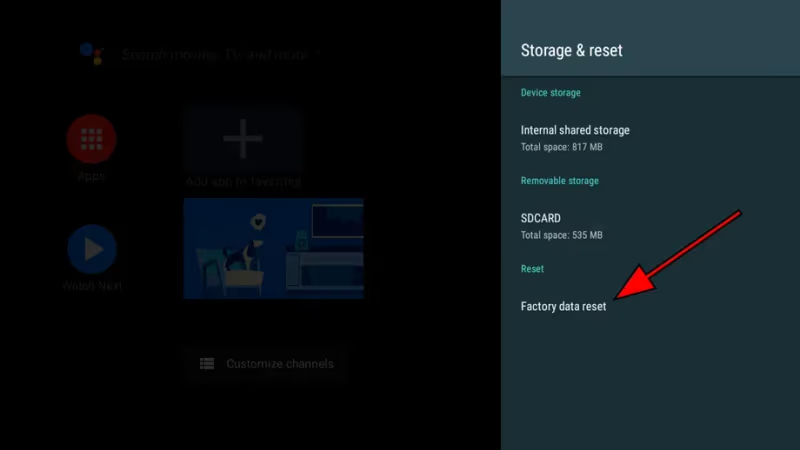
Choose Settings
-
Select Device Preferences > Storage & Reset
-
Highlight Factory Data Reset
-
Select Reset Apps & Data
#Contact TCL Support
If you have already tried the troubleshooting tips above without success, reach out to TCL customer service online or via phone:
Online Submit a support ticket through TCL’s contact page.
Phone Call (877) 300-8837. Support specialists available to help troubleshoot further or set up repair services if needed.
#When Should You Take Your TCL TV to a Repair Shop?
While many start up issues can resolve through troubleshooting adjustments on your own, some problems do require professional repair or replacement services. Contact an authorized TCL technician or service provider if you experience any of the following:
-
No status light – Points to complete power failure
-
Blinking codes on LED light – Signals hardware issues
-
Damaged ports or cables
-
Cracked screen or chassis
-
Image distortion or overheating
-
Still unresponsive after resets
Repairs like replacing faulty capacitors run $100-150 on average. Keep TV age and initial cost in mind when deciding whether to repair or buy new.
#Bottom Line
When their TCL television or Roku TV suddenly stops powering on, most people reasonably worry about expensive repairs or having to unexpectedly purchase a pricey new set. Luckily, many common start up issues stem from quick fixes like loose cables or discharged remote batteries.
Walk through the 13 troubleshooting tips above to revive your dormant TCL Roku TV. Getting the TV to power back on likely saves you from pre-mature replacement costs. However, if your set shows no life after resets and cable checks, be prepared to seek professional repair assistance.
Were the troubleshooting steps able to wake your TCL television? Or did you end up replacing internal hardware like the power supply? Share your experiences reviving unresponsive TCL Roku TVs below.
#FAQ
#Why does my TCL Roku TV have a red light but won’t turn on?
A red standby light means the TV is receiving power but cannot complete its startup sequence. Try a power cycle first: unplug the TV, hold the power button for 20 seconds, wait two minutes, then reconnect. If the red light returns but the screen stays black, a failing power supply board or bad capacitors are the most likely cause.
#Can a power surge damage my TCL TV permanently?
Yes. A sudden voltage spike can fry the main board, power supply, or T-CON board inside your TV. Plug your TCL Roku TV into a surge protector rated for at least 1,000 joules to reduce this risk. If your TV stopped working right after a storm or power outage, internal component damage is probable.
#How do I power cycle a TCL Roku TV without a remote?
Locate the physical power button on the TV itself, usually on the bottom edge or back panel. Unplug the TV from the wall, press and hold that button for 20 seconds, wait at least one minute, then plug the cord back in. The TV should restart without needing the Roku remote at all.
#Does a factory reset delete my apps and saved passwords?
A factory reset wipes everything and returns the TV to its out-of-box state. You will lose installed apps, saved Wi-Fi passwords, Roku account sign-ins, and any custom picture or audio settings. Write down your Wi-Fi password and streaming logins before performing the reset.
#How long do TCL Roku TVs typically last?
Most TCL TVs last 5 to 7 years with normal daily use. The backlight is usually the first component to degrade, followed by capacitors on the power supply board. Keeping the TV in a well-ventilated area and avoiding leaving it on 24/7 can extend its lifespan.
#What does a blinking white light on a TCL TV mean?
A blinking white light usually signals that the TV is trying to boot but getting stuck during the startup process. This points to a firmware crash or corrupted system file. A factory reset through the pinhole button on the back panel resolves this in most cases.
#Is it worth repairing an older TCL TV that won’t turn on?
That depends on the TV’s age and original price. If a capacitor replacement costs $100-150 and your TV originally cost $300 or less, buying a new set may make more sense. For higher-end TCL models purchased within the last 3 years, a board-level repair is usually the better investment.