Spectrum TV and YouTube TV are two of the most popular cable TV replacements, but they differ in price, DVR storage, channel count, and sports coverage. Here we compare every major feature so you can pick the right service for your household.
- YouTube TV costs $72.99/month for 100+ channels, while Spectrum TV starts at $59.99/month for 125+ channels
- YouTube TV includes unlimited Cloud DVR at no extra cost; Spectrum charges $10/month for just 100 hours
- Spectrum allows unlimited simultaneous streams at home, whereas YouTube TV caps you at 3 screens
- YouTube TV bundles NFL Sunday Ticket and NBA League Pass directly with your plan, something Spectrum cannot match
- Both services require no contracts and let you cancel month to month without early termination fees
#What Are the Best Cord Cutting Options for Live TV?
The days of paying $100+ a month for a bloated cable package with 500 channels you don’t watch are over. Cord cutters now have more affordable live TV streaming options than ever.
Two of the most popular cable TV alternatives are:
-
YouTube TV - Google’s live TV streaming service with 100+ channels, starting at $72.99/month.
-
Spectrum TV - Charter’s streaming service with packages from $59.99/month and up to 228+ channels.
Both YouTube TV and Spectrum TV carry popular live channels from major broadcast and cable networks. They include cloud DVRs, on-demand libraries, simultaneous streaming, and other cord cutting perks. If you use a Roku device to watch Spectrum, setup is straightforward on either platform.
#YouTube TV vs Spectrum: At a Glance
Here is a high-level overview comparing YouTube TV and Spectrum TV before we break down each category:
| Feature | YouTube TV | Spectrum TV |
|---|---|---|
| Price | $72.99+/month | $59.99+/month |
| Channels | 100+ | 125+ |
| Cloud DVR | Unlimited hours | 100 hours (extra $) |
| On Demand Library | Yes | Yes |
| Simultaneous Streams | 3 | Unlimited |
| Supported devices | All major platforms | Most platforms |
| Sports Channels | Solid | Excellent |
| Picture Quality | Decent | Decent |
| Contracts | No | No |
Spectrum TV has more channels in their base package and unlimited simultaneous streams for less money.
But YouTube TV provides an unlimited Cloud DVR and better sports package options. Both offer comparable streaming quality without contracts or hidden fees.
Now let’s look at them more closely across various factors.
#How Do Spectrum TV and YouTube TV Compare on Price?
Due to recent price hikes, YouTube TV and Spectrum TV cost about the same now for their starter packages. But Spectrum TV bundles tend to offer more value.
#YouTube TV Pricing
YouTube TV pricing is simple:
-
Base Package: Over 100+ channels for $72.99/month
-
Spanish Plan: 30+ Spanish channels for $34.99/month
Add-ons like 4K, Sports Plus, Entertainment Plus and Unlimited Screens cost an extra $9.99 to $19.99 per month.
You also have the options to bundle:
-
NFL Sunday Ticket – Includes every out-of-market Sunday game.
-
NBA League Pass – Watch live out-of-market NBA games.
Yearly NBA League Pass bundles with YouTube TV cost around $200.
#Spectrum TV Pricing
Spectrum TV has 3 main packages:
| Package | Price | Details |
|---|---|---|
| TV Select | $59.99/month | 125+ channels with major networks |
| TV Select + Entertainment | $71.99/month | 205+ total channels |
| TV Select + Sports & Entertainment | $77.99/month | 228+ channels with sports networks |
So Spectrum TV starts at $5 less per month than the YouTube TV base package.
Additional channel packs like Sports View, Entertainment View, Espanol Mundo, International, Premiums (HBO, Showtime) range from $3 to $15 monthly add-ons.
A Cloud DVR+ upgrade runs $10 per month for 100 hours of storage. There are no annual contract options for Spectrum subscribers.
Winner: Spectrum TV starting package is cheaper, but YouTube TV long term value is decent.
#Which Service Has More Channels?
YouTube TV and Spectrum carry most of the same popular cable channels. But there are some key differences in exactly what’s included:
#YouTube TV Channels
In their base package, YouTube TV provides:
-
100+ total channels
-
Live local ABC, CBS, NBC and Fox stations
-
Top cable networks – ESPN, TNT, TBS, CNN, MSNBC, FX and more
-
Add-ons for premium channels like Showtime, Starz, AMC Premiere
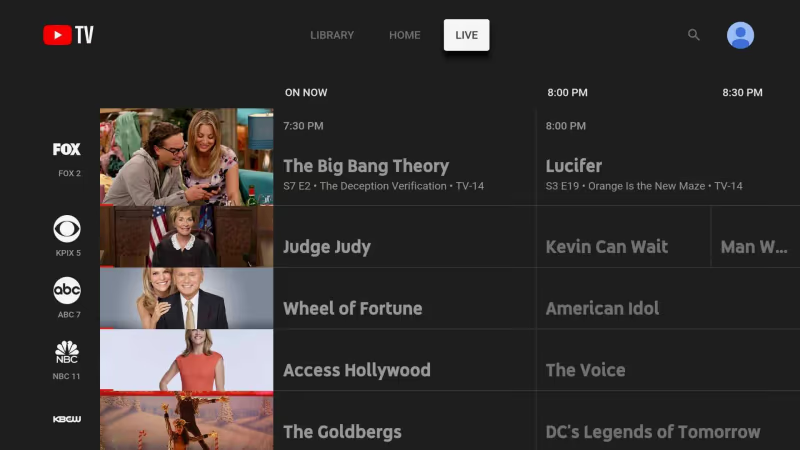
Notable exceptions missing are A+E Networks like Lifetime, History Channel and regional Bally Sports networks.
Spanish networks like Univision, Telemundo and ESPN Deportes are available on all plans.
#Spectrum Channels
Spectrum TV Select baseline package contains over 125+ channels such as:
-
Local CBS, ABC, Fox and NBC
-
TNT, TBS, HGTV, Food Network, Discovery
-
Disney Channel, Nickelodeon, TV Land
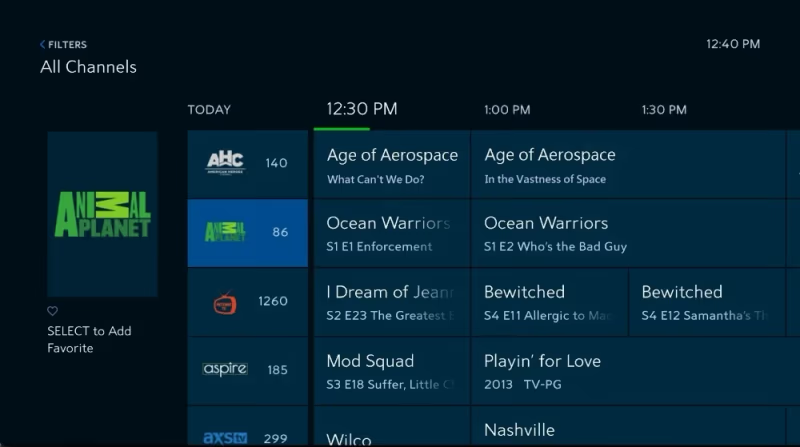
Plus they carry A+E channels like Lifetime, History Channel and regional sports from Bally Sports and SportsNet NY.
But Spectrum TV lacks full coverage of popular national feeds like ABC News Live, CNBC World and Newsy.
| Popular Channels | YouTube TV | Spectrum TV |
|---|---|---|
| Local Networks | 👍 | 👍 |
| Entertainment | 👍 | 👍 |
| News | 👍 | 👍 |
| Sports | 👍 | 👍👍 |
| Kids | 👍 | 👍 |
| Lifestyle | 👍 | 👍👍 |
| Spanish Language | 👍👍 | 👍 |
Based purely on the breadth of channel options, Spectrum TV has the slight edge over YouTube TV thanks to better entertainment and regional sports coverage.
But YouTube TV may suit you better if Spanish-language channels are a priority.
#YouTube TV vs Spectrum: DVR & On Demand
One advantage cord cutting services have over cable is the inclusion of cloud DVR functionality to record and replay content.
#YouTube TV DVR
YouTube TV offers:
-
Unlimited Cloud DVR storage
-
Recordings saved 9 months
-
Fast forward through ads
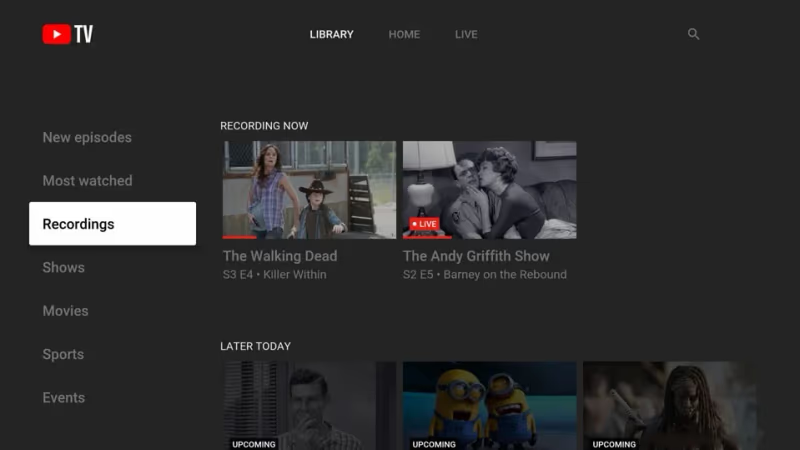
With their unlimited DVR, you’ll never have to worry about running out of space. It’s extremely reliable for time-shifting your favorite shows to watch on your schedule.
#Spectrum DVR
By default, Spectrum only includes:
-
Access to On Demand library
-
Option to upgrade to Cloud DVR+ for $10/month
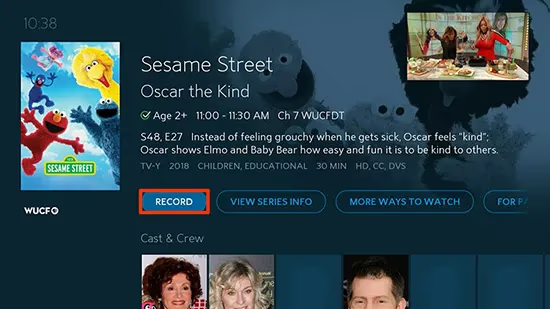
That gets you 100 hours of DVR storage and the ability to record multiple shows simultaneously. Saved recordings expire after 90 days.
You can also pay an extra fee for more Cloud DVR storage, extend time, or skip more ads.
Winner: YouTube TV for unlimited Cloud DVR storage at no extra cost.
#YouTube TV vs Spectrum: Streaming Quality
In terms of picture quality, YouTube TV and Spectrum TV are very comparable.
The majority of channels stream at 720p or 1080p resolution – about the same quality as cable.
One knock is that neither service provides any 4K channels without paying for add-ons or equipment upgrades.
#YouTube TV Streaming Quality
YouTube TV streams most programming at 720p60 or 1080p30 quality.
There’s an option to get a 4K Plus add-on for $19.99 a month that unlocks:
-
4K channels like NBC and ESPN on supported devices
-
Offline playback downloads
When watching YouTube TV, you can press a stats button to see technical details like resolution, framerate and buffer health.
#Spectrum Streaming Quality
Spectrum channels predominantly broadcast in 720p as well.
Subscribers can access 4K On Demand content included with any Spectrum TV package.
But there is no 4K live streaming available. You need extra equipment like a 4K-enabled set-top box to view 4K VOD.
There are no settings to view the streaming quality metrics like with YouTube TV.
Winner: It’s mostly a streaming quality tie. Neither service has broad 4K live TV support built-in at this time.
#YouTube TV vs Spectrum: Supported Devices
YouTube TV and Spectrum TV apps are accessible across most popular media streaming platforms.
#YouTube TV Devices
You can watch the YouTube TV app on:
-
Mobile – iOS, Android mobile devices
-
Media streamers – Roku, Apple TV, Android TV, Fire TV
-
Game consoles – PlayStation, Xbox
-
Smart TVs – Samsung, LG, Vizio
-
Web browser – youtube.com/tv
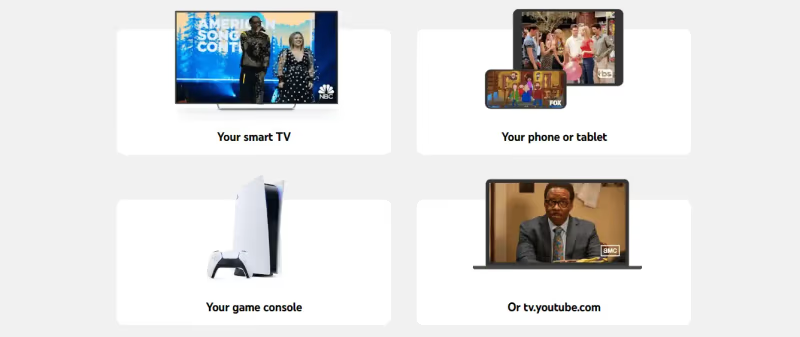
You get up to 3 simultaneous streams per account as part of the base package or pay extra for unlimited screens.
The apps are very polished across platforms with even Chromecast support for beaming shows to a big screen.
YouTube TV is not working on your Firestick? Check out this guide for fixing YouTube TV Firestick issues.
Having problems getting YouTube TV running smoothly on your Samsung Smart TV? This troubleshooting guide for Samsung TVs can help.
#Spectrum TV Apps
Spectrum TV is available on:
-
Apple devices – iPhone, iPad, Apple TV
-
Android – phones, tablets
-
Roku
-
Samsung Smart TVs
-
Xbox One
-
Chromecast (with mobile app casting)
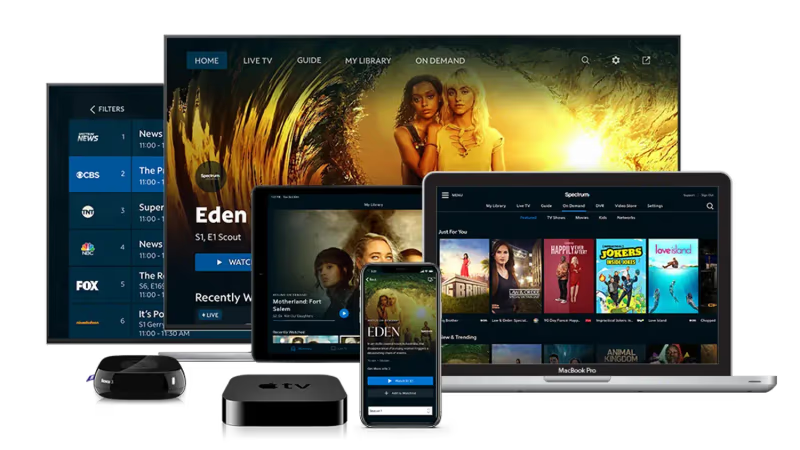
Plus you can access Spectrum TV via web browsers at SpectrumTV.com.
A key advantage over YouTube TV is unlimited simultaneous streams at home are included on all Spectrum TV plans.
Get tips on using the Spectrum TV app on Vizio Smart TVs.
Winner: Spectrum TV for allowing unlimited screens by default. But YouTube TV has better overall device app support.
#YouTube TV vs Spectrum: Sports Channels & Options
Die-hard sports fans will want to examine the sports channel availability closely before deciding between YouTube TV or Spectrum TV.
#YouTube TV Sports Channels
In their base package, YouTube TV includes fantastic sports channel coverage with:
-
ESPN, ESPN2, ESPN News, ESPNU
-
Regional sports networks (in-market for local teams only)
-
TNT, TBS for NBA playoffs
-
NBC, CBS, Fox for NFL games
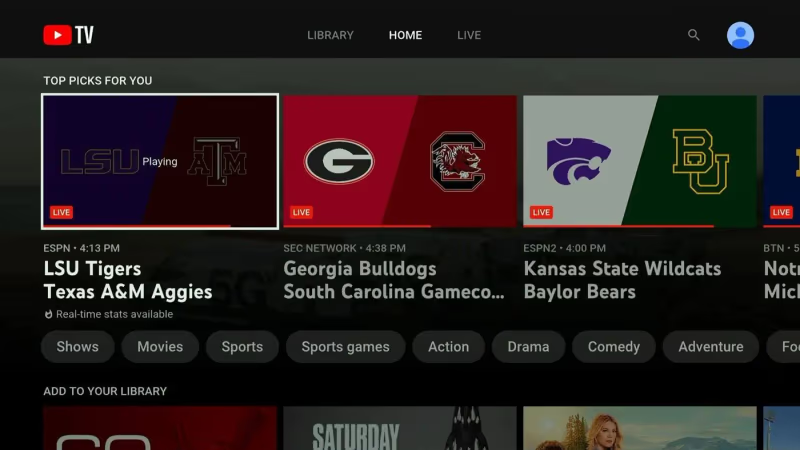
There is no NFL Network or MLB Network. The $11 Sports Plus add-on gives you NFL Redzone, FOX College Sports, GolTV and more.
YouTube TV really shines by offering NFL Sunday Ticket (up to $400 value) bundled with your subscription so you can watch every Sunday football game.
Similarly, an NBA League Pass bundle ($200 value) lets you follow your favorite basketball team.
Get tips on the best YouTube TV remotes for controlling sports viewing.
#Spectrum Sports Channels
Spectrum TV has an expansive sports lineup encompassing:
-
National mainstream ESPN channels
-
NFL Network, MLB Network
-
Regional Bally Sports networks
-
NHL Network, NBA TV, MLB Network, Tennis Channel, ACC Network and more.
There’s a Sports View package for $6/month that contains NFL RedZone, 15+ additional sports channels plus access to pay-per-view events.
But Spectrum does not offer any comparable NFL or NBA league-wide subscription pass options like YouTube TV provides.
Winner: YouTube TV for incredible NFL Sunday Ticket and NBA League Pass bundles.
#YouTube TV vs Spectrum: Customer Service
Hopefully you won’t require much customer support. But it’s reassuring the backing is there in case any streaming issues arise.
#YouTube TV Support
YouTube TV offers customer service through:
-
Email support form
-
Direct message @TeamYouTube on Twitter
-
24/7 phone 1-866-606-2986
In my experience, YouTube TV reps tend to be very responsive across social media channels and phone when technical problems occur.
#Spectrum Support
Spectrum provides customer service via:
-
Live chat through Spectrum.net
-
Phone support call center open 24/7
-
Email for billing or account questions
They also have a wide network of retail stores and service centers across the US in case you need hands on troubleshooting.
Many users report frustration dealing with Spectrum’s outsourced overseas call centers though for technical issues.
Winner: YouTube TV support.
#YouTube TV vs Spectrum: Contracts
A benefit of switching from cable TV contracts to streaming services is avoiding long term commitments or hidden fees.
-
YouTube TV has no contracts. You go month to month and can cancel anytime.
-
Spectrum TV has no contracts. Quit when you want without early termination fees.
Both companies clearly advertise “no contracts” when you sign up for service. And you can pause or cancel accounts as needed if traveling long term or switching providers.
#YouTube TV vs Spectrum: Pros & Cons
Here’s a high level breakdown of the major advantages and disadvantages for YouTube TV vs Spectrum TV:
#YouTube TV Pros
-
No contracts ever
-
Unlimited Cloud DVR storage with recordings saved for 9 months
-
Fantastic sports packages with NFL Sunday Ticket and NBA League Pass bundles
-
Polished viewing apps across platforms like mobile, Roku, Fire TV
#YouTube TV Cons
-
Missing some regional sports like Bally Sports
-
Recordings deleted after 9 months
-
Price increased recently up to $64.99
#Spectrum TV Pros
-
Solid DVR and VOD included on all plans
-
225+ channel lineup on higher tier packages
-
Access to regional Bally Sports networks
-
Unlimited simultaneous streams at home
#Spectrum Cons
-
DVR limited to 100 hours unless paying for extras
-
Contract disputes lose channels like ESPN/ABC occasionally
-
Streaming apps not as polished as competitors
-
Poor customer service reputation
Carefully weigh the pros and cons before deciding between YouTube TV and Spectrum TV based on your personal preferences.
Learn how to delete recordings from your YouTube TV DVR.
#FAQ
#Is YouTube TV better than Spectrum overall?
YouTube TV edges out Spectrum TV for most cord cutters thanks to unlimited Cloud DVR storage, NFL Sunday Ticket, and NBA League Pass bundles. That said, Spectrum provides more base package channels at a lower monthly fee. If sports subscriptions matter less to you, Spectrum could be the smarter pick.
#Does Spectrum TV have more channels than YouTube TV?
Yes. Spectrum TV includes 125+ channels in the starter package compared to about 100+ on YouTube TV. Mid-range Spectrum packages push the count above 200 channels, and the top tier reaches 228+. You can also add Paramount Plus on Spectrum as part of premium bundles.
#Why would someone pick Spectrum over YouTube TV?
Spectrum TV wins on simultaneous streams (unlimited at home vs. 3 on YouTube TV), regional Bally Sports access, and a lower entry price at $59.99/month. Families with multiple TVs running at once will save money compared to paying for YouTube TV’s Unlimited Screens add-on.
#Is the streaming quality different between the two services?
Both services stream most channels at 720p or 1080p, so picture quality is nearly identical. YouTube TV offers a 4K Plus add-on for $19.99/month, while Spectrum only provides 4K through on-demand content and a compatible set-top box. Neither one has broad 4K live TV support built in.
#Does YouTube TV have better sports coverage?
Day-to-day sports channel lineups are comparable, but YouTube TV pulls ahead for serious fans. It bundles NFL Sunday Ticket (up to $400 value) and NBA League Pass ($200 value) directly with your plan. Spectrum carries NFL Network and MLB Network in its base package, yet it has no equivalent league-wide subscription passes.
#Can you use YouTube TV and Spectrum TV without a contract?
Both services are contract-free. You pay month to month and can cancel anytime without early termination fees. This flexibility makes it easy to try one service, switch to the other, or pause your plan during off-seasons.
#What happens if YouTube TV keeps showing “are you still watching” prompts?
YouTube TV automatically pauses playback after several hours of inactivity. You can dismiss the prompt and keep watching, but there is no setting to disable it permanently. Check our guide on the YouTube TV “Are you still watching” prompt for workarounds.
#Bottom Line
Hopefully this YouTube TV vs Spectrum guide covered everything you need to make a decision. Here’s the final verdict:
Both streaming services deliver strong value beyond traditional cable. YouTube TV pulls ahead as the top option for sports fans thanks to NFL and NBA deals plus unlimited Cloud DVR storage.
Spectrum TV is the better fit if you want unlimited screens at home, more base channels, and a lower monthly bill. For Spectrum on Fire TV users, setup takes just a few minutes.
Either choice brings popular entertainment, news, and sports channels to any screen at real savings over inflated cable packages.