Sling TV on Samsung Smart TV gives you access to 50+ live cable channels without the cable bill. If you own a 2016 or newer Samsung model, the Sling TV app is ready to download from the built-in app store. This guide walks you through installation, supported models, pricing, and tips for getting the most out of Sling on your TV.
- Sling TV runs on 2016+ Samsung Smart TVs — download the app directly from the Samsung app store
- Plans start at $40/month — Sling Orange (32+ channels) or Sling Blue (42+ channels) with no contract
- Cloud DVR records up to 50 hours — add Cloud DVR Plus for $5/month to save your favorite shows
- Multiple device streaming is included — watch on your Samsung TV and phone at the same time
- Parental controls are built in — filter content by rating or block entire channels for younger viewers
#What Is Sling TV?
 Sling TV is a live TV streaming service that provides access to over 50 popular cable channels like ESPN, AMC, CNN, HGTV, and more. Plans start at just $40 per month, making Sling one of the most affordable cable alternatives.
Key highlights:
-
Stream over 50 live channels including ESPN, AMC, CNN, TBS, and more
-
Access on-demand movies and shows
-
Cloud DVR to record shows
-
Family-friendly filters and controls
-
Available on many devices like Roku, Fire TV, Apple TV, phones, tablets, and Samsung Smart TVs
#Why Choose Sling for Samsung Smart TVs?
Sling TV is built with streaming and cord cutting in mind. The service offers:
-
Easy set up: The Sling TV app can be quickly downloaded from the Samsung Smart TV app store. Create an account and start watching in minutes.
-
Optimized experience: The app provides an interface tailored for TV screens and remote controls, unlike phone or tablet apps mirrored to the TV.
-
Fewer cables needed: With Sling built into Samsung TVs, you can save HDMI ports and keep your setup straightforward.
Plus Sling provides reliability, broad device support, affordable pricing, and wide channel availability — everything you need to ditch cable. The service is also available on many other platforms like LG TVs, Sony TVs, and Fire TV.
#How to Install Sling TV on Samsung Smart TVs
Installing Sling on your Samsung TV takes just a few quick steps:
-
Turn on your Samsung Smart TV and connect it to the internet.
-
Select the app store icon from your home screen.
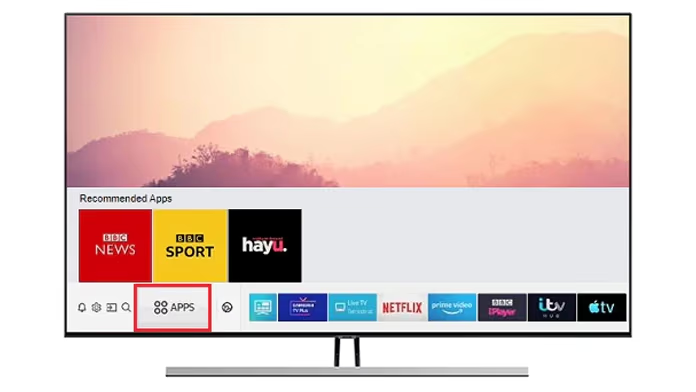
- Search for “Sling TV” and select the Sling TV app.
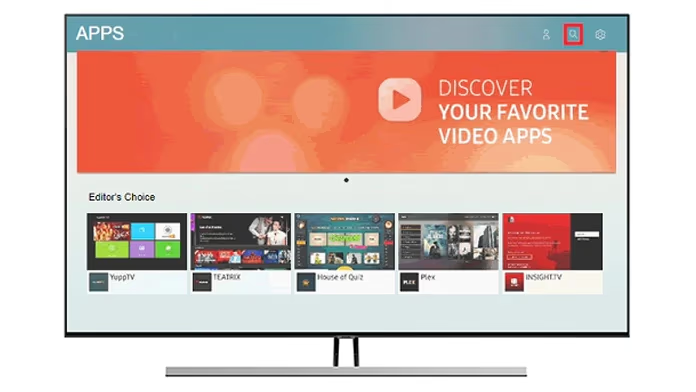
-
Choose install or add to favorites.
-
Once installed, open the app.
-
Create a new account right on your TV or sign in.
-
Start streaming immediately after sign up!
#Supported Samsung TV Models
The Sling app is available on 2016 and newer Samsung Smart TV models, including QLED TVs, The Frame, The Serif, and others.
To confirm, head to the app store on your TV. If you can find and install Sling, your model is supported.
#How Do You Use Sling on a Samsung Smart TV?
Using Sling on your Samsung Smart TV provides a full live streaming experience. Here is what you get:
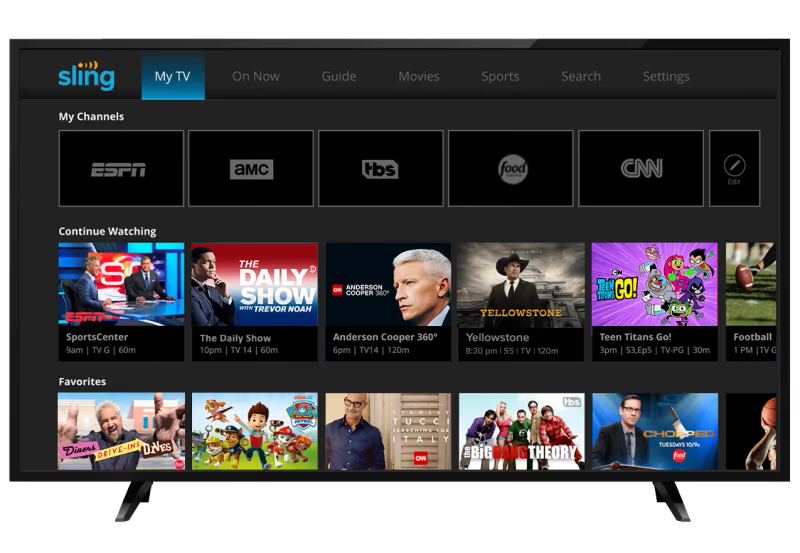
Live Channel Guide: Browse channels available in your Sling package. See what’s on now and view upcoming programs. Set reminders for shows you want to watch later.
Cloud DVR: Record up to 50 hours of programming with Cloud DVR Plus (a $5 monthly add-on). Play back recordings anytime. Protect important recordings from being deleted.
On Demand Shows and Movies: Watch thousands of hours of movies, shows, news clips, and more on-demand without a DVR.
Stream to Multiple Devices: Use Sling concurrently across devices without additional cost. Start watching CNN in the living room, then switch to ESPN in the bedroom.
Profile Support: Create personalized profiles for each viewer to have their own favorites, watch history, recordings, and more.
Pause and Rewind: Pause live TV and rewind so you never miss a moment. Stream smoothly even with slower internet. Resume watching after losing connectivity.
Parental Controls: Block mature content with family-friendly filters tailored to kids of all ages. Disable entire channels or filter shows by rating.
Use your remote to browse the Sling app just like any other channel. Signing up takes just minutes online and streaming starts instantly.
#Sling TV Packages, Add-Ons, and Pricing
Sling offers flexible packages to meet different interests at the lowest prices. Pick one or combine them:
Sling Orange ($40/month): 32+ channels like ESPN, Disney, CNN, AMC, TBS, MLB Network, and more.
Sling Blue ($40/month): 42+ channels like Fox, NBC, Bravo, FX, Syfy, NFL Network, and more.
Sling Orange + Blue ($55/month): Combine both packages (50+ channels) to maximize options. Most popular choice.
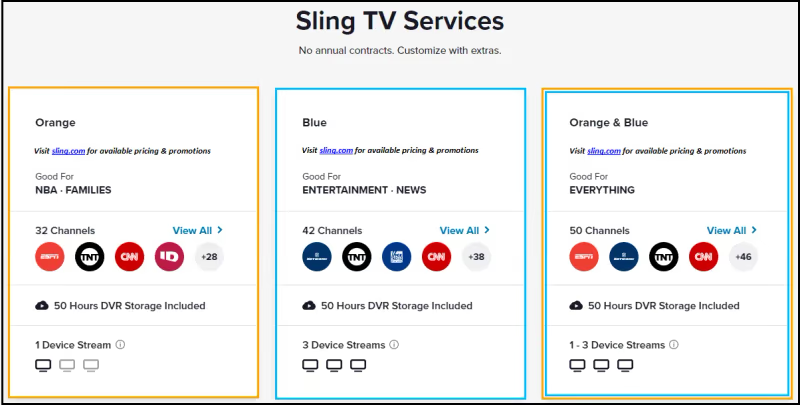
Cloud DVR, Sports Extras, Comedy Extras, and more add-on packages also available a-la-carte.
There are no contracts. Upgrade, downgrade, or cancel anytime.
#Bottom Line
Installing and watching Sling TV on Samsung Smart TVs is quick and takes just a few minutes:
-
Download the Sling TV app from the app store on compatible Samsung Smart TVs
-
Sign up for Sling Orange, Blue, or combined packages starting at $40/month
-
Stream over 50 popular live channels including ESPN, CNN, AMC, TBS, and more
-
Use Cloud DVR, profiles, parental controls, and multi-device streaming
-
Cut cable TV costs without giving up your favorite channels. Sling has advantages over other live streaming services like YouTube TV, Philo, and fuboTV.
Sling TV provides a strong cable channel replacement for Samsung Smart TV owners looking to save money. Use this guide to get set up with Sling TV on your Samsung TV today.
#Frequently Asked Questions
#Can you get Sling TV on all Samsung Smart TV models?
Sling TV is available on 2016 and newer Samsung Smart TV models. If your TV was made before 2016, you can still use Sling by connecting a Roku, Fire TV Stick, or Apple TV to your Samsung set. Check the Samsung app store on your TV to confirm whether Sling is available for your specific model.
#Do you need a separate streaming device for Sling on Samsung TV?
No. The Sling app comes pre-installed or can be downloaded on compatible Samsung TVs, so you can stream directly without an external device. This saves an HDMI port and avoids extra remote controls. Just open the Samsung app store, install Sling TV, and sign in.
#Does Sling TV replace cable on a Samsung TV?
Sling TV covers most popular cable channels that typical cable subscribers watch regularly. Combined with free ad-supported services like Pluto TV, Samsung TV owners can drop traditional cable and still watch live sports, news, and entertainment. The main gap is local broadcast channels, which you can pick up with an antenna.
#What internet speed do you need for Sling on Samsung TV?
Sling recommends at least 8-10 Mbps for a single stream at standard quality. If you plan to watch on multiple devices at the same time, aim for 25 Mbps or higher. Wired Ethernet connections tend to be more stable than Wi-Fi for live TV streaming.
#How much does Sling TV cost on Samsung TV?
Sling Orange and Sling Blue each cost $40 per month. The combined Orange + Blue package runs $55 per month with 50+ channels. Add-ons like Cloud DVR Plus ($5/month) and Sports Extra are available separately. There are no contracts, so you can cancel anytime without penalties.
#Can you record shows with Sling TV on Samsung TV?
Yes. Sling TV includes 50 hours of Cloud DVR storage with every plan. You can upgrade to Cloud DVR Plus for $5 per month, which also lets you fast-forward through recorded commercials. Recordings are accessible from any device linked to your Sling account, not just your Samsung TV.
#What channels are included with Sling TV?
Sling Orange includes ESPN, Disney Channel, CNN, AMC, TBS, and 27+ other channels. Sling Blue includes Fox, NBC, Bravo, FX, NFL Network, and 37+ other channels. The combined package gives you access to 50+ channels total. Premium add-ons for sports, comedy, and kids content are available for an extra fee.