You landed on this article because you are looking for Samsung TV remote codes, didn’t you?This article reveals all those codes, so you will never be disappointed if you read it to the end.
So, let us go ahead and learn what these Samsung universal remote codes are.
- Samsung TVs use both 4-digit and 5-digit codes — the most popular 4-digit codes include 1249, 0587, 0093, and 0178
- Automatic code search uses code 911 — press Setup until the light blinks twice, then enter 911 to start scanning
- Original Samsung Smart remotes need no codes — hold Play and Return for 5 seconds to pair directly
- GE, RCA, Philips, and Innovage remotes each require brand-specific codes — over 80 codes are listed across all brands
- Manual code entry takes 8 steps — if the LED blinks twice after entering a code, the pairing was successful
#Overview
It is always possible to pair your original Samsung remote controller with your Smart TV without a lengthy workaround.
However, when it comes to using third-party remotes, you will be able to use the function called code search. If not, you can even provide the code manually for third-party devices.
So, go ahead and read the codes you can use to pair third-party remotes with your TV.
Besides, are you confused about what Vizio TV universal remote codes are right for your universal remote for Vizio TV? Let us learn everything about it in this article.
#How Do You Connect a Samsung Smart Remote?
Samsung’s Smart remote is an excellent choice in terms of its operation. In addition to that, it offers plenty of features.
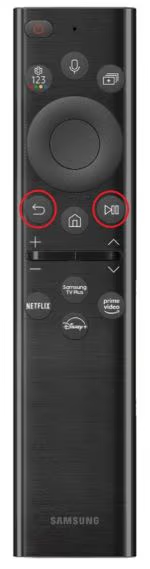
**So, if you want to pair an original Samsung remote with your television, below are the steps. **
-
First, you should point your remote toward the TV.
-
Then, hold both the “Play” and “Return” buttons together for a period of 5 seconds at the least.
-
Now, your TV will start to pair with the Samsung remote.
-
Your TV will display a notification on it. This will confirm if the TV is paired or not.
If the TV’s volume gets stuck during the charge, you should replace the batteries and see what happens.
Also, here, let’s figure out how to locate your Samsung TV power button and how to operate your TV without the use of a remote controller.
#How Do You Connect Different Universal Remotes to a Samsung TV?
Assume that you are going to use a universal remote for Samsung TV from a different manufacturer. If so, you’ll need to look out for the TV’s unique code in order to get it to function. The TV and its remote need to communicate via this code.
As a result, the remote can transmit the correct signals, and the TV can receive them properly. You can link a 3rd party universal remote to a Samsung TV in one of two ways. Do it either by having the remote immediately search for the respective code or by manually entering the code.
#Performing a Code Search
Without a doubt, performing a search for Samsung TV remote codes is the most convenient way. This is easier because the TV itself will locate the code for the remote. For this, the TV will use its own database.
In addition to that, it is also a very fast method as the TV can find codes quicker. Compared to the manual search, it is easier to find Samsung universal remote codes using the search.
So, below is how to do it:
-
Be sure that your TV is switched on before starting to search for Samsung TV remote codes.
-
Now, on your remote, press the button labeled TV.
-
Now, you should hold the button labeled “Setup” so the TV light should blink twice.
-
Then, enter the code 911. As a result, the light will start to blink once more.
-
Now, you can point your remote to your TV and select “PWR” to proceed.
-
After that, you should keep pressing your Channel Up button constantly. Then, the TV will turn off.
-
You can use this power button on the remote and turn your TV on once again.
-
Press the button labeled “Setup,” and that can be used to confirm the code without any trouble.
#Manual Way:
-
Make sure that your TV is switched on.
-
Press the TV button on your remote.
-
Press the “Setup” button so the TV light should blink twice.
-
Then, you should enter one of the appropriate Samsung universal remote codes for the brand. You will find those Samsung TV remote codes in the next segment of our article.
-
Now, the LED will blink two times if its code is entered correctly. If not, you should follow the previous steps to find the most accurate code.
-
After that, press your TV button.
-
Press the Setup button and hold it.
-
You should release it when its LED blinks two times.
Once the TV is paired with any of the above methods, you should check if it works. If everything works perfectly, you must be able to control the TV using the remote.
#Samsung Universal Remote Codes
In this section of our article, we will reveal the codes for the universal remote for Samsung TVs.
With that said, if it is possible to find your TV’s model number, the whole process is easier.
Make sure that you use the list of automatic code list and find the most appropriate code for you.
#Four-digit Codes
-
1249
-
0037
-
0812
-
1506
-
1584
-
0556
-
1619
-
1312
-
1744
-
2103
-
2137
-
0618
-
0587
-
3131
-
0093
-
1235
-
0009
-
0178
-
0644
-
1630
-
0370
-
1458
-
2051
-
0208
-
0264
-
0226
#Five-digit Codes
-
10056
-
10650
-
10178
-
10329
-
10032
-
10408
-
11632
-
10766
-
11959
-
10702
-
10030
-
12051
-
11575
-
10812
-
10814
-
13993
-
10427
-
10060
-
11060
-
10217
-
10482
-
10587
#Remote Codes for Philips
-
0309
-
0512
-
0002
-
0012
-
0102
-
0212
-
0802
-
0609
-
0112
-
0818
-
0895
-
0502
-
0209
-
0110
-
0302
-
0103
-
0437
#Codes for Universal Remotes
-
0587
-
0060
-
0056
-
0019
-
0093
-
0178
-
0030
#Codes for GE Remotes
-
0942
-
0358
-
0105
-
0172
-
0015
-
0077
-
0012
-
0076
-
0076
-
0172
-
0105
-
0077
-
0942
-
0358
-
0080
-
0104
-
0012
-
0015
-
0106
-
0080
-
0106
-
0104
#Universal Remote Codes for RCA
-
1104
-
1078
-
1083
-
1103
-
1014
-
1123
-
1046
-
1102
-
1009
-
1013
-
1194
-
1012
-
1124
-
1015
-
1065
-
1025
-
1056
-
1205
-
1207
-
1069
-
1004
#Codes for Innovage Jumbo 3
-
105
-
004
-
172
-
104
-
109
-
015
-
009
-
005
-
106
The necessary code differs based on the make and model of the respective universal remote.
Try all codes that might work with your universal remote by selecting your desired model. As we believe you have a greater chance to succeed with the list that is provided above.
#Frequently Asked Questions
Here are some frequently asked questions for our readers. These questions will clear any doubts you may have about it.
#How to Find the Code for My Samsung TV Remote?
Finding the right code for your Samsung TV is not that difficult at all. You can easily use the feature called “Code Search” so you can find the correct code without any hassle.
Once the code is found, you can easily pair that remote with the TV. However, if you want to enter the code manually, you have to find them by yourself. But the good news is that those codes are mentioned in our article for your convenience.
#What is the Functionality of the Magic Key on Universal Remotes?
You may have seen that there is a special key called “Magic Key” on your universal remote. This key is used to configure your remote controller with the TV.
#How Can You Reset Your Samsung TV?
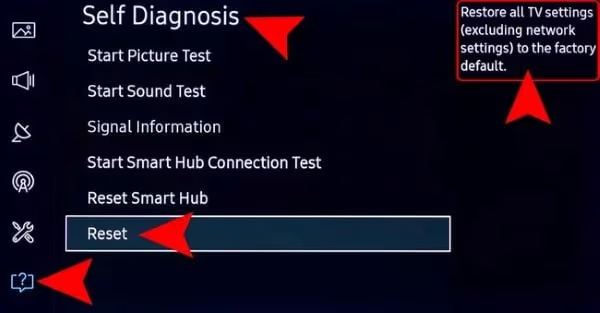
Resetting a Samsung TV is not that difficult. To do that, you should go to the menu called “Settings.” After that, you can go to the support page.
Once you have done that, you can start the resetting process simply by clicking on “Reset.”
Also read: Samsung TV volume stuck? Let’s fix it!
#Bottom Line
The Samsung universal remote is the best option, even if there are plenty of third-party options. In general, Samsung TV remotes offer more functionality and may improve the TV-watching experience.
If you are not tech-savvy and new to tech gadgets, a less complicated Samsun TV remote is ideal. With a Samsung Smart remote, you will not have to input any codes or search for them anywhere.
So, we recommend that you switch to a Samsung TV if the existing unit doesn’t have that compatibility.
And that’s our article about Samsung universal remote codes. If you have more doubts related to using universal remote controllers, please let us know.