Samsung TV Plus lets you watch live TV, movies and more on your Samsung device for free. Learn how it works and see if it’s worth using in this review.
- Over 200 free live channels spanning news, sports, entertainment, kids and lifestyle categories
- No signup or credit card required to start watching on supported Samsung devices
- Available in 24 countries with the US offering the largest content library
- Streams up to 4K with HDR on compatible Samsung TVs from 2016 onward
- Ad-supported model with roughly 2-3 minutes of commercials per break, less than traditional cable
#Introduction
Samsung TV Plus is a free, ad-supported streaming television service for compatible Samsung devices. It offers over 200 live TV channels spanning categories like news, sports, movies and more. There’s also an on-demand library with movies and shows to watch whenever you want.
As a free service included with Samsung products, it provides an easy way to access streaming content. But how exactly does it work, and what can you watch? This review will cover everything you need to know.
#What is Samsung TV Plus?
Samsung TV Plus is Samsung’s take on free ad-supported streaming television (FAST). It launched in 2015 and now offers live and on-demand programming you can access at no charge.
-
Completely free to use
-
No credit card or signup required
-
Supported by ads during programming
-
Streams live channels 24/7
-
Also provides on-demand movies and shows
-
Comes pre-installed on new Samsung TVs and phones
Unlike subscription services like Netflix or Hulu, Samsung TV Plus is free in exchange for airing advertisements periodically. It’s Samsung’s attempt to compete with other ad-supported platforms.
The service has grown to over 1,200 hours of programming. You can watch live channels and view content whenever you want. It may appeal to cord-cutters seeking free TV.
#How Does Samsung TV Plus Work?
Samsung TV Plus functions much like services such as Pluto TV, Roku Channel or Tubi in providing free, ad-supported movies and TV.
It works by:
-
Having partnerships with various content providers
-
Curating programming like live streams and on-demand libraries
-
Monetizing the content through advertisements
-
Using an internet connection and streaming the content to devices
-
Requiring a compatible Samsung device to watch
Supported devices can browse and play programming on-demand or via live channels. The service is monetized through periodic commercials.
An internet connection streams the content from Samsung partners. But Samsung TV Plus comes pre-installed, so accessing it is simple if you have a supported device.
#Supported Devices
Because it’s Samsung’s proprietary service, device support is limited mainly to Samsung products only. These include:
-
Samsung Smart TVs (2016 models and newer)
-
Select Samsung phones and tablets
-
Samsung Family Hub refrigerators (US and Korea)
-
Web browsers at SamsungTVPlus.com (US only)
With one of those devices, you can simply open the pre-loaded app or visit an URL to start watching. Support does not extend beyond Samsung hardware.
While Samsung TV Plus is not natively available on Roku devices, you can cast Samsung TV Plus to a Roku player from a phone or tablet using screen mirroring. But it doesn’t directly integrate with Roku hardware.
#Availability By Country
Samsung TV Plus is available in these 24 regions as of October 2022:
-
United States
-
Canada
-
United Kingdom
-
Spain
-
South Korea
-
Germany
-
France
The full list also includes:
-
Austria
-
Australia
-
Belgium
-
Brazil
-
Denmark
-
Finland
-
India
-
Italy
-
Luxembourg
-
Mexico
-
Netherlands
-
New Zealand
-
Norway
-
Portugal
-
Sweden
-
Switzerland
-
Thailand
Live channel listings can vary significantly across different countries. On-demand libraries also differ by region. The US service currently offers the most content.
#What Content Does Samsung TV Plus Offer?
Within Samsung TV Plus, you can access over 200 free live TV channels spanning categories like news, sports, entertainment and more.
There’s also a catalog of on-demand movies and shows you can watch whenever you want. Here’s a closer look at what you’ll find.
#Live TV Channels
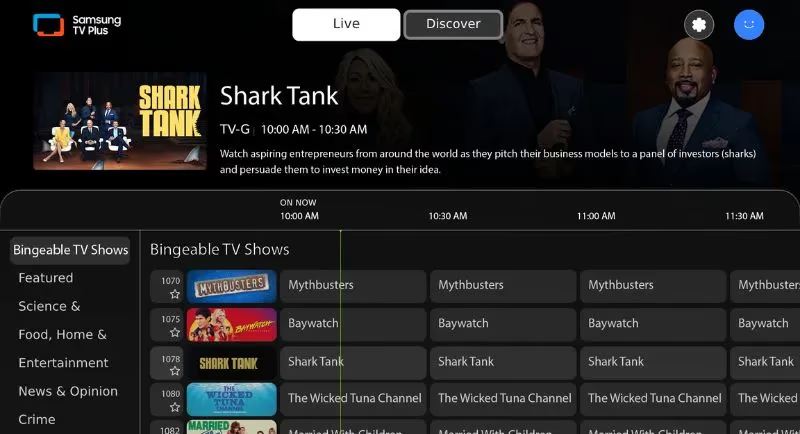
The live streaming lineup includes recognizable brands and networks. Offerings span categories like these:
#News
-
CBS News
-
Cheddar
-
NBC News Now
-
Bloomberg TV
#Sports
-
Stadium
-
CBS Sports HQ
-
Pac-12 Insider
-
beIN SPORTS XTRA
#Entertainment
-
Buzzr
-
Revry
-
USA Today News
-
FailArmy
#Kids
-
Nick
-
PBS Kids
-
Moonbug Kids
-
Kid Genius Plus
#Lifestyle
-
Bon Appétit
-
America’s Funniest Home Videos
-
Kitchen Nightmares
-
Docubox
You can essentially flip through channels endlessly like cable TV. Listings are also viewable if you prefer to see what’s on now or coming up later.
#On-Demand Movies and Shows
In addition to live channels, there’s a catalog of movies and shows available on-demand:
You’ll find popular older movies in genres like action, drama and comedy. There are also shows you can binge on-demand, such as:
-
MacGyver
-
Hell’s Kitchen
-
21 Jump Street
-
The Dick Van Dyke Show
Offerings change regularly, so shows and movies you see one day may be gone the next. On-demand content also helps cushion when live channels air commercials.
#Features and Interface
Using Samsung TV Plus is designed to feel much like cable or satellite, from the interface to channel flipping and viewing options.
#Menu and Navigation
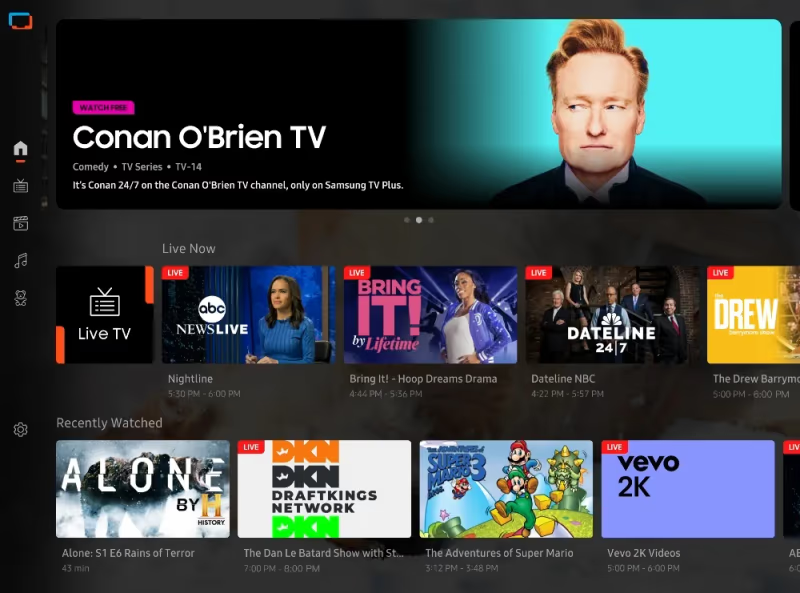
The interface aims to mimic a traditional channel grid guide:
With familiar menus and navigation, you can:
-
Browse live channel guide listings
-
Flip through channels aimlessly
-
Pull up details about current/upcoming programs
-
Search using filters
-
View recently watched channels
-
See recommended programs
It aims to provide a cable-esque viewing experience while streaming free content.
#Profiles and Watchlists
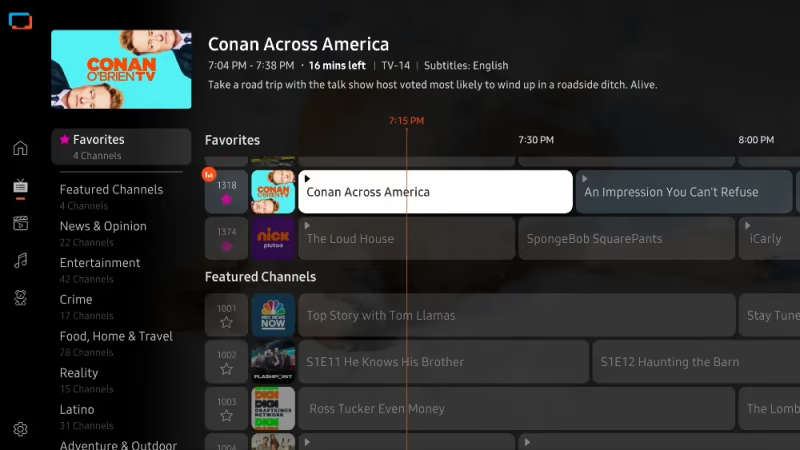
To personalize the experience even more, you can create profiles and use watchlists:
Profiles let each user have:
-
Separate watch history
-
Custom channel favorites
-
Tailored recommendations
Watchlists allow you to:
-
Save movies/shows for later
-
Get notified when available
-
Resume watching from any device
While optional, profiles and watchlists help surface preferred content.
#Video and Audio Quality
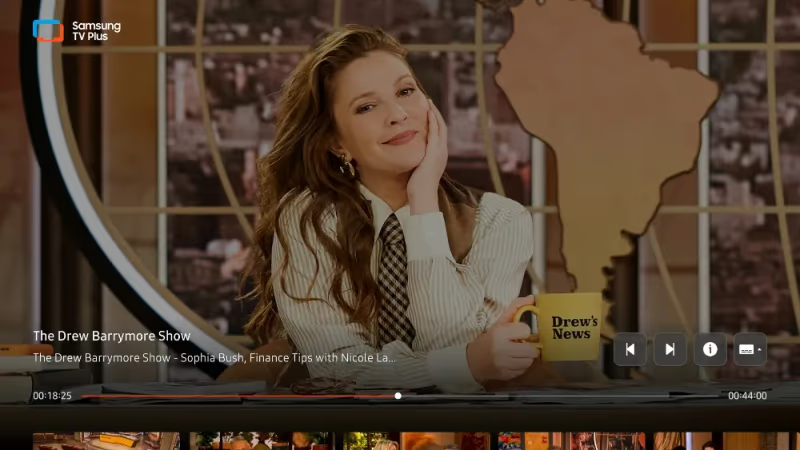
In terms of playback quality, Samsung TV Plus offers:
-
Up to 1080p resolution
-
Support for 4K and HDR
-
Surround sound audio on select devices
-
Consistent standard definition quality
4K and HDR provide an enhanced viewing experience for compatible TVs. Streams hold up reliably at the minimum 480p quality too.
#Advertisements
Since Samsung TV Plus is ad-supported, expect commercials during programming:
-
Around 2-3 minutes of ads during breaks
-
30-second ads at the start of on-demand video
-
Additional ads sprinkled in every 20+ minutes
This is less advertising compared to regular cable. But you’ll still see the usual mix of repetitive commercials.
#Pros and Cons
Before deciding if Samsung TV Plus is for you, weigh some of the notable advantages and disadvantages:
#Pros
Free access
-
No signup, fees or subscription
-
Watch instantly at no cost
No credit card needed
-
Simply open the app and start streaming
-
No risk to try the service
Ad-supported business model
-
Shows air with limited commercials
-
Free content subsidized by advertisements
Good for cord-cutters
-
Offers live TV without cable
-
Provides free movies and shows
-
Familiar channel guide
#Cons
Limited device support
-
Only works with Samsung devices
-
No streaming sticks or non-Samsung TVs
Fewer channels than competitors
-
Over 200+ channels but rivals offer more
-
Missing many niche offerings
Lacks sports and locals
-
No regional sports networks
-
Few local affiliate stations
Older movie selection
-
Focused on recognizable classic films
-
Lacking newer mainstream movies
While Samsung TV Plus saves money as a free option, it does have some drawbacks around content selection and availability.
#How Do You Get Samsung TV Plus?
Since Samsung TV Plus is exclusive to Samsung electronics, getting access depends on which devices you own.
#New Samsung TVs
The easiest way to get Samsung TV Plus is owning a recent Samsung television.
-
Comes pre-installed on 2016+ models
-
Under Samsung Account section of menus
-
Select app icon to open
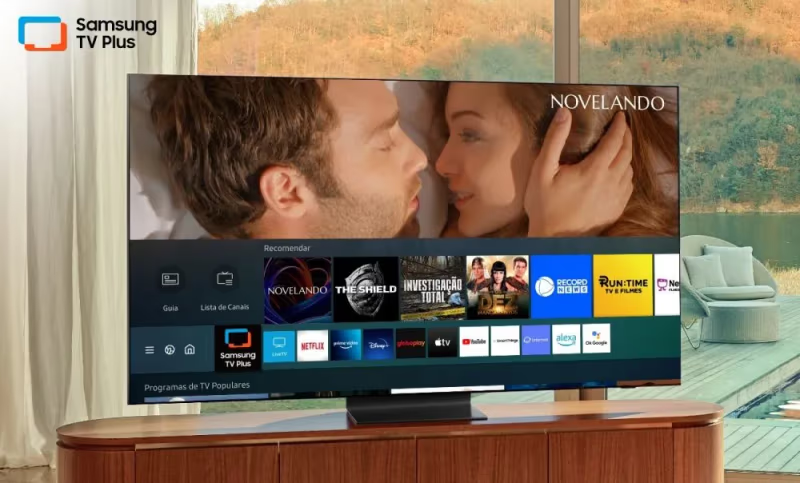
With the app already on your TV, just launch it and start watching. No download or signup necessary.
#Mobile Devices
Alternatively, you can install the app on a Samsung mobile device:
-
Available for Samsung phones and tablets
-
Download from Google Play store
-
Compatible with Android 8.0+
-
Find in Entertainment or Samsung folder
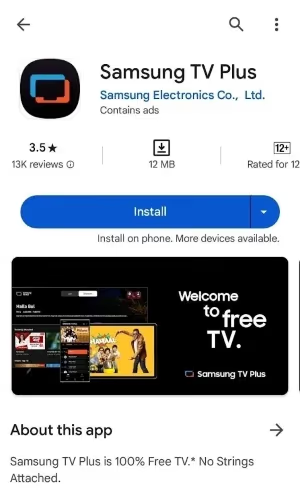
As long as you have an eligible Galaxy device, you can then take Samsung TV Plus on the go.
#Web Browser
You can also watch from a desktop or laptop within the browser at:
-
SamsungTVPlus.com
-
Limited to the United States only
-
Works on any web browser
-
Requires no app install
This provides another way to access Samsung TV Plus from PCs or Macs. Mobile browsers are hit-or-miss based on pop-up support.
#Samsung TV Plus vs Other Services
How does Samsung TV Plus compare to other free, ad-supported streaming options? Here’s how it stacks up to key rivals:
#Samsung TV Plus vs Pluto TV
| Samsung TV Plus | Pluto TV | |
|---|---|---|
| Devices | Samsung only | Most platforms |
| Channels | 200+ | 1000+ |
| On-demand | Movies & shows | Movies & shows |
| Stream quality | Up to 4K | Up to 1080p |
| Ads | Periodic commercials | Periodic commercials |
-
Pluto TV is on more devices but has 4x the channel offerings
-
Both provide free on-demand libraries and live channels
-
Pluto lacks 4K but has stronger overall content
For a deeper breakdown, see our Samsung TV Plus vs Pluto TV comparison.
#Samsung TV Plus vs Roku Channel
| Samsung TV Plus | The Roku Channel | |
|---|---|---|
| Devices | Samsung only | Roku devices |
| Channels | 200+ | 190+ |
| On-demand | Movies & shows | Movies & shows |
| Stream quality | Up to 4K | Up to 1080p |
| Ads | Periodic commercials | Periodic commercials |
-
Both tied to their brand’s devices only
-
Similar numbers of live channels
-
Samsung has edge for 4K and HDR
#Samsung TV Plus vs Amazon Freevee
| Samsung TV Plus | Amazon Freevee | |
|---|---|---|
| Devices | Samsung only | Most platforms |
| Channels | 200+ live channels | On-demand only |
| On-demand | Movies & shows | Movies & shows |
| Stream quality | Up to 4K | Up to 1080p |
| Ads | Periodic commercials | Periodic ads |
-
Amazon lacks any live channels
-
Both provide free on-demand libraries
-
Samsung also offers live sports and news
#Samsung TV Plus vs Tubi
| Samsung TV Plus | Tubi | |
|---|---|---|
| Devices | Samsung only | Most platforms |
| Channels | 200+ live channels | On-demand only |
| On-demand | Movies & shows | Movies & shows |
| Stream quality | Up to 4K | Up to 1080p |
| Ads | Periodic commercials | Periodic ads |
-
Another major on-demand option
-
Samsung provides 200+ live channels
-
Tubi has more movie variety in on-demand (read our full Tubi TV review)
Across the board, Samsung TV Plus holds its own with major competitors in the free streaming space. Just keep the device limitation in mind, as rivals work across platforms.
#Tips and Tricks
Take advantage of Samsung TV Plus even more with these helpful tips:
#Using Profiles
Create personal profiles so that you and family members each get:
-
Independent watch history and recommendations
-
Ability to set favorite channels
-
Customized homepages for each viewer
This prevents your suggestions from being overloaded by other household members.
#Managing Watchlists
Use the watchlist feature to:
-
Save movies or shows for later
-
Get notifications when they are live
-
Resume watching on another device
With multi-device syncing, you won’t lose your spot when switching TVs.
#Controlling Ads
While unavoidable, you can minimize ads by:
-
Flipping channels when commercial breaks start
-
Using on-demand content to bypass long ad blocks
-
Paying attention to live program runtimes to predict ads
Channel surfing during ads remains an effective way to skip commercials.
#Casting to Non-Samsung Devices
You can cast Samsung TV Plus to:
-
Roku players
-
Smart TVs with Google Cast
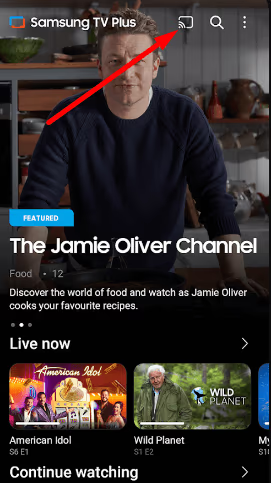
Mirroring to external devices expands access beyond Samsung hardware.
#FAQ
#Do I need to sign up for Samsung TV Plus?
No signup or account creation is needed. Just open the app if it came preloaded on your device, or install it from the Galaxy Store on a compatible phone or tablet.
#What devices support Samsung TV Plus?
Samsung smart TVs from 2016 or newer support it along with Galaxy phones and tablets. A web browser version at SamsungTVPlus.com is also available in the US.
#Can I download shows to watch offline?
No. Samsung TV Plus requires an active internet connection to stream all programming. There is no download or offline viewing option at this time.
#Does Samsung TV Plus offer 4K streaming?
Yes, select channels and on-demand content support 4K resolution and HDR playback. Your TV model and the specific channel determine whether 4K is available.
#Does Samsung TV Plus ever stop working or have issues?
Yes, some users have reported problems with Samsung TV Plus no longer functioning after software updates or other issues. Try rebooting the device or reinstalling the app if you experience crashes or freezing.
#Is Samsung TV Plus available outside the United States?
Yes, the service is available in 24 countries including Canada, the UK, Germany, France, Australia and South Korea. Channel lineups and on-demand libraries vary by region, with the US having the largest selection.
#How many channels does Samsung TV Plus have?
Samsung TV Plus offers over 200 live channels in the US covering news, sports, entertainment, kids programming and lifestyle content. The exact count changes as Samsung adds and removes channels over time.
#Can I use Samsung TV Plus on a non-Samsung TV?
Not directly. The app only runs on Samsung hardware. However, you can cast from a Samsung phone to a Chromecast or use screen mirroring to display it on other TVs.
#Bottom Line
As a free ad-supported service, Samsung TV Plus brings years of movies, shows and live channels to compatible Samsung products. While limited exclusively to Samsung hardware, it provides a quality option for free content across news, entertainment, lifestyle and kids programming.
If you already own a supporting device, the app is pre-installed and ready to use instantly. For cord cutters with a Samsung TV, it’s certainly worth test driving at no cost or commitment. Open the app and browse around to see if the content suits your interests.