Samsung TV Plus is not available on Roku devices. Samsung keeps this free ad-supported streaming service (FAST) locked to its own hardware ecosystem, which means there is no app to download from the Roku Channel Store. If you own a Roku player or a TCL Roku TV and want access to Samsung TV Plus content, you have two options: mirror it from your phone or switch to a free alternative that works natively on Roku.
- No Roku app exists — Samsung TV Plus is exclusive to Samsung Smart TVs, Samsung Galaxy phones, and select Samsung devices
- Android screen mirroring works — Samsung Galaxy owners can cast Samsung TV Plus to Roku using Smart View over Wi-Fi
- AirPlay is not an option — Samsung TV Plus has no iOS app, so iPhone and iPad users cannot mirror it
- The Roku Channel offers 400+ free channels — it is the closest native alternative with live TV, movies, and on-demand content
- Pluto TV adds 250+ channels — another free FAST service available directly in the Roku Channel Store
#Why Is Samsung TV Plus Not on Roku?
Samsung built TV Plus as a value-add for its own products. The service launched in 2015 on Samsung Smart TVs and later expanded to Galaxy phones and tablets, but Samsung has never made it available on third-party streaming platforms like Roku, Amazon Fire TV Stick, or Apple TV.
This is a deliberate business decision. Samsung earns ad revenue from TV Plus and uses the service to keep viewers inside its ecosystem. Releasing a Roku app would benefit Roku’s platform at Samsung’s expense.
The situation has not changed as of March 2026. Samsung’s official TV Plus page lists only Samsung devices as supported hardware.
#How Do You Mirror Samsung TV Plus to Roku?
The only way to watch Samsung TV Plus on a Roku device is through Android screen mirroring. This sends your phone’s display to the Roku over your local Wi-Fi network. It works, but your phone stays occupied while streaming.
#What You Need
- A Samsung Galaxy phone (or Android device running Android 8.0 or later)
- The Samsung TV Plus app installed from the Google Play Store
- A Roku device on the same Wi-Fi network as your phone
- Both devices connected to the 5GHz band for better video quality
#Step-by-Step Mirroring Setup
- Open your phone’s notification panel by swiping down from the top of the screen
- Tap the Smart View icon (on non-Samsung Android phones, look for “Cast” or “Screen Mirror”)
- Select your Roku device from the list of available displays
- Accept the connection prompt on your Roku TV screen
- Open the Samsung TV Plus app on your phone
- Pick any channel and start watching on the big screen
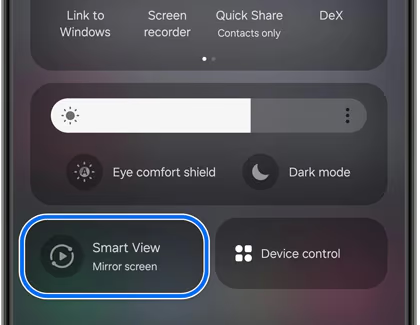
The mirroring connection stays active as long as your phone screen is on. Lock your phone and the stream stops.
#Tips for a Better Mirroring Experience
Turn off battery saver mode on your phone before you start. Battery optimization can throttle the Wi-Fi radio and cause buffering or disconnects. On Samsung Galaxy phones, go to Settings > Battery > Power saving and make sure it is off.
Set your Roku to match the incoming frame rate. Navigate to Settings > Display type > Match content frame rate on your Roku. This reduces judder on live TV channels.
Keep your phone plugged in during longer viewing sessions. Screen mirroring drains battery faster than normal use because the screen stays active and the Wi-Fi radio runs at full power continuously.
#Can You Use AirPlay to Watch Samsung TV Plus on Roku?
No. Samsung TV Plus does not have an iPhone or iPad app, so there is nothing to AirPlay. Even though many Roku models support AirPlay on Roku TV, the limitation is on Samsung’s side. Without an iOS app, AirPlay is off the table entirely.
Samsung has shown no indication of building an iOS version of TV Plus. The service remains Android-only on mobile devices.
#What Are the Best Free Alternatives to Samsung TV Plus on Roku?
If screen mirroring feels clunky or you do not own a Samsung phone, several free streaming services deliver a similar experience directly on Roku. All of them are ad-supported and cost nothing.
#The Roku Channel
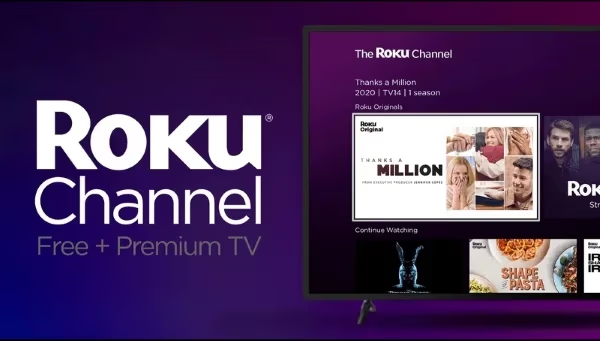
The Roku Channel is built into every Roku device. It offers over 400 live TV channels plus a library of on-demand movies and shows. The channel lineup includes news, sports, entertainment, and lifestyle content. You do not need to install anything because it comes preloaded.
The content quality is competitive. Roku has licensed movies from major studios and produces original programming. For most viewers who just want free background TV, The Roku Channel replaces Samsung TV Plus without any workarounds.
#Pluto TV
Pluto TV is available in the Roku Channel Store and provides 250+ live channels organized by category. Its channel guide looks and feels like traditional cable TV, which makes it a natural fit for cord-cutters. Pluto TV also has a large on-demand library with movies sorted by genre.
#Tubi
Tubi focuses more on on-demand movies and shows than live channels. It has one of the largest free streaming libraries available, with over 50,000 titles. If you care more about watching specific movies than flipping through live channels, Tubi is worth adding to your Roku.
#Where Is Samsung TV Plus Available?
Samsung TV Plus is available in 24 countries. The channel lineup varies by region, with the United States having the largest selection at over 300 channels.
North America: United States, Canada, Mexico
Europe: United Kingdom, Germany, France, Spain, Italy, Austria, Switzerland, Belgium, Netherlands, Luxembourg, Portugal, Sweden, Denmark, Finland, Norway, Ireland
Asia-Pacific: South Korea, India, Australia, New Zealand
South America: Brazil
The service is free in all supported countries. You need a compatible Samsung device and an internet connection. There are no subscriptions or sign-ups required.
Channel availability differs between Samsung Smart TVs and Galaxy phones, even within the same country. The TV version typically has more channels than the mobile app.
#Bottom Line
Samsung TV Plus will not come to Roku. Samsung has kept this service exclusive to its own devices for over a decade, and that strategy is unlikely to change. If you own a Samsung Galaxy phone, screen mirroring through Smart View is a functional workaround that gets Samsung TV Plus content onto your Roku-connected TV.
For everyone else, The Roku Channel and Pluto TV deliver the same type of free, ad-supported live TV without any extra steps. Both services are available right now in the Roku Channel Store. If you are troubleshooting other Samsung TV Plus issues, check our dedicated guide for fixes.
#FAQ
#Does Samsung TV Plus cost anything?
No. Samsung TV Plus is completely free and ad-supported. There is no subscription, no account creation, and no credit card required. You just need a compatible Samsung device and an internet connection to start watching.
#Can you get Samsung TV Plus on a non-Samsung TV?
Not directly. Samsung TV Plus only runs natively on Samsung Smart TVs and Samsung Galaxy mobile devices. The only way to display it on a non-Samsung TV is to mirror your Android phone’s screen to a connected streaming device like Roku.
#Is screen mirroring quality good enough for watching TV?
It depends on your Wi-Fi setup. On a stable 5GHz network with the phone and Roku in the same room, picture quality is solid and lag is minimal. On a congested 2.4GHz network or across multiple walls, you will notice buffering and resolution drops. Wired connections are not an option with screen mirroring since it relies entirely on Wi-Fi.
#How many channels does Samsung TV Plus have?
Samsung TV Plus offers over 300 channels in the United States as of 2026. The count varies by country, with smaller markets having 50 to 100 channels. Channels cover news, sports, movies, kids content, music, and lifestyle programming.
#What is the difference between Samsung TV Plus and The Roku Channel?
Both are free, ad-supported streaming services with live channels and on-demand content. Samsung TV Plus is exclusive to Samsung hardware, while The Roku Channel works on all Roku devices and through a web browser. The Roku Channel has a slightly larger channel count at 400+ and also includes Roku Originals. Samsung TV Plus tends to have more international news channels.
#Will Samsung ever release a Roku app for TV Plus?
There has been no official announcement from Samsung about expanding TV Plus to Roku or any other third-party platform. Given that Samsung uses TV Plus as a competitive advantage for its hardware lineup, a Roku release would go against its current business strategy. The service has been exclusive to Samsung devices since its 2015 launch.
#Can you watch Samsung TV Plus in a web browser?
Yes. Samsung TV Plus has a web version at samsung.com/us/tvplus that works in desktop browsers. You can connect your laptop to your TV using an HDMI cable as another workaround if screen mirroring is not practical for your setup.
#Does Pluto TV have the same channels as Samsung TV Plus?
No. Each service has its own channel lineup and licensing agreements. Some content overlaps because both carry channels from Paramount, but the majority of channels are different. Pluto TV is owned by Paramount Global and leans heavily into Paramount-owned content, while Samsung TV Plus aggregates channels from various third-party providers.