Stay on top of the latest extreme sports action with Red Bull TV. This guide covers everything you need to know to get the Red Bull TV app on FireStick, create an account, and stream live events and replays.
- Red Bull TV is 100% free with no subscription required and only minimal ads during streams
- Over 1,250 live events across 100+ extreme sports disciplines are streamed each year
- Installation takes under a minute by searching the Amazon Appstore directly from your FireStick
- Offline viewing supports 50+ hours of downloaded content for watching without internet
- Simultaneous streaming on 4 devices lets multiple household members watch different events at once
#What Is Red Bull TV?
 Red Bull TV is a free digital streaming service dedicated to action sports and music entertainment. It offers live streams and on-demand access to over 1,250 events across 100+ disciplines in 160+ countries.
Owned by the energy drink company Red Bull, this platform lets you stream competitions, concerts, documentaries, and more. Whether you’re into mountain biking, skateboarding, motorsports, snowboarding, surfing, or even gaming and music festivals, Red Bull TV has something for every adrenaline junkie.
The service is available globally on mobile, web, and TV platforms like FireStick. A Red Bull TV subscription unlocks added features but all base content can be accessed entirely free.
#What Features Does Red Bull TV Offer?
Here are some of the key features and content areas covered by Red Bull TV:
-
Live Sports & Events – Tune into live extreme sports competitions like UCI Mountain Bike World Cup, FIM Hard Enduro World Championship, Clash of the Tetons and Austin City Limits Music Festival. Over 1,250 global events streamed annually.
-
On-Demand Library – Access full replays, highlights and films from past Red Bull Signature Series events. Includes genres like bike, skate, motorsports, snow, surf, music, entertainment gaming and more.
-
Original Programming – Watch Red Bull original shows like The Miles Davis Way, Frames of Reference and Run & Gun exploring various sports, adventures and behind-the-scenes athlete stories.
-
Films & Documentaries – Hundreds of adrenaline-packed films and documentaries covering extreme athletes and competitions.
-
Athlete Features – Get insight into top athletes with films that highlight their career and achievements.
-
minimal ads – Stream content with only minimal ad interruptions.
-
Multiple Camera Angles – Enjoy multiple viewpoints for selected live events.
-
Closed Captions – Access closed captions for many on-demand titles.
-
Personalization – Create a free Red Bull account to track viewing history, get recommendations, save favorites and more.
With so much extreme sports content, Red Bull TV is a must-have for any action sports fan. If you’re looking for even more free sports apps on FireStick, there are plenty of options to pair with it.
#How to Install Red Bull TV on FireStick
Thanks to native integration with Amazon’s Appstore, installing Red Bull TV on your FireStick only takes a minute.
Here’s how:
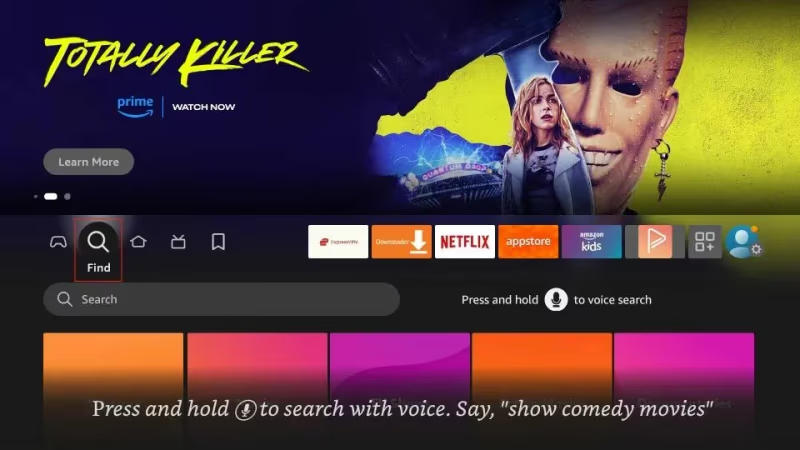
- From your FireStick’s home screen, select the Search option.
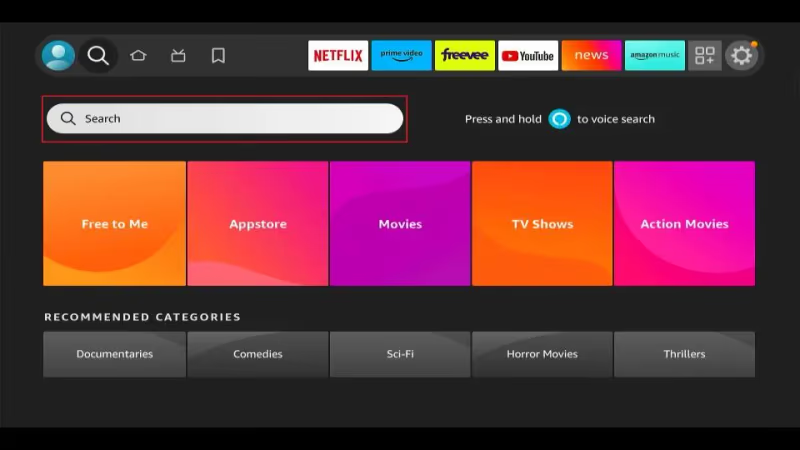
- In the search bar that appears, type in Red Bull TV.
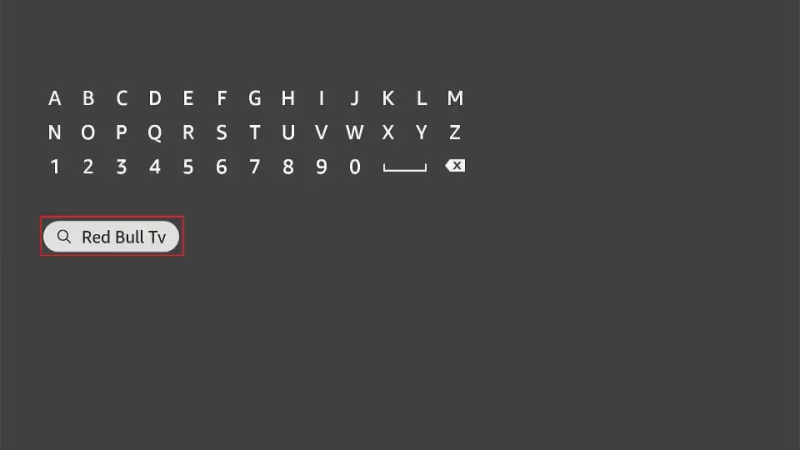
- In the list of results, select the Red Bull TV app.
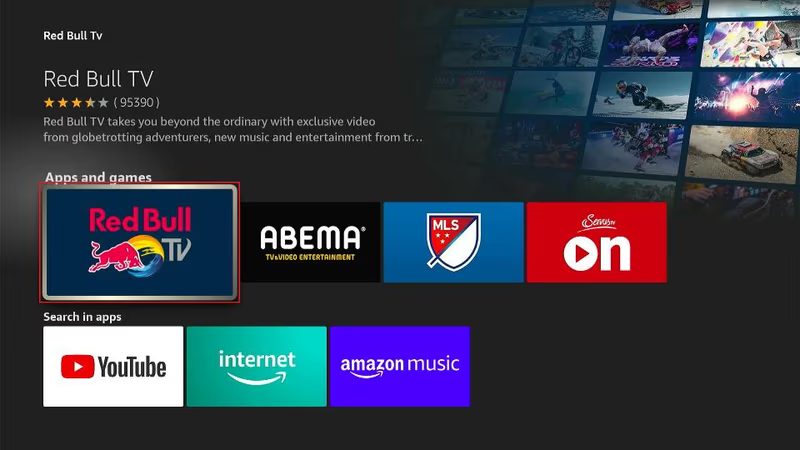
- On the next screen, choose Get to begin installing the app.
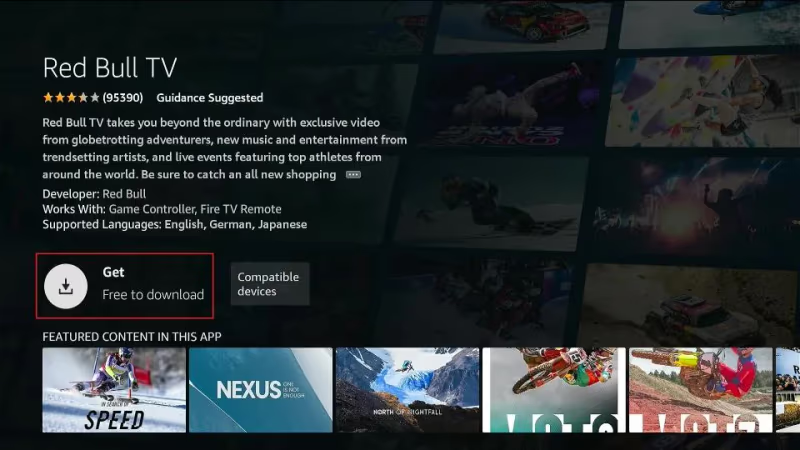
- Once installed, you can select Open to launch the app or find it on your Apps menu.
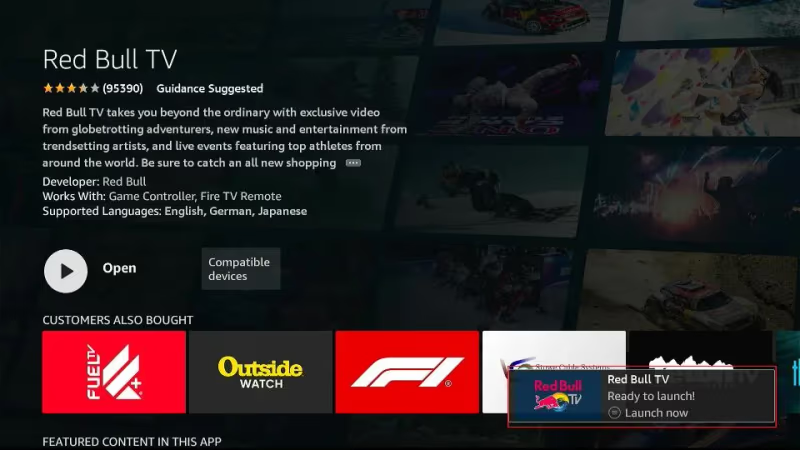
That’s all it takes to get streaming extreme sports and music events in seconds.
#Creating a Red Bull TV Account
Creating a free Red Bull TV account unlocks bonus features to improve your viewing experience. Here’s how to sign up an account in just two minutes.
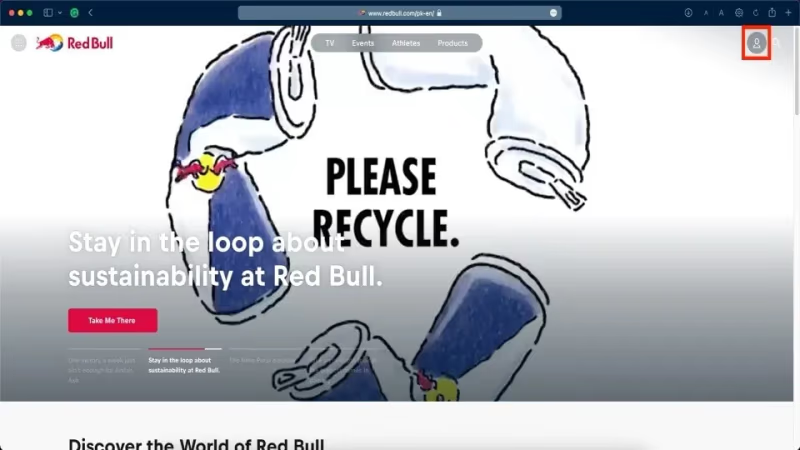
- In your web browser, go to www.redbull.com.
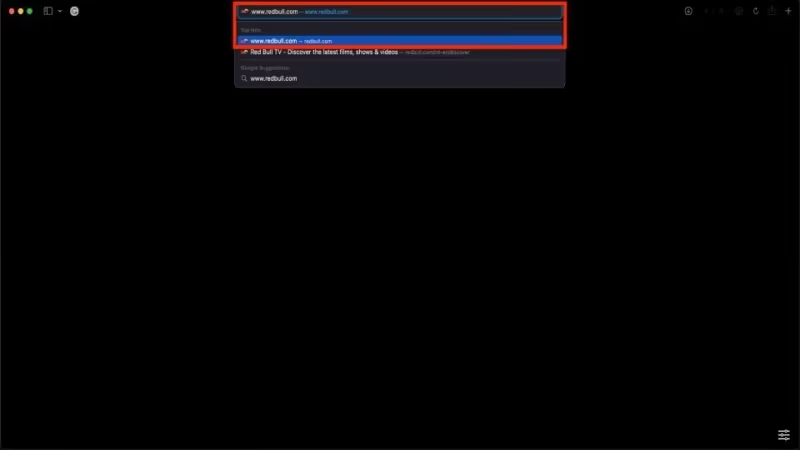
- In the top right, click on the profile icon and select Sign Up.
- Enter your email address and create a password.
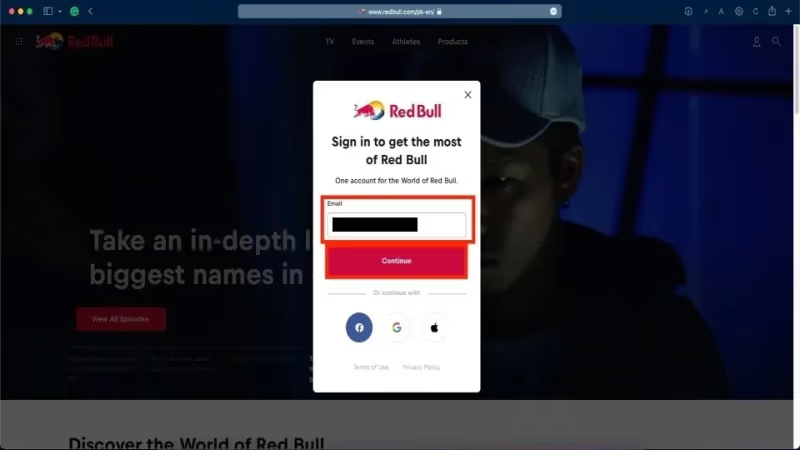
- Click Sign Up to complete registration.
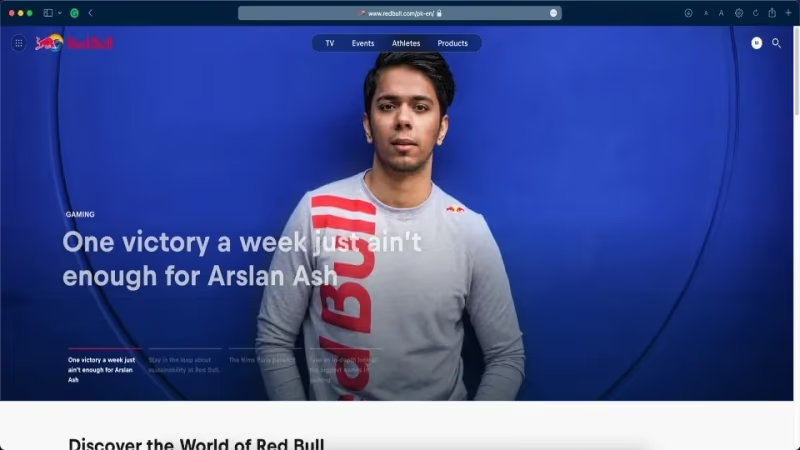
Once signed in on the website, features like favoriting videos, viewing history, personalized recommendations and offline viewing will sync across devices including your FireStick.
#How to Use Red Bull TV on FireStick
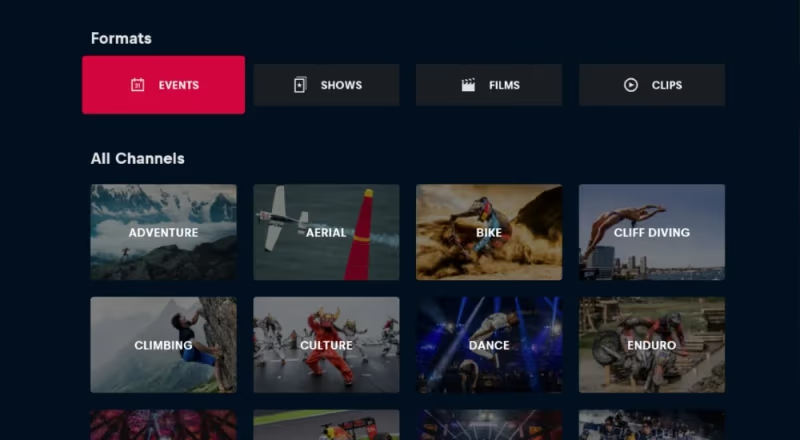
Navigating Red Bull TV on FireStick is very intuitive. Here’s an overview of the key sections:
#Home
The Home section shows featured events happening now or coming up soon. Scroll horizontally to discover different event categories.
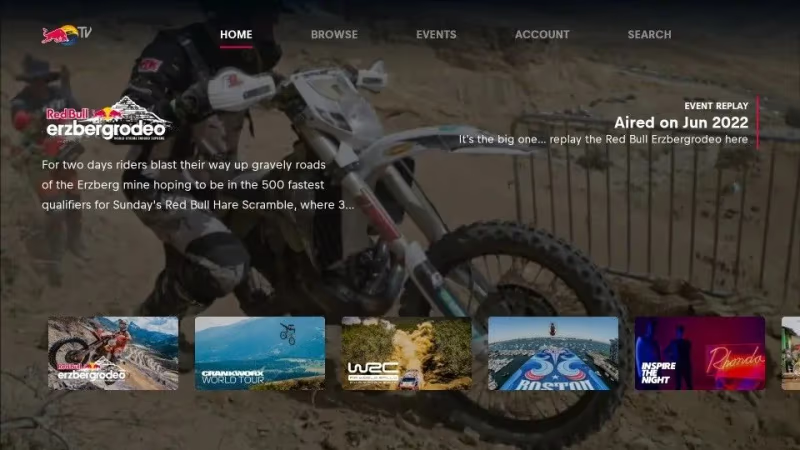
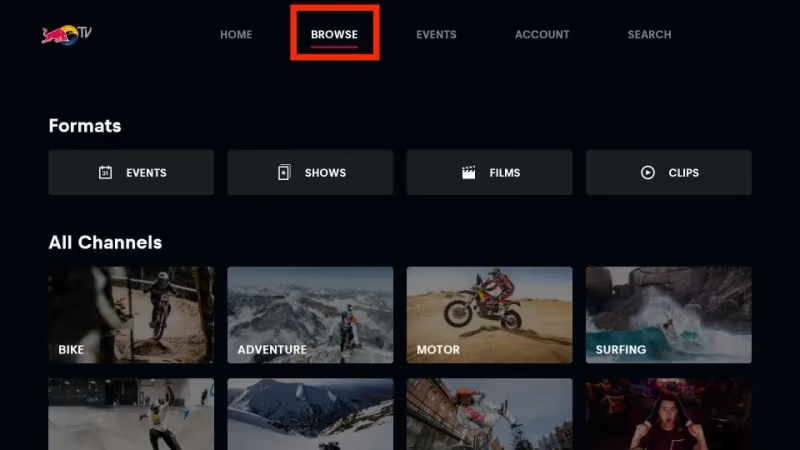
#Browse
Browse lets you filter content by category like bike, skate, motorsports etc. You can also filter by format such as live events, films, shows and playlists.
#Live TV
Watch Red Bull’s 24/7 live stream under Live TV. Expect a mix of live extreme sports coverage, films and replays.
#On Demand
The On Demand section gives you full access to Red Bull’s entire streaming library. Search or filter content here.
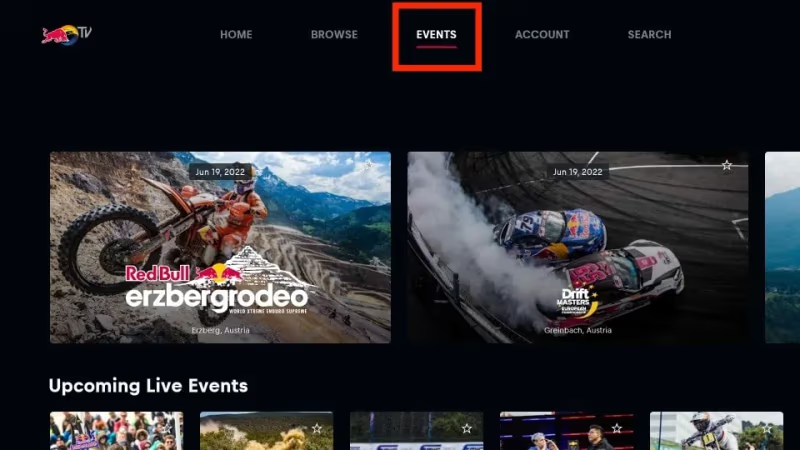
#Events
See listings of upcoming and previous live events under the Events tab. Easily find schedules of all the races, competitions and concerts streamed on Red Bull TV.
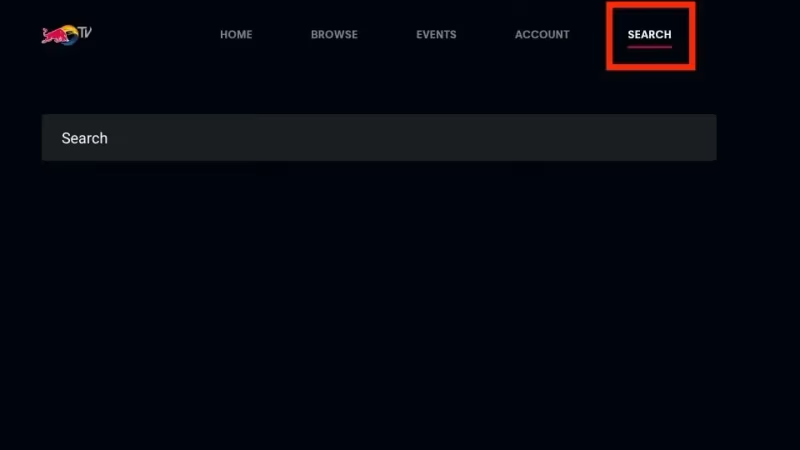
#Search
Not sure what you’re looking for? Use the Search feature to find athletes, teams, events, films and playlists.
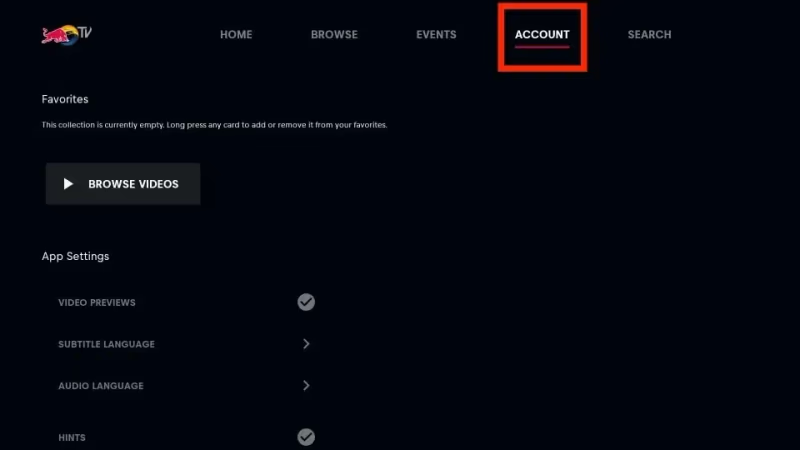
#Account
Manage your account settings and favorites lists under the Account icon. Sync viewing history across devices when signed in.
Between the always-on live stream and huge on-demand library, Red Bull TV offers plenty of extreme sports entertainment on FireStick. You can also explore free channels on FireStick if you want even more content without a subscription.
#Tips for Using Red Bull TV on FireStick
To get the most out of Red Bull TV, keep these tips in mind:
-
Use the Events section to see upcoming streams and set reminders so you never miss the live action.
-
Favorite events, films and playlists to easily find them again later. Everything you favorite syncs across mobile and web too when signed into your Red Bull account.
-
Take advantage of multiple live camera angles for a more immersive viewing experience during major events.
-
Enable Closed Captions under Settings to read commentary during noisy events in case you experience issues like Red Bull TV not working.
-
Download events in advance so you can watch without buffering or connectivity issues. Over 50 hours of content can be saved offline.
-
Use the Continue Watching row to pick up where you left off.
-
Follow your favorite athletes and teams under My Sports to customize your recommendations.
-
Turn on notifications so you receive alerts when live streams go online or new videos from tracked athletes and teams are released.
#How Do You Personalize Your Red Bull TV Experience?
Get the most tailored Red Bull TV experience by taking advantage of account personalization features:
Create favorites – Select the star icon on films, events or playlists to easily find them again later under My Favorites. Favorites sync across devices.
Track viewing history – Every video you watch is saved under Viewing History. Continue watching or find similar.
Get recommendations – Red Bull TV will suggest content based on your interests and viewing history. The more you watch, the better recommendations become.
Follow athletes & teams – Track your favorite athletes and teams to receive notifications when they are featured in new videos or live coverage.
Set reminders – Scheduling upcoming live stream reminders ensures you never forget to tune in.
Download videos – Avoid buffering by saving over 50 hours of video for offline viewing when internet connectivity is limited.
Multi-angle viewing – For select live events, switch between multiple camera angles to follow the action from different viewpoints.
Closed captions – Read commentary subtitles over live noisy events.
Continue watching – Pick up any video right where you left off even when switching devices by using the Continue Watching row.
Get notified – Opt into browser notifications or enable notifications in app settings to receive alerts about new videos from followed athletes/teams and when live streams begin.
Start tailoring Red Bull TV’s recommendations to match your interests. The more you watch, the better the streaming suggestions will match your taste for action sports.
#Accessing Red Bull TV’s Huge Library of On Demand Content
With over 1,250 global events covering 100+ adrenaline-pumping disciplines streamed annually, Red Bull TV grants you access to the largest library of extreme sports content in one place.
Thousands of hours of video spread across live events, films, documentaries, original programs and more can be accessed through the On Demand section.
#Browsing the On Demand Library
The On Demand library can be overwhelming given the vast amount of content. Use these tips to help navigate:
-
Filter content using categories like Skate, Snow, Gaming, Music etc.
-
Filter by format such as full events, films, shows and playlists
-
Search for specific sports, athletes, teams, competitions or film titles
-
Sort content by latest, most popular, or A-Z
-
Use recommendations and viewing history under Account
-
Follow favorite athletes and series so you never miss new releases
-
Download videos for offline viewing when traveling
#Must-Watch On Demand Content
Don’t know where to begin? These are some of the most popular films and series to get you started:
#Films & Documentaries
-
The Motocross Movie – Witness the 2020 AMA Motocross championship like never before in this film.
-
In Pursuit of Alaska – Join free skier Michelle Parker on an Alaskan adventure as she tries to ski a mountain unlike any other.
-
_ SESSION: Backyard Shredders_ – Top skateboarders build unique skate spots in their backyards to progress their riding during lockdown.
-
E-MTB: Chaos and Control – Journey into the emerging world of E-Mountain Biking and meet the athletes taking it to the next level.
#Shows & Series
-
Safety Patrol – Big mountain skier Jeremy Jones breaks down the skills and knowledge all adventure seekers need to make it home safely.
-
Frames of Reference – Top cinematographers explain how they shoot extreme sports to capture every heart-stopping moment.
-
Run & Gun – Join documentary filmmaker Sal Masekela across the globe capturing rarely seen sides of extreme sports and cultures.
-
The Horn – Go behind the scenes of the Cape Horn rally raid, one of the most challenging off-road races.
#Live Events
-
UCI Mountain Bike World Cup
-
FIM Hard Enduro World Championship
-
FISE Montpellier Xperience
-
Clash of the Tetons
-
Austin City Limits Music Festival
-
The Motocross of Nations
This only scratches the surface of the thousands of videos available on demand. Explore the category tabs or use search tools to find content specific to your interests. New events and films are added regularly.
#FAQ
#Is Red Bull TV completely free?
Yes. All base Red Bull TV content including live streams, on-demand library, and account features are 100% free with no subscription plans. Limited ads may appear during some streams.
#What FireStick devices support Red Bull TV?
Red Bull TV works with every FireStick model and Fire TV device. This includes the FireStick 3rd Gen, FireStick 4K, FireStick Lite, Fire TV Cube 3rd Gen, Fire TV Omni series, and Fire TV 4-series.
#Can you watch Red Bull TV offline on FireStick?
Yes. Register for a free Red Bull account and you can download over 50 hours of video for offline viewing. This is useful when traveling or when your internet connection is unreliable.
#What internet speed does Red Bull TV need?
Red Bull TV streams smoothly at 3 Mbps or higher. For multi-angle viewing during live events, aim for at least 5 Mbps. You can also download content ahead of time to avoid buffering altogether.
#How many devices can stream Red Bull TV at the same time?
Each Red Bull TV account supports simultaneous streaming on up to 4 devices. You can watch different live events on separate screens without needing additional accounts.
#Is Red Bull TV available worldwide?
Red Bull TV is available in 160+ countries. However, some live event streams may be geo-restricted based on broadcasting rights. A VPN can help bypass these regional blackouts.
#Can you use a VPN with Red Bull TV on FireStick?
Yes. Connecting your FireStick to a VPN encrypts streaming activity and helps bypass geo-blocks on region-locked events. ExpressVPN and NordVPN are popular choices for FireStick users.
#Does Red Bull TV work on other devices besides FireStick?
Red Bull TV is also available on LG TVs, phones, tablets, Roku, Apple TV, and web browsers. Your favorites, viewing history, and recommendations sync across all devices when signed in.
#Bottom Line
Installing Red Bull TV on your FireStick takes under a minute, and the entire service is free. Once set up, you get access to 24/7 live streams, thousands of on-demand videos, and original programming across 100+ extreme sports disciplines.
Create a free Red Bull account to unlock personalization features like favorites, viewing history, and offline downloads. Use the search and filter tools to find new athletes, teams, and competitions worth following.
If your FireStick is your main streaming device, Red Bull TV pairs well with other live sports streaming options to round out your entertainment lineup.