I’ve tested both Plex and Jellyfin extensively while rebuilding my personal media server in 2026. Each platform handles self-hosted streaming differently, and the right pick depends on what you value most. In this Plex vs Jellyfin comparison, I cover features, setup, transcoding, pricing, privacy, and customization so you can decide which server fits your workflow. If you’re also weighing other options, check out our Plex alternatives and Jellyfin alternatives guides.
- Jellyfin is completely free — no subscriptions, no paywalls, and every feature unlocked out of the box
- Plex requires a Plex Pass ($4.99/mo) for hardware transcoding, watch syncing, and most premium features
- Privacy gap is significant — Jellyfin stays fully local while Plex collects streaming activity and device data
- Plex wins on device support — native apps for virtually every platform including gaming consoles and smart TVs
- Hardware transcoding favors Jellyfin — free GPU-accelerated encoding handled more simultaneous 4K HDR streams in testing
#What Are Plex and Jellyfin?
Both Plex and Jellyfin allow you to privately host and stream your personal media collection across devices. While sharing the same core purpose, they take different approaches that will appeal to different users.
#Plex Overview

Plex has dominated the DIY media server market for over a decade. It’s evolved far beyond its origins as a simple media player into an ambitious centralized hub for virtually all media.
Today, Plex lets you unify your personal libraries alongside content from virtually any streaming service in one slick interface. You’ll find:
-
Full organization tools for movies, shows, music, photos & more
-
Live TV with DVR capabilities
-
An ad-supported catalog of movies & shows
-
Podcast & audiobook support
-
Cross-device playback syncing
While the core media server is free, unlocking all features now requires a paid Plex Pass subscription. Plans start at $4.99/month up to $119.99 for a lifetime license.
#Jellyfin Overview

Jellyfin is a fast-growing open source alternative laser-focused on streaming your owned content. Jellyfin forked from Emby in 2018 to preserve a transparent, community-driven project letting users retain full control of their data.
Out-of-the-box, Jellyfin capably organizes and streams your:
-
Movies & TV shows
-
Music libraries
-
Photos & home videos
-
Ebooks & audiobooks
All features are free forever with no hidden costs. The server installs on any OS and offers clients for all major devices. You can optionally extend functionality via plugins built by an active community of contributors.
#Key Differences at a Glance
Here’s a quick overview of the central distinctions between Plex and Jellyfin in 2026:
| Plex | Jellyfin | |
|---|---|---|
| Pricing | Freemium (free core or $4.99+/mo Plex Pass) | 100% free |
| Top Features | Full library management, Live TV/DVR, ad-supported content | Complete personal media hosting |
| Device Support | Extensive (virtually all platforms) | Strong (major platforms + generative AI assistants) |
| Transcoding | Software + hardware (Plex Pass only) | Full software/hardware |
| User Interface | Highly polished | Functional |
| Privacy | Requires central account, some data collection | Fully private, self-hosted |
| Customization | Moderate | Extensive (open source) |
Next I’ll take you through a detailed analysis of precisely how Plex and Jellyfin stack up across all the key factors to consider when choosing your media server.
#How Do Plex and Jellyfin Compare on Features?
From cost to capabilities to privacy practices, here’s the full breakdown of how Plex and Jellyfin hold up head-to-head.
#Features
When it comes to playing your owned media files, Plex and Jellyfin are equally capable. Both handle virtually any mainstream audio and video format you can throw at them. Each platform makes it simple to neatly organize your:
-
Movie & TV show collections
-
Music libraries
-
Personal photo & home video archives
For cord-cutters, either media server works great as a DVR with compatible TV tuners. Stream live television or schedule recordings to expand your on-demand catalog.
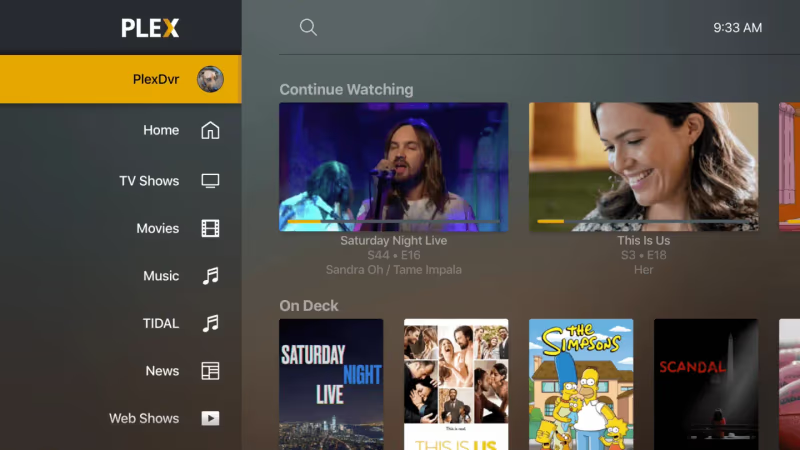
Plex does provide nice perks for certain use cases though:
-
Tracking watch status across devices (Plex Pass)
-
Browsing music albums, artists & playlists
-
Aggregating podcasts & web shows
-
Managing ebooks & audiobooks
But Plex’s biggest differentiator is an ad-supported on-demand library. Watch thousands of movies and shows streamed from Plex’s servers for free. You can even integrate other services into your Plex hub, like Netflix and Prime Video.
Jellyfin sticks squarely to hosting your own media. There are no plans to offer hosted content. The upshot is you have complete control over your files and data. You’re not beholden to any specific provider or locked into their ecosystem.
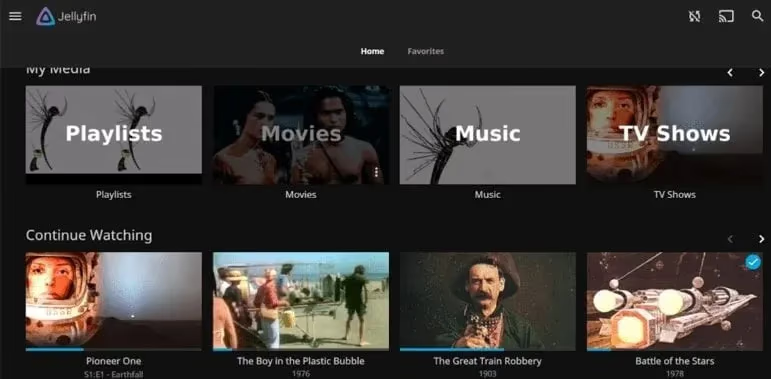
Almost everything requires a Plex Pass now. So if you just want to play your files without extras, Jellyfin provides a leaner, cost-effective experience. Choose Plex if you like the idea of an all-in-one media center blending your private and subscription content.
#Setup and Ease of Use
Both Plex and Jellyfin are straightforward to install, with thorough guides available. However, Plex takes the edge for user-friendliness.
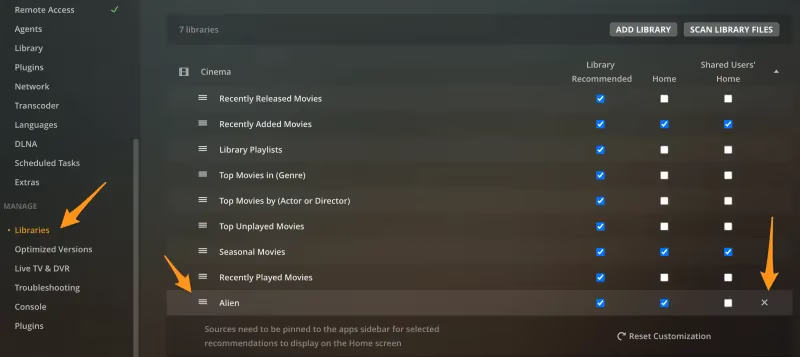
With Plex, you download the app, follow the initial prompts, and you’re quickly up and streaming. Installers exist for virtually all operating systems and NAS devices. You don’t need to mess with command lines or config files in most cases.
Jellyfin setup also starts by downloading the server app for your platform. But it currently requires some extra steps on many systems, like:
-
Installing dependencies
-
Compiling from source code
-
Configuring the server through config files vs a UI
None of this is particularly difficult. The Jellyfin docs walk you through the process. But it’s undeniably more involved than Plex’s “it just works” onboarding flow for newbies.
Once running, both servers make importing libraries intuitive. Point them at your media folders, and they handle the rest – downloading metadata, artwork, and neatly cataloging files.
Again Plex provides a slicker setup experience overall. But Jellyfin is close behind. And tinkerers may actually prefer Jellyfin’s extra options to fine-tune their server during install.
#Apps and Device Support
To access your server, you need client apps for your various viewing devices like smart TVs, streaming boxes, phones and PCs. And on this front, Plex has a clear lead.
You’ll find native Plex apps for virtually every platform:

-
Android & iOS phones/tablets
-
Android TV, Apple TV & Fire TV (see our guide to Plex on Amazon Fire Stick)
-
Roku, Chromecast & smart TVs
-
Gaming consoles
-
Windows, Mac, Linux PCs (including Plex on Chromebook)
If a device doesn’t have an app (increasingly rare), you can almost always still use the Plex web interface in any browser. I’ve yet to find a device I can’t get Plex on.
Jellyfin’s client selection isn’t quite as wide – which is unsurprising for a small open-source project compared to a venture capital-funded company. But coverage is still solid and rapidly growing:
-
Jellyfin iOS/Android mobile apps
-
Apple TV (Jellyfin on Apple TV guide) & Android TV apps
-
Roku channel & Fire TV app (Jellyfin on Firestick walkthrough)
-
Kodi add-on & web client
So while Jellyfin may be missing a few niche platforms, it covers the streaming device essentials. And the community often beats Plex to new platforms, already offering generative AI integrations for the likes of ChatGPT and virtual assistants.
For maximum hardware compatibility, pick Plex. But Jellyfin satisfies most households with support continuously expanding.
#User Interface
Beauty is in the eye of the beholder, but Plex inarguably delivers flashier aesthetics. The colorful posters, slick transitions between menus, and stylized player controls feel lifted straight from Netflix. It screams “premium”.
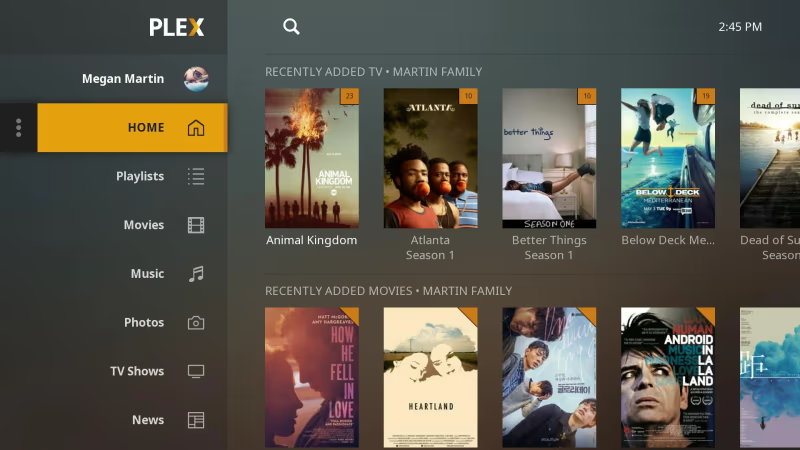
Jellyfin’s looks are more understated. The layout is clean and intuitive but lacks Plex’s visual polish. You won’t find any fancy animations or artwork galleries. The utilitarian style targets functionality over form.
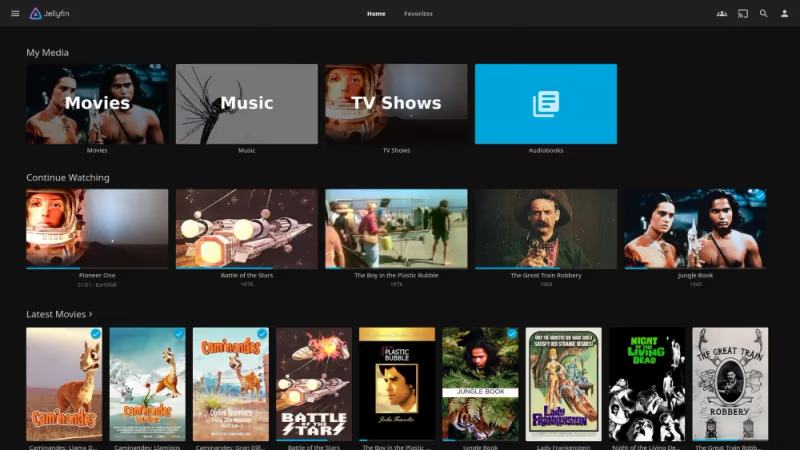
Ultimately, both media servers get the job done when it comes to finding and playing content. Plex feels a bit more high-end, especially in the TV interface. While some (myself included), prefer Jellyfin’s lighter, snappier UI. Go Plex for the wow factor, Jellyfin for raw performance.
#Transcoding Capabilities
Transcoding enables playing media formats unsupported by your client device by converting them in real-time. It’s invaluable if you have an older TV, limited bandwidth, or high-bitrate 4K files.
Plex and Jellyfin offer capable software transcoding out of the box to stream any content. However, software encoding taxes the CPU, limiting simultaneous streams.
Hardware-accelerated transcoding offloads the process onto the GPU instead. This allows far more concurrent streams while minimizing CPU usage. If you have a supported graphics card, it’s a massive upgrade.
And here’s where Jellyfin easily outpaces Plex. You have to pay for a Plex Pass to unlock hardware acceleration. But Jellyfin includes it 100% free.
In my tests, Jellyfin consistently handled more simultaneous 4K HDR transcodes than Plex thanks to its hardware implementation. And you can create custom transcode profiles optimized for your specific clients – a power user’s dream.
#Pricing and Subscriptions
No contest: Jellyfin is entirely free, forever. There are no costs, hidden or otherwise, to use the software.
In contrast, Plex has embraced a freemium model in recent years. While the core server and basic clients remain free, most premium features require an active Plex Pass subscription. Plans include:
-
Monthly: $4.99/month
-
Annual: $39.99/year
-
Lifetime: $119.99 one-time
If you only need bare-bones media playback, Plex’s free tier may suffice. But for advanced capabilities, expect to pay up.
As an open-source labor of love, Jellyfin simply provides a more compelling value. You get the full power of the platform without spending a dime. And you’re not beholden to any company’s shifting monetization whims.
#Privacy
Plex sparked major privacy concerns after a December 2022 data breach. While only a limited subset of users’ encrypted data was accessed, it cast doubt on Plex’s trustworthiness to many.
By design, every Plex server must connect with Plex HQ. There’s no way to use it fully locally. And according to their privacy policy, Plex collects info on your:
-
Streaming activity
-
Server usage
-
Account/device details
-
And more
Some data sharing can be disabled. But you’re still ultimately ceding control to Plex and trusting them to protect it.
In stark contrast, Jellyfin collects absolutely nothing. It’s completely self-contained on your local network by default. There are no external phone homes or forced cloud integrations.
You can audit the entirety of Jellyfin’s open source code to verify it respects your privacy. And with trivial tweaks, you can lock down your server to prevent any outside access.
For maximum ownership over your media and data, Jellyfin is the clear choice. Plex leaves you beholden to their practices and vulnerabilities.
#Extensibility and Integrations
One of Plex’s biggest strengths historically was its rich catalog of plugins. These community extensions expanded Plex with unique features like:
-
Auto-downloading subtitles
-
Displaying lyrics for music
-
Connecting smart home devices
-
Custom metadata agents
However, Plex has been steadily phasing out plugins in recent years. They want to exert more control and shift development in-house. Many legacy plugins simply no longer work. It’s become primarily an add-on platform for Plex’s streaming services.
Jellyfin embraces plugins wholeheartedly. Its open APIs extend the media server with community-built:
-
Metadata providers
-
Subtitle downloaders
-
Notifications & alerts
-
Library sync tools
-
Unique player themes
-
And more added frequently
Given its open nature, tinkerers will feel right at home customizing Jellyfin. And tight integration with the likes of Sonarr, Radarr, and Ombi make automating your media pipeline a breeze.
Plex is turning away from being a platform to an all-in-one product. So if you like to tweak and expand your setup, Jellyfin will ultimately be more accommodating than Plex.
#Which Media Server is Right For You?
Having tested both platforms extensively, it’s clear Plex and Jellyfin cater to different needs. Here’s my advice on which to choose:
#You Should Use Plex If…
-
You want a highly polished, Netflix-like experience
-
You’re a beginner seeking easy setup
-
You have a massive range of devices to support
-
You want hosted movies & shows
-
You don’t mind ongoing subscription costs
#You Should Use Jellyfin If…
-
You only need to stream your own media
-
You refuse to pay for a media server
-
You want total control over your files and data
-
You prefer lightweight, snappy interfaces
-
You like to tinker and customize your server
#Frequently Asked Questions
#Is Jellyfin better than Plex?
Neither is universally better because they target different users. Jellyfin is free, more private, and more customizable, while Plex has flashier apps, easier setup, and an ad-supported content library. Pick based on whether you value privacy and cost savings or polish and convenience.
#Can I use Jellyfin and Plex together?
Yes, and they can even share the same media folders on your server. I run both simultaneously to compare features and target different devices. The two servers don’t conflict as long as you assign them different ports.
#Is Jellyfin still actively developed?
Jellyfin is under active development with regular releases throughout 2025 and 2026. The project has a growing contributor base, and you can track all activity on GitHub. New client apps and plugin updates ship frequently.
#Does Jellyfin offer free movies like Plex?
No. Jellyfin is strictly a platform for hosting your own media files. There are no plans to add hosted content or advertising of any kind.
#Can I migrate my Plex library to Jellyfin?
Point Jellyfin at your existing Plex media folders during setup and it will scan them automatically. You may need to recreate Collections and custom playlists manually. Metadata and artwork typically carry over without issues since both servers pull from the same online databases.
#What hardware do I need to run Plex or Jellyfin?
Any modern PC, NAS, or even a Raspberry Pi 4 can run either server for direct-play streaming. If you need real-time transcoding for multiple users, a CPU with Intel Quick Sync or a dedicated GPU makes a big difference. Jellyfin has the edge here because hardware transcoding is free, while Plex locks it behind a Plex Pass.
#What are the best alternatives to Plex?
Jellyfin is the top free alternative, but Emby and Kodi are also worth considering. We’ve also compared Stremio vs Plex and Plex vs Infuse if you’re exploring other options.
#What are the best alternatives to Jellyfin?
If Jellyfin doesn’t fit your needs, Emby, OSMC, and Mezzmo are solid picks. For a direct head-to-head, see our Kodi vs Jellyfin comparison.
#Bottom Line
Here are the key takeaways from this Plex vs Jellyfin comparison for 2026:
-
Both excel at letting you privately host and stream your media library
-
Plex offers flashier apps, more device support, and hosted content
-
Jellyfin is completely free and open-source for maximum privacy
-
Non-technical users will appreciate Plex’s smoother onboarding
-
Power users can extensively customize Jellyfin
-
Jellyfin has the edge on simultaneous 4K transcoding
-
Plex increasingly requires a paid subscription to unlock premium features
Ultimately, Plex targets a mainstream audience seeking an “it just works” experience. Jellyfin caters to folks who want complete data ownership and infinite customizability, even if it requires more initial setup.