Plex is a streaming platform that combines a personal media server for organizing your own content with a growing library of free on-demand programming. But how does it stack up for most cord cutters? This Plex review covers pricing, features, content, and whether Plex Pass is worth it.
- Free core server — Plex Media Server costs $0 and handles media playback, library management, and on-demand streaming
- Plex Pass pricing — $4.99/month or $119.99 lifetime unlocks hardware transcoding, offline sync, DVR, and advanced music tools
- 14,000+ free titles — Ad-supported movies and shows from Lionsgate, MGM, Warner Bros, and Crackle originals
- Widest device support — Apps for Roku, Fire TV, Apple TV, Xbox, PlayStation, smart TVs, mobile, and web browsers
- Open-source alternatives trail behind — Emby, Jellyfin, and Kodi offer more customization but lack Plex’s polished multi-device experience
#What Is Plex and How Does It Work?
 Plex is a media server software that lets you store, organize, and stream your personal media library — including video files, music, and photos — to all your devices. The key components are:
-
Plex Media Server: Software you install on a computer, NAS, or Nvidia Shield TV to host your libraries.
-
Plex Apps: Apps for streaming devices, mobiles, smart TVs to access your server.
-
Free Movies & TV: Ad-supported streaming content similar to Tubi or Pluto TV.
To get started, you simply:
-
Download Plex Media Server to a device where your files are located.
-
Create libraries for your movie, TV, music folders. Plex scans and matches metadata.
-
Stream your libraries anywhere with Plex apps. Share server access if desired.
Plex intelligently direct plays media when compatible or transcodes it on-the-fly so virtually any file plays on any device. For example, an MKV Blu-ray rip could stream to an older Roku despite missing codec support.
#How Much Does Plex Cost?
Plex offers mostly free functionality but charges for some premium upgrades and mobile app unlock via Plex Pass.
| Plan | Price | Key Features |
|---|---|---|
| Free | $0 | Media playback & management. On-demand movies & shows. Free live TV streaming. |
| Plex Pass Monthly | $4.99/month | Enhanced music, offline sync, hardware acceleration, early access updates, DVR. |
| Plex Pass Lifetime | $119.99 | Same as above but one-time charge. |
Plex Pass includes extras like advanced photo management, HDR to SDR tonemapping, managed user accounts, GPU transcoding, and more. But most core media server and playback capabilities are available for free.
Plex also offers a discounted $9.99 Tidal plan for Premium streaming music. Or the $19.99 HiFi Plus bundle with lossless Tidal audio paired with Plex Pass.
#Plex Pass Benefits & Premium Features
While Plex Media Server itself is free, here are some of the key things unlocked with a Plex Pass membership:
#Enhanced Music Features
-
Auto-tagging to match metadata
-
Intelligent sorting by release date
-
Lyrics support
-
Personalized artist radio stations
-
Track hazard notifications
-
TIDAL integration
#Mobile Offline Sync
-
Download media to watch offline
-
Syncs wirelessly
-
Saves data when traveling
#Early Access & Updates
-
Priority updates
-
Early previews of new capabilities
-
Submit feedback to influence development
#Plex DVR & Live TV
-
Watch and record free over-the-air TV
-
Requires antenna and HDHomeRun tuner
-
14 days cloud DVR storage
#GPU Acceleration & Hardware Encoding
-
Enhanced performance
-
Reduces transcoding strain
-
Smoother streams
Additional unlocked benefits include premium photos support, camera upload, enhanced trailers and extras, premium filters, skip intros, multi-user accounts, secure connections, and more.
#Plex Platform Support & Devices
One strength of Plex is support across a vast range of platforms including streaming devices, smart TVs, gaming consoles, set top boxes, and more:
-
Fire TV, Android TV
-
Smart TVs – LG, Samsung, VIZIO
-
Mobile – iOS, Android
-
Web app
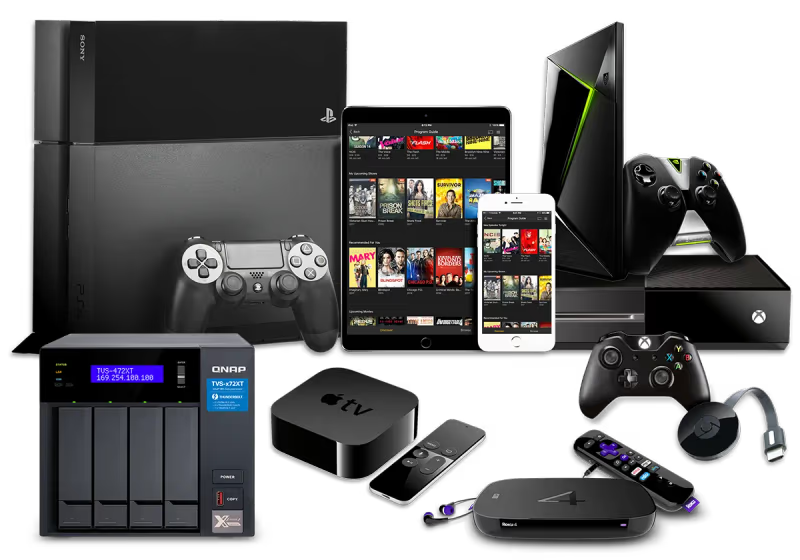
Plex’s computer platforms include Windows, Mac, Linux, FreeBSD plus network attached storage (NAS) options and Docker.
With apps scaling to almost any device, you can stream Plex libraries across multiple screens. Even niche platforms like VR headsets work.
#What Media Formats Does Plex Support?
Plex supports a huge range of media file formats, and this flexibility is one advantage over locked-down streaming platforms.
Video: MP4, MKV, AVI, MOV, HEVC, DivX, Blu-ray rips Music: MP3, M4A, FLAC, WMA Images: JPG, PNG, RAW
Plex can direct play files natively supported by your device hardware. If formats are missing codec support, Plex’s server will transcode media into a compatible streaming format.
Transcoding happens in real-time, converting quality or file types on-the-fly so playback succeeds on target device limitations. With Plex Pass, your server can use hardware acceleration and GPU encoding for efficient conversions.
Advanced users can dig into technical playback details like codecs, resolutions, bitrates, and audio formats. Check Plex’s support documentation for a complete list of media types.
#Library Organization Features
Plex automatically adds descriptions, artwork, genres, ratings for your media by matching file names against online databases. This metadata enrichment process enables powerful library browsing, sorting and searching tools.
Smart organization tools include:
-
Automatic tagging and metadata matching
-
Customizable libraries
-
Cover art and descriptions
-
Genre, year, rating facets
-
Recently added sorting
-
On deck sorting for shows
-
Intuitive search
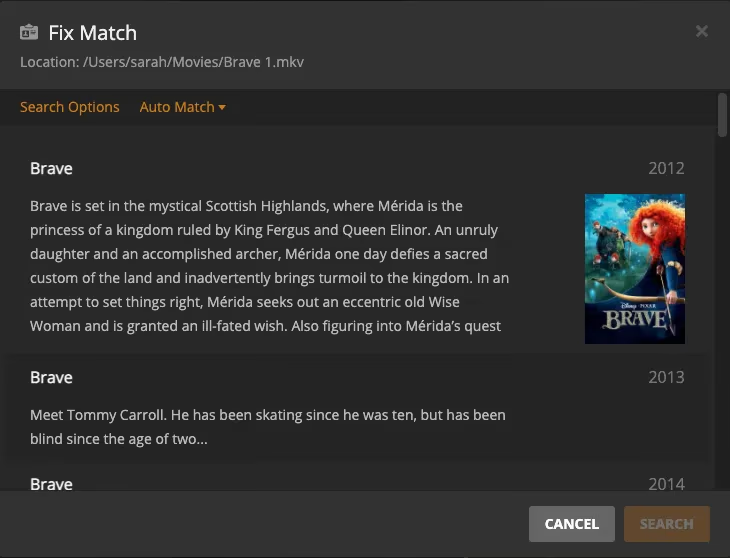
You start by creating libraries for your movie, TV show, and music folders. Plex scans contents and tries matching file names against metadata sources. For best auto-detection, organize files using naming conventions like:
-
Movies: Movie Title (Release Year).ext
-
TV: Show Name – s01e01 – Episode Title.ext
-
Music: Artist – Album/Song.ext
You can manually fix inaccurate matches or add information for unknown media. Refine library settings under Manage > Edit for each library.
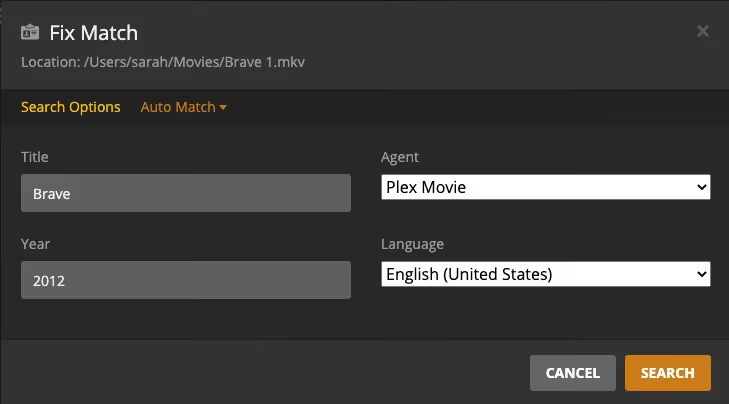
Enable advanced settings to customize metadata agents, scanner locations and intervals, thumbnail prefs and more fine-tuned management.
#Flexible Playback & Streaming Features
Plex intelligently handles streaming your files with two core methods:
Direct Play: Media files compatible with target device play natively. Direct playing avoids conversions for smoother, faster streaming.
Transcoding: Incompatible files get remuxed in real-time into a streamable format supported by receiving player.
Transcoding uses more processing power but expands format support. With Plex Pass, enable GPU hardware acceleration to reduce CPU strain.
Useful streaming tools include:
-
Bandwidth limiting – helps minimize buffering
-
Remote quality limiting – saves mobile data
-
Audio boost dialog normalization
-
Subtitle support and management
-
Continue watching status sync
Monitor activity under Dashboard to see when media plays directly vs transcoding. Identify playback limitations then optimize server, network, and devices.
For example, upgrade a Roku stick to handle more codecs natively instead of relying on Plex conversions. Or enable hardware acceleration if your CPU struggles transcoding high bitrate 4K.
#Free Movies, TV Shows & Web Series
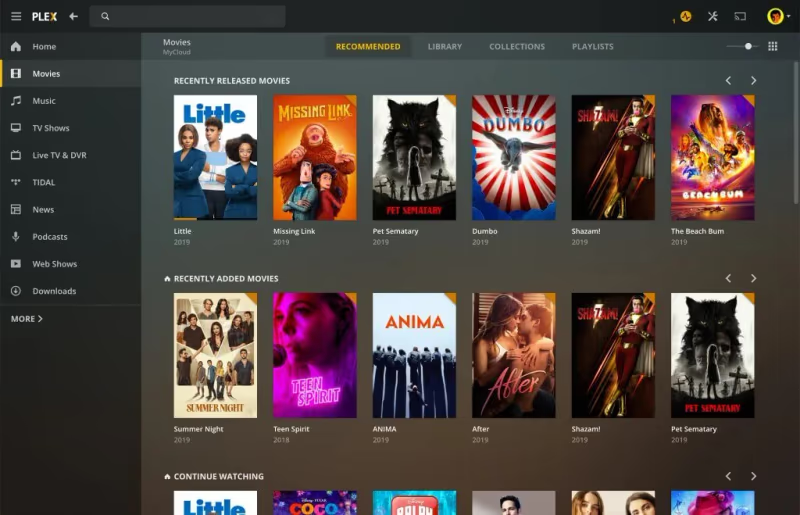
Alongside personal media management, Plex offers an entire standalone streaming library dubbed Mediaverse:
-
14,000+ movies and shows
-
Content from Lionsgate, MGM, Warner Bros
-
New additions monthly
-
Free live TV channels
The catalog quality improves thanks to a partnership with Crackle folding in their entire library.
Genres span action, comedy, drama, family/kids, horror, romance, and other categories. Featured movies include Patriot Games, Snowpiercer, The Illusionist, Snatch, and more. Though selections rotate regularly.
Crackle Original content also streams free including sports docuseries On Point and rapper biography Yelawolf: A Slumerican Life.
In addition, retro programming from The Film Detective was added: beloved classics, B-movies, film noir and other genres.
While Plex’s catalog can’t rival leading subscription services, this free bundled content marks a continued expansion into streaming while still playing nicely with your personal media.
#Content Limitations
Despite ever-growing catalogs, Plex still faces some limitations around content breadth and depth compared to paid-for options like Netflix or Hulu.
Pros may find Plex’s focus on personal libraries diminished as streaming priorities seem to increase. Still, most core functionality remains solid.
Plex also gamifies finding free movies and shows through a BINGO-style game promoting engagement. However the content discovery experience overall remains simplistic compared to smarter recommendation algorithms of paid services.
#Live TV Streaming & DVR Features
Plex provides live TV streaming from over 80+ channels spanning news, sports, movies, tech, culture plus free programming from Crackle and others.
Built-in electronic program guide data enables browsing upcoming programming in real time. Filter across genres using tabs like News, Entertainment, Sports, Kids.
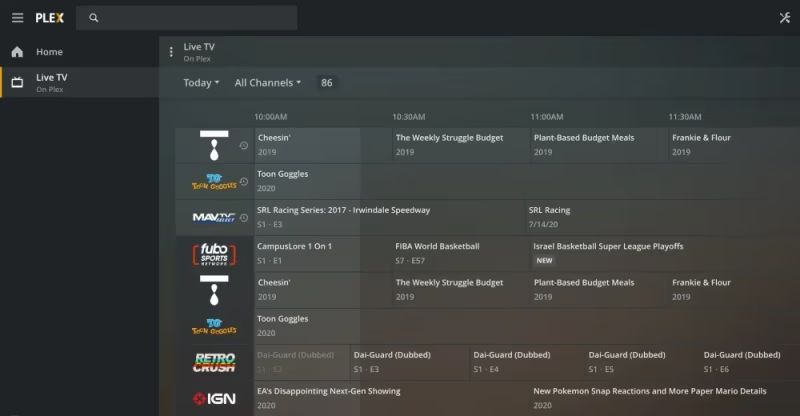
Many live channels display details like current program and remaining runtime. Quality maxes out at 720p however and lean-back watching experience isn’t as refined as dedicated live streaming platforms.
For recording shows, Plex offers DVR support but requires additional hardware like HDHomeRun CONNECT tuners plus an antenna. Configure under DVR settings.
Once setup, you can record both live TV broadcasts and also schedule recordings. Storage depends on your Plex server device size. Recordings integrate directly into libraries for watching like any other media.
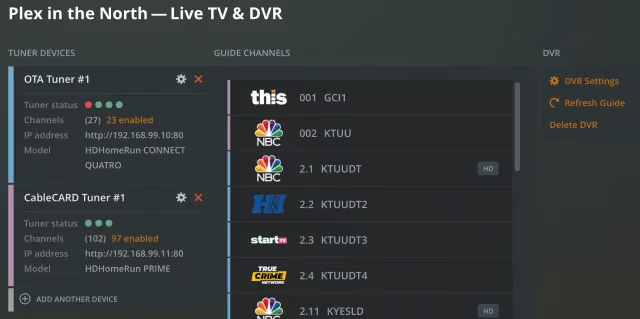
While helpful for cord cutters missing local channels, Plex DVR involves more gear and setup compared to something like YouTube TV. But it does enable locast antenna streaming as well.
#Plex App Interface, Design & UI
Plex prioritizes usability with an intuitive interface centralized around browsing your media. Consistent navigation works fluidly across most platforms.
Every Plex app surfaces key tabs in the sidebar:
-
Home
-
Movies & Shows
-
Web Shows
-
Podcasts
-
Live TV
Home displays On Deck lineup of recently added episodes plus a tailored What to Watch section with suggested titles to resume or download.
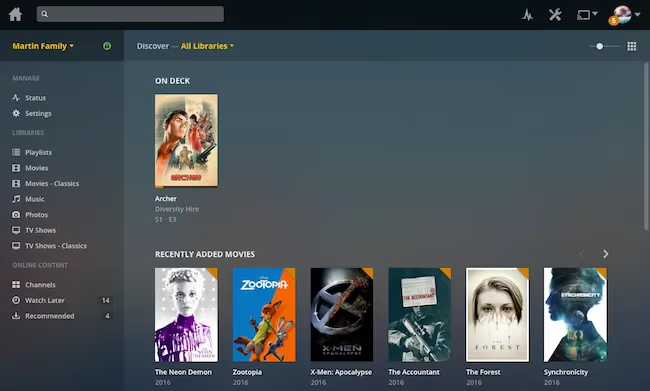
The Discover section compiles recommendations based on watch history and favorites status. Continue Watching keeps track of partly played media. My List enables building a custom playlist with bookmarks.
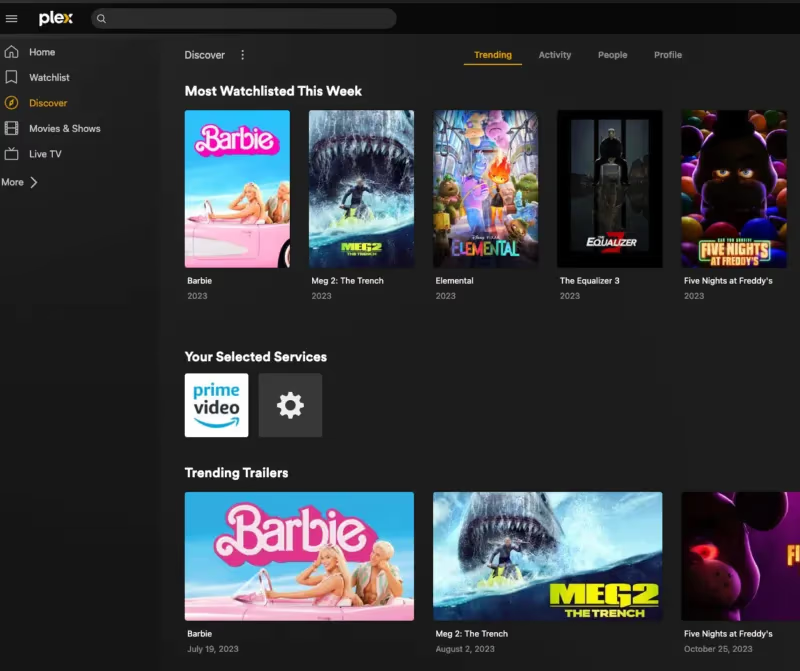
Generally Plex apps provide a visually polished experience. While simpler than leading paid streaming platforms, the UI looks more premium than freebie rivals.
However some limitations around profiles and personalization exist. You can’t make multiple user profiles to segment suggestions and watch status. No smart content syncing or watch list sharing across devices either. But handy mobile options like offline downloading help.
#Customizing Your Plex Setup
While Plex works nicely out of the box, tailoring some preferences helps personalize it further:
-
Create libraries – Organize media into Movies, TV Shows folders or custom channels.
-
Tag favorites – Mark favorite episodes, artists, albums, movies.
-
Curate watch status – Flag seen/unseen content.
-
Enable widgets – Surface recent media on home screen.
-
Share servers – Invite friends for collaborative libraries.
-
Add user accounts – Manage restrictions for kids (Plex Pass).
-
Show intro detection – Auto-skip TV intros after first episode watch.
-
Limit bandwidth – Customize remote streaming quality limits.
-
Refresh metadata – Improve inaccurate descriptions or artwork.
Tweaking server settings expands customization even more:
-
Manage agents – Prioritize metadata sources
-
Switch scanner intervals – Control library scan frequency
-
Create smart playlists – Personalized dynamic rules
-
Update thumbnails – Customize thumbnail appearance
-
Back up databases – Download metadata backups
Administrators can go deeper by:
-
Remote accessing server dashboards
-
Monitoring bandwidth usage charts
-
Reviewing server logs for troubleshooting
-
Scripting Tautulli for advanced statistics
For straightforward streaming, defaults work great. But power users have almost endless room for tailoring, automation and self-hosting.
If encountering home screen errors like “could not save changes”, restart the app or clear cached data.
#How Does Plex Compare to Emby, Jellyfin and Kodi?
Plex dominates the personal media server space but faces competition from Emby, Jellyfin and Kodi:
-
Open source & self hosted
-
More plugins & customization
-
Better codec support
-
Lacks hardware acceleration
-
Forked from Emby
-
Entirely open source code
-
Focus on community
-
Lesser device support
Kodi
-
Fully free & open source
-
Extremely customizable via plugins & skins
-
Stable & mature platform
-
No centralized server
Plex strikes a balance of usability and customization. Server-client architecture expands device support. Intuitive interface and metadata tools enable ease of use. But Plex Pass paywall limits some capabilities.
Overall, Plex still provides the most polished end-to-end experience for personal streaming. But Kodi, Emby or Jellyfin suit advanced self-hosters willing to trade some complexity for control.
Consider advanced player Infuse Pro for added codec support compared to the Plex app.
#Bottom Line
Plex lets you organize personal media while offering some free streaming movies, a unique combo in the cord cutting space. Easy setup and broadly compatible apps offset limitations around profile management and smarter recommendations.
For straightforward streaming, Plex Media Server itself brings excellent functionality even without Plex Pass. Overall, Plex provides an impressive ecosystem tying together personal libraries and expanding free content.
The free server software and apps make Plex easy to try out. And Plex Pass offers nice upgrades for serious home media enthusiasts. For those with existing file collections looking for a slick library-to-living room solution, Plex delivers.
#FAQ
#Is Plex free to use or do you need a subscription?
Plex Media Server is completely free and handles most streaming needs including library management, on-demand movies, and live TV channels. Plex Pass adds premium upgrades like hardware transcoding, offline sync, and DVR for $4.99/month or $119.99 as a one-time lifetime purchase. Most users can get by without paying anything.
#What devices work with Plex?
Plex has apps for nearly every consumer streaming platform: Roku, Fire TV, Apple TV, Chromecast, Android TV, Xbox, PlayStation, LG and Samsung smart TVs, iOS, Android, and web browsers. The server software runs on Windows, Mac, Linux, NAS devices, and Docker containers. Enable universal plug and play (UPnP) to discover Plex servers automatically on your network.
#Can you stream Plex outside your home network?
Yes. Enable remote access under server settings and Plex routes traffic through its relay servers. Port forwarding may be required for direct connections outside your home network. All Plex apps provide secure sign-in for streaming your libraries from anywhere with internet access.
#How does Plex handle unsupported video formats?
When a file format isn’t natively supported by the playback device, Plex’s server transcodes it in real-time into a compatible format. This means an MKV Blu-ray rip can play on an older Roku that lacks native MKV support. Plex Pass users can offload transcoding to a GPU for faster, more efficient conversions.
#Is Plex better than Kodi for home media?
Plex excels at multi-device streaming with its server-client architecture and automatic metadata matching. Kodi is better for single-box home theater PCs with deep customization through add-ons and skins. Many power users run both: Kodi for local playback and Plex for remote access across devices.
#Does Plex have free movies and TV shows?
Plex offers 14,000+ ad-supported movies and shows through its Mediaverse library, including content from Lionsgate, MGM, Warner Bros, and Crackle Originals. The catalog also includes 80+ free live TV channels spanning news, sports, and entertainment. New titles get added monthly, though selections rotate regularly.
#How private and secure is Plex?
Plex uses industry standard TLS and SSL encryption for data protection. Plex Relay bypasses router port forwarding by proxying streams but does not encrypt that traffic. For maximum privacy, disable Plex analytics data sharing in your account settings unless needed for troubleshooting.
#What is the difference between Plex Pass monthly and lifetime?
Both plans unlock identical premium tools: hardware transcoding, offline sync, DVR support, advanced music tagging, and managed user accounts. The monthly plan costs $4.99/month while the lifetime plan is a single $119.99 payment. If you plan to use Plex for more than two years, the lifetime option saves money long-term.