Getting Peacock TV on your Roku device opens up a world of on-demand shows, movies, sports, news and more. As a streaming expert who has set up Roku devices for thousands of viewers over the past decade, I’ll walk you through everything you need to know.
- Peacock TV works on most Roku devices — models from Roku 2 (4210X) onward are supported
- Three subscription tiers available — Free (limited content), Premium at $4.99/month, and Premium Plus at $9.99/month
- No 4K streaming on Peacock — all content maxes out at 1080p HD regardless of your Roku model
- Three ways to install — add directly from Roku, through the Roku mobile app, or via Roku.com
- Includes next-day NBC shows, WWE, and live sports — Sunday Night Football, Premier League, and Olympics coverage
#What Is Peacock TV?
 Peacock TV is NBCUniversal’s streaming service featuring current shows, classics like The Office and 30 Rock, movies, sports, WWE wrestling, news, kids content and more. It has three subscription tiers:
-
Peacock Free – Limited content with ads
-
Peacock Premium – Full catalog of shows & movies with ads for $4.99/month
-
Peacock Premium Plus – Full catalog without ads (some live TV still has ads) for $9.99/month
Peacock used to not be on Roku at launch due to a carriage dispute, but now has an official Roku channel as of late 2020.
#Which Roku Devices Are Compatible With Peacock TV?
Peacock works on most modern Roku devices, including:
-
Roku 2 (4210X model only)
-
Roku 3 and 4 (model 4200X or later)
-
Roku Streaming Stick (model 3600X or later)
-
Roku Express/Express+ (model 3900X or later)
-
Roku Premiere/Premiere+ (model 3920X or later)
-
Roku Ultra/Ultra LT (model 4640X or later)
-
Roku TV and Smart Soundbar (model 5000X or later)
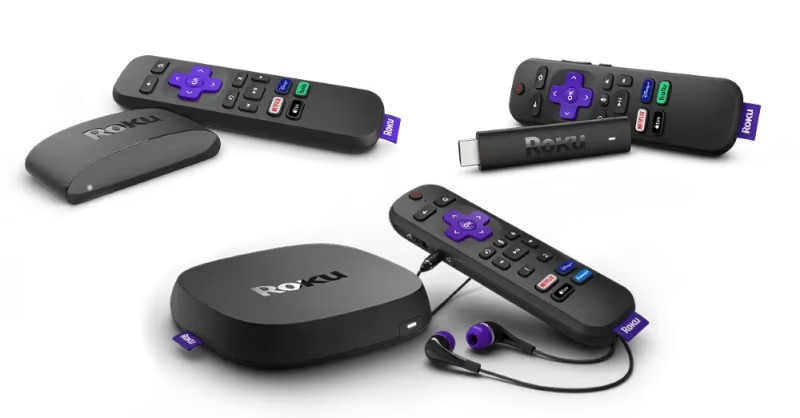
Older Roku models like the Roku SD (N1050) unfortunately do not support the Peacock app.
#Do You Need a 4K Roku for Peacock TV?
No, Peacock does not currently stream any content in 4K resolution. So even if you have a 4K TV and a 4K Roku like the Premiere or Ultra, Peacock will only play in HD quality.
The good news is you can use any modern Roku device even older 1080p models. Picture quality is still decent, and you get access to the full Peacock catalog.
#How Do You Add the Peacock TV Channel on Your Roku?
Once you’ve confirmed your Roku model supports Peacock, adding the app only takes a minute.
#Method 1: Add Peacock Directly on Your Roku
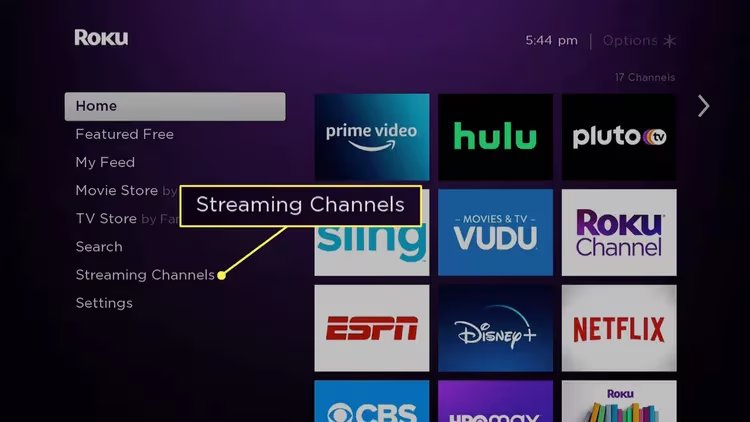
- From the Home screen, go to Streaming Channels
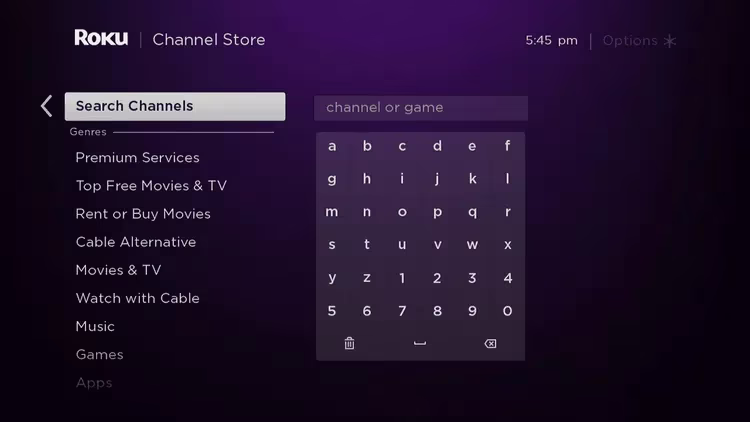
- Select Search Channels
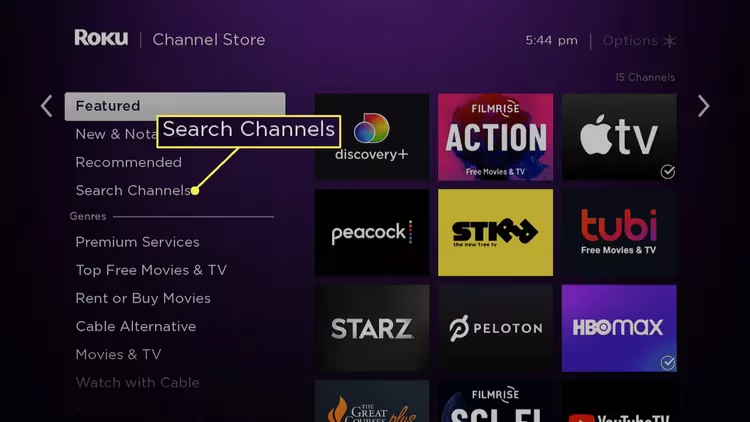
- Type in “Peacock TV”
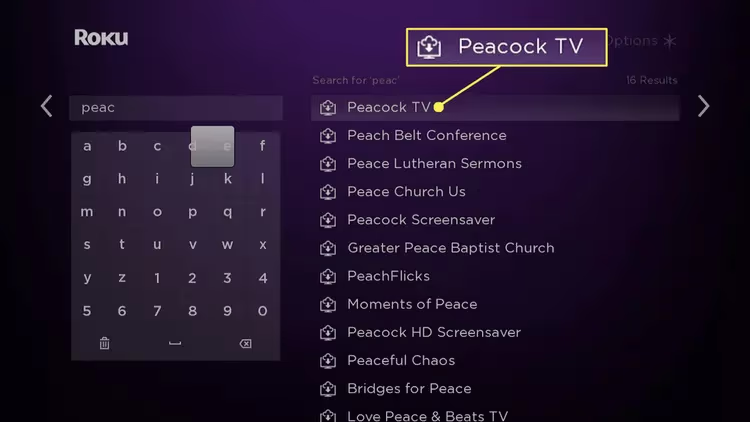
- Select Peacock TV from the search results
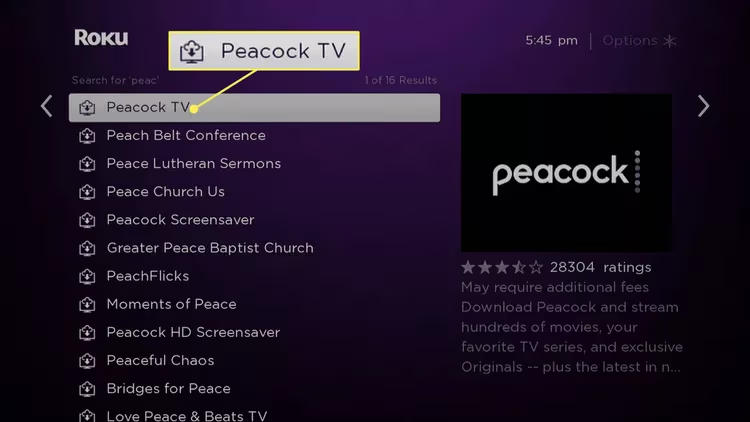
- Choose Add Channel
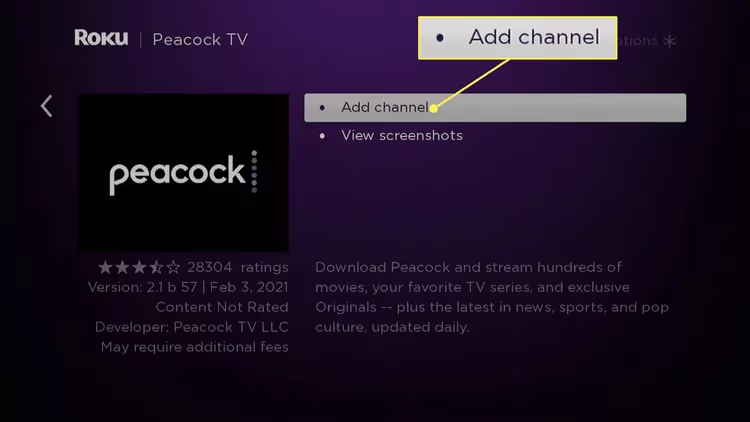
- Select OK to confirm
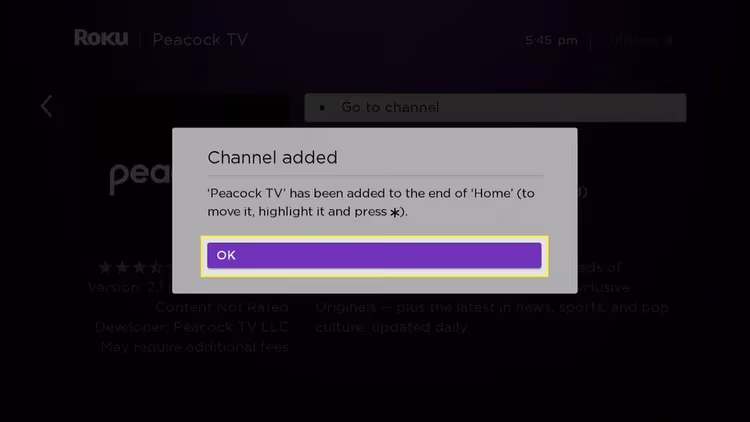
After installing, you’ll find Peacock TV in your channel list ready to launch.
#Method 2: “Add Channel” from the Roku Mobile App
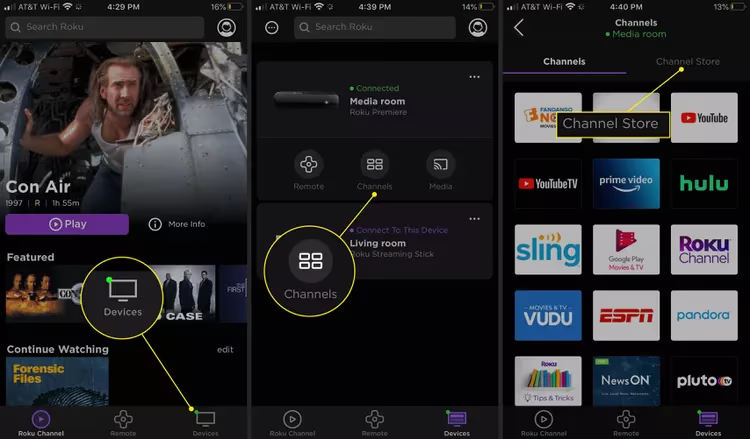
You can also add channels through the Roku mobile app, available for iOS and Android.
-
Open the Roku app on your smartphone
-
Go to Devices > Channels > Channel Store
-
Search for “Peacock TV”
-
Choose Add
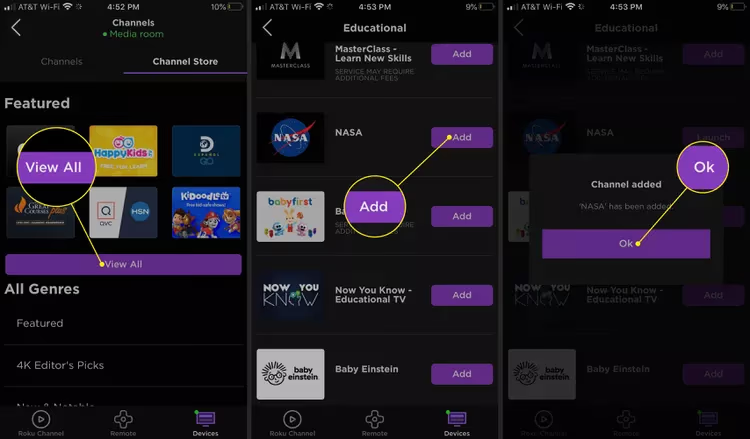
This queues up Peacock for install next time you use your Roku.
#Method 3: Get Peacock TV from Roku Website
Adding channels via Roku.com allows queuing installs even when you can’t access your device:
- Login to your Roku account
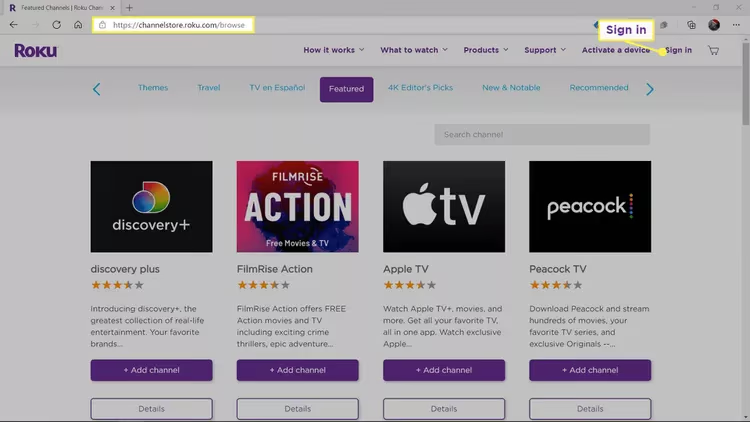
- Use site search for “Peacock TV”
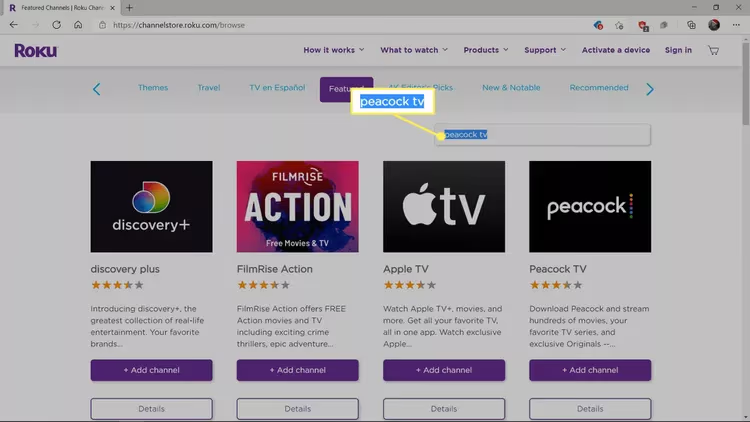
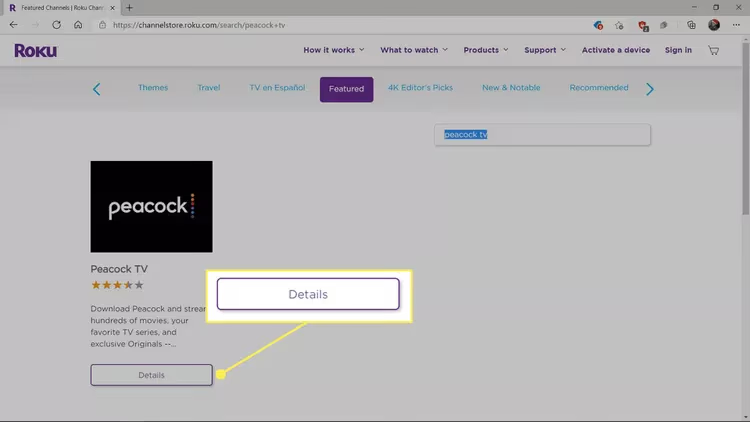
- Select Details > Add channel
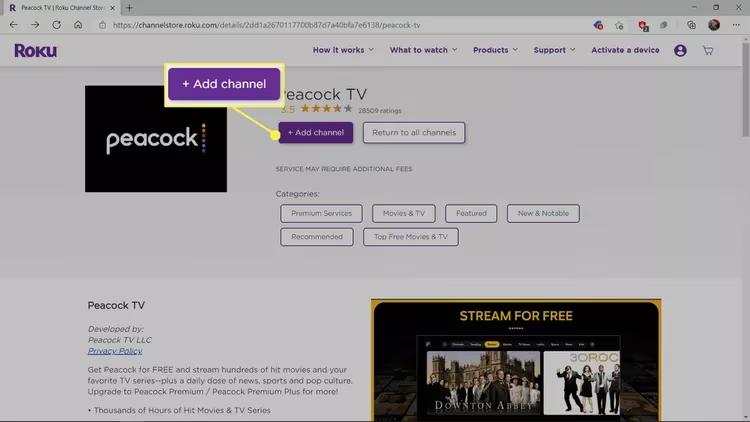
- Peacock will now be ready to open next time you use your Roku
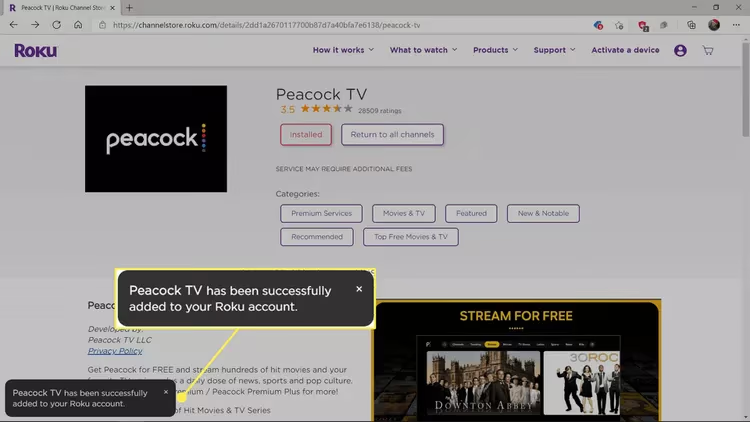
After getting Peacock from any of these methods, simply open the app from your Home screen to get started.
#Logging in and Paying for Peacock Premium on Roku
The first time opening Peacock you’ll arrive at the signup/login screen:
You have two options:
-
Create a Free Peacock account – Get limited shows & movies with ads. Just enter email.
-
Pay for Premium – Unlock full catalog without ads. Enter payment info.
If paying, you can start with the 1-week Premium free trial before entering any payment information.
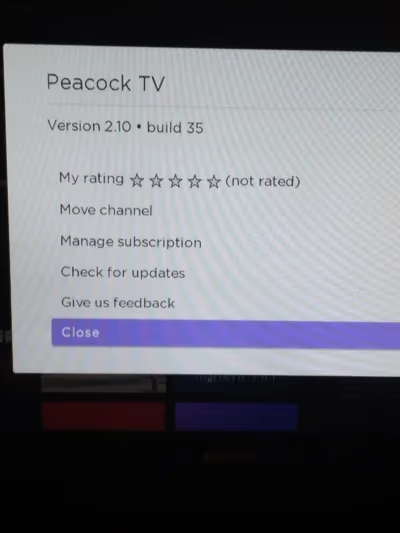
To manage your Peacock subscription later, highlight the Peacock channel and press * to open options, then choose Manage Subscription. You can also cancel directly at PeacockTV.com by going to Account > Settings.
Unlike live TV providers like YouTube TV, Peacock focuses more on on-demand movies, shows, sports and news rather than live channels.
Here’s what you get with Peacock Premium.
#What Can You Watch on Peacock TV Using Roku?
A Peacock Premium subscription unlocks tens of thousands of hours of movies, shows, sports and more:
#Currently Airing Shows the Next Day
Stay on top of NBC hits like La Brea, New Amsterdam, Chicago Fire, The Voice and Saturday Night Live just a day after they air.
#WWE Wrestling & Pay-Per-View Events
Get every WWE Raw, Smackdown, NXT, new documentaries like John Cena’s “WWE Evil” along with every live pay-per-view like Royal Rumble and WrestleMania.
#Past Seasons of NBC Favorites like The Office
Binge classic NBC sitcoms like 30 Rock, Parks & Rec, Friday Night Lights, Frasier, Cheers, Saturday Night Live, King of Queens and every glorious season of The Office.
#Peacock Originals Like Bel-Air & Joe vs. Carole
Exciting new series you can’t stream anywhere else, such as mystery drama One of Us is Lying, Fresh Prince reboot Bel-Air, Joe Exotic biopic Joe vs. Carole, and comedy Rutherford Falls.
#Universal, DreamWorks & Illumination Movies
From new movies like Nope, Ticket to Paradise and Easter Sunday to classics like Jaws, E.T., Shrek, Despicable Me and more. Lots for kids and families too.
#News & Late Night Shows
Stay informed with NBC News, MSNBC, CNBC, Noticias Telemundo and late night episodes in the mornings.
#Live Sports & Events
NFL Wildcard playoffs, Sunday Night Football, Premier League, Olympics, Ryder Cup, World Cup qualifiers and more. Plus replays, analysis and highlights.
With thousands of hours of quality programming across every genre, a Premium Peacock subscription is very reasonably priced on Roku compared to giants like Netflix.
How does Peacock compare to other top streaming platforms? Our hands-on Peacock review breaks down the pros and cons from over 50+ hours of testing the service ourselves.
Peacock also has native apps for platforms like Vizio SmartCast and Amazon Fire TV, expanding device support beyond just Roku.
#Bottom Line
Peacock TV on Roku gives you access to a massive library of NBCUniversal content at a reasonable price. The free tier lets you sample the service, while Premium at $4.99/month unlocks the full catalog including next-day NBC shows, WWE, live sports, and originals. Adding the channel takes about a minute through the Roku Channel Store, mobile app, or website.
The only real limitation is the lack of 4K streaming, but HD quality at 1080p still looks sharp on most TVs. If you watch NBC shows, follow WWE, or want an affordable streaming option alongside Netflix or Hulu, Peacock on Roku is worth trying.
#FAQ
#Can you get Peacock TV as a Roku channel?
Yes, Peacock has an official Roku channel that you can add for free from the Channel Store. Comcast NBCUniversal and Roku reached a carriage agreement in late 2020, and the app has been available on all supported Roku devices since then.
#How good is the picture quality on Peacock with Roku?
Peacock streams at up to 1080p HD on supported Roku devices. There is no 4K content available on the platform at this time. Picture quality looks sharp across movies, shows, and live sports on any modern Roku player.
#Is WWE Network content available through Peacock on Roku?
Yes. WWE Network migrated all its content into Peacock in 2022. You can access every WWE pay-per-view, Raw, SmackDown, NXT, and original documentary through your Peacock subscription on Roku. If you had existing WWE Network credentials, you can use those to log in.
#What Roku models do not support Peacock?
Older models like the Roku SD (N1050) and early Roku 2 units (except the 4210X) cannot run the Peacock app. If your Roku was manufactured before 2013, it likely falls outside the supported device list. Check the model number under Settings > System > About on your Roku to confirm.
#Do you need Peacock Premium to watch anything on Roku?
No. Peacock Free gives you access to a limited selection of shows, movies, and clips without paying anything. You only need Premium ($4.99/month) or Premium Plus ($9.99/month) if you want the full catalog, ad-free viewing, or access to live sports and next-day NBC episodes.
#Can you cancel your Peacock subscription directly on Roku?
Yes. Highlight the Peacock channel on your Roku Home screen, press the asterisk (*) button on your remote, and select Manage Subscription. You can also cancel through your account at PeacockTV.com under Account > Settings. Either method stops billing at the end of your current cycle.
#Does Peacock replace the NBC app on Roku?
No. The NBC, NBC News, and NBC Sports apps remain separate channels on Roku. Peacock is an additional streaming service that offers on-demand content from NBCUniversal, including originals and library titles not found in the standard NBC apps.
#What sports can you watch on Peacock through Roku?
Peacock carries Sunday Night Football, NFL Wildcard playoff games, Premier League soccer, Olympics coverage, Ryder Cup, and select World Cup qualifiers. You also get replays, highlights, and analysis. A Premium subscription is required for most live sports content.