Orby TV is a satellite TV service aiming to provide an affordable alternative to traditional cable and streaming services. But is it right for you? This guide examines Orby TV reviews, pricing, channels, and other key details to know before signing up.
- Orby TV starts at $40/month for 44 live channels with no long-term contracts required
- Upfront equipment costs total at least $250 for dish installation, receiver, and wiring for one TV
- No sports networks like ESPN are included in any Orby TV package to keep monthly prices low
- Premium add-ons like HBO and Starz cost $6 to $18/month on top of the base package
- Satellite delivery means no internet required but weather can occasionally disrupt the signal
#What Is Orby TV and How Does It Work?
 Orby TV is a satellite TV provider launched in 2019 as a lower-cost competitor to Dish Network and DirecTV. Rather than requiring an internet connection like streaming services, it transmits digital satellite TV and audio signals to a satellite dish and antenna setup at your home.
Here’s a quick overview of how Orby TV works:
-
Equipment – Orby TV requires a satellite dish, outdoor antenna, receiver(s) and wiring to be installed, typically on your roof. The antenna picks up local channels.
-
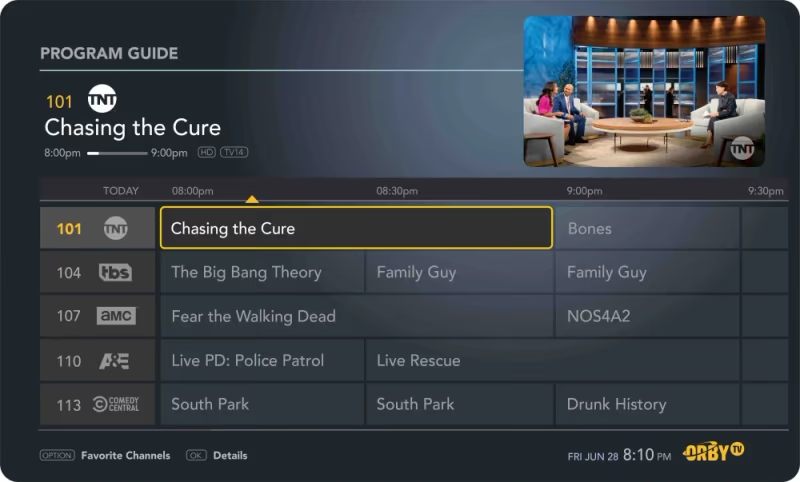
Access – Once installed, use the Orby TV remote and on-screen guide to access live national and local channels based on your package.
-
Packages – Orby has two base channel packages (Essentials and Extras) plus optional premium add-ons like HBO and Starz. No long-term contracts.
As a satellite service, Orby TV may experience occasional service interruptions during severe weather. Installation success also depends on having a clear line of sight to transmit and receive signals from Orby TV’s satellites.
#What Do Customers Say About Orby TV?
Orby TV customer reviews frequently highlight the convenience and value from the service’s contract-free packages and competitive pricing compared to alternatives.
However, many reviews also describe frustration with the required equipment purchase, installation and overall channel selection.
Here is a sampling of common pros and cons from Orby TV customer reviews:
PROS
-
Competitive pricing and no contracts
-
Decent channel selection in base packages
-
Optional premium add-ons like HBO available
-
Reliable service for satellite TV fans
CONS
-
High equipment and installation costs
-
Missing some popular channels
-
Possible signal reliability issues
-
Fewer channels than alternatives overall
While Orby TV is a fairly unique product compared to streaming providers, reviews suggest it works best for budget-focused viewers willing to sacrifice access to certain sports, news and entertainment channels in exchange for the value.
#How Much Does Orby TV Cost?
Orby TV pricing aims to give customers solid value, with no long-term contracts and fees/taxes built into the advertised monthly rates. However, total costs can still add up due to various startup fees and additional hardware requirements.
#Monthly Packages
Orby TV has two main programming packages:
-
Essentials ($40/month) – Includes 44 live channels
-
Extras ($50/month) – Expands channel lineup to 68 channels
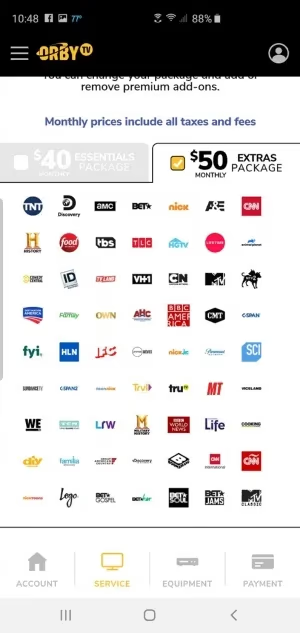
Both packages include a variety of popular entertainment, news, lifestyle and movie channels. However, Orby TV does not carry sports networks like ESPN to help keep costs down.
Local channel availability will also vary based on geography and antenna reception capability.
#Add-Ons, Premiums and Other Fees
In addition to the base packages, Orby TV subscribers can supplement their channel lineup with the following extra content and capabilities for an additional monthly fee:
-
HBO – $18/month for 5 channels
-
Cinemax – $12/month for 4 channels
-
Starz – $9/month for 4 channels
-
Epix – $6/month for 4 channels
-
DVR Service – $4/month add-on or $12/month for antenna recordings only
#Startup and Installation Costs
As a satellite TV provider, Orby TV comes with considerable one-time fees to purchase and set up the necessary equipment:
-
Satellite Dish + Antenna – Professional installation by Orby technicians starts at $150
-
Receivers – $100 per TV. Required to tune channels on each TV
-
Wiring – $50 per room for connections beyond the initially installed room
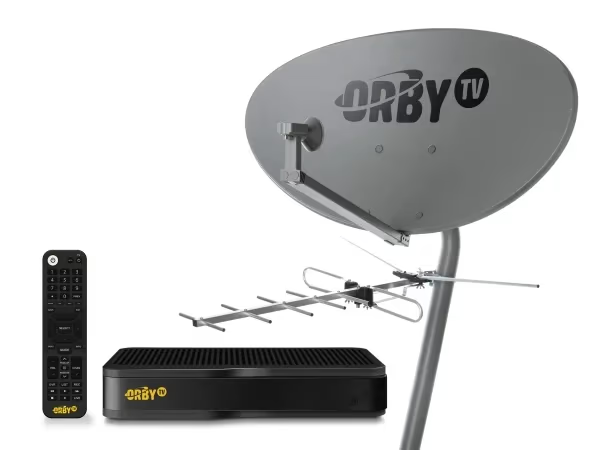
Minimum startup costs total around $250 for equipment, basic installation and wiring for a single TV. However, costs can easily escalate as you add receivers and rooms.
While Orby TV has self-installation kits for less, professional expertise is recommended for most. Carefully weigh these startup expenses before deciding if Orby TV works for your budget.
#Orby TV Channel Lineups and Supported Devices
Orby TV emphasizes value over volume when it comes to channels. While its base packages may lack some popular sports and entertainment options compared to competitors, they still provide a solid selection of programming.
View Orby TV’s current Essentials and Extras channel lineups below:
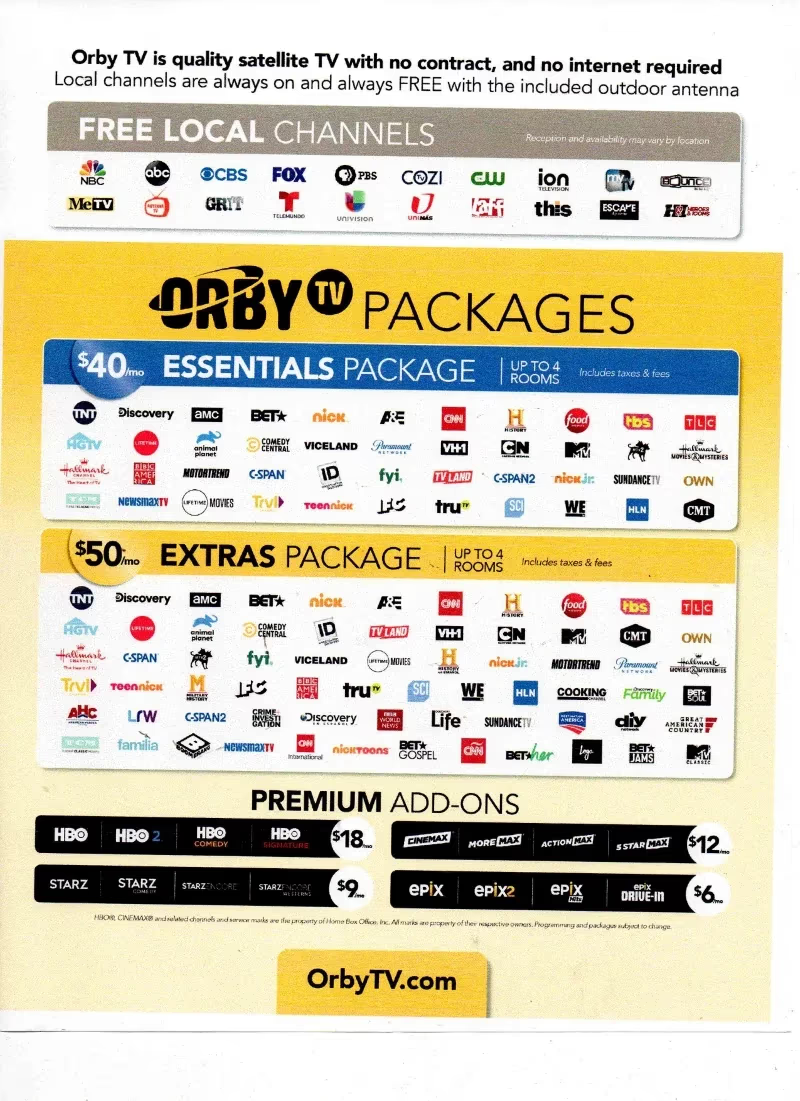
Local channel availability will vary geographically based on over-the-air antenna reception at your location. Use [antenna signal locator link] to check which local channels you may receive.
Since Orby TV uses a dish antenna and receiver setup to deliver satellite TV, supported devices are limited compared to streaming platforms. Live Orby TV can only be accessed through the required Orby receiver hardware connected to your television. Recordings made via the Orby DVR can then be accessed on those supported devices as well.
While Orby TV prioritizes entertainment channels in their packages, providers like Xfinity and Verizon Fios offer larger channel bundles similar to traditional cable.
#Key Considerations Before Signing Up for Orby TV
Orby TV is a unique satellite TV service model compared to both traditional cable/satellite providers as well as newer live streaming platforms. Before deciding if it’s the right fit, weigh the following key factors:
Pros
-
No long-term contracts
-
Competitive pricing and packages
-
Optional premium add-ons
-
Decent channel lineup for the price
Potential Drawbacks
-
Large upfront equipment/installation costs
-
Missing some popular sports/entertainment channels
-
Possible signal reliability issues in bad weather
-
Limited mobile and streaming device access
For the right consumer, particularly budget-focused viewers in rural areas without access to high-speed internet, Orby TV is a flexible and affordable way to access live satellite television.
But be sure to fully account for total costs, channel limitations and signal considerations before signing up. Analyze your must-have channels, household budget and TV habits carefully.
Orby TV does not integrate with popular streaming platforms like Peacock or offer streaming capabilities like providers such as Plex and Samsung TV Plus.
#Bottom Line
Orby TV is best suited for:
-
Viewers primarily interested in general entertainment/movie channels
-
Budget-focused households unable to afford traditional satellite/cable
-
Rural residents without access to high-speed internet
-
Part-time residents looking for a temporary satellite TV solution
-
Cord-cutters who still value live satellite TV with DVR capability
Comparatively, streaming TV providers like YouTube TV or DIRECTV Stream may suit you better if sports channels, broader device access, larger channel packages or more flexibility are higher priorities.
Carefully analyze your channel needs, restrictions and budget trade-offs before deciding if Orby TV is the right fit. Their contract-free, value-driven approach will appeal most to a specific segment of cord-cutters interested in accessing satellite TV affordably.
-
Orby TV provides live satellite TV packages starting at $40/month with no contracts
-
Considerable startup costs exist for required equipment & professional installation
-
Channel selection includes 70+ entertainment/movie options but no sports
-
Potential reliability issues in severe weather due to satellite dependence
-
Ideal for budget viewers prioritizing value over sports/volume of channels
-
Compare channel needs & restrictions before signing up
For the right consumer, Orby TV can provide an affordable path to access live satellite television. But carefully weigh factors like channel limitations, reliability concerns and upfront costs before deciding if it aligns with your needs and budget restrictions.
#Frequently Asked Questions
#Does Orby TV require an internet connection?
No, Orby TV does not need an internet connection. It delivers channels through a satellite dish and antenna system installed at your home. This makes it a strong option for rural households that lack reliable high-speed internet access.
#What channels are included in Orby TV packages?
The Essentials package ($40/month) includes 44 live channels, while the Extras package ($50/month) expands that to 68 channels. Both packages focus on entertainment, news, lifestyle, and movie channels. Sports networks like ESPN are not available in any package.
#How much does it cost to set up Orby TV?
Minimum startup costs run about $250 for the satellite dish, one receiver, and basic wiring. Each additional TV requires a $100 receiver, and extra room wiring costs $50 per room. Professional installation by Orby technicians starts at $150.
#Can you watch Orby TV on your phone or tablet?
Orby TV does not support mobile devices, tablets, or streaming platforms. You can only watch through the Orby receiver hardware connected to your television. DVR recordings are also limited to playback on connected TVs.
#Is Orby TV better than YouTube TV or Sling TV?
It depends on your priorities. Orby TV costs less per month and requires no internet, but it lacks sports channels and mobile access. YouTube TV and Sling TV offer broader channel lineups, streaming device support, and sports networks, though they need a stable internet connection.
#Does weather affect Orby TV signal quality?
Yes, severe weather can temporarily disrupt satellite reception. Heavy rain, snow, or storms may cause brief signal interruptions. Clear line of sight between your dish and the satellite is also important for consistent service.
#Does Orby TV have a contract or cancellation fee?
Orby TV operates on a month-to-month basis with no long-term contracts. You can cancel at any time without paying an early termination fee. The equipment you purchased remains yours after cancellation.
#Can you add premium channels to Orby TV?
Yes, Orby TV lets you add HBO ($18/month), Cinemax ($12/month), Starz ($9/month), and Epix ($6/month) to either base package. A DVR service add-on is also available for $4/month or $12/month for antenna recordings only.