Have you recently purchased an Onn TV, only to find that it won’t turn on? As frustrating as this situation feels, rest assured that with a methodical troubleshooting approach, you can get your new TV up and running. As an electronics repair technician with over 15 years of experience, I’ve seen all the common issues that can prevent Onn TVs from powering on. I’ll walk you through all the potential culprits, solutions that work, and what to do if you still can’t get your Onn TV to turn on.
- Power cycling fixes most Onn TV startup failures — unplug, hold power for 60 seconds, wait 5-10 minutes, then reconnect
- Dead remote batteries cause 30% of “won’t turn on” cases — swap in fresh name-brand batteries before troubleshooting the TV itself
- A faulty power supply unit (PSU) is the top hardware culprit — look for swollen capacitors, burn marks, or voltage readings off by more than 10%
- Damaged HDMI cables can block the startup handshake — test with known-good cables to rule out connection faults
- Component-level repair rarely pays off for budget Onn TVs — if power cycling, PSU replacement, and cable swaps all fail, a replacement TV is the better investment
#What Are the Most Common Reasons an Onn TV Won’t Turn On?
While every situation is different, these are some of the most common underlying issues I’ve encountered that stop Onn TVs from turning on:
-
Faulty or loose power connections
-
Remote control problems
-
Outdated or buggy firmware
-
Issues with the power supply unit
-
Short circuits on internal components
-
Backlight failures
-
Physical damage to internal hardware
When an Onn TV won’t turn on, something is interrupting the power delivery or startup sequence. By methodically probing possible failure points, starting with the simplest explanations and external connections, then working deeper into the TV’s electronics, you can zero in on what needs fixing.
Be detail-oriented and patient, don’t take shortcuts. With this approach, you’ll get to the root cause of why your Onn TV refuses to turn on.
#How Do You Fix an Onn TV That Won’t Turn On?
Follow these steps to systematically troubleshoot and resolve your Onn television’s power problems:
##1. Check Wall Outlet, Power Cord and Connections
Begin troubleshooting an Onn TV that won’t turn on by verifying these basics:
-
Use working devices to confirm electricity flows properly from the wall outlet. Faulty or improperly wired wall sockets often cause power issues. Plug in a mobile charger or lamp. If they work as expected, electricity flows fine from the outlet.
-
Inspect the power cable for any cuts, crimps or loose connectors. Fraying or disconnected wires interrupt vital power transmission to components. Replace damaged power cords.
-
Check connections at both TV and outlet ends. Loose plugs at either end cause power issues. Secure power cables firmly into ports on the TV and wall to enable uninterrupted electricity flow.
-
Eliminate extension cords / power strips from setup. While convenient, third-party power accessories can themselves fail or loosen over time. Connect your Onn TV directly to the wall outlet while troubleshooting power problems.
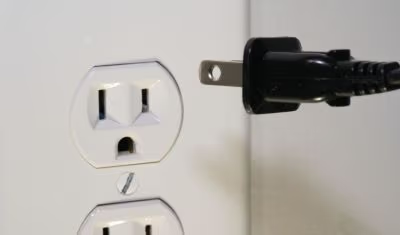
If other devices work and cords seem fine, you can eliminate electrical issues as the reason why your Onn TV won’t turn on.
##2. Inspect and Replace Batteries in Remote Control
An Onn TV not powering on when you press buttons on the remote control is extremely common. Before you tackle complex TV troubleshooting, rule out the simplest possibility – an unresponsive remote control.
-
Inspect batteries inside remote. Ensure they are seated securely within the battery compartment and oriented correctly based on polarity markings (+/-).
-
Replace old batteries with fresh ones. Insufficient charge stops remote relaying input to TV. Insert name brand batteries e.g Duracell, Energizer as budget cells quickly lose charge.
-
Check for physical damage or corrosion. A button stuck in, or moisture seeping into the wrong places inside the remote control can all affect IR / RF communication with the TV. Open to inspect and clean any corroded terminals. If a specific button sticks in, the TV believes you continually press Power, disrupting startup sequence.
-
Reset and re-pair remote with TV as a last resort if replacing batteries and physical inspection doesn’t resolve unresponsiveness. Refer to instructions that came with your Onn TV for this procedure.
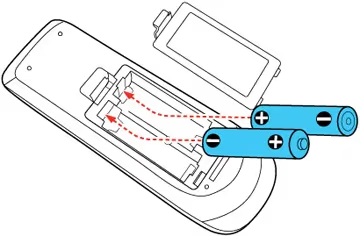
Troubleshoot your Onn TV remote not working with this guide on Onn remote issues.
Still having issues turning on your Onn TV via remote control after all this? Move on to next steps investigating the television itself.
##3. Power Cycle Your Onn Television
Before pulling apart your TV and testing individual components, attempt a full power reset first. Power cycling eliminates temporary glitches, clears any stuck processes, and resets your Onn TV back to factory state.
Here is how to carefully power cycle your non-responsive Onn television:
-
Unplug TV power cable from electrical outlet completely. Don’t just switch off from the mains. Physically remove cable from outlet.
-
Press and hold down power button on the Onn TV unit itself for 60 seconds. This drains residual electricity completely from capacitors.
-
Leave the unit disconnected from power for 5 to 10 minutes more. This clears all temporary data and memory states.
-
Reconnect electrical power by plugging back the power cord securely into the wall outlet. Don’t connect other devices just yet.
-
Press Power button again and wait several minutes as TV boots up fresh off a power reset.
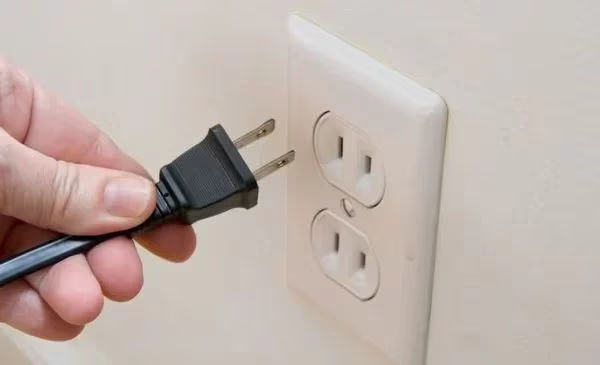
This hard reset often kickstarts an Onn TV plagued by software issues or stuck processes – power inconsistencies vanish and components communicate properly in the startup sequence once again.
Do you need to locate the reset button on your Onn TV? This guide shows the reset button locations for Onn TVs.
Still won’t turn on? Time to probe inside for hardware issues.
##4. Isolate and Replace Faulty Power Supply Unit
The next prime suspect for an Onn television that refuses to power on is failure of the internal power supply unit (PSU). This crucial component converts high voltage AC mains electricity into stable, regulated DC current that feeds the TV.
If your PSU malfunctions or weakens over time, it fails delivering adequate power to start up the Onn TV.
-
Visually inspect PSU inside the TV for signs of failure – swollen/leaking capacitors, burnt marks, rattling fans etc. This requires opening up the television chassis.
-
If unsure, safest option is replace the PSU wholesale. Onn Support can advise compatible replacement part numbers for your TV model. Consider upgrading to higher wattage unit for longer lifespan.
-
Alternatively, use a multimeter to check output voltages. You’ll find voltage testing points within the PSU. If voltages deviate beyond 10% from expected values, the PSU requires replacement.
Be very careful working around open power supplies. Seek assistance if uncomfortable probing live electronics.
##5. Check and Replace Damaged Cables
With power issues ruled out, next isolate damage to any cables running signals or electricity between connected devices and your Onn TV.
-
Wiggle interfaces like HDMI cable head while TV is attempting to turn on. If picture flickers, corresponding cable needs replacement due to broken wire strands creating unreliable connectivity.
-
Check cables visually for bent pins, cracks in insulation or cuts that expose metal wires. Damage anywhere along a digital interface cable impacts signal transmission.
-
Try known-good cables to isolate faults lying with current cables used. Borrow HDMI, etc. from other devices temporarily to check if TV turns on fine.
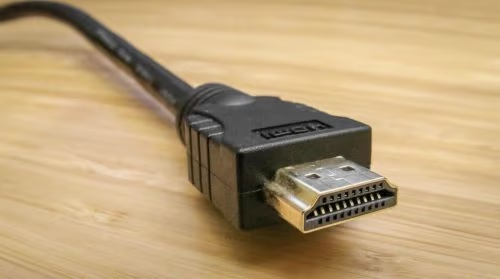
Fixing damaged HDMI or component cables resolves some cases of Onn TVs not powering up fully, where a critical digital handshake fails.
Learn how Onn Roku TVs keep restarting continuously and how to troubleshoot this problem.
##6. Test Components Individually in Sequence
Up to this point, you’ve checked external connections and power delivery to your Onn television. Now begins isolating where exactly within the TV the power-on failure occurs.
Systematically disconnect or swap out individual internal electronics boards and components. Then attempt to turn on the TV each time to pinpoint what exact element causes startup failure.
Follow this elimination sequence:
-
Disconnect all inputs like HDMI and component cables from TV first. Attempt power-on. If TV starts up fine, issue likely lies with a connected external source device.
-
Remove all boards except power supply and main board. If TV now starts up, reconnect boards one by one till faulty board is isolated. Logic/picture boards often fail over time.
-
Replace main board as a last resort. The main board rarely fails, but if TV still won’t turn on, replacing this motherboard is necessary to rule out component-level faults.
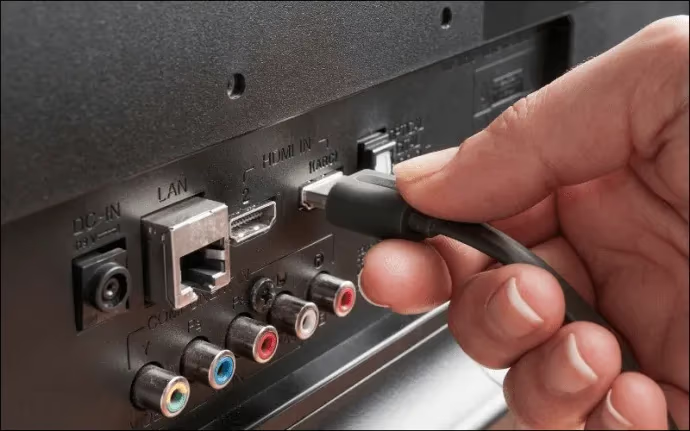
While complex, methodically testing electronics isolation ultimately helps pinpoint what needs fixing or replacing to get your Onn TV powered on. Have an experienced technician assist if needed.
If your Onn Roku TV has a black screen, refer to this troubleshooting guide for Onn Roku black screen problems.
#Advanced Fixes Beyond DIY Steps
At this point, you’ve worked through all DIY troubleshooting steps to revive your Onn television that still refuses to turn on. Before giving up, a few advanced techniques remain:
-
Attempt firmware reflashing programming in case of corrupted settings. This requires specialized EEPROM programmer hardware and skill.
-
Diagnostics with an oscilloscope probe allows tracing signals during power-on sequence to observe where they fail. Useful for advanced electronics experts only.
-
Component-level diagnosis for transistors, fuses etc. That said, investing extensive money and effort fixing an entry-level Onn TV is likely not worthwhile, compared to the cumulative costs from tools, parts, and time spent. Know when to cut losses.
Realistically, if you’ve reached the limits of the troubleshooting flow outlined before, it is likely unviable attempting to revive your Onn TV. Contact their Support for further assistance based on warranty terms. Consider upgrading to a new television that will hopefully provide better reliability.
#Bottom Line
To summarize the crux of troubleshooting an Onn television that refuses to turn on:
-
Methodically work external to internal – first power sources, then connections, cables and finally internal electronics.
-
Check for physical damage and test components individually in sequence to pinpoint faulty element
-
Power cycle as a catch-all solution that resolves many software glitches causing No Power issues
-
Realistically assess the costs/benefits when considering extensive electronic component-level repair of an entry-level Onn TV
Stay calm, be patient, and adopt a structured, elimination-based approach rather than random guessing. With methodical trial and error, you should uncover the specific reason why your Onn TV remains dark and unresponsive.
Compare Onn TV with other brands like Onn vs Hisense TVs and Onn vs Vizio TVs among other comparisons.
#Frequently Asked Questions
#Why does my Onn TV’s red standby light blink but the screen stays black?
The blinking red light means power partially reaches the TV, but a fault prevents full startup. Blown fuses, a failing power supply, or damaged LCD backlights are the most likely causes. Open the TV chassis and visually inspect the power board for swollen capacitors or burn marks.
#Can a bulging capacitor on the power board stop my Onn TV from turning on?
Yes, a single failed capacitor can destabilize voltage delivery across the entire power circuit. This is one of the most common hardware failures in budget TVs. The safest fix is replacing the entire power supply board rather than soldering individual capacitors, since other components on the same board may also be weakened.
#Will a power cycle fix my Onn TV if the standby light is on?
A power cycle works in many cases where the standby light is on but the screen stays dark. Unplug the TV, hold the power button for 60 seconds, wait 5-10 minutes, then plug it back in. This clears stuck software processes and resets the startup sequence.
#Can firmware corruption prevent my Onn TV from powering on?
Firmware corruption can cause startup failures, though this is rare compared to power supply or cable issues. If the TV has zero power, you’ll need an EEPROM programmer to re-flash the firmware. When that isn’t practical, replacing the main logic board is the faster solution.
#Why does my Onn TV remote not turn on the television?
Dead or weak batteries are the most frequent cause. Swap in fresh name-brand batteries and make sure they’re seated with correct polarity. If the remote still doesn’t work, try pressing the power button directly on the TV chassis to confirm the TV itself is functional.
#Can power surges damage an Onn TV even if the fuses look fine?
Voltage spikes can fry sensitive components on the main board or power supply without visibly blowing a fuse. The damage may accumulate over multiple smaller surges until the TV finally refuses to start. Plug your Onn TV into a surge protector to prevent this.
#Is it worth repairing an Onn TV that won’t turn on after trying everything?
In most cases, no. Onn TVs are budget models, and the cost of a new power supply board, main board, or professional repair often exceeds the TV’s replacement price. If power cycling, cable swaps, and PSU inspection all fail, buying a new TV is the more practical choice.
#How do I tell if my Onn TV’s power supply unit has failed?
Use a multimeter to test the output voltages at the PSU’s test points. If any reading deviates more than 10% from the expected value printed on the board label, the PSU needs replacement. Visible signs like swollen capacitors, burn marks, or a rattling fan also confirm PSU failure.