ONN TV reset buttons hide in different spots depending on the model year. Most 2022 and newer ONN Roku TVs use a recessed pinhole button on the lower back panel, while older models placed a physical button along the bottom edge. This guide covers every reset method across all ONN TV generations so you can get your TV working again fast.
- Pinhole reset button — located on the back panel near HDMI/USB ports on 2022+ ONN Roku TV models
- External reset button — found on the bottom edge of pre-2022 ONN TVs, labeled “Reset” or “Factory Reset”
- Hold time matters — press and hold the reset button for 15-20 seconds until the TV power light blinks
- Menu reset path — Settings > System > Advanced System Settings > Factory Reset works when you have a remote
- No-remote reset — hold Volume Down + Input on the TV while plugging in the power cord to access the reset menu
#Where Is the Reset Button on an ONN TV?
The reset button location depends on your ONN TV model. There are two physical button types across ONN TV generations.
Pinhole (recessed) reset button — This is the most common type on current ONN Roku TVs. Look at the back of your TV, near the bottom edge where the ports are. You will see a tiny hole, usually within 2-3 inches of the HDMI inputs. The hole is not labeled on all models, so check every small opening near the port cluster.
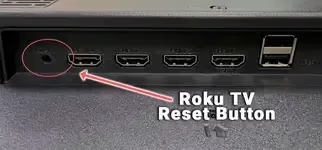
External (raised) reset button — Older ONN TVs from 2020-2021 placed a physical button on the lower back panel or bottom edge. These buttons are labeled “Reset” or “Factory Reset” and can be pressed with your finger. No tool needed.
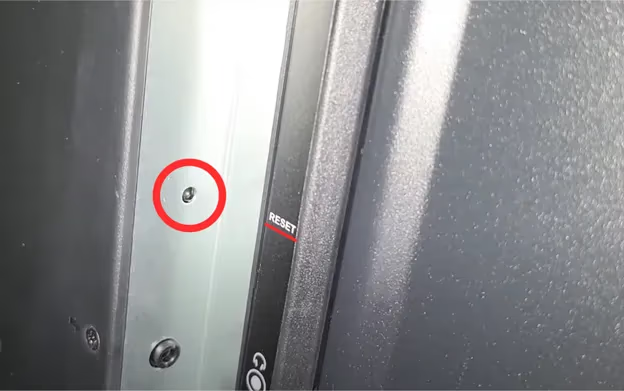
If your ONN TV has a black screen or is stuck and won’t turn on, the physical reset button is your best option since you cannot access the on-screen menus.
#How to Identify Your Model
Flip the TV around and look at the sticker on the back panel. ONN model numbers start with “100012” or similar patterns. The sticker also lists the manufacture year. Models from 2022 onward almost always have the pinhole type. If you see no visible button at all, check again near the power input and AV ports.
#How Do You Factory Reset an ONN TV With the Button?
The physical reset process works the same whether you have a pinhole or external button. Follow these steps:
- Make sure the TV is powered on (or at least plugged in with the power light showing)
- Locate the reset button on the back panel
- For pinhole buttons, straighten a paperclip and insert it into the hole
- Press and hold the button firmly for 15-20 seconds
- The TV screen will go blank, and the power indicator will blink
- Release the button and wait 2-3 minutes for the TV to restart
- The Roku setup wizard will appear, confirming the reset worked
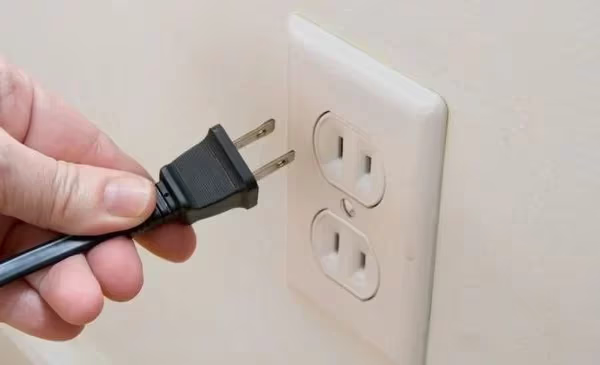
The TV will reboot on its own. Do not unplug it during this process. Once you see the language selection screen, the factory reset is complete and you can set up the TV fresh.
If your ONN TV has been randomly turning off or restarting on its own, a factory reset through the button often resolves the underlying software corruption causing these issues.
#How to Reset an ONN TV Through the Settings Menu
When your remote works and the TV responds normally, a menu-based reset is the easiest approach. This method gives you a confirmation screen before erasing anything.
- Press the Home button on your ONN Roku remote
- Scroll down to Settings
- Select System
- Choose Advanced System Settings
- Select Factory Reset
- Choose Factory Reset Everything
- Enter the on-screen code when prompted
- Select Start Factory Reset
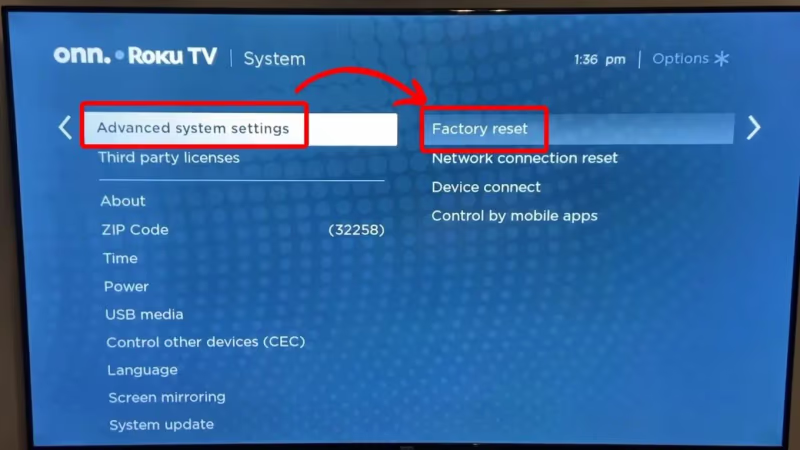
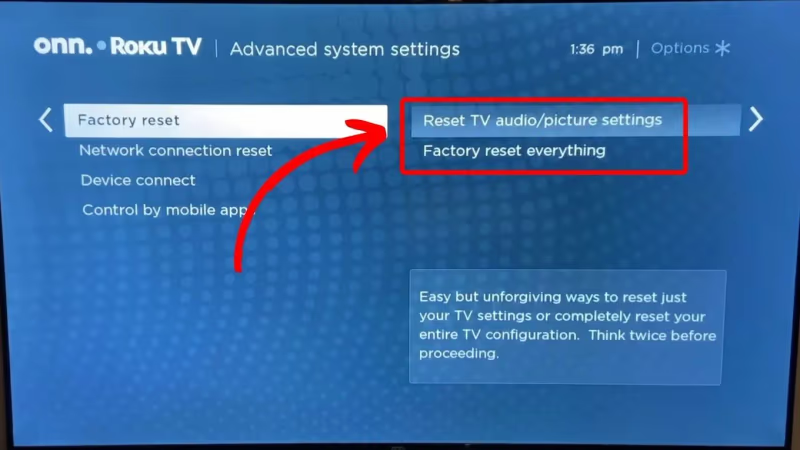
The confirmation code prevents accidental resets. Roku displays a 4-digit code on screen, and you type it using the remote’s directional pad. After entering the code, the reset begins automatically. The whole process takes about 3-5 minutes.
For more details on the Roku reset menu structure, see Roku’s official factory reset guide.
#What Gets Erased During a Factory Reset?
A factory reset wipes your TV back to its out-of-box state. Everything you configured after unboxing gets deleted.
Erased by factory reset:
- Wi-Fi network and password
- All streaming app logins (Netflix, Hulu, Disney+, etc.)
- Installed channels and apps
- Picture and audio settings you adjusted
- Parental controls and PINs
- Roku account link on the TV
Not erased by factory reset:
- Roku OS firmware stays at its current version
- Hardware calibration data
- HDMI-CEC settings reset to defaults but the feature remains available
- Your Roku account itself is unaffected (only the TV’s link to it is removed)
Write down your Wi-Fi password and streaming service credentials before you reset. You will need to re-enter all of them during setup. Your Roku account purchases and channel list remain on your Roku account at my.roku.com, so re-linking the account restores your channel lineup.
#How Can You Reset an ONN TV Without a Remote?
If your ONN TV remote stopped working, you have two options for resetting without it.
#Option 1: Physical Reset Button
Use the pinhole or external reset button described above. This works regardless of whether you have a remote. Press and hold for 15-20 seconds, and the TV resets itself.
#Option 2: TV Button Combination
Some ONN Roku TV models support a button combination reset using the physical buttons on the TV itself.
- Turn off the TV and unplug the power cord
- Press and hold Volume Down and Input buttons on the TV (not the remote)
- While holding both buttons, plug the power cord back in
- Keep holding for about 10 seconds until a recovery menu appears on screen
- Use the Volume buttons to navigate and the Input button to select
- Choose Factory Reset from the menu
Not all ONN models support this button combination. If no menu appears after 15 seconds, the feature is not available on your model. In that case, use the pinhole reset button instead.
#Option 3: Roku Mobile App
Download the Roku mobile app on your phone, connect to the same Wi-Fi network as the TV, and use the app’s virtual remote. Navigate to Settings > System > Advanced System Settings > Factory Reset from there.
#When Should You Reset vs Power Cycle?
Not every problem needs a full factory reset. A power cycle fixes many common issues without erasing your settings.
Power cycle first if your TV has:
- A frozen screen that won’t respond to the remote
- Apps loading slowly or crashing
- Screen flickering during playback
- Temporary Wi-Fi connection drops
To power cycle, unplug the TV from the wall outlet. Wait 60 seconds. Plug it back in. This clears temporary memory without touching your settings or logins.
Factory reset when:
- Power cycling did not fix the problem
- The TV gets stuck in a boot loop
- You see persistent error messages about overheating
- You are selling or giving away the TV
- Multiple problems stack up and the TV feels unreliable
A factory reset is the nuclear option. Try a power cycle first because it solves most temporary glitches in under two minutes.
#Bottom Line
Start with a power cycle (unplug for 60 seconds) before attempting a factory reset. If the issue persists, locate your ONN TV’s reset button on the back panel near the ports. On 2022+ models, it is a pinhole that requires a paperclip. Press and hold for 15-20 seconds to trigger the reset. Write down your Wi-Fi password and streaming logins beforehand because the reset erases everything. If you still have problems after a factory reset, the issue is likely hardware-related and may need professional service or a warranty claim through Walmart.
#FAQ
#Where exactly is the reset button on an ONN Roku TV?
On most ONN Roku TV models made after 2022, the reset button is a small pinhole located on the back panel within a few inches of the HDMI ports. It sits near the bottom edge of the TV. Use a straightened paperclip to reach it.
#Does a factory reset delete my Roku account?
No. A factory reset only removes the link between your TV and your Roku account. Your account, purchased channels, and subscription information remain intact at my.roku.com. You just need to sign back in and re-link the TV during setup.
#How long does an ONN TV factory reset take?
The reset process takes 3-5 minutes from start to finish. After holding the reset button for 15-20 seconds, the TV reboots and loads the initial setup wizard. The setup wizard itself adds another 5-10 minutes as you reconnect to Wi-Fi and sign into your accounts.
#Can I reset my ONN TV if the screen is completely black?
Yes. The physical reset button works even when nothing displays on screen. Locate the pinhole on the back panel, press it with a paperclip for 15-20 seconds, and let the TV restart. If the screen remains black after the reset, the problem is likely a failed backlight or T-con board rather than a software issue.
#What is the difference between a soft reset and factory reset?
A soft reset (power cycle) clears temporary memory by unplugging the TV for 60 seconds. It preserves all your settings, apps, and logins. A factory reset erases everything and returns the TV to its original out-of-box state. Always try a power cycle first.
#Will a factory reset fix my ONN TV that keeps restarting?
In most cases, yes. Restart loops on ONN TVs are usually caused by corrupted software or a failed firmware update. A factory reset reinstalls the clean version of Roku OS and eliminates the corrupt data causing the loop. If restarts continue after the reset, the problem is hardware.
#Do I need to update firmware after a factory reset?
The TV keeps its current Roku OS version after a factory reset. However, once you reconnect to Wi-Fi, the TV will automatically check for and install any available firmware updates. This happens during the initial setup process without any extra steps from you.
#My ONN TV reset button is not working. What should I try?
Make sure you are pressing firmly enough. Pinhole buttons require a thin, stiff object like a paperclip pushed straight in. Hold for a full 20 seconds, not just a quick press. If the button still does not respond, try the Volume Down + Input button combination with the power cord method. A non-responsive reset button on an otherwise powered TV could indicate a mainboard issue.