Has your ONN Roku TV started unexpectedly restarting and you have no idea why? You’re not alone. Many Roku TV owners face this frustrating issue, and the fix is often straightforward once you identify the root cause.
- Cache reset fixes most software glitches — press Home 5 times, Up once, Rewind twice, Fast Forward twice on your remote
- Overheating triggers automatic shutdowns — ensure at least 4 inches of clearance around all TV vents
- Power supply problems cause random reboots — try a different wall outlet and replace worn cables
- HDMI-CEC conflicts restart the TV unexpectedly — disconnect all HDMI devices to isolate the issue
- Failed capacitors require board-level repair — bulging or leaking caps on the power board need professional soldering
#What Causes an ONN Roku TV to Keep Restarting?
Before jumping into the step-by-step troubleshooting, here is a quick overview of the most common triggers of an ONN Roku TV restarting repeatedly and how to address them:
#Software Glitches
Resetting your TV cache often fixes simple software bugs causing restarts.
#Overheating Components
Allow the TV to fully cool off and ensure proper ventilation to prevent internal overheating.
#Power Supply Issues
Inspect cables, try different outlets, replace faulty power boards if voltage is inconsistent.
#HDMI-CEC Conflicts
Disconnect HDMI cables and devices to isolate control signal issues making the TV restart.
#Outdated Firmware
Manually trigger a Roku TV update if automatic updates are failing.
#Wrong Picture Settings
Reset picture modes to default if incorrect configurations are causing restarts.
#Damaged Capacitors
Open TV to visually inspect for bulging or leaking capacitors and replace if found.
If you are having other issues like your Onn Roku TV remote not working, black screen problems, or need help finding the reset button, check our detailed guides.
#How Do You Fix an ONN Roku TV That Keeps Restarting?
Follow these steps below to troubleshoot and resolve what exactly is making your ONN Roku TV keep restarting:
#1. Reset Your ONN Roku TV Cache
Resetting your cache often resolves random software issues or glitches that lead to freezing and unexpected reboots:
-
Press Home button on remote 5 times rapidly
-
Press UP once
-
Press REWIND twice
-
Press FAST FORWARD twice
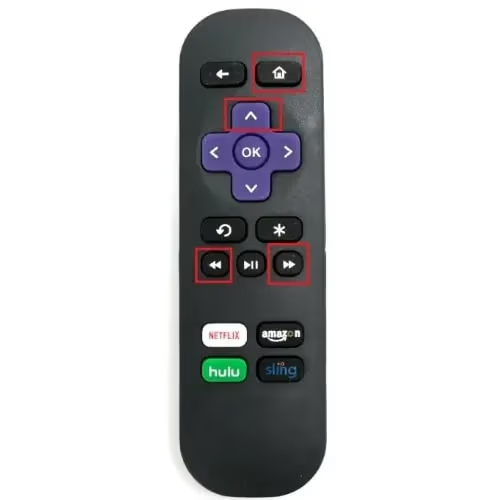
This restart sequence initiates a power cycle along with clearing any corrupted cached data.
#2. Rule Out Overheating Problems
If internal components like CPU or memory chips overheat, the TV will reset itself as a protective measure.
-
Ensure your ONN Roku TV has adequate ventilation on all sides
-
Use compressed air to clean any dust buildup inside vents
-
Consider adding a laptop cooling pad underneath to improve airflow
-
Disable Energy Saving mode which reduces fan speeds
Also relocate the TV away from any heat sources making the temperature rise internally.
#3. Inspect All Connected Cables and Power Sources
Loose HDMI connections or voltage fluctuations from overloaded power strips can trigger random ONN Roku TV reboots:
-
Inspect and push all cables firmly into port openings
-
Try different power bar, extension cord, and wall outlet
-
Use a UPS battery backup to smooth electrical irregularites
-
Replace any visibly damaged or worn HDMI and power cords
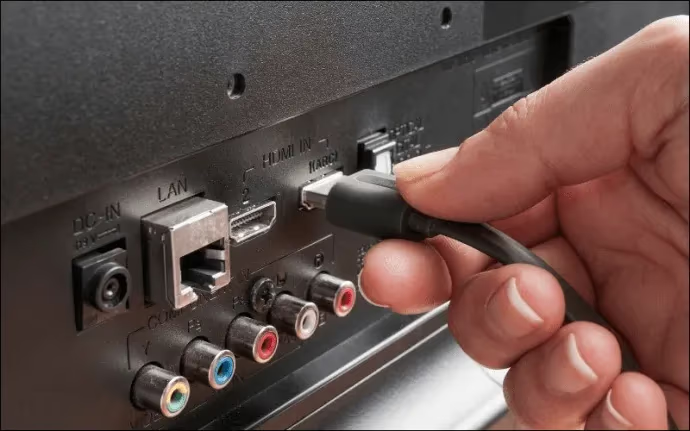
If TV stays on fine by itself, something in link to external devices likely the culprit.
#4. Factory Reset the ONN Roku TV
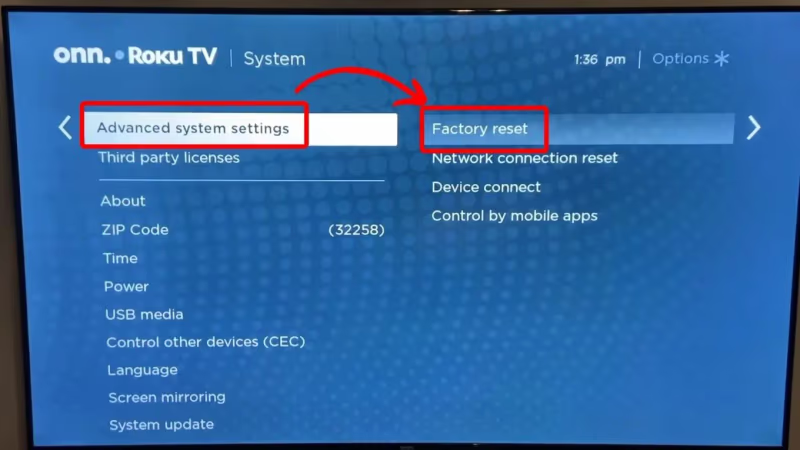
If software corruption is causing infinite crashes and restarts, a factory reset should wipe these errors:
- From Home screen, go Settings > System > Advanced Systems > Factory ResetEverything will be erased so backup Roku channels, preferences etc first.
#5. Update ONN Roku TV Software/Firmware
Outdated firmware can sometimes lead to instability and freezing issues.
-
Go to Settings > System > System update > Check now for latest firmware
-
If problems updating over internet, download firmware onto USB drive from roku.com/link website using your Roku TV model number
-
With USB inserted into TV’s port, initiate manual install under Settings > Systems > System update > via USB
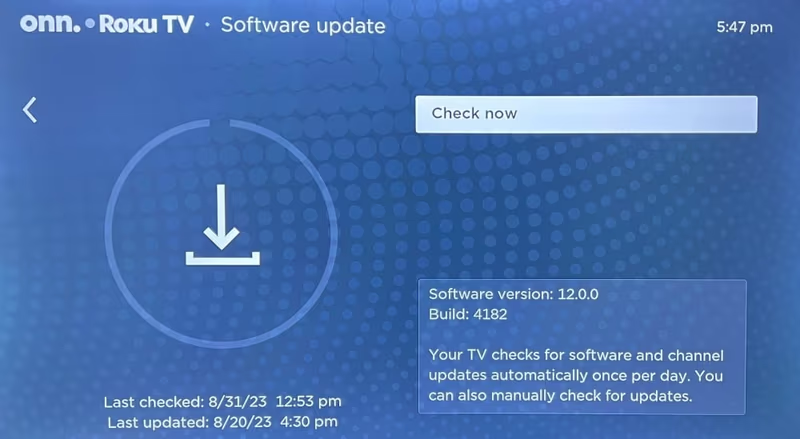
Be patient as installing firmware can take 15+ minutes.
#6. Open TV Case to Check for Failed Capacitors
Capacitors regulate voltage flow on internal boards. If they bulge, leak or fully burst then TV keeps restarting itself.
-
Carefully open back case after unplugging and discharging TV
-
Visually inspect all capacitors for swelling at the top or any leaks
-
If any found, they must be replaced by soldering in new same spec capacitors
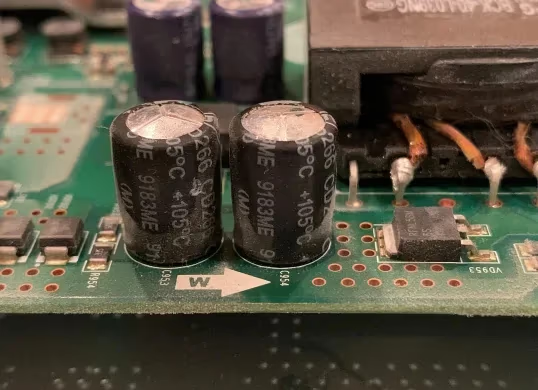
This requires advanced technical skill – have repaired by professional unless experienced with soldering.
#7. Call ONN Support About Replacement/Repairs Under Warranty
If you have tried all troubleshooting suggestions and Roku TV still constantly restarting, then internal electrical fault likely.
Contact ONN support about replacement options if under 1 year warranty at:
-
Phone: 1-844-334-2355 (9AM-9PM Eastern)
Provide your ONN Roku TV model # and overview of issue observed.
Other common problems like Netflix not working, screen flickering, or general Onn TV problems may require different troubleshooting.
#Bottom Line
-
Reset your TV cache from remote buttons to clear software bugs
-
Ensure adequate ventilation and prevent overheating internally
-
Inspect all cables for pinched damage and secure connections
-
Factory reset removes any corrupted memory/settings causing crashes
-
Update firmware to see if fixes software instability problems
-
Visually check capacitors for bulging/leaks and replace faulty ones
-
Call ONN support for repairs/replacement if under warranty
Following these troubleshooting steps will help identify exactly why your ONN Roku TV keeps restarting repeatedly and guide you to the proper solution.
#Frequently Asked Questions
#Why does my ONN Roku TV randomly restart while watching shows?
Software bugs and overheating are the two most common causes. Try clearing the cache first using the remote button sequence (Home 5 times, Up, Rewind twice, Fast Forward twice). If that doesn’t work, check that the TV has proper ventilation and disconnect HDMI devices one by one to rule out CEC conflicts.
#Can a bad power outlet cause my ONN TV to keep rebooting?
Yes, inconsistent voltage from a faulty outlet or overloaded power strip directly causes random reboots. Try plugging the TV into a different wall outlet in another room. A UPS battery backup can also stabilize power delivery if your home wiring is older.
#How do I factory reset an ONN Roku TV that won’t stop restarting?
Go to Settings > System > Advanced Systems > Factory Reset from the Home screen. Back up your Roku channel list and preferences first since everything gets erased. If the TV restarts too quickly to navigate menus, use the physical reset button on the back of the TV with a paperclip.
#What does it mean when my ONN TV turns off and back on by itself?
Rapid power cycling usually points to damaged capacitors on the internal power board. These components regulate voltage, and when they bulge or leak, the TV loses stable power and restarts itself. This requires opening the TV case and either soldering replacement capacitors or having a technician handle it.
#Will updating firmware stop my ONN Roku TV from restarting?
A firmware update fixes the problem when outdated or corrupted software is the cause. Go to Settings > System > System update > Check now. If the TV restarts before the update finishes, download the firmware onto a USB drive from roku.com and install it manually through Settings > System > System update > via USB.
#Does HDMI-CEC cause ONN Roku TVs to restart?
HDMI-CEC lets connected devices send control signals to your TV, and a malfunctioning device can trigger repeated restarts. Unplug all HDMI cables and see if the TV stays on. If it does, reconnect them one at a time to find which device is sending the bad signal, then disable CEC on that device.
#Is my ONN Roku TV restarting covered under warranty?
ONN TVs come with a 1-year warranty from Walmart. Call ONN support at 1-844-334-2355 (9AM-9PM Eastern) or email customerservice@onntvsupport.com with your model number and a description of the issue. Keep your original purchase receipt since they require proof of purchase date.