Having problems getting audio from your LG TV’s optical output? You can fix it by adjusting settings, replacing cables, or trying alternative connections. This guide walks you through every solution.
- Loose or damaged cables — a bad Toslink connection is the most common cause of optical audio failure on LG TVs
- Sound Out must be set to Optical — the TV defaults to internal speakers, so you need to manually select optical output
- Digital Sound Out should be PCM — switching from Auto to PCM resolves codec incompatibility with most soundbars
- Power cycling clears audio glitches — unplug the TV for 5 minutes to drain residual power and reset the audio board
- HDMI ARC is a reliable fallback — if the optical port is faulty, ARC carries audio over a single HDMI cable
#Why Is Your LG TV’s Optical Audio Not Working?
Using your LG TV’s optical audio output to connect an external sound system or speakers can greatly improve your viewing experience. However, many LG TV owners report issues getting audio from the optical output.
If you’ve connected your LG TV to an AV receiver, soundbar, or speakers via optical cable but aren’t hearing any audio, don’t panic. In most cases, this problem can be fixed by adjusting settings or trying a different connection method.
#Common Causes
Here are the most common reasons the optical audio output may not be working properly on your LG TV:
-
Loose or faulty optical cable connection
-
Incorrect audio output settings
-
Outdated TV firmware
-
Faulty optical port
-
Incompatible audio codec
By working through troubleshooting steps one at a time, you can isolate the cause and get your optical audio output functioning again.
#How Do You Fix LG TV Optical Audio Step by Step?
Follow these solutions sequentially until your LG TV’s optical output works:
#1. Verify Cable Connections
First, ensure your Toslink optical cable is fully inserted into the port on both your LG TV and AV device. These connectors can come loose over time.
Carefully examine the cable ends and ports for any dirt, damage, or bent pins. Damaged cables will need to be replaced.
If the connections check out, try using a different optical cable that you know works properly. This will confirm whether the issue is with the cable or something else.
#2. Adjust Sound Settings
Navigate to your LG TV’s settings menu and then audio or sound options.
Under Digital Sound Out, toggle between Auto, Pass Through, and PCM formats to see if one works.
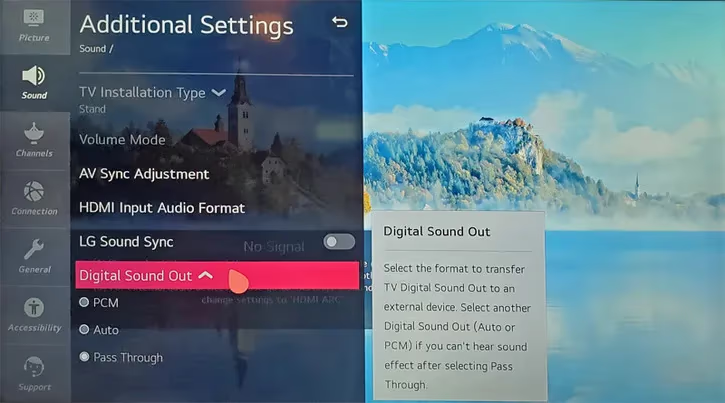
In Sound Out settings, choose Optical as the audio output. You can also try enabling LG Sound Sync.
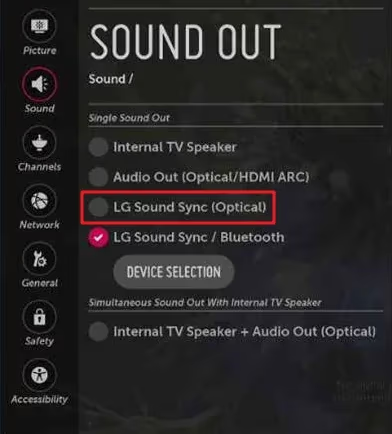
If neither selects optical alone, choose Optical + TV Speaker then mute TV volume.
#3. Power Cycle Devices
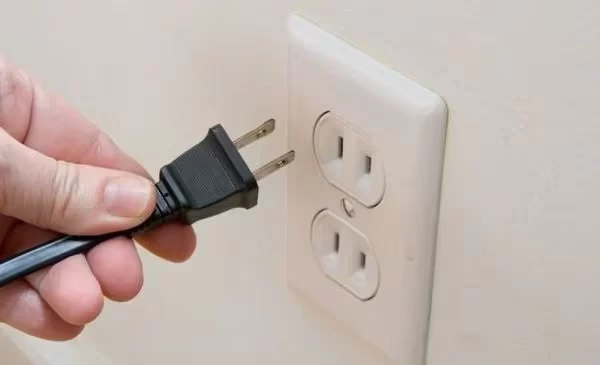
Unplug your LG TV and connected audio gear power cables for 5+ minutes to completely drain residual power.
While powered down, press and hold the power buttons on each device for 30 seconds to discharge.
Plug everything back in, power up, and retest your optical audio connection.
#4. Test Optical Port
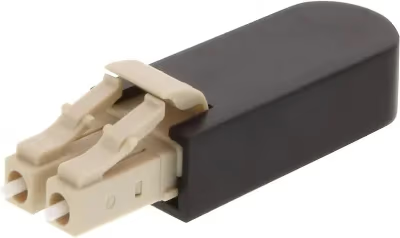
To figure out whether the problem is with your LG TV’s optical port, grab a fiber optic loopback adapter.
Connect the loopback adapter to the TV’s optical output and input. Sound from the TV speakers indicates the port works fine.
You can also connect another optical-out device like a DVD player. If that works, the TV port is likely good.
#5. What Are the Best Alternative Connections?
If you have an ARC-compatible audio device, use an HDMI cable instead for audio. Many soundbars and AV receivers support ARC.
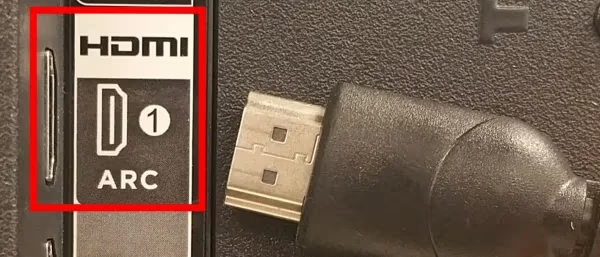
You can also connect using analog RCA cables from the TV’s headphone or audio output jacks. There may be some loss of audio quality.
If your equipment supports it, you can transmit audio wirelessly over Bluetooth. This avoids physical cable issues altogether.
#6. Factory Reset TV
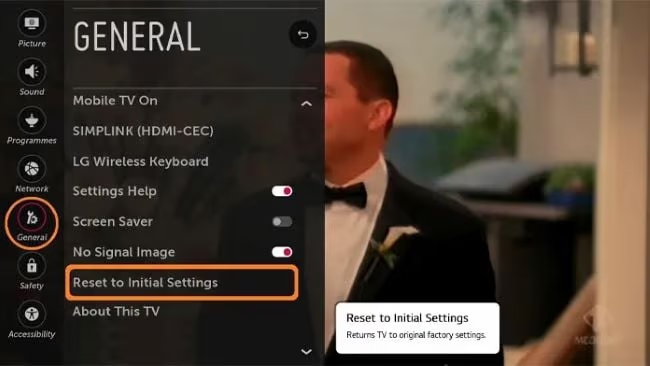
Resetting your LG TV to factory default settings can clear up firmware glitches causing optical audio problems.
Navigate to General > Reset to Initial Settings and choose Factory Data Reset. This will erase all custom settings so back things up first.
#7. Contact LG Support
If you still can’t get optical audio output after trying everything else, contact LG support online or by phone.
You may need to get the TV serviced if there is an internal component failure like a bad optical port.
#Bottom Line
-
Carefully check optical cable connections for a loose fit or damage
-
Adjust audio settings like Digital Audio Out and Sound Out
-
Try power cycling the TV and audio equipment
-
Test optical port with loopback adapter
-
Use HDMI ARC, RCA, or Bluetooth as alternates
-
Factory resetting may clear up firmware issues
-
Call LG support if needed to replace parts
#Frequently Asked Questions
#Why does my LG TV say “no signal” on optical audio?
This usually means the TV is not receiving any input from the connected device. Check that cables are seated firmly on both ends, swap in a known-good cable, and verify audio settings on the TV and receiver.
#How do I switch my LG TV audio output to optical?
Go to Settings > Sound > Sound Out and select Optical or LG Sound Sync (Optical). If you still hear sound from the TV speakers, choose Optical + TV Speaker and mute the built-in volume. Make sure your soundbar or receiver is powered on and set to the optical input.
#Does the optical cable type matter for LG TVs?
Yes. A damaged or low-quality Toslink cable can cause intermittent audio dropouts or complete silence. Look for cables with gold-plated connectors and protective dust caps. Cables longer than 3 meters (10 feet) are more prone to signal loss.
#Can LG TV optical output carry Dolby Atmos?
No. LG TVs can only pass through standard Dolby Digital 5.1 via the optical port. Optical cables lack the bandwidth for Atmos metadata. If you want Atmos, connect your soundbar or AV receiver using an HDMI eARC cable instead.
#What is the difference between PCM and Auto in Digital Sound Out?
PCM sends a two-channel stereo signal that works with virtually every soundbar and receiver. Auto lets the TV choose the format, which can cause problems if your audio device does not support the selected codec. Start with PCM to confirm sound works, then switch to Auto or Pass Through if you want surround sound.
#Why does optical audio cut out during streaming apps?
Some streaming apps switch between audio codecs mid-playback. When the codec changes, the optical handshake can drop. Set Digital Sound Out to PCM to force a consistent format. You may lose surround sound, but the audio will stay stable.
#Should I use optical or HDMI ARC for my LG TV?
HDMI ARC supports higher-quality formats like Dolby Digital Plus and Dolby Atmos, while optical is limited to standard Dolby Digital 5.1 and PCM stereo. Use HDMI ARC if both your TV and sound device support it. Optical is still useful as a backup or when your HDMI ports are all in use.
#How do I know if my LG TV’s optical port is broken?
Shine a flashlight into the port and look for bent or dirty contacts. When the TV is on, you should see a faint red light coming from the port. No red light usually means the port or optical transmitter has failed, and the TV needs professional service.