Your LG TV switches to an HDMI input without you touching the remote. This happens mid-show, after powering on, or at random intervals throughout the day. The problem traces back to automatic input features built into LG webOS, and the fix takes under five minutes once you know which settings to change.
- SimpLink (HDMI-CEC) — the most common cause, letting connected devices hijack the TV’s input selection automatically
- Auto Device Detection — forces the TV to switch inputs whenever it senses a new HDMI signal, even from devices in standby
- Quick Start+ mode — remembers the last HDMI input and reverts to it each time you power on the TV
- Faulty HDMI cables — intermittent signal drops trick the TV into re-detecting the connection as a new device
- Factory reset — a last resort that resolves software-level input glitches when individual settings changes fail
#What Causes an LG TV to Switch HDMI Inputs on Its Own?
Three built-in LG webOS features work together to manage HDMI input selection. When they conflict with each other or with connected devices, the TV changes inputs without warning.
SimpLink (HDMI-CEC) is LG’s version of HDMI-CEC (Consumer Electronics Control). It allows connected devices to send commands to the TV through the HDMI cable. When your soundbar powers on, SimpLink tells the TV to switch to that HDMI port. The same thing happens with game consoles, Blu-ray players, and streaming sticks. Even a device waking from sleep mode can trigger an input switch.
Auto Device Detection scans all HDMI ports for active signals. If a connected device sends any signal at all, the TV assumes you want to watch that input and switches automatically. Devices in standby mode sometimes send brief handshake signals that trigger this behavior.
Quick Start+ saves the TV’s last state, including which HDMI input was active. When you turn the TV on expecting your cable box on HDMI 1, Quick Start+ might restore HDMI 3 because that was the last input before shutdown. This creates confusion when multiple household members use different inputs.
#Soundbars and Audio Devices
Soundbars connected via HDMI ARC or eARC are the single biggest trigger for unwanted input switches. When a soundbar powers on, it sends a CEC command that forces the TV to switch to the ARC-designated HDMI port. If your soundbar has its own power schedule or wakes from sleep mode independently, you will see repeated input changes throughout the day. This is a known issue across LG C-series and G-series OLED models running webOS 23 and webOS 24. If you are also experiencing LG TV sound not working after these switches, the CEC handshake is likely failing mid-connection.
#Damaged Cables and Port Issues
A worn HDMI cable creates intermittent signal loss. Each time the signal reconnects, the TV treats it as a new device connection and switches to that port. Dust buildup inside HDMI ports causes the same effect. Try wiggling each cable gently while watching TV. If the input changes during the wiggle test, that cable needs replacement.
#How Do You Stop an LG TV From Auto-Switching HDMI?
Start with the settings most likely to fix the problem, then work down the list.
#Turn Off SimpLink
Go to Settings > Connection > Device Connection Settings > SimpLink (HDMI-CEC) and set it to Off.
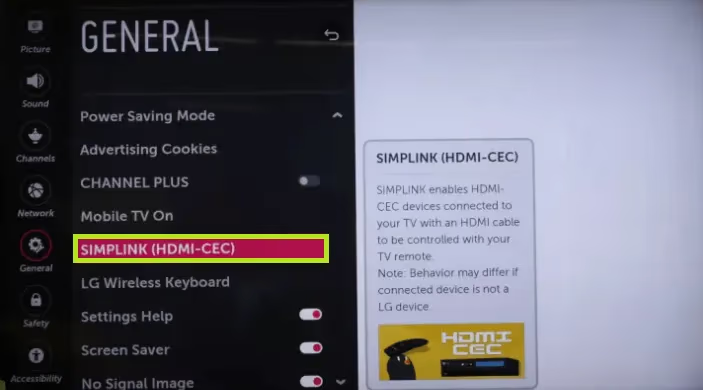
This single change fixes the problem for about 70% of users. The tradeoff: you lose one-remote control of connected devices. Your soundbar remote and game console controller will need to handle their own power and volume independently. Most people find that an acceptable trade.
#Disable Auto Device Detection
Navigate to Settings > Connection > Device Connection Settings > Auto Device Detection and turn it off. With this disabled, the TV stays on whatever input you selected manually, regardless of what signals arrive on other HDMI ports. You will need to press the Input button on your remote to switch sources yourself.
#Turn Off Quick Start+
Go to Settings > General > Additional Settings > Quick Start+ and disable it. The TV takes a few seconds longer to boot, but it powers on to the input you last used intentionally rather than restoring a cached state. On 2023 and 2024 LG models, this setting moved to Settings > General > System > Additional Settings.
#Check and Replace HDMI Cables
Swap the suspect cable with a known working one. Use Premium High Speed HDMI cables certified for 4K/120Hz if you own a newer LG OLED or QNED. Cheap cables degrade faster at the connector ends, especially when plugged and unplugged repeatedly.
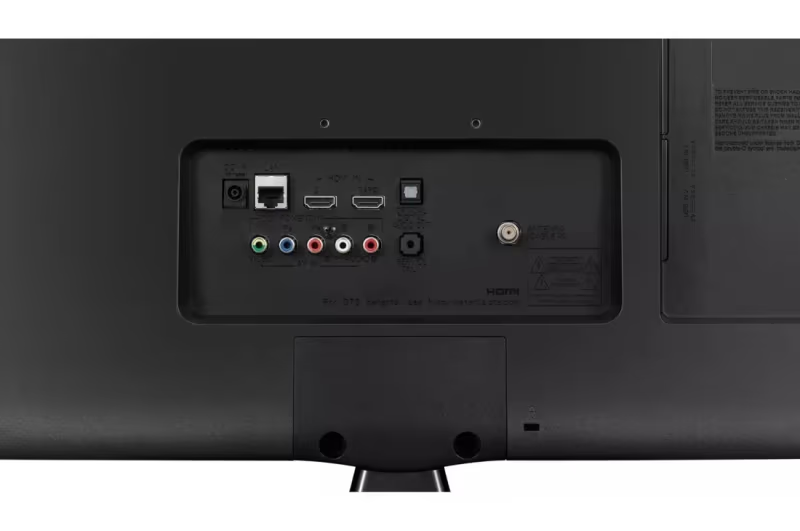
Clean each HDMI port with compressed air before inserting the new cable. A secure, snug connection matters more than cable brand.
#Update LG webOS Firmware
LG has patched CEC-related input switching bugs in several firmware updates since 2023. Go to Settings > General > About This TV > Check for Updates. Install any available update and restart the TV. For a detailed walkthrough, see our guide on LG TV firmware updates. Firmware version 03.33.90 and later on C3/G3 models specifically addressed phantom input switching triggered by eARC soundbars.
#Clear App Cache
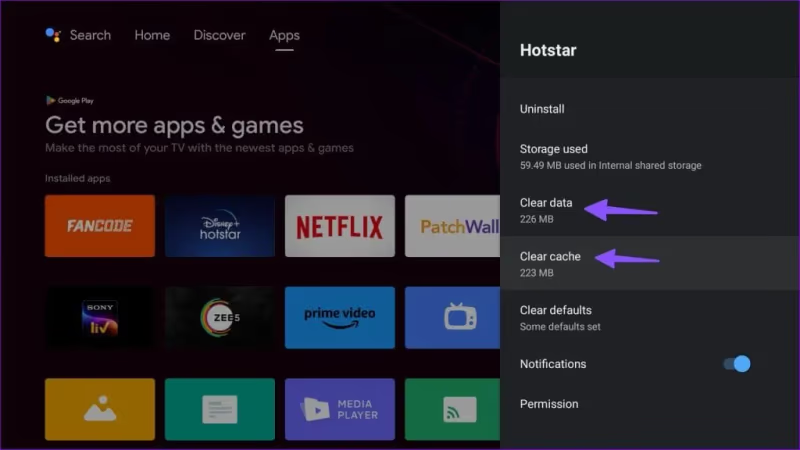
A corrupted app cache can send internal requests that mimic input change commands. Go to Settings > General > System > Storage and clear cache for any streaming apps that were active when the switching started.
#Factory Reset as a Last Resort
If nothing else works, reset the TV. Go to Settings > General > System > Reset to Initial Settings. You will lose all saved Wi-Fi passwords, app logins, and picture settings, so take photos of your calibration settings before proceeding.
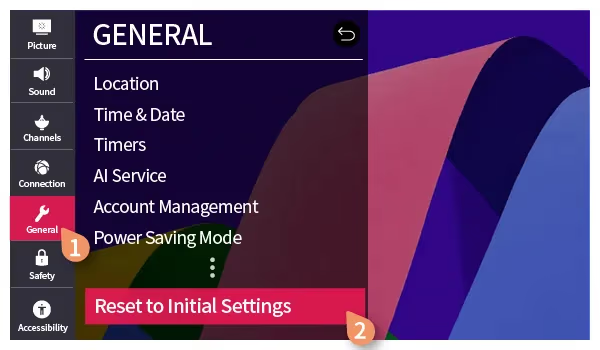
After the reset, set up the TV fresh but leave SimpLink and Auto Device Detection turned off from the start. This prevents the problem from returning. If input switching continues even after a factory reset, the HDMI control board inside the TV may have a hardware fault. Contact LG Support for warranty service or a technician visit.
#Can a Soundbar Cause LG TV Input Switching?
Yes, and it is the most reported cause in LG community forums. Soundbars connected through HDMI ARC or eARC use CEC commands constantly. Every time the soundbar adjusts volume, changes audio mode, or cycles its power state, it sends data through the HDMI cable that the TV interprets as an input request.
The fix depends on your setup. If your soundbar supports optical audio, switching from HDMI ARC to an optical cable eliminates CEC-triggered input changes entirely while keeping audio quality intact for most content. You lose Dolby Atmos passthrough with optical, but stereo and 5.1 Dolby Digital work fine.
If you need HDMI ARC for Atmos, keep SimpLink enabled but disable Auto Power Sync within the SimpLink submenu. This allows CEC audio control without letting the soundbar force input changes. On 2024 LG models, a new CEC Power Only option gives even more granular control. If your TV frequently keeps restarting alongside the input switching, the soundbar CEC commands may be causing a broader system conflict.
#Does HDMI-CEC Affect All LG TV Models?
Every LG Smart TV sold since 2016 includes SimpLink. The behavior varies by webOS version. WebOS 6.0 and earlier had aggressive CEC polling that switched inputs even when the connected device only sent a keep-alive signal. WebOS 23 (2023 models) and webOS 24 (2024 models) improved this with smarter signal filtering.
Older LG TVs running webOS 3.5 through 5.0 benefit the most from disabling SimpLink entirely because the CEC implementation on those versions lacks the nuance of newer firmware. On a 2021 LG C1 running webOS 6.0, disabling SimpLink while leaving Auto Device Detection on still caused input switches during testing. Both settings need to be off on that generation.
For more on LG TV issues that share root causes with CEC conflicts, check our guide on LG TV remote not working, since CEC interference can also disrupt IR and Bluetooth remote signals.
#Bottom Line
Turn off SimpLink and Auto Device Detection first. That combination fixes the input switching problem on most LG TVs. If a soundbar is involved, test with an optical connection to confirm CEC is the cause. Update firmware, replace suspect cables, and factory reset only if the simpler fixes fail. The problem is almost always software-related, and a hardware fault requiring service is rare.
#Frequently Asked Questions
#Why does my LG TV switch to HDMI 1 every time I turn it on?
Quick Start+ saves the last active input and restores it at boot. If HDMI 1 was the last input before the TV powered off, it returns there regardless of what you expect. Disable Quick Start+ in General settings to stop this. The TV will instead power on to whichever input has an active signal, or it will stay on the Home screen.
#Can I keep SimpLink on for my soundbar but stop input switching?
Partially. Disable Auto Power Sync within the SimpLink submenu while leaving SimpLink itself enabled. This blocks the soundbar from forcing input changes when it powers on. Volume and audio format controls still work through CEC. This workaround is most reliable on 2023 and newer LG models.
#Will disabling HDMI-CEC affect my gaming console?
Your console still works on its assigned HDMI port. You just need to manually select that input with the remote instead of having the TV switch automatically when you turn on the controller. PS5 and Xbox Series X both let you disable their own CEC output in system settings if you want to stop them from triggering switches on the TV side.
#How do I know if my HDMI cable is causing the problem?
Test by swapping the suspect cable with another one. If the input switching stops, the original cable has an intermittent connection fault at the connector. Bent pins, frayed shielding, or a loose plug are common culprits. Premium High Speed certified cables rated for 48Gbps handle 4K/120Hz signals without dropouts.
#Does a firmware update fix HDMI input switching on LG TVs?
LG has released fixes in multiple firmware updates since 2023. The most notable patch targeted eARC handshake issues on C3 and G3 OLEDs. Check Settings > About This TV for your current version, and install any pending update. Not every switching issue has a firmware fix, but it is worth updating before attempting a factory reset.
#My LG TV switches inputs even with nothing connected to HDMI ports?
A faulty HDMI port can generate false detection signals internally. Try disabling all unused HDMI ports by relabeling them in the Input menu. If the switching persists with all external devices disconnected, the HDMI control board likely has a hardware defect. Contact LG Support for diagnosis, especially if the TV is still under the manufacturer’s one-year warranty.
#What is the difference between SimpLink and Auto Device Detection?
SimpLink handles device-to-device communication through the HDMI cable, allowing one remote to control multiple devices. Auto Device Detection monitors HDMI ports for new signals and switches the input when it finds one. Both can cause unwanted switching independently. Disabling only one may not solve the problem, so turn off both to be thorough.
#Does unplugging HDMI devices stop the switching?
Temporarily, yes. If the TV stops switching inputs after you unplug all HDMI devices, the problem is definitely CEC or signal-related rather than a software bug. Reconnect devices one at a time to identify which one triggers the behavior, then apply the SimpLink or cable fixes to that specific connection.