This article is composed to answer the popular question, “is MLB TV free with Amazon Prime.” If you are a baseball enthusiast who wishes to watch MLB TV through Amazon Prime, keep reading.
- MLB TV is not free with Amazon Prime — it requires a separate paid subscription as an add-on channel
- New subscribers get a 7-day free trial — after that, a monthly or annual fee applies
- Two subscription tiers exist — “All Teams” covers all 30 MLB clubs, while “Single Team” covers one
- Blackout restrictions apply — live video feeds for local in-market games may be blocked
- MLB TV works on many devices — including Amazon Fire TV, Roku, Chromecast, and smart TVs
#Overview
We assume you are reading this article because you are a fan of baseball. Well, in that case, you are most likely familiar with Major League Baseball or the advanced media it uses.
MLB.tv is known as an audio and video facility that’s available in the United States on a subscription basis. The company offers two distinct service tiers. Each of those enables users to access the video and audio service by watching and listening to baseball games.
They broadcast games of Major Leagues in high-definition quality. We had inquiries from plenty of enthusiasts on the availability of a free version of MLB.TV on Amazon Prime. In simplest terms, they have the question, “is MLB TV free with Amazon Prime.”
#So, Is MLB TV Free with Amazon Prime?
No, the truth is that you are unable to watch MLB.tv at no cost with Amazon Prime. You are required to have a subscription to the network in order to watch any of its programs.
You should know that MLB.tv is considered an add-on service in the same vein as Britbox and Starz. So, you should have a subscription plan in addition to your Amazon Prime membership to watch MLB.TV on it.
However, if you are a newbie, you will be able to access a 7-day free trial from Amazon Prime. After that specific trial period, you will need to go for a subscription plan. You should know that MLB.tv is not free through Amazon Prime.
So, you will be required to pay for additional subscription services to access this specific sports channel. This is true even if you are already subscribed to an Amazon Prime plan.
In this article, we will explain the rationale behind why MLB.tv is not a free service. Also, we will walk you through the steps necessary to get the MLB.tv channel on your Amazon Prime membership.
#Can MLB.TV Be Added to Amazon Prime with No Fee?
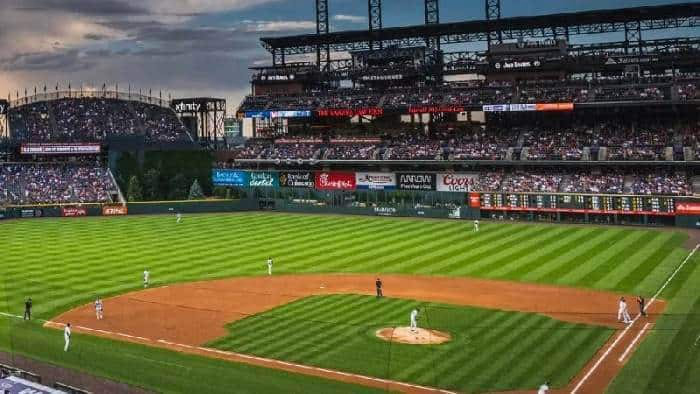
You already know that MLB.tv is a subscription-based streaming service. Therefore, it is not possible to add it to Amazon Prime without having to pay a fee.** **However, subscribers can watch MLB.tv on Amazon Prime for a monthly or annual fee.
MLB.tv is basically an add-on streaming service under Amazon Prime. It does offer high-quality premium video and audio content for fans of the MLB.
The “MLB.tv All teams” subscription is currently available and provides subscribers with live video and audio. It offers content from all 30 MLB clubs. That’s in addition to the highlights of each game, stats, DVR control (Live), and full game records. It also offers a pitch widget.
#There is Another Good Option
In addition, there is “MLB.tv Single Team.” This specific option gives users access to live video and audio content of a single MLB team.
In addition to that, it offers highlights of the game and specific stats along with Live DVR options. Live video and audio feeds are available via MLB.tv’s “Single Team” option. However, there are blackout restrictions on the video feeds.
MLB.tv used to offer “Basic” or “Premium” service, with the former giving users access to HD quality content. You can access them either on a desktop or laptop, the latter giving users access to their live game content. You can access them using a free subscription system on the mobile app called “At-Bat.”
Also, here are the best options to consider if you are looking for a TV recliner; this article comprises all the information about this useful piece of furniture.
#It Supports Many Different Devices
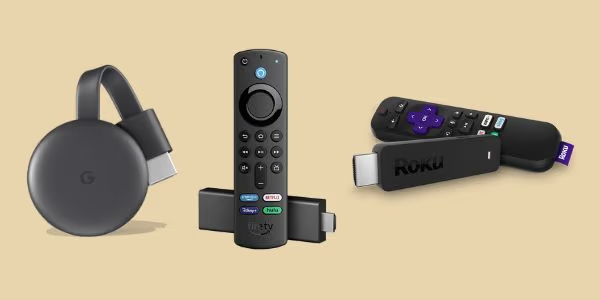
Devices such as smart televisions and players are all provided access to the feature. MLB.tv has done away with these limitations. Now, “All Teams” and “Single Teams” tier subscribers may now watch each other’s games on the same devices. For instance, it supports the new Amazon Fire TV, Google Chromecast, and Roku devices.
Back in 2012, the company called MLB.tv started a specific feature called an audio overlay. This specific feature does allow users to replace the home or away audio of the video.
They can use audio from the away or home radio feed as the replacement audio. The away team’s audio overlay was available to premium subscribers of MLB.Tv.
If not, they can use the feature called “Park,” which eliminates all the commentary. As a result, the viewer will be able to hear the natural sound of the ballpark. There were plenty of services provided by MLB.tv. However, as of now, all those services have been discontinued.
In addition, if you have the question “is Fox Now free with Amazon Prime”, let’s learn everything about the Fox Now app and Amazon Prime, as well as its relationship.
#Why Cannot You Use MLB.tv with Amazon Prime?
MLB.tv is not available for free for users of Amazon Prime for a variety of different reasons. When providing a service, you should always strive to generate a profit using it. This is just like what you would with any other kind of commercial enterprise.
One of the reasons why MLB.tv isn’t free because it offers a broadcasting system that has high operating expenses. In order for the company to turn a profit in the long run, it will need to find a way to monetize its service, which could involve the creation of subscription choices or other forms or methods of monetizing its respective services.
Aside from what has been said previously, Amazon Prime does not include any free channels. It also doesn’t have “add-ons” of the type described.
#MLB.tv Makes a Profit by Selling Subscriptions
It is true that Amazon Prime’s platform makes it possible for MLB.tv to generate revenue by selling subscriptions. So, the two companies might have come to an arrangement.
As a result, Amazon Prime receives a certain proportion of the money made from these transactions. This would make sense, given that Amazon Prime is the party responsible for creating the money-making opportunity for MLB.tv. They generate revenue by selling subscriptions.
Understandably, if they include MLB.tv on Amazon for free, the company might potentially run at a loss. This is not good for the business as it will restrict profitability, which is not a healthy situation.
The information shown above is merely conjecture regarding the reasons why MLB.TV’s services are not provided for free. That is irrespective of the fact that MLB.tv has not issued any official statement regarding the aforementioned topic.
#There’s a Free Trial Though
However, those who wonder, “is MLB TV free with Amazon Prime” have good news as well. If you are a new member, you have access to the content of MLB.tv during the first seven days.
So, you will be able to enjoy watching a game of baseball you prefer to watch. After the free trial period, you will be required to purchase your monthly subscription as an option. It is required in order to access the content on MLB.tv.
#How to Watch MLB.tv on Amazon Prime?
So, that’s the answer if you wondered, “is MLB TV free with Amazon Prime.” Let’s learn how to use it. The steps below will explain how to add the MLB.tv channel to Amazon Prime for your convenience.
#01. Visit Amazon’s Official Website
As the first step, you should go to the official website of Amazon. You should do that using any web browser on your laptop, PC, or even a smartphone.
#02. Click “Accounts”
Find the “accounts” icon in the upper right-hand corner of the screen and click on it. You will initially be presented with a different page. This prompts you to either sign up for a new account or log in if you already have one.
#03. Create an Account or Sign in
Now, you should enter the email address and sign in. If you don’t have an account created so far, you should create a new one and then sign in.
#04. Go to the Respective Account
Now, you should go to the icon that appears as “Account” so you can access Prime Videos.
#05. Click Prime Videos
Access to Amazon Prime can be gained by going to your account and selecting the “Prime Videos” option. To access all of the Amazon Prime services, you must first have an active subscription to Amazon Prime.
#06. Select the Channels You Want
Now, you should click on the option called “Channels.” That allows you to select the channels that should be accessed through Amazon Prime.
#07. Find MLB.tv
You should now look up MLB.tv to view its profile. The specifics of the channel will be included in the search info.
#08. Select the Option That Allows You to Start a 7-day Trial
Now, you should subscribe to the option called MLB.tv. You should click on the option called “Start 7-day free trial”. Then, you will be directed to the page where you should enter the information related to your account.
#09. Add Information
Now, it is a matter of entering the information account. Then, hit “Submit.”
#10. Verify
Once the information is entered, just verify it before proceeding.
#11. Start the Free Trial
Now that you have confirmed the information, just tap “Start Your…”. After seven days, you should pay the monthly subscription fee if you want to continue.
#FAQ
#Can I watch all MLB games for free with Amazon Prime?
No. Amazon Prime does not include free access to MLB TV. You need a separate paid subscription to stream any MLB TV content, though Prime members sometimes get discounted rates.
#What is the difference between MLB TV All Teams and Single Team?
The All Teams plan gives you live video and audio from all 30 MLB clubs, plus game highlights, stats, DVR control, and full game archives. Single Team limits your access to one club’s live feeds and highlights. Both tiers require a paid subscription on top of Amazon Prime.
#Are there blackout restrictions on MLB TV through Amazon Prime?
Yes, blackout restrictions apply for in-market games. If your local team is playing, you may not be able to stream that game live. These restrictions protect the broadcasting rights of regional sports networks.
#How long is the MLB TV free trial on Amazon Prime?
New subscribers get a 7-day free trial. After those seven days, Amazon will automatically charge the monthly subscription fee unless you cancel beforehand.
#What devices support MLB TV through Amazon Prime?
MLB TV works on Amazon Fire TV, Roku, Google Chromecast, smart TVs, desktops, laptops, and mobile devices. Both the All Teams and Single Team tiers share the same device compatibility, so your subscription level does not limit which hardware you can use.
#Can I watch MLB games on streaming platforms other than MLB TV?
Yes. ESPN+ and Hulu + Live TV carry select MLB games as part of their sports packages. YouTube TV and fuboTV also broadcast regional sports networks that air local games. Each platform has different pricing and channel lineups, so compare them based on which teams you follow.
#How do I cancel MLB TV if I subscribed through Amazon Prime?
Go to your Amazon account, open “Memberships & Subscriptions,” find MLB TV in the list, and select “Cancel Subscription.” Your access continues until the end of the current billing period. Amazon does not offer partial refunds for unused days.
#Does MLB TV include radio audio feeds?
Yes. MLB TV subscribers can listen to home and away radio broadcasts for each game. There is also an audio overlay option that lets you replace the TV commentary with radio calls, or use the “Park” mode to hear only the natural ballpark sounds without any commentary.
#Bottom Line
MLB TV is not available for free with an Amazon Prime subscription. Prime members can, however, take advantage of discounted rates and promotional offers when signing up for MLB TV through the partnership.
Baseball fans who pair Amazon Prime with an MLB TV subscription get access to live games, on-demand content, and exclusive viewing options across multiple devices.