Your Hyundai TV has a black screen, and you need it fixed. This is one of the most reported issues with Hyundai Smart TVs, and it usually comes down to something you can solve at home in under five minutes.
The causes range from a loose cable to a failed backlight. This guide walks through each fix in order, starting with the easiest and moving to the ones that require more effort. Most people get their picture back by step three.
- Power cycle fixes most black screens — unplug for 60 seconds and hold the power button for 10 seconds while unplugged
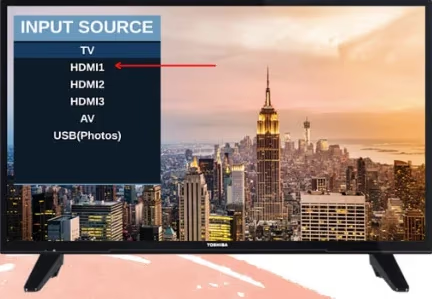
- Wrong input source is the second most common cause — press the Input/Source button on your remote to cycle through HDMI 1, HDMI 2, AV, and TV
- Backlight failure shows a faint image — shine a flashlight at the screen to check if the picture is still there but dark
- Factory reset clears software glitches — use the remote to access Settings and restore factory defaults
- Repair costs for backlight replacement average $150 to $350 — older models may not be worth the repair bill
#How Do You Fix a Hyundai TV Black Screen?
Start with the basics. The fix depends on what is causing the black screen, so work through these steps in order. Each one rules out a specific cause.
#Step 1: Check Power Connections
Make sure the TV is actually getting power. This sounds obvious, but a loose power cord is responsible for a surprising number of “black screen” calls to repair shops.
- Verify the wall outlet works by plugging in another device like a phone charger
- Push the power cord firmly into the back of the TV and into the outlet
- Look for the standby LED light on the TV. If it is off, power is not reaching the TV
- Try a different outlet to rule out a tripped breaker or faulty socket
If the standby light is on but the screen stays black, the TV has power and the issue is elsewhere.
#Step 2: Check All Cable Connections
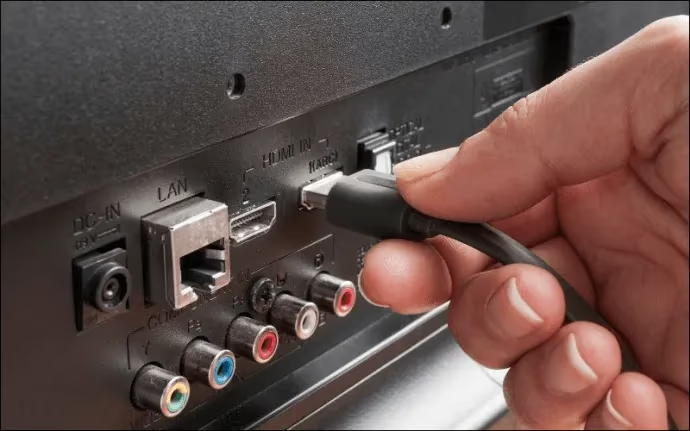
Loose or damaged HDMI cables cause black screens more often than most people expect. Pull each cable out and push it back in until it clicks.
- Disconnect and reconnect every cable plugged into the TV
- Swap the HDMI cable for a known working one if available
- Try a different HDMI port on the TV. If HDMI 1 gives a black screen, plug into HDMI 2
- Reset connected devices (cable box, streaming stick, game console) by unplugging them for 30 seconds
A bad cable will sometimes cause the TV to show a black screen with sound still playing. If you hear audio but see nothing, the cable is a strong suspect.
#Why Does My Hyundai TV Screen Go Black but Still Has Sound?
This specific symptom points to a few causes. Sound without a picture means the TV is receiving a signal, so the issue is on the display side rather than the input side.
Wrong input source. Your TV may be set to an input that is not connected to anything. Press the Input or Source button on your remote and cycle through each option until you find the active one.
T-Con board failure. The timing controller board processes the image signal before it reaches the screen. When it fails, audio keeps working but the display goes dark. This requires professional repair.
Backlight failure. The backlight illuminates the LCD panel. A failed backlight produces a completely dark screen, but the image is technically still there. Hold a flashlight against the screen in a dark room. If you can see a faint picture, the backlight has failed.
If you are dealing with a Vizio TV black screen or an LG TV black screen, the same backlight test applies across brands.
#How to Perform a Soft Reset on a Hyundai TV
A soft reset (also called a power cycle) clears temporary memory and fixes most software-related black screens. This is the single most effective fix.
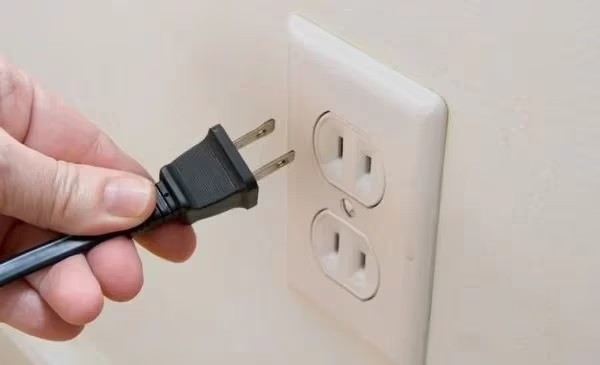
- Turn off the TV using the remote or the power button on the set
- Unplug the power cord from the wall outlet
- Wait 60 seconds. This gives the capacitors time to fully discharge
- While the TV is unplugged, press and hold the power button on the TV itself for 10 seconds
- Plug the power cord back in and turn on the TV
The 60-second wait matters. Skipping it or only waiting 10 seconds often does not fully clear the issue. If the black screen returns after a few hours or days, a deeper problem like a failing power supply board may be at play.
#How Do You Check for Backlight Failure?
Backlight failure is the most common hardware cause of a black screen on LCD and LED TVs, including Hyundai models. The test takes about 30 seconds.
- Turn on the TV so it is powered but showing a black screen
- Take a bright flashlight and hold it directly against the screen
- Look closely for any faint image, menu text, or color behind the flashlight beam
- Move the flashlight to different areas of the screen
If you see a faint image: The backlight has failed. The LCD panel itself still works, but it has no light source behind it. Contact Hyundai support or a local TV repair shop. Backlight strip replacement typically costs $150 to $350 depending on the model and screen size.
If you see nothing at all: The problem is likely not the backlight. It could be a failed T-Con board, main board, or a power supply issue feeding the display circuitry.
For older Hyundai TV models (5+ years), compare the repair cost against a new TV. A replacement set often makes more financial sense than a $300 repair on a TV that may develop other issues soon after.
#How to Factory Reset a Hyundai TV
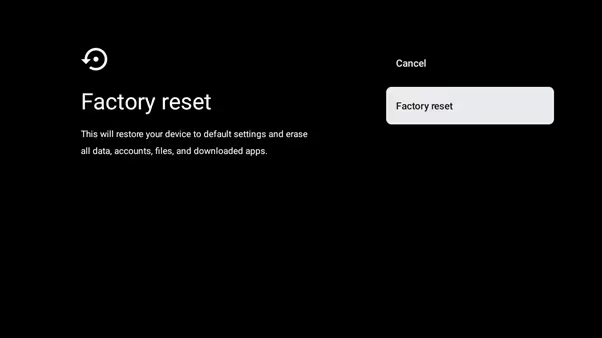
A factory reset wipes all settings, apps, and saved preferences back to the original state. Use this when a soft reset did not work and the black screen appears to be software-related.
If you can access the menu:
- Press the Home or Menu button on your Hyundai TV remote
- Go to Settings, then System or Device Preferences
- Select Reset or Factory Reset
- Confirm the reset and wait for the TV to restart
If you cannot see the menu (black screen prevents navigation):
Some Hyundai models have a physical reset button. Check the back or bottom of the TV near the input ports. It is usually a small pinhole button. Press it with a paperclip and hold for 10 seconds.
A factory reset erases all saved Wi-Fi passwords, app logins, and picture settings. You will need to set everything up again after the reset completes.
After the reset, reconnect to Wi-Fi, sign back into your streaming apps, and adjust picture settings. If the black screen persists after a full factory reset, the problem is hardware-related, not software.
The factory reset process is similar on most smart TVs. If you also own other brands, our guides on Hisense TV factory reset and TCL TV factory reset without remote cover those steps.
#What to Do if the Black Screen Keeps Coming Back
Intermittent black screens that go away temporarily after a power cycle but keep returning point to a hardware issue that is getting worse over time.
Failing power supply board. The board delivers voltage to the backlight and other components. As capacitors age, they can provide inconsistent power, causing the screen to cut out. A repair technician can test the board with a multimeter and replace it for $80 to $200.
Overheating. If the TV goes black after being on for an hour or more, check the ventilation. Blocked vents or placing the TV inside a tight cabinet can cause thermal shutdowns. Make sure there is at least 4 inches of clearance on all sides.
Loose internal ribbon cable. Cables connecting the main board to the display panel can work loose over time, especially if the TV has been moved or mounted. This requires opening the back panel and reseating the connections. Only attempt this if you are comfortable working with electronics.
If you have tried every step in this guide and the screen still goes black, contact an authorized Hyundai service center. Bring your model number and a description of the symptoms to speed up the diagnosis. You can also check if your Insignia TV black screen or Element TV black screen behaves the same way if you have other TVs in your home showing similar issues.
#Bottom Line
A Hyundai TV black screen is usually fixable at home. Start with a power cycle (unplug for 60 seconds, hold power button 10 seconds). Check all cables and try different HDMI ports. If those do not work, run a factory reset.
For hardware problems like a failed backlight or power supply board, get a repair estimate and compare it against the cost of a new TV. On models older than five years, replacement is often the smarter choice.
#Frequently Asked Questions
#Why did my Hyundai TV screen suddenly go black?
The three most common causes are a loose power connection, an incorrect input source, and a temporary software glitch. A power cycle fixes the majority of sudden black screens. Unplug the TV for 60 seconds, hold the power button for 10 seconds while unplugged, then plug it back in and turn it on.
#Does a black TV screen always mean the backlight is broken?
No. Backlight failure is only one possible cause. Test it by shining a flashlight directly at the screen in a dark room. If you see a faint image behind the light, the backlight has failed. If you see nothing, the problem is likely a cable issue, wrong input, or a main board failure.
#How much does it cost to fix a Hyundai TV black screen?
It depends on the root cause. Backlight strip replacement runs $150 to $350 including labor. Power supply board repair costs $80 to $200. T-Con board replacement is typically $100 to $250. Most repair shops charge a $30 to $75 diagnostic fee that gets applied toward the repair cost.
#Can a factory reset fix a black screen on a Hyundai TV?
Yes, if the black screen is caused by a software problem. A factory reset clears all settings and returns the TV to its original state. It will not help if the cause is a hardware failure like a dead backlight or damaged power supply board.
#How do I know if my Hyundai TV needs professional repair?
If you have tried a power cycle, checked all cables, verified the correct input source, and performed a factory reset without success, the problem is almost certainly hardware-related. The flashlight test can confirm backlight failure specifically. Any internal board repair requires a qualified technician.
#Is it worth repairing an older Hyundai TV or should I buy a new one?
For TVs under three years old, repair usually makes sense since parts are available and the cost is reasonable. For TVs five years or older, compare the repair estimate against the price of a new set with similar features. A $300 repair on a seven-year-old TV is rarely a good investment when new 50-inch smart TVs start around $250.
#Why does my Hyundai TV turn on but the screen stays black?
The TV powers on (standby light turns on, you hear sound) but the display stays dark. This points to a backlight failure, a T-Con board issue, or a failed main board output. The backlight is the most common culprit. Run the flashlight test to narrow it down before calling for service.