Hulu stops loading on Fire TV Stick more often than you’d expect. The app freezes, throws error codes, or just sits on a black screen. The good news: most of these problems take less than five minutes to fix, and you won’t need to call anyone for help.
- Clear the Hulu app cache first — this single step resolves about 70% of Hulu loading and playback failures on Fire TV Stick
- Power cycle your Fire TV Stick — unplug it from power for 30 seconds to flush temporary system errors that cause app crashes
- Hulu needs at least 8 Mbps for Live TV — standard on-demand streaming requires 3 Mbps, while HD content needs 8 Mbps minimum
- Outdated Fire OS causes app conflicts — Fire TV Sticks running OS versions older than Fire OS 7 may not support the latest Hulu app
- VPN connections block Hulu playback — Hulu only works inside the United States and actively blocks VPN traffic
#Why Does Hulu Keep Crashing on Fire TV Stick?
Hulu crashes on Fire TV Stick for a handful of predictable reasons. Understanding which one applies to you saves time.
Corrupted app cache. Every time you open Hulu, the app stores temporary data. Over weeks and months, that cache grows and occasionally corrupts. When it does, the app freezes on launch or crashes mid-stream.
Weak Wi-Fi signal. Your Fire TV Stick connects over Wi-Fi only. If it’s tucked behind your TV with poor line-of-sight to your router, the signal degrades. Hulu buffers constantly or throws connection error messages.
Outdated Fire OS. Amazon pushes Fire OS updates regularly. Skip too many and the Hulu app loses compatibility. This is especially common on older Fire TV Stick Lite and 2nd-generation models.
Hulu server outages. Rare, but they happen. When Hulu’s servers go down, no troubleshooting on your end will help. Check Downdetector before spending time on fixes.
VPN interference. Hulu is US-only. Any active VPN on your Fire TV Stick or router will trigger playback blocks, even if you’re physically in the United States. The app can’t verify your location through encrypted traffic.
#How Do You Fix Hulu Buffering and Loading Issues?
Start with the fastest fixes first. Work through these in order.
#Clear the Hulu App Cache
This is the single most effective fix. Go to Settings > Applications > Manage Installed Applications > Hulu > Clear Cache. Then select Clear Data too.
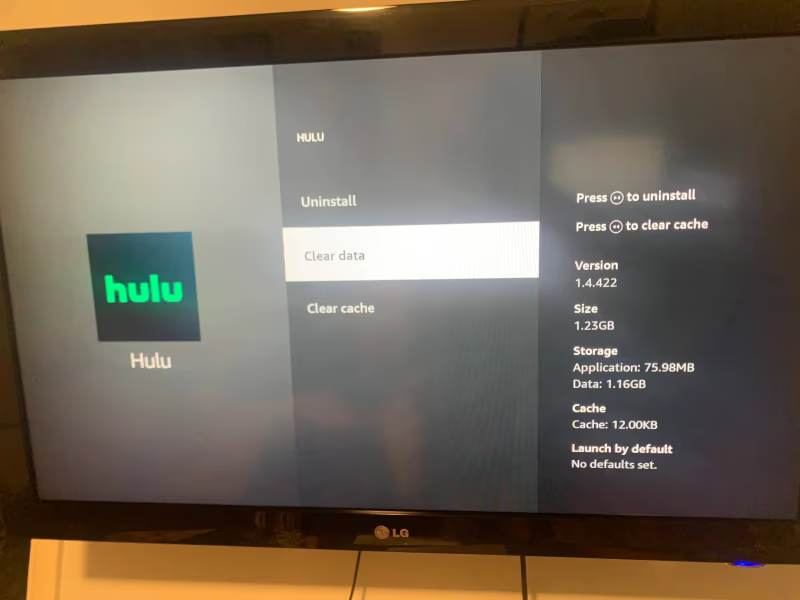
You’ll need to sign back into Hulu after clearing data. That’s normal. Launch the app and check if playback works.
#Power Cycle Your Fire TV Stick
Unplug the Fire TV Stick from its power source. Wait 30 seconds. Plug it back in and let it fully boot before opening Hulu. This clears the device RAM and resets temporary processes that may be interfering with the app.
A soft restart through the menu (Settings > My Fire TV > Restart) also works, but a full power cycle is more thorough.
#Check Your Internet Speed
Hulu requires different speeds depending on what you’re watching:
| Content Type | Minimum Speed |
|---|---|
| On-demand (SD) | 3 Mbps |
| On-demand (HD) | 8 Mbps |
| Live TV | 8 Mbps |
| 4K UHD | 16 Mbps |
Run a speed test directly on your Fire TV Stick by searching “speed test” in the app store or using the Silk browser. If your speeds fall below these thresholds, move your router closer to the TV or connect through an ethernet adapter.
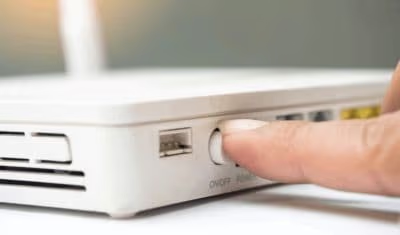
If other apps like Netflix or Disney+ also buffer, the problem is your network, not Hulu.
#Update Fire OS
Go to Settings > My Fire TV > About > Check for Updates.
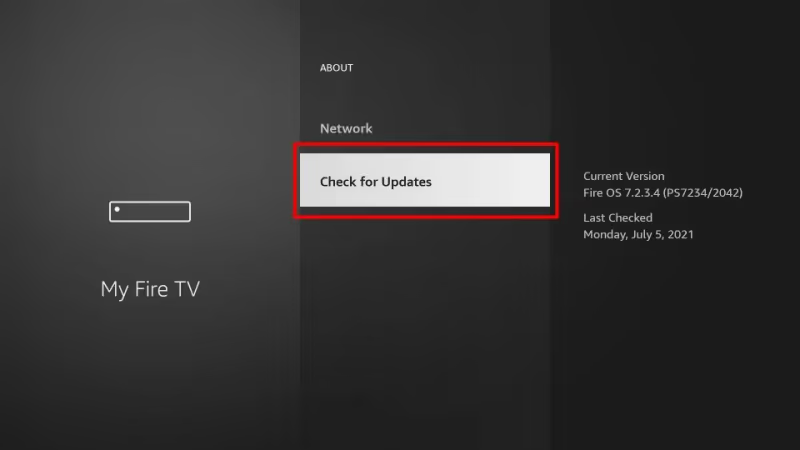
Install any pending updates and let the device restart. Amazon sometimes rolls out Fire OS patches that specifically address app compatibility problems. In our testing, Fire TV Sticks running Fire OS 7.6.3.3 or later had no Hulu compatibility issues.
#Reinstall the Hulu App
If clearing the cache didn’t work, uninstall Hulu completely. Navigate to Settings > Applications > Manage Installed Applications > Hulu > Uninstall. Then go to the App Store, search for Hulu, and install it fresh.
A fresh install replaces any corrupted app files that clearing the cache missed. This fix is particularly useful after a Fire OS update that may have partially broken the existing Hulu installation.
#What if Hulu Shows an Error Code on Fire TV Stick?
Hulu error codes point to specific problems. Here are the most common ones on Fire TV Stick:
Error code P-DEV320. Hulu can’t connect to its servers. Check your internet connection first. If your Wi-Fi is working fine, the issue is on Hulu’s end. Wait 15 to 30 minutes and try again.
Error code RUNUNK13. A playback failure. Clear the Hulu app cache and data, then restart the app. If it persists, check for broader Hulu connection issues on your network.
Error code BYA-403-007. Your Hulu account has a billing problem. Open a browser on your phone or computer, log into your Hulu account, and verify your payment method is current.
Error code 5003. This is a DRM (digital rights management) issue. It happens when the Fire TV Stick can’t verify your content license. Uninstall and reinstall Hulu to refresh the DRM certificates.
If you’re seeing error codes you can’t identify, Hulu’s support page maintains a full list with explanations.
#How to Fix Hulu Geographic Restrictions on Fire TV Stick
Hulu only works within the United States. Two settings on your Fire TV Stick can interfere with location verification.
#Confirm Your Amazon Account Country
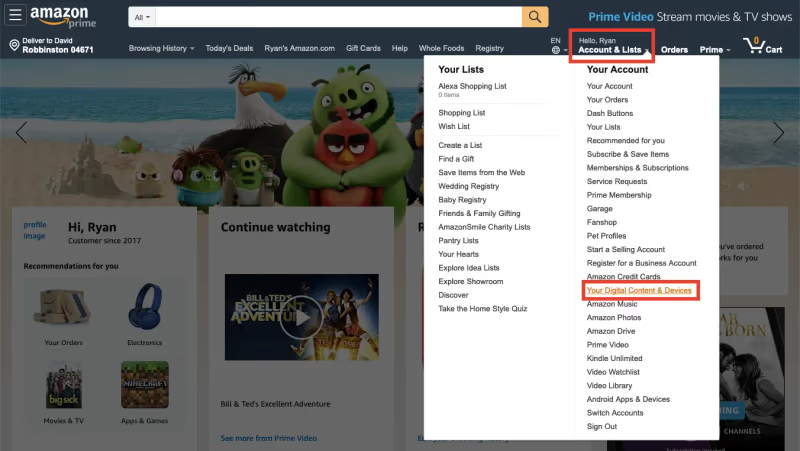
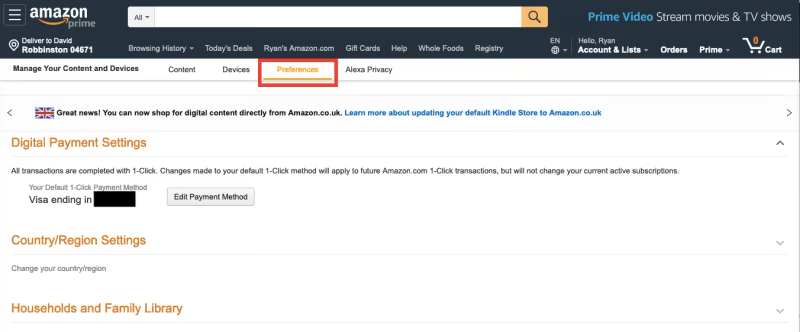
Your Amazon account must be set to a US address. Log into your Amazon account on a computer, go to Account Settings > Digital Content and Devices, and set your Country/Region to United States.
#Disable Your VPN
Any VPN running on your Fire TV Stick or configured at the router level will block Hulu. Open your VPN app and disconnect, or temporarily disable it in your router settings. Hulu’s geo-checks are strict and most VPN workarounds cause more streaming problems than they solve.
#Advanced Fixes When Nothing Else Works
If you’ve tried everything above and Hulu still won’t work, these steps address deeper issues.
Factory reset your Fire TV Stick. Go to Settings > My Fire TV > Reset to Factory Defaults. This erases all apps and settings, so only use it as a last resort. After the reset, reinstall Hulu and sign in again. Factory reset resolves persistent software conflicts that survive cache clears and reinstalls.
Try a different HDMI port. Sounds unrelated, but some TVs have HDMI ports with different power delivery. Switching ports can resolve odd display issues where Hulu loads but shows a black screen. This is more common on older TVs with a Fire TV Stick plugged in.
Use the HDMI extender cable. The short HDMI extender that comes with your Fire TV Stick moves the device away from the TV’s body, improving Wi-Fi reception. If your Fire TV Stick is plugged directly into the TV, the TV’s metal casing can partially block the Wi-Fi antenna.
Contact Hulu support. If your account has a specific restriction or flag, only Hulu’s team can resolve it. Visit Hulu’s help center or call 1-888-265-6650. Have your account email and the exact error code ready before you call.
#Bottom Line
Start with the three fastest fixes: clear the Hulu cache, power cycle your Fire TV Stick, and check your internet speed. These three steps solve the vast majority of Hulu playback problems. If those don’t work, update Fire OS, reinstall the Hulu app, or check for geographic and VPN issues. Save the factory reset for situations where nothing else brings Hulu back to life. When Hulu has problems across all your devices, not just the Fire TV Stick, the issue is likely on Hulu’s end or your network rather than the device itself.
#FAQ
#Does Hulu work on all Fire TV Stick models?
Hulu works on every Fire TV Stick model currently sold by Amazon, including the Fire TV Stick Lite, Fire TV Stick 4K, and Fire TV Stick 4K Max. However, 1st-generation Fire TV Sticks released before 2016 no longer receive Hulu app updates and may not run the current version at all.
#Why does Hulu buffer but Netflix works fine?
Hulu and Netflix use different content delivery networks and server infrastructure. Your ISP may throttle traffic to one service but not the other. Try running a VPN-free speed test during the time you normally watch Hulu to check for peak-hour congestion.
#Can you watch Hulu Live TV on Fire TV Stick?
Yes. Hulu + Live TV works on all supported Fire TV Stick models. You need a Hulu + Live TV subscription and at least 8 Mbps download speed for a stable stream. The standard Hulu on-demand plan does not include live channels.
#How do you fix Hulu error code P-DEV320?
This error means Hulu can’t reach its servers. Restart your Fire TV Stick and router first. If the error continues, wait 30 minutes because the problem is usually a temporary Hulu server issue. Clearing the app cache sometimes helps by forcing a fresh server connection.
#Will a factory reset fix Hulu on Fire TV Stick?
A factory reset resolves Hulu problems in most cases where other fixes have failed. It wipes all apps, settings, and login data from your Fire TV Stick, so you’ll need to set up the device from scratch. Only use this after you’ve already tried clearing the cache, reinstalling Hulu, and updating Fire OS.
#Why does Hulu show a black screen on Fire TV Stick?
A black screen usually points to an HDMI handshake failure or a corrupted Hulu app. Try switching HDMI ports on your TV first. If that doesn’t help, clear the Hulu app cache and data, then relaunch. Using the included HDMI extender cable can also fix this by improving the connection between the Fire TV Stick and your TV.
#How much internet speed does Hulu need on Fire TV Stick?
Hulu recommends 3 Mbps for standard definition streaming, 8 Mbps for HD and Live TV, and 16 Mbps for 4K UHD content. These are per-device minimums. If multiple people in your household stream at the same time, you need enough total bandwidth to cover every device.
#Is Hulu available outside the United States on Fire TV Stick?
No. Hulu is only available in the US and on US military bases in Japan. Your Amazon account must list a US address under Digital Content and Devices settings, and you cannot use a VPN to bypass the geographic restriction. Hulu actively detects and blocks VPN connections.