Streaming websites were the norm for decades, but in recent years, apps have become more popular. This is even to the extent of smart TVs having the necessary features that allow streaming apps to be installed on them.
Popular sites like Putlocker and Movies123 are far from gone, but apps like Bobby Movie Box have taken the lead. If you are looking for more options, check out our list of the best movie apps for Android TV.
This particular app includes the most recent TV show episodes and the latest box office hits, and you can watch them anywhere. As long as your handheld device has a network connection, streaming is as easy as ever.
On that note, in this article, we’re going to focus on the ins and outs of Bobby Movie APK, explaining how you can install it on Android and iOS, and discussing everything you need to know about it.
- Bobby Movie Box is now called CotoMovies and remains free with no advertisements on both Android and iOS
- Android installation requires enabling Unknown Sources in Settings before downloading the APK from the official site
- iOS users can install directly from the Bobby Box website or through an emulator app like iOSEmus
- The app supports Chromecast and AirPlay so you can cast content from your phone to a smart TV
- Using a VPN is strongly recommended because ISPs may block access to third-party streaming apps
#What Is Bobby Movie Box?
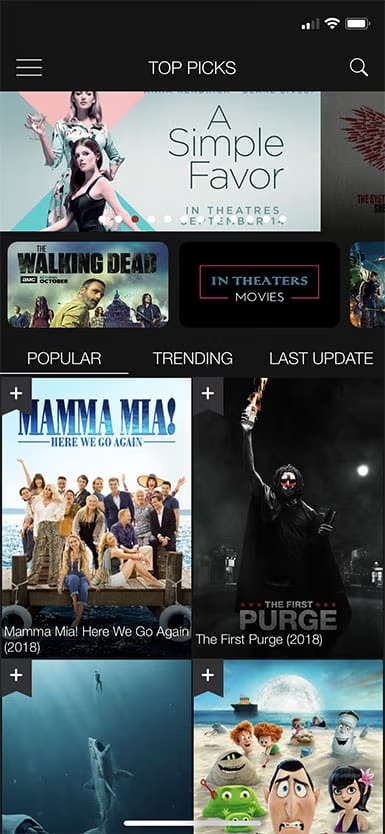
Bobby Movie Box for Android is a hassle-free streaming app available for all Android devices, which includes all of the latest movies and TV shows. Their high-quality library also covers the classics, and you can access them from all over the globe.
Using an app to stream movies can be beneficial for many reasons. Accessing the movie library is quicker and easier than a website alternative, and some browser apps crash when mobile users attempt to watch videos on them.
Bobby Box has been around for a few years and was recently renamed as CotoMovies. But name-changing aside, it continues to offer the same ad-free and enjoyable user experience.
In the past, only an APK version of the app was available, and you’d have to download an Android emulator if you wanted to stream movies on an iOS device. But fortunately for iPhone and iPad users, an official iOS version is now available.
Besides, click here to find out and what to do if your Netflix is not working on TV.
#Key Features of Bobby Movie APK
We believe that Bobby Movie APK is an impressive app, but if you’re unfamiliar with it, you might wonder what makes it different from other streaming apps. Here are the key features you’ll get to experience by downloading it.
#Multiple Servers to Stream From
Only being able to stream from one server is waiting for trouble. If that server goes down or you can’t connect to it, you won’t be able to stream content. Bobby Box has multiple servers for that exact reason, and it’s very unlikely that all of their servers will be down at once.
#Massive Library of HD Content
There are thousands of movies and TV show episodes already in the Bobby Movie APK library, and there are more constantly being added every week.
Aside from the latest uploads, such as movies that have only just been released in theatres, you can expect HD quality every time. Since most theatre releases are recorded with low-quality cameras, it’s rare to find an HD video on any streaming app.
#Sleek User Interface
CotoMovies’ sleek user interface makes navigating the app not only easy but enjoyable. The modern appearance allows you to clearly scroll through the different movies and TV shows that are available.
The interface also makes it easy to access features like your bookmarks, language settings, and search.
#Bookmarking
Bookmarking gives you a chance to save content to watch later. A lot of us like to browse all of the videos that a streaming platform has and save whatever we like the look of to watch later. By bookmarking, you can do exactly that.
#Multi-Language Subtitle Support
We expect that streaming sites and apps are compatible with subtitles and offer them. That said, multi-language subtitle support is still not a mainstream feature.
Moviebox for iPhone includes general multi-language support (e.g., changing the app’s language) and extends this to subtitles too.
#Free with No Advertisements!
It’s one thing for CotoMovies to be completely free with no subscription packages. It’s another thing for it to have absolutely no advertisements as well.
We’re not unfamiliar with free streaming apps that trick users with the lack of a subscription only to cover the app’s interface in ads. Fortunately, this isn’t something you’ll have to worry about with this app.
#Download Content
Streaming at home is pretty straightforward, and most people don’t have to worry about bandwidth limits. People who stream videos on their way to work or while traveling have to worry about their data plan limits.
If you plan on traveling or you won’t have access to the internet for a while, CotoMovies has the option to download any content you see. Offline access is one of the big benefits of this app.
#Frequently Updated
As we said before, the app’s content library is updated often to include the most recent movies and TV shows. The app itself also gets frequent updates that patch any reported bugs, add support for more devices, and add more sources.
#Compatibility
When it comes to the app’s compatibility, you can put your mind at ease. For iOS devices, as long as your device has iOS 9 or later, the app will be compatible. This includes Jailbroken devices.
For Android devices, you must be running Android 5.0 or later. This includes rooted devices.
Although both Jailbroken and Rooted devices are supported by this app, it’s not a requirement. Not having to Jailbreak or Root is another benefit of this streaming app!
#Search Filters
Do you have a specific movie in mind? Perhaps you only want to browse a specific genre? Or maybe you’re only interested in high-rated movies? Whatever you’re searching for, CotoMovies’ search filters are plentiful.
With these search features, you can really limit the number of movies that you’re browsing so that only movies that interest you appear.
#Supports AirPlay and Chromecast
An appealing feature of CotoMovies/Bobby Movie Box is that it supports screen casting. This enables you to mirror videos that you’re streaming to your TV. You can learn more about casting options by reading our Chromecast vs Roku comparison.
As long as you have a smart TV that supports this, you’ll be able to utilize this feature.
#Is It Illegal to Use Bobby Movie Box?
An important point to raise is the legality of using a streaming app like Bobby Movie Box for Android. Unlike Netflix, Amazon Prime Video, and even HBO Go, these apps aren’t coming from well-known companies.
These sites host their own shows as well as others; they have the right to host. Apps like Bobby Box do not.
So, is it legal to use this app? Ultimately, it depends on several factors: the country you live in, the type of content you’re watching, and how you access it.
Bobby Box uses torrenting to stream content. Torrenting isn’t illegal, but since torrents are typically used for copyright content, most people assume otherwise. Since using this app allows you to stream copyrighted content without paying and without the creator’s permission, it is a criminal offense.
By using this app, you are doing so through your own choice. Please note that we have no affiliation with Bobby Box, nor do we condone the illegal act of streaming copyright content.
Now, there is also content on this streaming app which doesn’t have copyright protection. Thus, it is legally acceptable to stream those movies and TV shows. Because of this grey area, there is often confusion around the overall legality of apps like Bobby Movie Box for iPhone.
The golden question: will you get into legal trouble by using Bobby Box? Yes, if you’re caught by your ISP (Internet Service Provider) then depending on your country, you may be subject to punishment.
The authorities usually target the creators of these streaming apps. Rather than targeting individual users, this approach gets rid of the source of illegal content.
All in all: it is illegal to watch copyrighted content on an app like Bobby Box, but typically only the app developers get in trouble.
#How Do You Install Bobby Movie Box on Android?
Now you know all about Bobby Movie Box for Android, its features, and the legal side of things. We are now going to walk you through how to install it on any Android device.
Step #1 – Start by preparing your Android device. To do this, go to “Settings,” and in the “Security” section, enable the “Unknown Sources” option.
Note: Enabling this setting will allow you to download third-party applications that aren’t available from the Google Play Store. After you install the app, you can disable the setting.
Step #2 – Go to the official Bobby Movie Box for Android website and download the APK. Remember that the app is now known as CotoMovies.
Step #3 – After the app downloads, go to the downloads folder and tap on the APK.
Step #4 – Allow any permissions that the app requests and follow the on-screen steps to complete the Bobby Box installation.
Step #5 – Finally, the app will finish installing, and you can open it from your app’s menu.
Like any other third-party APK, you’ll have to adjust the security settings before installing the actual APK. Doing this is as hard as it gets, and the rest of the installation is as easy as downloading and tapping on a file.
Afterward, you’ll have complete access to the streaming library that this application provides. For more Android app recommendations, take a look at the best apps for Android TV.
#How Do You Install Bobby Movie Box on iOS?
We can’t forget about iPhone users! If you own one of Apple’s many iPhone models, then you can also enjoy Bobby Movie Box for iPhone. Follow the guide below and find out how.
Step #1 – Unlock your iPhone, launch the Safari app, and go to the official Bobby Box website.
Step #2 – Scroll down and tap the “FOR IOS” button. When you see the download prompt, tap on “Install.”
Step #3 – The iOS app will now download to your device and should start installing.
Step #4 – After the installation is complete, you won’t be able to open the app just yet. Open “Settings” and go to “General > Profiles & Device Management.”
Step #5 – Select the “Shanghai P&C Information Technology CO. LTD” profile.
Step #6 – Tap on the “Trust ShangHai P&C…” button and confirm this choice on the popup box.
After trusting the developer, you’ll be able to launch the application. Just like installing the Android version, you’ll have to make slight security setting changes. This is still a very straightforward process that allows you to access an app with endless entertainment!
#What Is the Alternative Way to Install Bobby Movie Box on iPhone?
If you had problems using the iOS guide above, there’s an alternative method to install Movie Box for iPhone.
Using this guide will require you to also install an Android emulator app on your device in order to access the streaming app.
Here’s what you need to do to install this app on your iPhone.
Step #1 – On your iPhone, open Safari and go to the iOSEmus website.
Step #2 – Choose one of the app icons to download and then let iOSEmus install on your iPhone.
Step #3 – After you install iOSEmus on your iPhone, tap on the app to open it, and use the search feature to find the Bobby Box application.
Step #4 – When you find the app, download the most recent APK version.
Step #5 – You’ll be shown a popup that prompts you to install the application after it downloads. Tap on “Yes” to authorize the installation.
Step #6 – Following the app’s installation, you will be able to access MovieBox for iPhone through iOSEmus anytime that you want.
Both of these iOS installation methods are relatively easy to follow. You don’t have to be incredibly tech-savvy, and it’ll only take a few minutes to prepare your device for streaming.
Before you know it, you’ll be streaming all of the best movies and TV shows to all of your handheld devices! If you want to mirror your phone screen to a bigger display, here is how to mirror your Android phone to TV.
#Tips for Fixing Bobby Movie Box if Not Working
Using an emulator app to watch Bobby Movie Box for iPhone isn’t a perfect solution. Nor is installing a third-party APK on an Android device.
As such, many users report that they encounter some problems with using Bobby Movies. To ensure you can get the app working, here are some tips for fixing it.
#Connect to a Different Network
The best way to determine the source of an app’s error is by connecting to another network. If the app works fine, then the problem isn’t with the app or your device. Similarly, to check if there is an issue with your device, try another one and check if the app works.
#Use a VPN App
Some ISPs block their customers from accessing specific websites or applications. If you are having trouble accessing a lot of the app’s content or you experience network issues, a VPN could help. Installing a VPN app will hide your IP address and circumvent your ISP’s block.
#Delete App Data
If you have been using the streaming app without any difficulties and the issues appeared suddenly, it could be a quick fix. All you have to do is go to your Android’s “Settings” app and the “Applications” menu.
Locate Bobby Movie Box from that menu and clear the app data and cache. For iOS devices, reinstalling the app will suffice.
#Update the App
It’s important to keep all of your applications up to date. Not only do you get to access the latest features, but bug fixes and security patches are included in in-app updates.
In particular, streaming apps frequently change their content hosting servers to prevent getting caught. Updating your app also ensures you can access all of the most recent movies and TV shows!
Users commonly experience problems with Bobby Movie APK. This is largely due to ISPs blocking illegal streaming sites and apps. As we said before, the best way to get around these blocks is by using a VPN.
#General Tips for Using Movie Apps
Now, given how shady some people consider using Bobby Movie Box for Android and iOS to be, it’s worth mentioning a few extra tips that you should take on board before using it.
#Install a VPN App
This is crucial if you want to ensure that you never get caught illegally streaming. Although we don’t support this activity, using a VPN will protect your browsing privacy. As a result, it’ll make it almost impossible for you to get caught and get in trouble.
Most of the top VPN apps will require a subscription. That said, there are a few free apps that work well, or if you’d prefer, you can manually change your network settings to connect to a free proxy server.
#Change Your DNS Settings
Regardless of what streaming app you use, whether it’s Netflix or Bobby Movie Box for Android, you’ll want to maximize your bandwidth speeds. Doing this will stop internet lag and video stutters, which is ideal for those with a slower internet connection.
If you go into your network settings and select your current network, you will be able to change DNS manually. Preferably, make a note of the current DNS server IPs that are shown before changing them. Our suggestion is to change them to Google’s Public DNS, which is completely free.
#Clear App Cache on Android
As you continue using the app, the app’s cache will start filling up. The more movies and TV shows you watch, the larger the cache gets and the slower the app runs.
It goes without saying that this can ruin your movie experience. To fix this, every so often, go to “Settings,” and in the “Applications” section, select CotoMovies and choose to clear the cache.
If you’re a long-time user, then you’ll notice an improvement in how long the app takes to load.
#Connect to Smart TV
This last tip is more for your benefit. iPhones and Android smartphones have small screens. If you want to watch content while you aren’t home, then this may be ideal, but if you’re at the office or in the comfort of your own home, a bigger screen is a huge upgrade.
After you install the Bobby Movie APK, you can stream your videos to any smart TV that supports Chromecast or AirPlay. Also, if your television uses Android firmware, you may even be able to install the app on your TV. You can also mirror your iPhone to a TV without Apple TV for more casting options.
#Can You Watch Bobby Movie Box on PC?
Yes! One of the features of Bobby Movie Box is Wi-Fi Direct Share. This allows you to choose a movie from your phone, start playing it, and then tap an icon to mirror it on your PC.
The downside of this is that if you don’t have a lot of resolutions to choose from, then the video may be grainy on a computer. Luckily most of the content on the app is high video quality, so this isn’t too big of an issue.
You might also prefer to install an Android emulator on your computer and install the app this way. Even though this is an extra step and, in a way, a hassle, some users find it easier than relying on their smartphones to watch movies.
#Bottom Line
Netflix’s library is constantly growing, but sometimes it just isn’t enough. You end up re-watching shows and forcing yourself to watch movies that you don’t enjoy.
If you want an endless library of content at your fingertips, then Bobby Movie Box is exactly what you need. You won’t be bound by the limits of location-locked content, and your wallet will remain intact.
Don’t forget the legal details we mentioned, either! Hopefully, after setting up the app, you’ll consider some of our tips to minimize your risk of getting caught and fully enjoying the content.
#Frequently Asked Questions
#Is Bobby Movie Box completely free to use?
Yes, Bobby Movie Box (now CotoMovies) is free to download and use with no subscription required. The app also has no advertisements, which sets it apart from most other free streaming apps on the market.
#Can you download movies for offline viewing in Bobby Movie Box?
You can download any movie or TV show episode directly through the app for offline playback. This is especially useful when you’re traveling or stuck in an area with poor Wi-Fi coverage, since you can queue up content ahead of time.
#Is it legal to stream content on Bobby Movie Box?
The legality depends on what you watch and where you live. Streaming content that has no copyright protection is legal, but watching copyrighted movies or shows without the creator’s permission is considered a criminal offense in most countries. Authorities tend to target app developers rather than individual users.
#Does Bobby Movie Box work with Chromecast and AirPlay?
Yes, the app supports both Chromecast and AirPlay. You can cast videos from your phone directly to any compatible smart TV, which makes it much easier to enjoy content on a larger screen.
#What should you do if Bobby Movie Box stops working?
Start by connecting to a different Wi-Fi network to rule out network-specific blocks. If that doesn’t help, try clearing the app data and cache on Android, or reinstall the app on iOS. Using a VPN can also bypass ISP restrictions that may be blocking the app.
#What Android and iOS versions does Bobby Movie Box require?
The app requires Android 5.0 or later for Android devices and iOS 9 or later for iPhones and iPads. Both rooted Android devices and Jailbroken iOS devices are supported, though neither modification is required to run the app.
#Can you install Bobby Movie Box on a smart TV?
If your smart TV runs Android firmware, you may be able to sideload the APK directly onto the television. Otherwise, you can install the app on your phone and use Chromecast or AirPlay to cast the video to your TV screen.
#How often does Bobby Movie Box update its content library?
New movies and TV show episodes are added to the library on a weekly basis. The app itself also receives regular updates that fix bugs, add new streaming sources, and expand device compatibility.