Are you trying to find your Roku’s IP address but aren’t sure where to start? This guide walks you through three quick methods — using your Roku remote, the mobile app, or your router settings.
- Settings menu is the fastest method — navigate to Settings > Network > About on your Roku to see the IP address in under 30 seconds
- The free Roku mobile app works without a remote — connect your phone to the same Wi-Fi network and check System Info for the IP
- Router admin panels show all device IPs — log in to your router’s gateway address and find Roku in the connected devices list
- Roku IPs can change after a reboot — your router assigns IPs dynamically via DHCP unless you configure a static address
- You don’t need the IP for regular streaming — it’s only required for troubleshooting, port forwarding, or setting up a static connection
#What is an IP Address and Why Find Your Roku’s?
An IP address, short for Internet Protocol address, is a unique numerical identifier assigned to every device on a network, including your Roku. It serves two main functions:
-
Identifying the host device
-
Providing its location for communication
Knowing your Roku’s IP address can be useful in a variety of situations:
-
Troubleshooting network connectivity issues
-
Configuring port forwarding
-
Setting up a static IP for reliable connections
-
Using certain Roku features and channels
-
If you’re experiencing a Roku No Signal error, checking the IP address is one troubleshooting step.
-
IP conflicts could also cause Roku to Keep Restarting unexpectedly.
-
Proper network configuration via IP can resolve Roku Audio Out Of Sync problems.
While you don’t need the IP for general streaming, it’s good to know for advanced networking tasks. Since Rokus use a lot of bandwidth for video, confirming its network status via IP is a smart move.
#How Do You Find a Roku IP Address Using the Remote?
The most straightforward way to find your Roku’s IP address is right on the device itself. You can easily look it up using these steps:
-
Press the Home button on your Roku remote
-
Scroll down and select Settings
-
Choose Network
-
Select About
-
Your Roku IP address will be listed on this screen under “IP Address”
That’s it! Jot down the address for easy reference or snap a quick photo.
#How Do You Find a Roku IP Address Without the Remote?
Don’t have your Roku remote handy? No problem. There are a couple other simple ways to retrieve the IP address:
#Use the Roku Mobile App
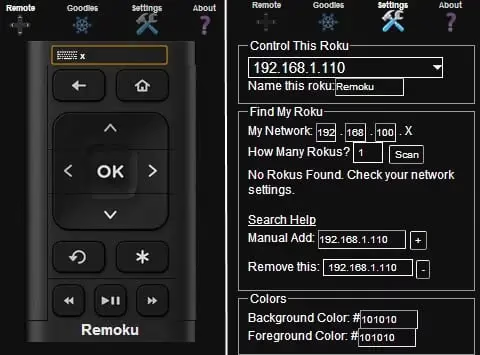
-
Ensure your phone is connected to the same network as the Roku
-
Launch the app and tap Devices at the top
-
Select your Roku
-
Go to Settings gear icon
-
Scroll down to System Info
-
Note the IP Address listed
This is also a handy method if your Roku Remote is Not Working.
#Check Your Router Settings
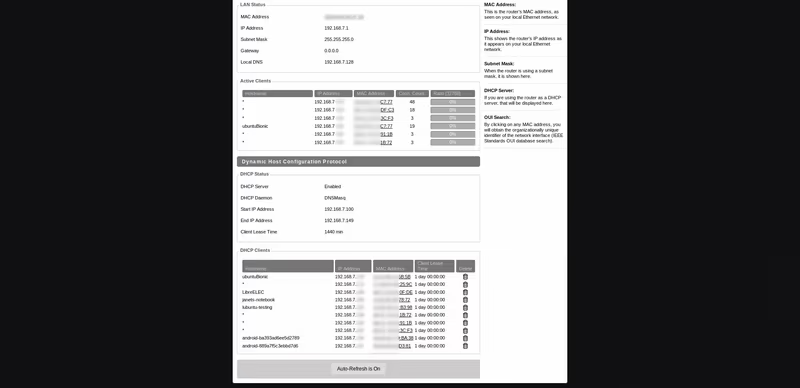
You can also find your Roku’s IP address in your router’s admin interface:
-
Log in to your router by entering its gateway IP in a web browser
-
Look for a list or menu of connected devices (may be called Device List, Attached Devices, DHCP Clients, etc)
-
Find and select your Roku in this list
-
Note the IP address assigned to it by the router
If the Roku isn’t listed by name, you may need to identify it by its MAC address and compare to the MAC addresses shown in the device list.
#FAQs on Finding a Roku IP Address
#How do I find my Roku IP without the remote or mobile app?
You can find your Roku IP address by logging in to your router’s admin settings and checking the list of connected devices for the Roku.
#Why would I need to know my Roku’s IP address?
The Roku IP address is useful for troubleshooting network issues, configuring port forwarding, setting a static IP, and accessing certain Roku features.
-
It’s a useful troubleshooting step if your TCL Roku TV is Not Connecting to WiFi.
-
You may need the IP address if you want to Mirror Android to Roku.
-
Setting a static Roku IP is helpful if you Use Roku and Firestick on the Same TV to avoid address conflicts.
#Will my Roku IP address change?
Yes, your Roku’s IP address can change if assigned dynamically by the router. Rebooting the router or Roku may result in a new IP. You can set a static IP for a consistent address.
#Is a Roku IP address needed for normal streaming?
No, generally you don’t need to know your Roku’s IP for regular streaming use. It’s more helpful for advanced networking or troubleshooting.
#Can I set a static IP address for my Roku?
Yes, most routers allow you to assign a specific static IP to a device like your Roku. Check your router’s documentation for instructions.
#Bottom Line
-
You can easily find your Roku IP address on the device itself in Settings > Network > About
-
The free Roku mobile app for iOS and Android also shows the IP
-
Your router’s admin interface will list the Roku’s assigned IP in the connected devices menu
-
Knowing the IP is useful for troubleshooting, port forwarding, and setting a static address
-
A Roku IP isn’t needed for regular streaming but is helpful for advanced networking purposes
-
Knowing your Roku’s IP address is also useful if you need to Restart Your Roku TV for troubleshooting purposes.
With these simple methods, you’ll be able to quickly retrieve your Roku IP address whenever you need it. While not required for casual streaming, knowing the IP comes in handy for configuring network settings and diagnosing any issues. Now you’re equipped to locate your Roku IP like a pro!