You sit down on the couch, ready to enjoy a quiet evening. Suddenly, your Hisense TV springs to life, unprompted and displaying static. You grab the remote to turn it off again, but five minutes later the TV turns itself on yet again!This frustrating issue has numerous possible causes, from settings glitches to hardware failures. Read on as we diagnose the reasons your Hisense TV keeps powering up automatically, and walk through fixes to get your evenings back.
- HDMI-CEC is the #1 cause — disabling CEC in Settings > System > HDMI & CEC stops connected devices from powering on your TV automatically
- Power cycling clears temporary glitches — unplug your Hisense TV for 60 seconds to fully discharge capacitors and reset the power board
- Firmware bugs trigger random power-ons — Hisense pushes updates that fix known auto-wake issues, so check Settings > System > About > System Update
- Sleep timers and On Timer cause scheduled wake-ups — go to Settings > System > Time and disable all timer functions to rule out scheduled behavior
- Component-level repairs cost $50-$100 — faulty capacitors or a failing power supply board account for most hardware-related self-powering issues
#What Causes a Hisense TV To Turn On by Itself?
Before jumping into solutions, let’s break down root causes of a Hisense television powering up by itself without prompting:
HDMI-CEC Enabled
Consumer Electronics Control (HDMI-CEC) allows connected devices to communicate and share limited control. For example, starting a Blu-Ray player could automatically turn the TV on or change inputs. If your devices have CEC enabled, disabling it on the TV may solve self powering on.
Outdated Firmware
Bugs or flaws in outdated firmware versions can manifest randomly, like turning the TV on without input. Performing a firmware update typically resolves issues.
Remote Control Defects
If buttons become stuck on the remote or batteries are overheating, they could send errant on/off signals. Resetting or replacing remote batteries often fixes this.
Power Surges
Electrical power inconsistencies like surges or sags can reset TVs. Surge protectors help prevent this cause.
Sleep Timer Enabled
Modern Hisense TVs include sleep timers to automatically power down after preset durations. Turning the timer off stops unattended auto shut off.
Hardware Failures
Defective capacitors, backlight failures, and overheating components can lead TVs to randomly reset or turn on. Replacing damaged hardware resolves these issues.
Now let’s walk through practical fixes to stop your Hisense turning itself on, starting with the simplest approach.
#How Do You Disable HDMI-CEC on a Hisense TV?
HDMI-CEC is the most common culprit causing Hisense TVs to power on automatically. Disabling CEC typically stops the television from turning itself on:
-
Using your Hisense remote, go to Settings
-
Navigate to System
-
Choose HDMI & CEC
-
Turn CEC Control to Off
-
Disable Device Auto Power On
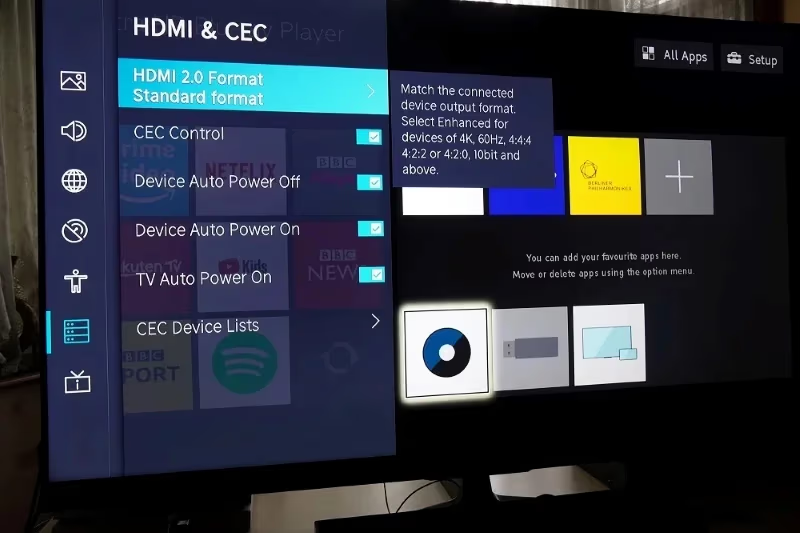
With CEC disabled, devices can no longer directly control or send power commands to the TV.
Re-enabling CEC returns integrated functionality like using one remote to control your system. But if the self-powering on continues, CEC miscommunication likely isn’t the cause.
#Fix 2: Check and Disable Timer Settings
Like most modern televisions, Hisense TVs feature a variety of timer functions to automatically power on or off after set durations. If you have a timer enabled accidentally, disabling it stops the unattended power on/off cycle:
-
Go to Settings
-
Choose System
-
Select Time
-
Find options like On Timer, Off Timer, or Sleep Timer
-
Turn timers to Off and disable auto power behaviors
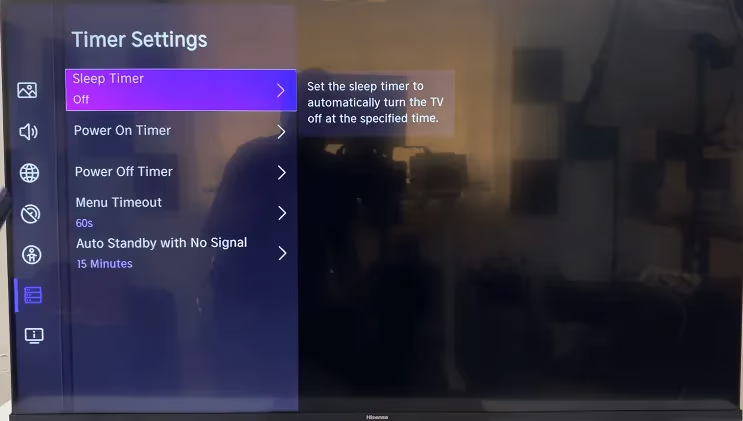
With timers disabled, the TV will remain powered off unless directly prompted to turn on via the remote or manual power button.
#Fix 3: Power Cycle the Hisense TV
“Have your tried turning it off and on again?” Sometimes this basic IT troubleshooting step does the trick:
-
Unplug the Hisense television from wall power
-
Keep TV unplugged for 1 full minute
-
Plug powered-off TV back into wall outlet
-
Manually power up TV using power button (not remote)
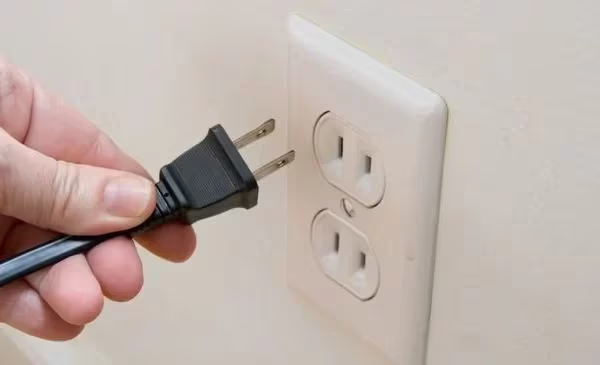
Power cycling forces key components to fully discharge, clearing any potential glitches causing TV to turn itself on.
If your Hisense TV has a black screen issue, power cycling can help reset any glitches.
#Fix 4: Update Hisense TV Firmware
Buggy, outdated firmware manifesting issues like randomly powering television on can usually be resolved by updating to the latest firmware:
-
Go to Settings
-
Choose System > About > System Update
-
Turn on Automatic Updates if disabled
-
Or manually check for updates available for your model
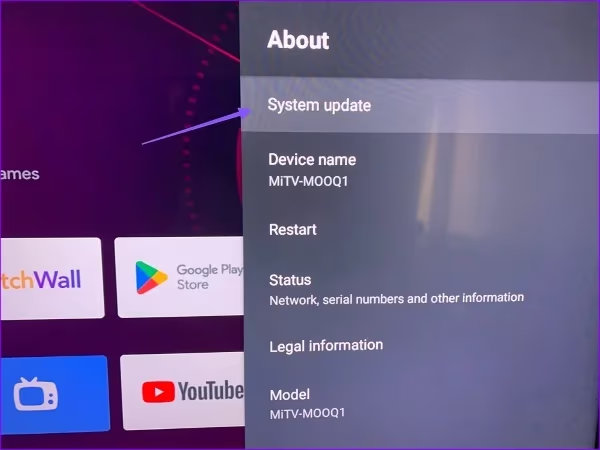
Updating firmware also improves general performance and stability of smart TV functionality.
#Fix 5: Reset Hisense TV Remote Control
As highlighted earlier, stuck buttons or faulty components within remote controls themselves can cause televisions to turn off and on repeatedly.
Before replacing batteries or the entire remote, attempt power cycling the remote control through following steps:
-
Remove batteries from Hisense remote
-
Press and hold power button for 30+ seconds
-
Replace batteries in remote
-
Test if issue persists
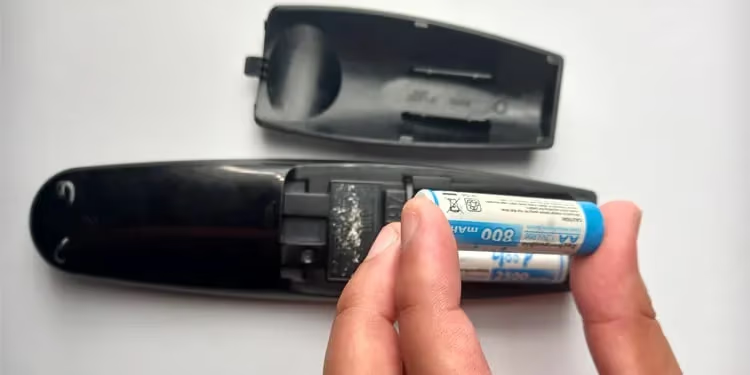
If TV continues turning itself on, you may need to program a universal remote if the included Hisense remote is damaged.
Stuck buttons on a faulty remote can cause Hisense TVs to keep turning on and off.
#Fix 6: Factory Reset the Hisense TV
Resetting your Hisense smart television to factory default settings can act as a “clean slate” troubleshooting step for persistent issues like repeated automatic powering on.
Note: Resetting deletes all personalized data like streaming service logins or custom settings.
Factory reset using either of these methods:
-
Go to Settings > Device Preferences > Factory Reset
-
Or press tiny pinhole “Reset” button on TV casing
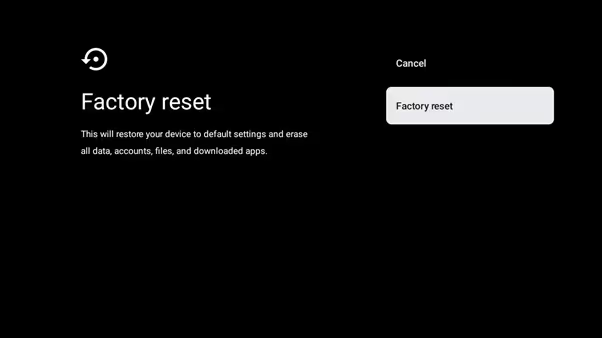
Allow device to reboot to setup mode, re-configure initial preferences, and test if problem continues.
A factory reset reverts your TV back to original out-of-box settings.
#Fix 7: Replace Faulty Cables or Power Sources
Before tearing into advanced hardware repairs, check that connected devices like surge protectors, power strips, HDMI converters, or the power cable itself aren’t introducing problems causing TV to reset.
Swap out any potential faulty hardware with known-good replacement parts, or eliminate sources like cable boxes from the setup temporarily to isolate root cause.
A blinking red light on startup often indicates power supply issues.
#Fix 8: Replace Internal Components
For persistent power-up problems localized to the TV itself, overheating parts or shorted capacitors likely need replacement by a repair technician.
Common culprits include:
-
Faulty capacitors letting through excess current
-
Timing controller board glitches
-
Overheating video processor or power regulation chips
Shop warranty coverage below before paying for extensive mainboard replacements. Component-level fixes cost $50-100.
#Does Hisense Warranty Cover Self-Powering Issues?
If you’ve tried all troubleshooting steps and the Hisense television continues turning itself on automatically, exercise warranty coverage:
-
Hisense Warranties: 1 year coverage for repair/replacement
-
Phone Support: 1-888-935-8880 (Hours: 9AM – 9PM EST)
Technicians can verify if mainboards or components need replacement due to manufacturing deficiency. On-site repair or shipping TV to service depot may be covered fully under warranty.
Hisense vs Vizio – how do two popular budget TV brands compare on price and picture quality?
#Bottom Line
In review, you can stop your Hisense TV from powering on by itself through:
-
Disabling HDMI-CEC in settings
-
Turning off timer features
-
Power cycling the TV
-
Updating firmware
-
Replacing remote batteries
-
Factory resetting the television
-
Swapping damaged cables/power strips
-
Replacing faulty internal hardware
Still having issues with your Hisense randomly powering up? First call Hisense support while under 1 year factory warranty. For older models, consider replacing defective capacitors causing auto power on.
I hope this guide gives you peace of mind and evenings free from unexpected TV disruption! Let me know in the comments if you have troubleshooting tips to add.
Much like Hisense, Vizio TVs powering up automatically can stem from outdated firmware.
#FAQ
#Why does my Hisense TV turn on by itself at night?
HDMI-CEC is the most common reason. If a connected device like a game console or streaming stick enters standby or receives an update overnight, it can send a CEC power-on signal to your TV. Disable CEC in Settings > System > HDMI & CEC to stop this behavior.
#Will a factory reset fix my Hisense TV from turning on randomly?
A factory reset can resolve the issue if a software glitch or corrupted setting is the root cause. Keep in mind that resetting erases all saved apps, logins, and custom picture settings. Try disabling CEC and updating firmware first before resorting to a full reset.
#Can a bad HDMI cable cause my Hisense TV to power on?
Yes, a damaged or loose HDMI cable can send erratic signals that the TV interprets as a CEC power-on command. Swap the cable with a certified high-speed HDMI cable and make sure the connection is snug on both ends.
#How do I stop my Hisense Roku TV from turning on by itself?
Go to Settings > System > Power and disable “Fast TV Start” along with “CEC” under System > Control Other Devices. Roku-based Hisense TVs handle CEC settings differently than Android or VIDAA models, so look under the Roku system menu rather than general TV settings. Also disable any On Timer under Settings > System > Time.
#Does a power surge cause Hisense TVs to turn on automatically?
Power surges and voltage fluctuations can reset the TV’s power state, causing it to boot up unexpectedly. Plugging your Hisense TV into a surge protector with at least 1,000 joules of protection helps prevent this. If you experience frequent surges, consider an uninterruptible power supply (UPS) for added stability.
#How long does a Hisense TV warranty last for power issues?
Hisense provides a standard 1-year manufacturer warranty that covers defects including power-related malfunctions. Contact Hisense support at 1-888-935-8880 (9AM to 9PM EST) to file a claim. If your TV is outside the warranty period, component-level repairs for capacitor or power board issues typically cost $50 to $100 through a local repair shop.
#Should I unplug my Hisense TV when not in use?
Unplugging eliminates any chance of phantom power-ons from CEC signals, timers, or firmware glitches. The downside is that the TV takes longer to boot from a cold start and loses its internal clock settings. A smart plug with scheduling gives you the best of both worlds by cutting power automatically during overnight hours.