Your Haier TV won’t turn on, and you need it fixed fast. This guide walks through every troubleshooting step I use as a technician with over 10 years repairing consumer electronics, including Haier, Samsung, Sony, Sharp and TCL TVs. Work through the steps below in order, and you’ll find the cause.
- Power cycle fixes most Haier TV startup failures — unplug, hold power 15 seconds, wait 2 minutes, replug
- A lit standby LED with no power-on points to an internal board failure — not a power supply issue
- Damaged HDMI or power cables cause 20-30% of no-power symptoms — swap cables before opening the TV
- Remote batteries die before the remote itself — test with fresh batteries and clear line of sight to the IR sensor
- Board replacements cost 50-75% of a new TV — get a repair quote before ordering parts
#Why Won’t Your Haier TV Turn On?
There are a few main culprits for a Haier television that will not power on:
- Power issue: no electricity reaching the TV at all
- Faulty component: internal hardware failure of a key part
- Loose connection: HDMI or other cables not properly attached
- Remote control: remote not sending signals correctly
I’ll cover each of these common issues in detail in the troubleshooting steps below.
#How Should You Diagnose the Problem?
Getting frustrated trying random fixes hoping one works? I don’t blame you. But there’s a right way to troubleshoot.
Follow these steps in order to methodically narrow down the cause:
-
Confirm the TV is getting power
-
Try resetting the TV
-
Check all cable connections
-
Test remote control functionality
-
Swap out damaged cables or components
Taking this structured approach will lead you to the source of the problem much faster. Now, let’s get into the step-by-step process for getting your Haier TV working again.
#Step 1: Check Power to the Haier TV
The most obvious issue stopping your TV from turning on is a lack of power getting to the unit.
-
Make sure the TV is plugged directly into the wall outlet. Remove any power strips, surge protectors or extension cords temporarily to eliminate them as a factor.
-
Try connecting a different device like a phone charger to the outlet to confirm power. If the outlet doesn’t power the test device either, you likely have an external issue with your electrical system or circuit breaker.
-
Inspect the power cord carefully for damage. Exchange for a new power cord if there are any cuts, loose connections or bent plugs.
-
If the standby light illuminates but turning on the TV via remote does nothing, this indicates there is power getting to the unit but an internal component failure is preventing full activation.
Confirming where power is lost is the first step towards narrowing down where the root cause lies.
#Step 2: Reset Your Haier Television
Before taking apart any hardware, try restarting your TV with a power cycle:
-
Unplug TV from power source
-
Press and hold the power button on the TV unit itself for 10-15 seconds to discharge residual electricity
-
Let the TV sit for 2 full minutes before plugging back in
-
Connect power cord and press power button
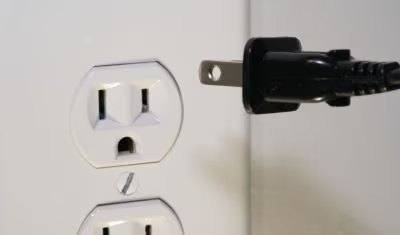
This forces a hard reboot and flushes any corrupted data or glitchy firmware that could be preventing startup. I recommend a reset as step 1 for any electronic that suddenly stops working.
#Step 3: Inspect All Video and Data Connections
If your TV powers on but doesn’t show video or sound, loose cable connections could be the issue.
Check for any loose or disconnected:
-
RCA or component video cables
-
Optical or RCA audio cables
-
Antenna/coaxial cable
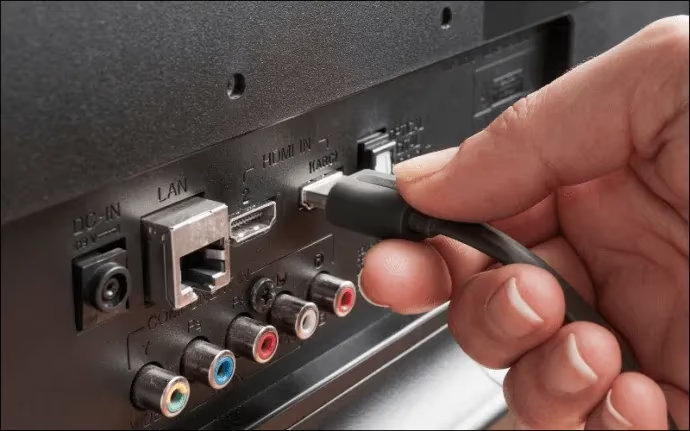
Remove each cable and reconnect firmly into the port on the back of the TV, then power cycle after reconnecting everything. This re-seats any temperamental connections.
Inspect cables for damage too. A single disconnected wire inside the cable can cause handshake issues between devices, leading to no video or audio. Replace damaged cables right away.
#Step 4: Is the Remote Control Working?
Can your television turn on via the manual power button but NOT using the remote control? That is a strong indication of remote failure.
-
Check remote control battery levels. Replace batteries with brand new ones.
-
Make sure remote has direct line-of-sight access to the IR sensor on front of the TV.
-
Try using the remote with a different device (Blu-ray player, cable box) to confirm it works.
-
If available, test with an alternative remote control to isolate the problem.
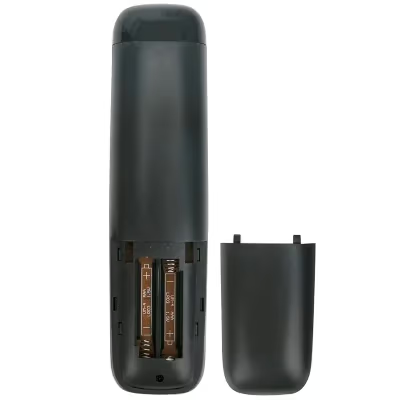
If the remote tests functional, then an IR sensor failure within the TV could be preventing communication and activation via remote. This requires internal component testing and replacement.
#Step 5: Diagnose and Replace Faulty Internal Hardware
If you’ve made it through all the previous troubleshooting steps, the TV likely has a fault with an internal electronic component that needs replacement.
Common at-fault parts that prevent successful power on:
-
Power supply board
-
T-con board
-
Main logic board
Confirming exactly which piece failed can take specialized diagnostic equipment and circuit-level troubleshooting expertise.
At this stage I recommend working with a qualified TV repair technician for the fastest resolution. Replacing damaged internal electronics requires soldering know-how and specialty tools.
Generic replacement power boards and main logic boards are available on eBay and Amazon for many Haier TV models at reasonable prices. Get the exact part number off the damaged board before ordering a replacement online.
If the TV is outside of warranty, repair costs can approach 50-75% of a new TV price, so assess expenses before proceeding.
#How Do You Keep Your Haier TV Running Like New?
Avoid future startup issues by keeping your television clean, maintained and stored properly when not in use:
-
Keep TV away from dust, liquids and direct sunlight
-
Use compressed air to routinely clear ventilation openings
-
Allow 4-6 inches clearance around the unit for airflow
-
Unplug TV before thunderstorms to avoid power surges
-
Install the TV on a sound, level surface so it doesn’t tip
-
Avoid using spray cleaners or liquid cleaners on the display
-
Use a soft, dry lint-free cloth to wipe dust from the screen
Following these care instructions helps prevent damage and extends your Haier television lifespan.
#When to Call in a TV Repair Expert
As outlined above, many startup problems can be resolved with basic troubleshooting or affordable component replacements.
However, if you are uncomfortable working inside modern HDTVs (which contain sensitive electronics), or repairs exceed the remaining value of the TV, calling a certified TV repair technician is the best option.
Here are a few indicators it’s time to hand over the job:
-
You followed this troubleshooting guide but the problem persists
-
You don’t have the right tools or skillset for internal electronics work
-
You’re unsure exactly which component requires replacement
-
Repair costs are too high compared to purchasing a replacement TV
-
You found other faults during inspection
Trusted TV repair techs have the diagnostic tools, parts sourcing channels and specialized expertise to get you up and running quickly. They should also offer free quotes for the job before starting work.
#Bottom Line
This troubleshooting guide covers the most common reasons a Haier TV won’t power on, from basic power issues to internal board failures. The same methods work for many models and brands, including Vizio and Philips.
Working through the power tests, cable checks and component replacements above will get your TV functioning again in most cases. For anything beyond these steps, a professional TV repair service can finish the job right. Their parts discounts and technical skills will have you watching your favorite shows again at minimal expense.
#FAQ
#Why does my Haier TV standby light blink but the TV won’t turn on?
A blinking standby light usually signals a power supply board failure. The board receives electricity but cannot deliver stable voltage to the main board. Count the number of blinks, as Haier uses blink codes to indicate specific faults. Check your model’s service manual for the exact code meaning.
#Can a power surge damage a Haier TV permanently?
Yes. A power surge can fry the power supply board, main board, or both at once. Surge protectors help but don’t guarantee protection against large spikes. If your TV stopped working after a storm or power outage, the power supply board is the most likely casualty.
#How do I factory reset a Haier TV that won’t turn on?
You can’t perform a factory reset on a TV that won’t power on at all. A factory reset requires access to the on-screen menu. What you can do is a power cycle: unplug the TV, hold the power button for 15 seconds, wait 2 minutes, then plug it back in. This clears temporary firmware issues without needing the menu.
#How long do Haier TVs typically last before needing repair?
Most Haier TVs last 5-7 years with normal use before components start failing. The backlight and power supply board tend to go first. Keeping the TV in a well-ventilated area and using a surge protector can add 2-3 years to its lifespan.
#Is it worth repairing an older Haier TV or should I buy a new one?
Compare the repair cost to the TV’s current value. If the repair exceeds 50% of what a comparable new TV costs, replacement makes more financial sense. Power supply boards typically run $30-60 for parts, making them worth fixing. Main board replacements at $80-150 are a closer call depending on the TV’s age and size.
#Does unplugging a Haier TV for a few minutes actually fix anything?
It fixes more than you’d expect. Unplugging for 2 minutes drains residual capacitor charge and forces the firmware to reload from scratch on the next boot. This resolves frozen states, corrupted display settings, and HDMI handshake failures that a normal restart can’t clear.
#Why does my Haier TV turn off by itself right after powering on?
This usually points to an overheating protection circuit or a failing capacitor on the power supply board. The TV starts up, detects an abnormal voltage or temperature reading, and shuts down to protect itself. Blocked ventilation openings are the most common trigger, so check for dust buildup first.
#Can I use a universal remote if my Haier remote stops working?
Yes. Most universal remotes support Haier TVs using code 0054, 0108, or 0073. Program the code into the universal remote following its setup instructions. If none of those codes work, use the remote’s auto-search function to find the right one.