ESPN on DirecTV starts at channel 206, with additional ESPN networks spread across channels 207 through 614. Every DirecTV package includes ESPN channels, so you do not need to upgrade just to watch Monday Night Football or SportsCenter. This guide covers the exact channel numbers, package breakdowns, ESPN+ access, and ways to stream ESPN when you are away from home.
- ESPN main channel — Channel 206 on DirecTV (1206 for HD), available in all packages starting at $69.99/month
- Six ESPN networks included — ESPN, ESPN2, ESPNU, ESPNews, ESPN Classic (614), and ESPN Deportes (466) across DirecTV tiers
- ESPN+ requires a separate subscription — It is a standalone streaming service, not a DirecTV channel, priced at $11.99/month
- DirecTV app enables mobile viewing — Stream live ESPN content on phones, tablets, and computers with your DirecTV login
- Regional sports fees vary — DirecTV may charge an extra $3 to $12/month depending on your local market and RSN availability
#What Channel Is ESPN on DirecTV?
ESPN’s primary channel on DirecTV is 206. The HD version is on 1206. Beyond the flagship channel, DirecTV carries five additional ESPN networks:
| Network | Channel Number |
|---|---|
| ESPN | 206 / 1206 (HD) |
| ESPN2 | 209 |
| ESPNews | 207 |
| ESPNU | 208 |
| ESPN Classic | 614 |
| ESPN Deportes | 466 |
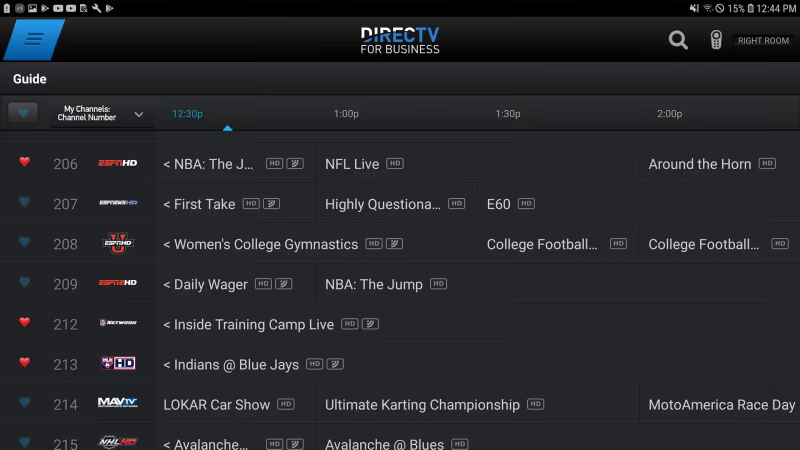
Channel 206 also has overflow feeds. When multiple games air at the same time, DirecTV uses channels 206-1 through 206-9 for simultaneous broadcasts. This is common during college football Saturdays and March Madness weekends.
If you are trying to find other sports channels on DirecTV, check out the full DirecTV channel lineup compared to DISH or how DirecTV stacks up against Spectrum TV.
#Which DirecTV Packages Include ESPN?
All four DirecTV satellite packages include ESPN channels. The difference between tiers is the total number of channels and premium add-ons, not ESPN access.
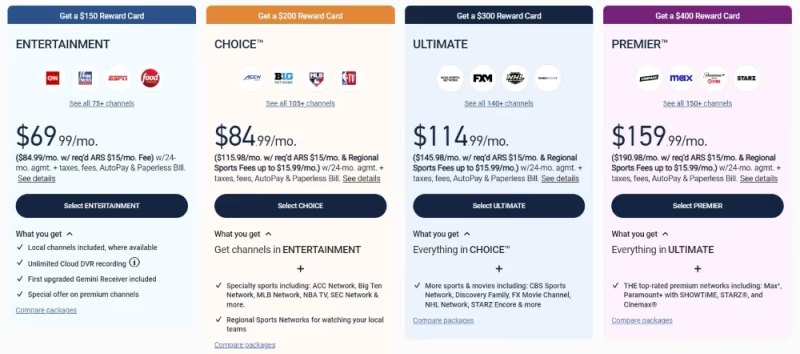
Here is what each package offers:
- Entertainment ($69.99/month): ESPN, ESPN2, ESPNews, ESPNU, plus 75+ other channels
- Choice ($84.99/month): Everything in Entertainment, plus regional sports networks and 105+ total channels
- Ultimate ($114.99/month): All Choice channels plus ESPN Deportes and 140+ total channels
- Premier ($159.99/month): Every available ESPN network plus HBO, Showtime, and 150+ channels
The Choice package is the most popular for sports fans because it adds regional sports networks (RSNs). If you only care about national ESPN coverage, the Entertainment package works fine and saves $15/month.
Regional sports fees range from $3 to $12 per month depending on your area. DirecTV adds this automatically based on your zip code during signup. You can call DirecTV at 1-800-531-5000 to confirm the exact fee for your location.
#Can You Get ESPN+ on DirecTV?
No. ESPN+ is a standalone streaming service from ESPN that costs $11.99/month or $119.99/year. It is not available as a channel on any DirecTV package.
ESPN+ carries content you will not find on regular ESPN channels. That includes out-of-market college games, UFC pay-per-view events, some MLB and NHL games, and original shows like the 30 for 30 documentary series.
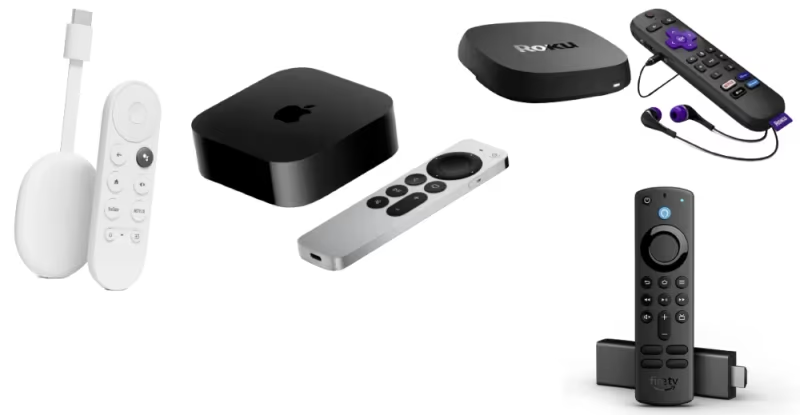
To watch ESPN+ content on your TV, download the ESPN app on your streaming device:
- Roku (all models)
- Apple TV and Apple TV 4K
- Amazon Fire TV Stick and Fire TV Stick 4K
- Samsung Smart TV (2017 and newer)
- LG Smart TV (webOS 3.0 and newer)
- PlayStation 4, PlayStation 5, Xbox One, Xbox Series X/S
Sign in with your ESPN+ account inside the app. Your DirecTV credentials will not unlock ESPN+ content, but they will let you watch live ESPN, ESPN2, and other linear channels through the ESPN app.
#How Do You Stream ESPN Away From Home?
The DirecTV app is the fastest way to watch ESPN outside your house. It works on iOS, Android, and most web browsers. Sign in with your DirecTV account and you get access to every ESPN channel in your package.
There are a few things worth knowing about mobile streaming:
Wi-Fi vs. cellular data. Live sports in HD uses about 3 GB per hour. If you are on a limited data plan, connect to Wi-Fi when possible. Most airports, hotels, and coffee shops have free Wi-Fi that handles streaming without buffering.
Blackout restrictions still apply. Some live games are blacked out on mobile based on your location. This mostly affects regional MLB and NBA games, not national ESPN broadcasts like Monday Night Football or College GameDay.
DVR access on the go. If you have a DirecTV DVR (Genie or Genie 2), you can schedule recordings remotely through the app. Record a game while you are out, then watch it when you get home. The app also lets you stream recorded content from your DVR if your home internet upload speed supports it.
If you want a different live TV option for travel, fuboTV carries ESPN channels and works well on hotel Wi-Fi since it does not require satellite hardware.
#ESPN vs. ESPN+ Content: What Is the Difference?
Understanding the split between ESPN and ESPN+ helps you decide if you need both or just one.
ESPN (cable/satellite channel) carries the biggest live events: Monday Night Football, NBA Finals, College Football Playoff, and flagship shows like SportsCenter and First Take. These are included with your DirecTV subscription at no extra cost.
ESPN+ fills in the gaps. It streams thousands of games that do not make it to the main ESPN channel, including most UFC events, Big 12 and SEC Network+ games, La Liga soccer, and PGA Tour Live coverage. It also has the full 30 for 30 library.
Most sports fans with DirecTV benefit from adding ESPN+ if they follow niche sports or want access to every UFC card. For casual viewers who only watch primetime NFL and NBA games, regular ESPN through DirecTV is enough.
The Disney Bundle ($16.99/month) combines ESPN+ with Disney+ and Hulu, which cuts the cost compared to subscribing to each service separately.
#How to Fix Common ESPN Issues on DirecTV
ESPN signal problems are usually not ESPN-specific. They are DirecTV issues. Here are the most common fixes:
“Channel not available” error. This typically means your DirecTV receiver lost its authorization. Go to Settings > Reset > Refresh Service, or call 1-800-531-5000 for an over-the-air refresh. This takes about 5 minutes.
Pixelated or freezing picture. Check your satellite dish alignment. Heavy rain, snow, or strong wind can shift the dish slightly. If the problem only happens during storms, wait it out. If it persists in clear weather, schedule a technician visit.
No sound on ESPN. Press the audio button on your DirecTV remote and make sure it is set to “Stereo” instead of “Dolby Digital.” Some older receivers default to Dolby output even when your TV does not support it.
If your DirecTV box is frequently freezing across all channels, a full power cycle usually resolves it. Unplug the receiver, wait 30 seconds, then plug it back in.
#Bottom Line
ESPN channels come standard with every DirecTV package. Tune to channel 206 for the main ESPN feed, and check channels 207 through 614 for the rest of the ESPN family. If you want ESPN+ for UFC, out-of-market college games, and documentaries, subscribe separately at $11.99/month and watch through the ESPN app on your streaming device.
For streaming ESPN on the go, download the DirecTV app and sign in with your account. Record games remotely with your DVR, and stream live channels from anywhere with a stable internet connection.
If DirecTV pricing feels too high for your sports needs, compare it against other live TV alternatives that also carry ESPN.
#Frequently Asked Questions
#What channel number is ESPN on DirecTV?
ESPN is on channel 206. The HD version is on channel 1206. DirecTV also uses overflow channels 206-1 through 206-9 during heavy sports programming days like college football Saturdays.
#Does the cheapest DirecTV package include ESPN?
Yes. The Entertainment package at $69.99/month includes ESPN, ESPN2, ESPNU, and ESPNews. You do not need to upgrade to a higher tier for ESPN access.
#Is ESPN+ free with a DirecTV subscription?
No. ESPN+ is a separate streaming service that costs $11.99/month or $119.99/year. Your DirecTV login does not grant access to ESPN+ content, though it does unlock the linear ESPN feed inside the ESPN app.
#Can I watch ESPN on my phone with DirecTV?
Download the DirecTV app on iOS or Android and sign in with your account. You can stream every ESPN channel included in your package. Live HD sports uses about 3 GB of data per hour, so Wi-Fi is recommended.
#What sports are exclusive to ESPN+ and not on regular ESPN?
ESPN+ carries UFC pay-per-view events, out-of-market college football and basketball games, La Liga and Bundesliga soccer, PGA Tour Live, and some MLB and NHL regular-season games. These do not air on the standard ESPN cable channel.
#Why is ESPN not working on my DirecTV?
The most common fix is a service refresh. Go to Settings > Reset > Refresh Service on your DirecTV receiver. If that does not work, power cycle the box by unplugging it for 30 seconds. Persistent issues usually point to a satellite dish alignment problem.
#How do I record ESPN games on DirecTV?
Use the DirecTV remote to press the Record button while watching ESPN, or schedule recordings through the DirecTV app. Genie and Genie 2 DVRs can record up to five shows at once, and you can manage your recording schedule remotely from your phone.
#Does DirecTV Stream include ESPN channels?
Yes. DirecTV Stream, the internet-based version of DirecTV, includes ESPN in its Entertainment package and above. It works without satellite hardware, which makes it a good option if you rent or cannot install a dish.