Deciding between Dish TV and YouTube TV for your home entertainment? This guide compares features, pricing, channels, DVR, streaming, and more to help you choose the best option.
- YouTube TV costs $72.99/month with no contract — Dish TV starts at $79.99/month and requires a 2-year commitment
- Dish TV offers up to 290+ channels — YouTube TV has 85+ channels focused on the most popular networks
- YouTube TV includes unlimited cloud DVR free — Dish TV’s Hopper 3 DVR stores 2,000 hours but adds monthly equipment fees
- YouTube TV streams on virtually any device — Dish TV requires satellite receivers with limited mobile streaming through Dish Anywhere
- Dish TV works better in rural areas — YouTube TV depends entirely on your broadband internet connection
#Introduction: Dish TV Overview
 Dish TV is a satellite TV service offered by Dish Network with a wide selection of programming packages and extra channel add-ons available.
Here’s an overview of Dish TV and what it offers:
Programming Packages: Dish TV offers package tiers ranging from basic 190+ channels to 290+ channels in their top-tier “America’s Top 250” package. Customizable channel lineups available.
Equipment Needed: Requires Dish satellite dish and proprietary receivers like the Hopper 3 DVR. Multi-TV households need Joey receivers.
DVR Features: Hopper 3 Smart DVR can record up to 16 shows at once and store up to 2,000 hours. Functions like PrimeTime Anytime and AutoHop allow skipping commercials.
Availability: Available nationwide in continental USA where Dish can install satellite equipment pointing southwards. Rural availability higher than cable.
Contracts: Typically requires 2-year contract when bundled with equipment discounts. Early termination fees may apply if canceled before term ends.
Compared to streaming services, the main advantages of satellite TV are more channel options, reliable service even in rural areas, advanced DVR functionality and picture quality. The tradeoffs are higher pricing, contracts, less flexibility, and the need for satellite dish installation.
#Overview: YouTube TV Streaming Service

YouTube TV is an internet-based live TV streaming service with 85+ top channels offered at a flat monthly rate.
Here are the key things to know about YouTube TV:
Programming: 85+ channels across sports, news, entertainment and more. Add-ons like HBO Max available. Covers major national and regional sports networks. YouTube TV allows changing your location on YouTube TV to access different regional sports and local channels.
Cloud DVR: Includes unlimited cloud DVR at no extra charge with recordings stored for 9 months. Supports pausing live TV.
Simultaneous Streams: Up to 3 concurrent streams. Unlimited streams within home network. 6 individual user profiles supported.
Availability: Available nationwide without contracts wherever you have a broadband internet connection. No satellite dish or installation needed.
Supported Devices: Compatible with smartphones, tablets, computers, Chromecast, Roku, Apple TV, smart TVs, and more. Fewer devices than satellite but offers flexibility.
Family Friendly: Parental controls and family-friendly programming available. Can create and manage individual profiles for each household member.
Compared to traditional cable and satellite, YouTube TV offers flexibility, no contracts, easier setup, and savings. The tradeoff is having fewer total channels than the highest satellite packages, and relying on your home’s internet connectivity.
#How Much Does Dish TV Cost?
Dish TV packages range from $79.99 per month to $109.99 per month with prices guaranteed for two years. Here’s a pricing breakdown of Dish TV programming tiers:
| Dish TV Packages | Price/Mo | Channels | Features |
|---|---|---|---|
| America’s Top 120 | $79.99 | 190+ | Pop stations, regional sports |
| America’s Top 120+ | $99.99 | 240+ | More sports & entertainment |
| America’s Top 200 | $109.99 | 290+ | Full channel lineup + movies |
Additional Fees to Consider
-
Premium Movie Channels: $5-20/mo for HBO, Showtime, etc
-
Equipment Fees: $10/mo per receiver (Hopper DVR, Wireless Joey, etc)
-
Installation & Activation: Up to $200 in fees
-
Early Termination Fee: Up to $20 per month remaining if canceled before 2 years
Bundling Dish TV with internet or Dish’s phone service Sling can help lower TV pricing. Starting prices are for first-time Dish customers on select packages with 2-year agreements.
#How Much Does YouTube TV Cost?
YouTube TV costs a flat rate of $72.99/month regardless of channels selected or household size. Here’s a pricing breakdown:
-
Base Charge: $72.99/mo
-
Premium Add-Ons: Showtime, Starz, AMC Premiere ($5-20/mo extra)
-
Taxes & Fees: None
YouTube TV offers a few ways to save:
-
Intro Offer: $10 off/mo for 3 months ($62.99/mo)
-
Annual Billing: $599.88 total per year ($49.99/mo equivalent)
-
Student Discount: $15 off/mo with student email verification
Unlike Dish TV, YouTube TV has no contracts, no hidden fees, and can be canceled online anytime. Applicable sales tax charged in some states.
#Feature Comparison: Dish TV vs YouTube TV
Now, let’s compare Dish TV and YouTube TV across some key features like channel lineup, DVR, streaming, and ease of use:
#Channels & Programming
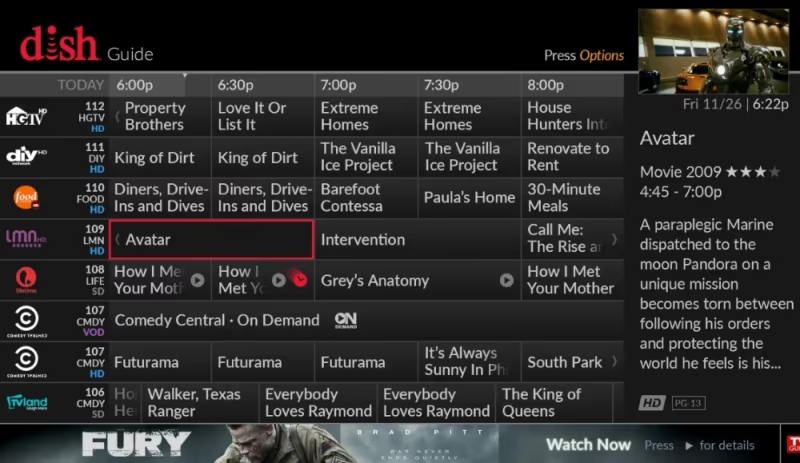
Channel Count
-
Dish TV: 190+ to 290+ channels depending on package
-
YouTube TV: 85+ channels with add-on options
Content Selection
-
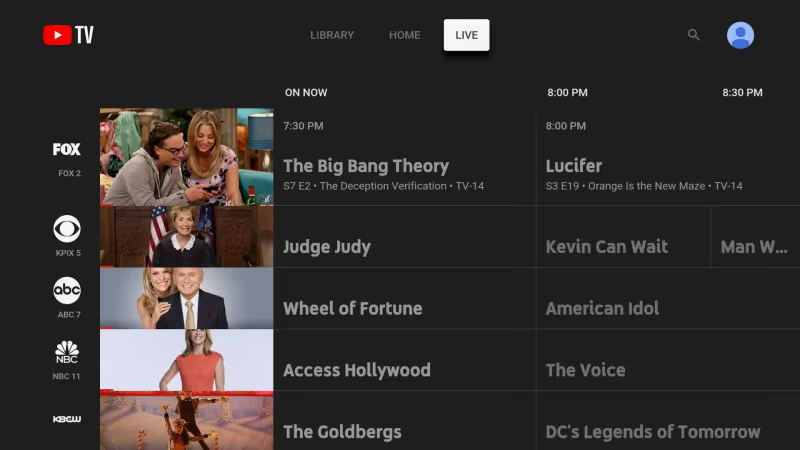
Dish TV has more total channels, especially in top-tier packages
-
YouTube TV offers the most popular stations with less filler
-
Dish includes Showtime & Hallmark; YouTube has AMC, Discovery, Viacom stations
-
Regional sports coverage comparable between both
Premium Channels
-
Dish TV includes premium movie channels like HBO, Showtime, and Cinemax in bundled packages
-
YouTube TV charges $5-15 extra per month for premium channels
Both services offer customization with extra channel packs, but Dish TV has larger lineups to build from depending on your preferences.
#DVR Features: Hopper 3 vs YouTube TV
For recording your shows to watch later, Dish TV and YouTube TV take different approaches:
Hopper 3 DVR (Dish)
-
Stores up to 2,000 hrs
-
Record 16 shows simultaneously
-
SkipMode to auto-skip commercials
-
Watch on mobile with Dish Anywhere app
-
Added monthly fees per receiver
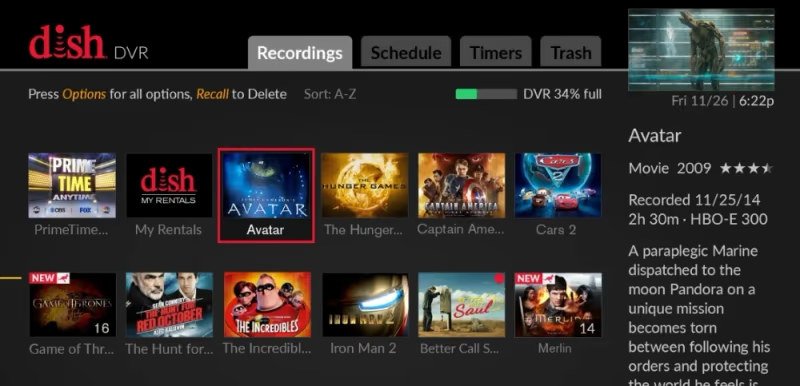
The Hopper 3 DVR helps Dish TV stand out from cable competitors like Spectrum and Xfinity. Advanced features like commercial skipping put it above DirecTV DVRs too.
YouTube TV DVR
-
Unlimited 9-month storage
-
Records as many shows simultaneously as included in library
-
Watch anywhere, anytime
-
No storage space limits
-
Mobile downloads for offline viewing
-
Free cloud DVR included
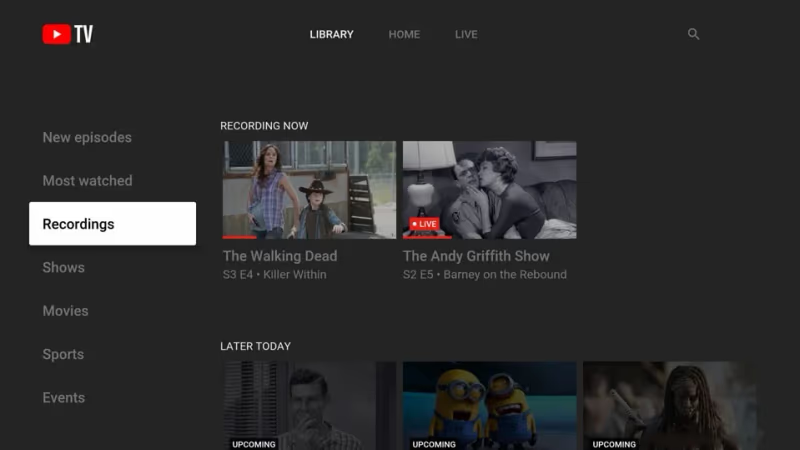
Both allow scheduled recordings, pausing live TV, and have generous storage. Dish relies on dedicated DVR hardware while YouTube TV uses cloud-based storage instead.
#Streaming & Devices
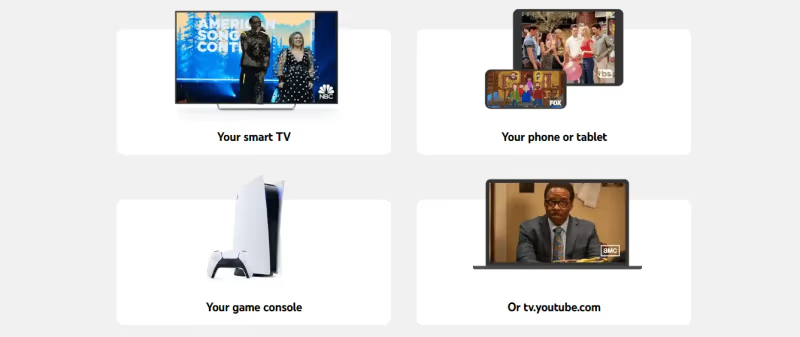
Since Dish TV comes via satellite, you can only stream on mobile devices using Dish Anywhere. In contrast, YouTube TV works on all of your household devices:
YouTube TV Compatible Devices
-
Smart TVs
-
Game Consoles
-
Streaming boxes like Roku and Apple TV
-
All tablets and cell phones
-
Computers
Dish TV Compatible Devices
-
Hopper family receivers
-
Dish anywhere mobile app
-
Chromecast/Airplay from mobile
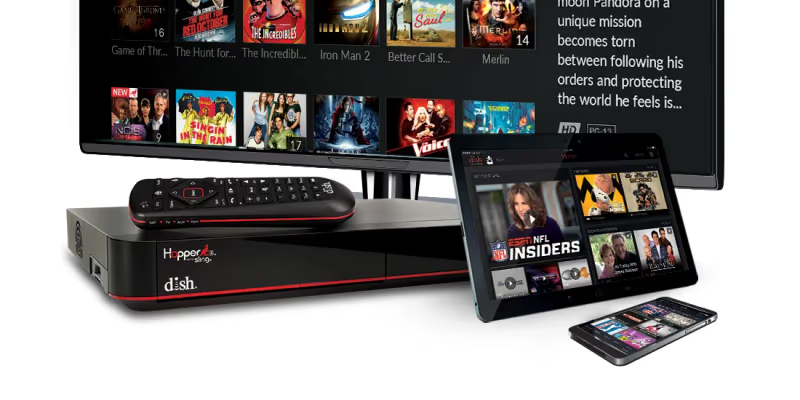
YouTube TV works directly on virtually any device already in your home for a consistent viewing experience. Dish TV streaming requires their receivers or going through your phone.
#Ease of Use Comparison
Interface
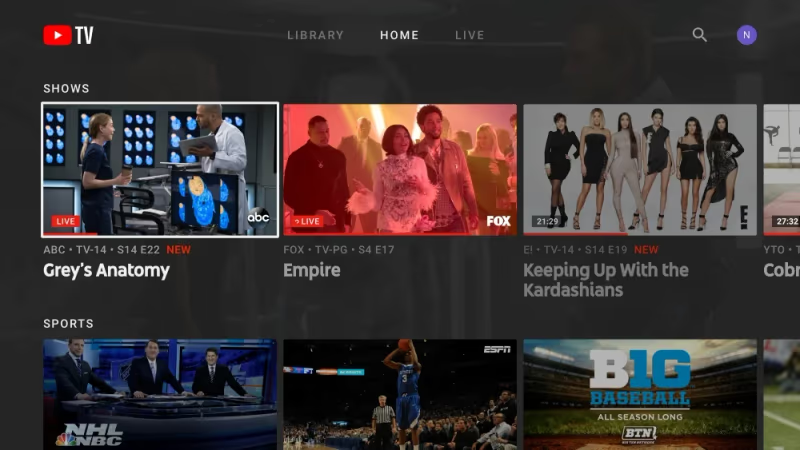
- YouTube TV has an intuitive, unified interface mirrored across devices
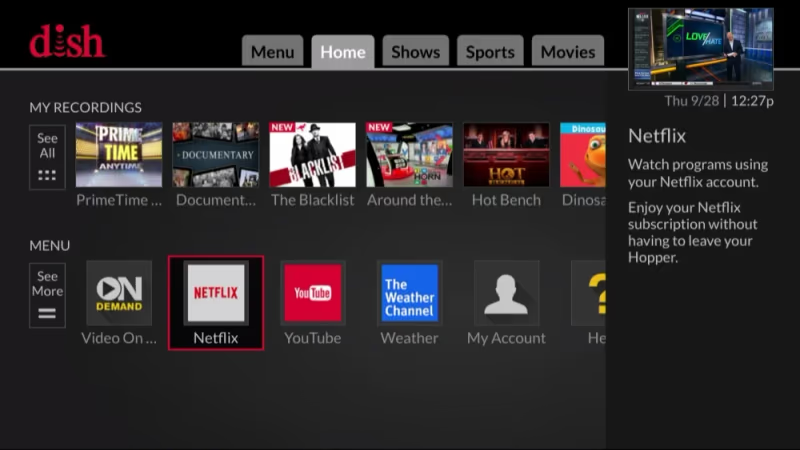
- Dish TV uses Hopper DVR menus plus Dish Anywhere app for mobile
Account & Settings Management
-
YouTube TV allows up to 6 user profiles to track watch history and recommendations
-
Dish TV settings shared across one account per household
Tech Skill Required
-
YouTube TV simple for anyone to start watching on personal devices immediately
-
Dish TV requires installing satellite dish and receivers, more complexity
YouTube TV generally provides a more fluid, mobile-centric system while Dish relies on hardware boxes and satellites. Those less tech-savvy typically find YouTube TV easier to set up and navigate across devices.
YouTube TVsubscribers can have issues with YouTube not working on Vizio smart TVs or NBC content being unavailable. The “are you still watching” prompt can also be frustrating. However, you can easily delete recordings to save cloud DVR storage space.
#Pros and Cons Comparison
| Dish TVPros | YouTube TVPros |
|---|---|
| More channel options with 290+ available | No contracts – cancel anytime |
| Advanced DVR functionality | Unlimited cloud DVR included |
| Available nationwide & rural areas | More flexible streaming across devices |
| Picture quality & reliability | Intuitive interface |
| Parental controls & profiles |
| Dish TV Cons | YouTube TV Cons |
|---|---|
| 2-year contracts | Fewer total channels than Dish |
| Hundreds in fees possible | Limits 3 concurrent streams |
| Limited streaming devices | Reliant on internet connectivity |
| Tech complexity for setup | 4K only available on extra package |
#Frequently Asked Questions
#Do Dish TV and YouTube TV require contracts?
YouTube TV has no contracts, so you can cancel online at any time without penalties. Dish TV typically requires a two-year agreement when bundled with equipment discounts, and early termination fees apply if you cancel before the term ends.
#Which service has better regional sports coverage?
Both services carry ESPN, Fox Sports, NBC Sports, CBS Sports Network, NBA TV, MLB Network, and NHL Network. Availability for specific regional games depends on your location. YouTube TV has added several regional sports networks in recent years, making coverage roughly comparable to Dish TV for most markets.
#Can I watch 4K content on either service?
YouTube TV charges $9.99 per month for a 4K Plus add-on with live 4K sporting events and on-demand 4K content. Dish TV includes some 4K VOD movies and events in select packages, but live 4K sports are not supported, and their 4K Joey receiver adds $15 per month.
#Are there cancellation fees?
YouTube TV has no cancellation fees at all. Dish TV charges $10-20 for each month remaining on your two-year agreement if you cancel early.
#How many devices can stream at the same time?
YouTube TV allows up to 3 simultaneous streams, with unlimited streams on your home Wi-Fi network. Dish TV lets you watch on your main Hopper receiver and up to 3 Joey receivers, plus one Dish Anywhere mobile stream at the same time.
#Does YouTube TV work on smart TVs?
Yes. YouTube TV runs on Samsung, LG, Vizio, and most other smart TVs, along with Roku, Apple TV, Chromecast, game consoles, phones, tablets, and computers. Dish TV requires its own satellite receivers for the main viewing experience, with mobile streaming limited to the Dish Anywhere app.
#Which service is cheaper overall?
YouTube TV costs $72.99 per month with no hidden fees or equipment charges. Dish TV starts at $79.99 per month but adds $10 per month per receiver, potential installation fees up to $200, and premium channel charges that can push the total well above $100 per month.
#Bottom Line
When choosing between Dish Network and YouTube TV for pay TV services, start by outlining your must-have requirements around channels, budget, contract terms, streaming needs and ease of use.
YouTube TV makes the most sense if you want contract flexibility, fully integrated streaming across devices, and a simpler overall experience. Offering less channels may even be seen as a benefit to avoid paying for content you don’t watch.
YouTube TV compares very favorably to traditional cable replacements like Xfinity and Spectrum TV. Features like unlimited MLB TV streaming make YouTube TV a top option for baseball fans.
Dish TV satellite reigns supreme for the total number of channels and customization available. Their advanced DVR hardware andHopper ecosystem also go above streaming options. But these advantages come alongside two-year agreements, higher pricing all-in for equipment, and limited streaming functionality.
Use this Dish vs YouTube TV comparison to weigh packages, pricing, streaming flexibility, and key features against your household viewing patterns and budget.