Your Dish TV screen went black and you want it fixed. In most cases, the problem comes down to satellite signal loss, a frozen receiver box, or a wrong input selection on your TV. This guide covers 10 proven fixes so you can get back to watching.
- Signal strength below 40% — causes intermittent or total black screens on Dish receivers
- 60-second power cycle — fixes most software-related black screens without losing saved settings
- LNB damage or corrosion — blocks signal at the dish and requires physical inspection
- Wrong HDMI input — the most overlooked cause, especially after switching devices
- Expired subscription — Dish deactivates your receiver remotely, resulting in a black screen on all channels
#What Causes a Dish TV Black Screen?
Several things can kill your Dish TV picture. Here is what to check first:
- Satellite signal issues from weather, tree growth blocking line of sight, or a shifted dish alignment
- Hardware failures like a bad LNB, damaged coax cable, or a dying receiver box (these can also trigger no sound on Dish TV)
- Outdated firmware that causes the receiver to freeze or crash
- Incorrect input selection on your TV remote
- Expired subscription or authorization where Dish remotely deactivates your receiver
The fix depends on the root cause. Work through the solutions below in order.
#How Do You Fix a Dish TV Black Screen?
If your Dish TV shows a black screen, start with the easiest fixes and move to more involved steps only if needed.
#1. Check Satellite Signal Strength
Open your Dish receiver’s signal meter screen. Look for signal levels on each transponder. Anything below 40% on multiple transponders points to a dish alignment or obstruction problem.
To access the signal meter on most Dish receivers, press Menu > System Setup > Installation > Point Dish. Write down the numbers you see so you can compare after making adjustments.
#2. Inspect the Satellite Dish Setup
Walk outside and look at your dish. Check for three things: clear line of sight to the southern sky, no new tree branches or structures blocking the path, and tight cable connections at the dish arm.
A dish that shifted even 2-3 degrees during a storm can drop signal below usable levels. If you suspect misalignment, call Dish for a professional realignment. Attempting it yourself without a signal meter tool often makes things worse.
#3. Power Cycle the Receiver Box
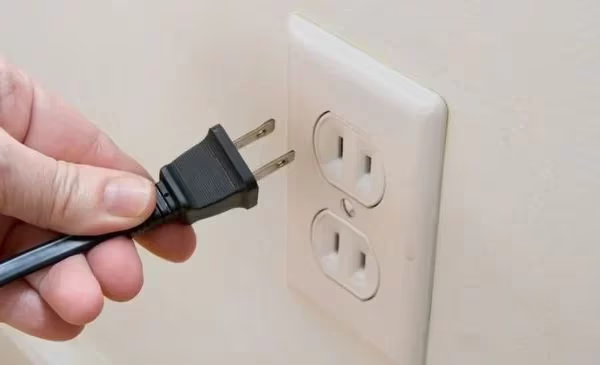
Unplug your Dish receiver from the wall outlet. Wait a full 60 seconds. Plug it back in and let it boot completely, which takes 3-5 minutes on most Hopper and Wally models.
This clears temporary software glitches that freeze the video output. It is the single most effective fix for sudden black screens. According to Dish’s official support page, power cycling resolves the majority of receiver-related display issues.
#4. Reset Your Remote Control
Hold the SAT and MUTE buttons together for about 10 seconds until all mode lights flash. This resets the remote to factory defaults.
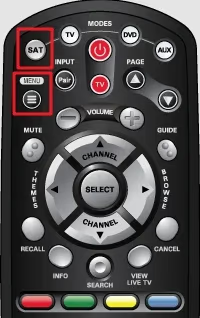
After the reset, re-pair the remote to your receiver by pressing the SAT button once. If the remote was sending commands to the wrong device or operating in the wrong mode, this fix restores normal operation. A misconfigured remote is a surprisingly common cause of apparent black screens.
#5. Verify Your Subscription Status
Log into your Dish account at mydish.com or call 1-800-333-3474. Confirm your subscription is active and your receiver shows as authorized.
Dish can remotely deactivate receivers for billing issues, and the result is a black screen on every channel. The guide still works, but live TV goes dark.
#6. Toggle Through TV Inputs
Grab your TV remote (not the Dish remote) and press the Input or Source button. Cycle through HDMI 1, HDMI 2, HDMI 3, AV, and Component until you find the active signal.
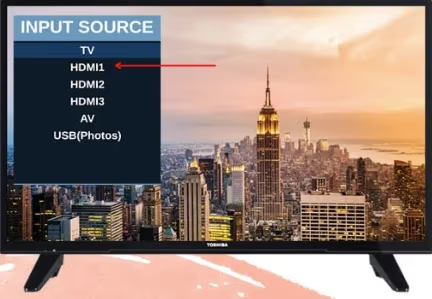
This happens more than you would expect. Someone switches the input for a game console or streaming stick and forgets to switch it back. If you recently connected a device like Dish on Roku TV or a Dish Network on Apple TV app, double-check which input your Dish receiver actually uses.
#7. Connect the Receiver Directly to Your TV
Bypass any soundbar, AV receiver, or HDMI splitter. Run a single HDMI cable straight from the Dish receiver’s HDMI output to an HDMI port on your TV.
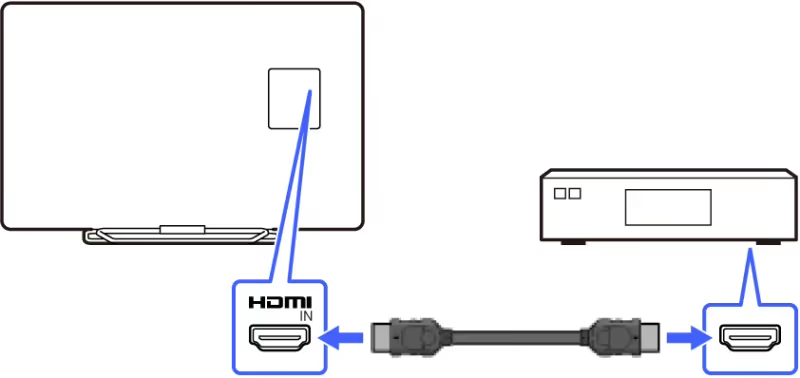
If the picture comes back, the problem is in your audio/video chain, not the Dish receiver itself. Bad HDMI cables, failing HDMI ports on a soundbar, or an AV receiver that lost its handshake can all produce a black screen. Try a different HDMI cable too.
#8. Check the LNB Assembly
The LNB sits at the end of the arm on your satellite dish. It converts the satellite signal into something your receiver can process.
Look for visible damage, corrosion on the connectors, or moisture inside the LNB housing. A failed LNB produces zero signal and a completely black screen. Replacement LNBs cost $20-40, but installation requires precise alignment, so most people call a technician.
#9. Update Receiver Firmware
Dish pushes firmware updates automatically overnight, but if your receiver missed an update, it can cause freezing and black screens.
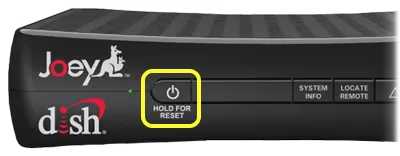
Force a firmware check by pressing Menu > System Setup > Installation > Software Update on your receiver. Let it download and install without interrupting. The process takes 10-15 minutes.
#10. Factory Reset the Receiver
If nothing else works, reset your Dish receiver to factory defaults. Press Menu > System Setup > Installation > Factory Reset. Confirm when prompted.
A factory reset erases all your DVR recordings, timer settings, and preferences. Only use this as a last resort after trying every other fix.
After the reset, the receiver runs through initial setup again. You will need to re-scan channels and reconfigure your preferences. This clears any corrupted settings that might cause persistent black screens.
#When Should You Call Dish Support?
You have checked all connections, power cycled the receiver, verified your subscription, and ruled out weather and obstruction issues. The screen is still black.
At this point, the problem is likely hardware failure in the receiver box or a dish alignment issue that requires professional equipment. Call Dish support at 1-800-333-3474. They can run remote diagnostics on your receiver and dispatch a technician if needed. Most service calls are covered under your Dish protection plan if you have one.
If you are comparing satellite providers, see how Dish TV stacks up against DirecTV or check the differences between Dish TV and YouTube TV for a streaming alternative that avoids satellite signal problems entirely.
#Bottom Line
Dish TV black screens almost always trace back to one of three things: satellite signal loss, a frozen receiver, or a wrong TV input. Start with a 60-second power cycle and input check before moving to more involved fixes like LNB inspection or factory reset.
Work through the solutions in order. Most people fix the problem within the first three steps. If you have tried everything and the screen stays black, call Dish support for remote diagnostics or a technician visit.
#FAQs about Dish TV Black Screen
#What is the most common cause of a black screen on Dish TV?
Weak or lost satellite signal causes most Dish black screens. Heavy rain, snow buildup on the dish, or tree branches that grew into the signal path are the usual culprits. Check your signal meter first before trying anything else.
#Why does my Dish TV show a black screen only during storms?
Rain fade is a known limitation of satellite TV. Ku-band signals (which Dish uses) weaken when passing through heavy rain or thick cloud cover. The effect is temporary and resolves when the weather clears. Positioning your dish for maximum signal strength gives you more margin during bad weather.
#Can a bad HDMI cable cause a black screen on Dish TV?
Yes. A damaged or loose HDMI cable drops the video signal completely. Try a different HDMI cable and a different HDMI port on your TV. HDMI cables degrade over time, especially at the connector ends where they get bent repeatedly.
#My Dish guide works but channels show a black screen. What is wrong?
This usually means your conditional access authorization expired. The guide data is free, but channel decryption requires an active subscription. Contact Dish to refresh your smart card authorization. They can do it remotely in about 5 minutes.
#How long should I unplug my Dish receiver for a proper reset?
Wait at least 60 seconds with the receiver unplugged. This gives the internal capacitors time to fully discharge. Plugging it back in after only 10-15 seconds may not clear the issue because residual power keeps the frozen state in memory.
#Does a factory reset on my Dish receiver delete my recordings?
Yes, a factory reset erases all DVR recordings, scheduled timers, and custom settings. Back up anything important before resetting. After the reset, the receiver goes through initial setup as if it were brand new. Use factory reset only after exhausting all other troubleshooting steps.
#Will Dish send a technician for a black screen issue?
Dish offers free technician visits if you have the Protection Plan (around $11/month). Without it, service calls cost $95 and up. Before scheduling a visit, call 1-800-333-3474 so their support team can run remote diagnostics. They can often fix authorization and software issues without sending anyone out.
#Is Dish TV worth keeping if I keep getting black screens?
Frequent black screens may point to a location problem. If trees, buildings, or weather regularly block your satellite signal, a streaming service might be more reliable. Compare your options with Dish TV vs YouTube TV or Dish TV vs Spectrum to see if switching makes sense for your situation.