Want to remove closed captions from your DirecTV programming? This guide covers how to disable closed captions on DirecTV set-top boxes and streaming platforms in just a few steps.
- INFO + CC toggle — press INFO on your DirecTV remote, select the CC icon, and switch captions off in seconds
- Works across all devices — satellite receivers, DirecTV Stream apps, browsers, and Osprey boxes all support caption control
- Older boxes use a different path — legacy receivers require navigating Menu > System Setup > HDTV Setup to find the caption toggle
- Full customization available — you can adjust font size, color, opacity, background, and text position under the CC menu
- Per-channel defaults — DirecTV lets you set caption preferences on individual channels, though no universal off switch exists
#What Are Closed Captions and Why Use Them?
Closed captions display dialogue and audio descriptions on your TV screen during programming. They are invaluable for those with hearing impairments, useful in noisy environments, and aid comprehension.
Here are some key benefits of closed captions:
-
Assist viewers with hearing loss to fully access TV content
-
Enable viewing in loud areas like bars, gyms, parties
-
Help non-native speakers improve language skills
-
Boost comprehension and retention
-
Allow viewers to fully enjoy programming by reading missed dialogue
-
Useful when volume needs to be kept low
Federal regulations require captions on most TV broadcasts to ensure accessibility. DirecTV provides user-adjustable closed captions and subtitles across platforms.
#Directions to Turn Off Closed Captions on DirecTV Models
DirecTV makes it simple to toggle closed captioning on/off across receivers and streaming apps. Follow these step-by-step directions for your device:
#Turn Off Captions on DirecTV Satellite Set-Top Boxes
The vast majority of DirecTV satellite boxes have consistent methods to enable/disable closed captioning:
-
While watching programming, push the INFO button on remote
-
Select the CC icon and choose “Closed Captioning”
-
Push remote RIGHT arrow to toggle captions off
-
Push EXIT or BACK to finish
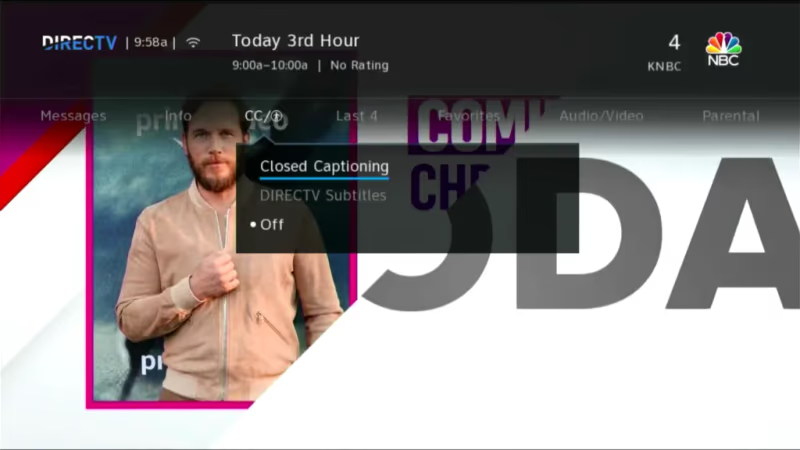
This works for most HD and advanced models like:
-
Genie DVRs (HR20 – HR24)
-
H21, H23
-
R22
Under the CC menu, you can also customize appearance by adjusting font style, color, size, opacity, and more to meet vision needs or preferences. This helps with readability and keeps captions from blocking on-screen elements like graphics or scoreboxes in sports programming available through services like MLB.tv or ESPN on DirecTV.
#Alternative Method for Older DirecTV Boxes
Some older DirecTV receivers may use legacy menus requiring these steps:
-
Push MENU button during programming
-
Navigate to Parental, Fav’s & Setup
-
Select System Setup
-
Choose HDTV set up
-
Toggle Closed Captioning on/off
This method works on some DIRECTV Plus DVRs and standard definition models.
#Turn Off Captions on DirecTV Stream Device Apps
The DirecTV Stream platform (formerly ATT TV/DirecTV Now) functions through mobile apps, browser streaming, and Osprey set top boxes. You can also integrate DirecTV with other services like fuboTV, Spectrum TV, and Dish TV.
Here’s how to disable closed captions:
Mobile App
-
Open DirecTV Stream app during program
-
Tap remote icon (bottom right)
-
Select CC icon
-
Choose Off
Browser Streaming
-
Click Settings icon (top right)
-
Go to Closed Captioning
-
Select Off
Osprey Device
-
Push INFO on remote during streaming
-
Navigate to CC
-
Select Off
You can also customize appearance, language, and text style when enabling captions.
#Why Should You Disable Closed Captions on DirecTV?
Why turn off closed captions? While they certainly serve a purpose, there are legitimate reasons you may want captions disabled:
-
Find captions distracting
-
Don’t require audio assistance
-
Watching content in a quiet environment
-
Sharing screen for presentation
-
Prefer uncluttered picture
-
CC text overlays important graphics/scoreboxes
Familiarize yourself with methods to toggle captions on/off when needed. DirecTV makes it quick and convenient across devices.
#How Can You Customize DirecTV Closed Captions?
Beyond basic on/off functionality, DirecTV offers detailed customization so you can tailor closed captions to your preferences and accessibility needs:
-
Adjust text size for easier reading
-
Change font style for clearer characters
-
Alter text color/opacity for enhanced visibility
-
Switch caption background colors for maximized contrast
-
Set language for accurate translations
-
Display captions only when muted
-
Shift text position to avoid obstructing key graphics
-
Configure individual channel CC defaults
Explore options under CC menu when enabled. Fine-tuning text elements greatly improves readability and minimizes distractions.
#FAQ
#Do all DirecTV boxes support turning off closed captions?
Yes, nearly every DirecTV model allows you to disable closed captions. The only exceptions are a handful of outdated standard-definition receivers that lack the CC toggle in their menus.
#How do I turn off captions on the DirecTV Stream app?
Open the DirecTV Stream app while watching a program, tap the remote icon in the bottom right corner, select the CC icon, and choose Off. The same steps apply whether you are on iOS or Android.
#Why do closed captions still appear after I turned them off?
Some channels override your device settings with their own caption defaults. Try rebooting your receiver after toggling captions off. If they keep showing up, check whether the specific channel has its own CC preference saved.
#Can I change the look of closed captions on DirecTV?
You can adjust font size, text color, background color, opacity, and text position through the CC menu on both satellite receivers and DirecTV Stream devices. These settings let you make captions easier to read or less obstructive on screen.
#Does changing the audio language affect closed captions?
Yes. Switching your primary audio language often changes the closed caption text language automatically. You can also set the caption language separately under the CC customization menu if you want them to differ from the audio.
#Is there a way to set captions to off for every channel at once?
DirecTV does not currently offer a universal off switch for all channels. You need to set caption preferences on a per-channel basis, which means toggling them off individually as you watch.
#Will a factory reset fix persistent captioning problems?
A factory reset clears all saved settings, including caption preferences, and returns the receiver to default configuration. Only use this as a last resort after trying a standard reboot and resetting CC customization to defaults. Contact DirecTV support at 1-800-531-5000 before resetting if the issue is intermittent.
#Bottom Line
Here are the critical points on controlling closed captioning on DirecTV receivers and streaming:
-
Press INFO then CC icon to toggle on/off across devices
-
Customize appearance under CC menu – size, font, color, etc
-
Reboot box after adjusting settings for correct display
-
Set channel-specific defaults for personal preferences
-
Contact tech support for troubleshooting unique issues
-
Disable captions for unobstructed viewing in quiet environments
-
Keep enabled for noisy spaces or hearing accessibility needs
Understanding closed captioning tools ensures you optimize DirecTV platforms for personal preferences and viewing environments.