Canceling a DAZN subscription takes less than five minutes through the website, mobile app, or live chat. The process works the same whether you signed up for a monthly or annual plan. Your access stays active until the end of your current billing cycle, so there is no rush to time it perfectly.
- No cancellation fee — DAZN does not charge anything to cancel, regardless of plan type or timing
- Access continues — your subscription stays active until the last day of your paid billing period
- Three cancellation methods — website account settings, DAZN mobile app, or live chat support
- Reactivation is instant — log back in and restart your plan anytime without losing saved preferences
- No prorated refunds — DAZN does not refund unused days after cancellation
#How Do You Cancel DAZN Through the Website?
The fastest way to cancel is directly through your DAZN account on the web. Here is the step-by-step process:
- Go to dazn.com{rel=“noopener” target=“_blank”} and log into your account
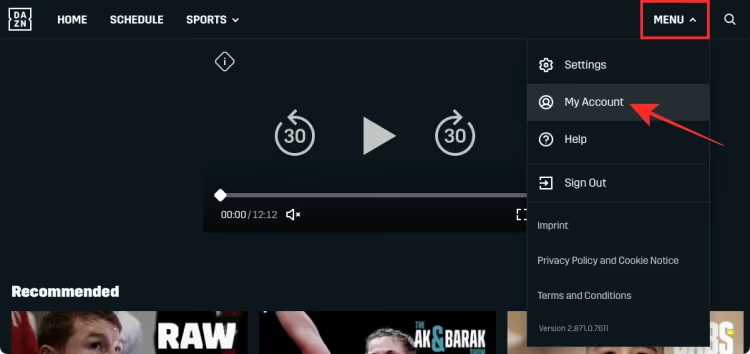
- Click your profile icon in the top-right corner
- Select My Account
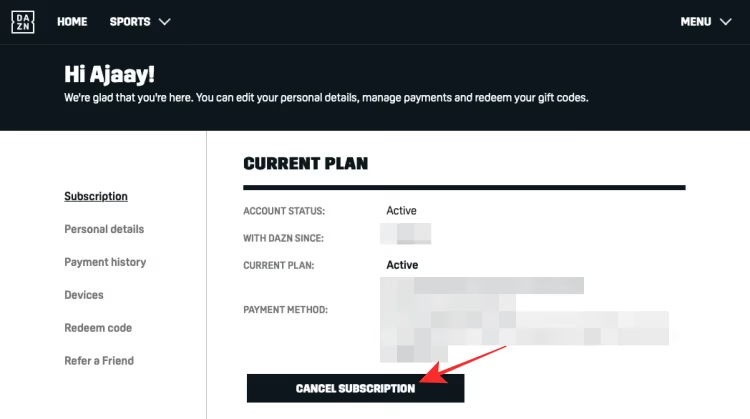
- Click Cancel Subscription under the plan details section
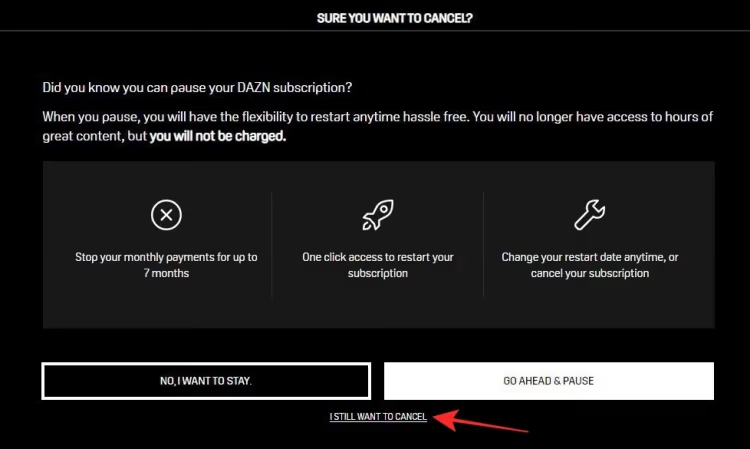
- DAZN may offer you a discounted rate or a pause option. Decline if you want to fully cancel.
- Confirm your cancellation
You will receive a confirmation email within a few minutes. Save it in case you need proof later.
#Cancel Through the DAZN App
Open the DAZN app on your phone or tablet. Tap More in the bottom menu, then My Account. The cancellation option appears under your subscription details. The steps mirror the website process exactly.
If you subscribed through Apple’s App Store or Google Play, you need to cancel through those platforms instead. DAZN cannot process cancellations for subscriptions managed by third-party app stores.
#Cancel via Live Chat
DAZN also offers cancellation through its support team:
- Visit the DAZN Help Center{rel=“noopener” target=“_blank”}
- Click the Live Chat button at the bottom of the page
- Tell the agent you want to cancel your subscription
- Provide your account email when asked
The agent will process the request in a few minutes. They may try to offer retention deals like a discounted monthly rate or a free month. A polite “no thanks” moves things along. Live chat is available 24/7 in most regions, so you can reach someone even outside business hours.
#What Happens After You Cancel DAZN?
Your account does not shut down immediately. DAZN lets you keep watching until your current billing cycle runs out. If you paid on March 1 and cancel on March 15, you still have access through March 31.
After the billing period ends, your account switches to an inactive state. All your settings, watch history, and preferences stay saved. Nothing gets deleted.
One thing to watch for: DAZN does not send a reminder before your access expires. Mark your calendar if you want to use every remaining day. Some users assume cancellation means immediate cutoff, but DAZN treats it like most subscription services where you get what you already paid for.
#Can You Get a DAZN Refund?
DAZN does not offer prorated refunds for partially used billing periods. Once you pay for a month, that payment is final. This policy applies to both monthly and annual plans.
There are two exceptions worth knowing about. If DAZN charged you after you already canceled, contact support with your cancellation confirmation email. They will reverse the charge. Second, if you experienced extended service outages that prevented you from watching, DAZN has occasionally issued credits on a case-by-case basis.
For annual subscribers, the no-refund policy means you keep access for the full year even after requesting cancellation. Your plan simply will not renew at the end of the 12-month period. This makes annual plans less flexible than monthly ones, so consider switching to monthly billing before canceling if you are on the fence about leaving.
#How Do You Cancel DAZN if You Signed Up Through an App Store?
Subscriptions purchased through Apple or Google bypass DAZN’s billing system entirely. You must cancel through the store where you originally subscribed.
#Apple App Store
- Open Settings on your iPhone or iPad
- Tap your name at the top, then Subscriptions
- Find DAZN in the list and tap it
- Tap Cancel Subscription
#Google Play Store
- Open the Google Play Store app
- Tap your profile icon, then Payments & subscriptions
- Select Subscriptions
- Find DAZN and tap Cancel subscription
If you stream DAZN on a Roku or Fire TV Stick, check whether you subscribed through those platforms. Roku and Amazon each have their own subscription management pages where you can cancel.
#What Are the Best DAZN Alternatives for Sports?
If you are leaving DAZN because it lacks specific sports coverage, several services fill different gaps. Here is how the main options compare:
ESPN+ costs $11.99/month and covers UFC, MLB, NHL, college sports, and soccer leagues including La Liga and Bundesliga. It bundles with Disney+ and Hulu for $16.99/month. See our ESPN+ vs DAZN comparison for a detailed breakdown.
fuboTV starts at $79.99/month but includes over 100 channels with NFL, NBA, MLB, and international soccer. It works as a full cable replacement with cloud DVR. Our DAZN vs fuboTV guide covers the key differences.

YouTube TV runs $72.99/month and carries ESPN, Fox Sports, CBS Sports, and NBC Sports. It includes unlimited DVR storage. Sling TV offers the most affordable option at $40/month for the Orange plan, which includes ESPN and TNT.
For a full list of options, check our DAZN alternatives guide.
#How to Restart Your DAZN Subscription Later
Reactivating takes about two minutes. Log into your existing DAZN account, and the homepage will prompt you to choose a plan. Your old watch history, favorites, and settings carry over automatically.
DAZN occasionally sends promotional pricing to former subscribers. If you are not in a hurry to come back, waiting a few weeks might land you a discounted rate. Check your email inbox and spam folder for these offers.
There is no waiting period or cooldown. You can cancel today and resubscribe tomorrow if you change your mind. DAZN does not penalize returning subscribers or require a minimum commitment on reactivation. Your account picks up right where you left off, including any previously saved content in your watchlist.
#Bottom Line
Cancel DAZN through your account settings in under five minutes, or use live chat if you prefer speaking with an agent. Remember that app store subscriptions require cancellation through Apple, Google, Roku, or Amazon directly. You keep access until your billing period ends, and your account data stays intact for when you want to come back. If sports coverage is your main concern, compare DAZN alternatives before making the switch.
#Frequently Asked Questions
#Does DAZN charge a cancellation fee?
No. DAZN does not charge any fee to cancel your subscription. You can cancel at any point during your billing cycle without penalty, and your access continues through the end of the paid period.
#What happens to my DAZN account after I cancel?
Your account stays in the system but switches to inactive status. All saved preferences, watch history, and account details remain intact. You can reactivate at any time by logging in and selecting a new plan.
#Can I pause my DAZN subscription instead of canceling?
DAZN offers a pause option in some regions. When you start the cancellation process, the platform may present a pause offer that suspends billing for one to three months. This option is not available in every country, so you may not see it.
#How long does it take for DAZN cancellation to process?
Cancellation is immediate once you confirm it. You receive a confirmation email within minutes. Your access continues until the end of your current billing cycle, but no future charges will occur.
#Will I lose my DAZN free trial if I cancel early?
If you cancel during a free trial, you lose access right away in most cases. DAZN ends trial access at the moment of cancellation rather than letting it run until the trial period expires. Cancel on the last day of your trial if you want the full experience without being charged.
#Can I cancel DAZN and get a full refund?
DAZN does not issue refunds for unused portions of a billing period. The only exceptions involve billing errors or charges applied after a confirmed cancellation. Contact DAZN support with your confirmation email if you believe you were charged incorrectly.
#Is there a difference between canceling monthly and annual DAZN plans?
The cancellation process is identical for both plans. The key difference is timing. Monthly subscribers lose access at the end of that month. Annual subscribers keep access for the remainder of their 12-month term since the full year was already paid upfront.
#How do I confirm my DAZN subscription is actually canceled?
Log into your DAZN account and check the subscription section under My Account. It should show your plan as canceled with an end date. You should also have a cancellation confirmation email in your inbox from the day you canceled.