Connecting your Vizio soundbar to an LG TV is straightforward for most models using either an HDMI or optical cable. Optimizing the setup ensures you get immersive audio to match the brilliant LG picture quality. This guide walks you through connecting Vizio soundbars to LG smart TVs, adjusting audio settings for the best sound, and fixing common issues between LG televisions and Vizio sound systems.
- HDMI ARC is the best connection method — it carries uncompressed 5.1 audio and allows single-remote volume control via SIMPLINK
- Optical cables work on every LG TV model — they deliver stereo PCM or compressed Dolby Digital up to 5.1 channels
- Set Sound Out to HDMI ARC or Optical — without changing this setting in LG webOS menus, audio stays on built-in speakers
- SIMPLINK and Auto Power Sync save time — enabling both lets the soundbar turn on and off with the TV automatically
- Bluetooth pairing adds 100-200 ms of audio delay — wired HDMI or optical connections keep lip sync accurate
#Why Add a Vizio Soundbar to an LG TV?
LG makes high-quality 4K and 8K UHD televisions with stunning visuals. However, even high-end LG OLED and NanoCell TVs still rely on small built-in speakers which limit sound performance.
Adding a Vizio soundbar significantly enhances audio quality with dedicated woofers and tweeters for deeper bass, clearer dialogue, and a wider, more immersive soundstage.
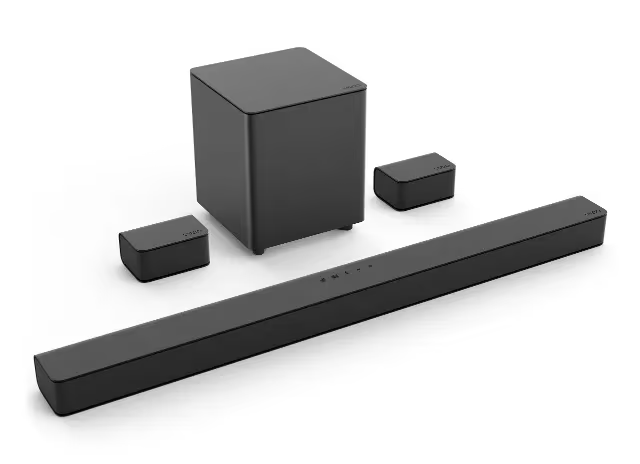
Key benefits of connecting a Vizio soundbar to an LG television include:
-
Enhanced clarity and detail – Hear every line of dialogue crisply without straining
-
Thunderous bass – Feel the action from blockbuster soundtracks and effects
-
Surround sound experience – Get drawn into movies and sports with 3D audio
-
Compact, clutter-free setup – Avoid complicated receivers and speaker wires
-
Easy installation – Connect in minutes with a single cable
-
Universal compatibility – Works with the latest webOS LG smart TVs out of the box
-
Value pricing – Quality sound upgrade at budget-friendly prices
Vizio makes it simple to boost your LG television’s built-in sound through various soundbar models ranging from 2.0 channel designs with crystal clear audio to 5.1 channel systems with wireless surrounds for a complete home theater configuration.
#Do LG TVs Work With Vizio Soundbars?
Absolutely – Vizio soundbars are completely compatible with LG smart televisions, making these a popular audio upgrade for enhancing both TV shows and movies.
The key is connecting the devices properly to transmit sound. Modern LG television models include dedicated ports for pairing soundbars, which makes setup quick.
You have two main options for hooking up a Vizio soundbar to an LG TV:
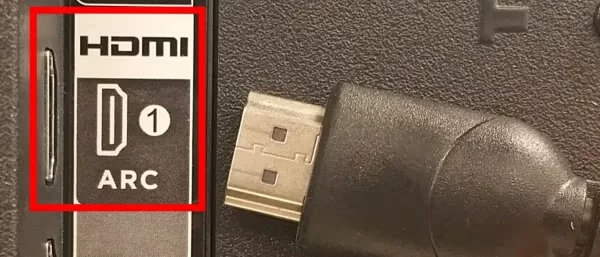
HDMI ARC – The HDMI Audio Return Channel allows digital audio to be sent over the same HDMI cable used for video. This method provides higher resolution sound and convenient control features.
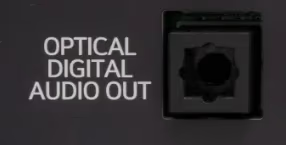
Optical Audio – Optical cables, also called SPDIF or TOSLINK, offer an all-digital signal to transmit sound as well. This is the simplest connection option if HDMI ARC is not available.
As long as you choose the right connection method for your specific models, setup takes just a few minutes.
In some cases, you may need to adjust TV settings to route audio output to the soundbar correctly. But overall the process is straightforward even for beginners.
#Step-by-Step Instructions for Connecting a Vizio Soundbar to an LG TV
Follow these simple steps to hook up a Vizio soundbar to an LG television using the optimal connection type for your models:
#Pre-Setup Guidelines
-
Ensure home theater components are powered off during initial connection
-
Use high-speed HDMI cables for 4K HDR and above
-
Optical/SPDIF cables work for all
-
Position soundbar centrally below TV
-
Place external subwoofer on solid surface away from walls
#Connecting Via HDMI ARC
-
Locate HDMI ARC or HDMI (ARC) port on rear of LG TV
-
Connect HDMI cable from LG HDMI ARC port to HDMI ARC port on Vizio soundbar
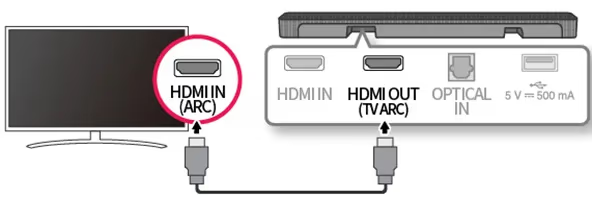 HDMI ARC connection between LG TV and Vizio soundbar
-
Turn on LG TV first, then Vizio soundbar
-
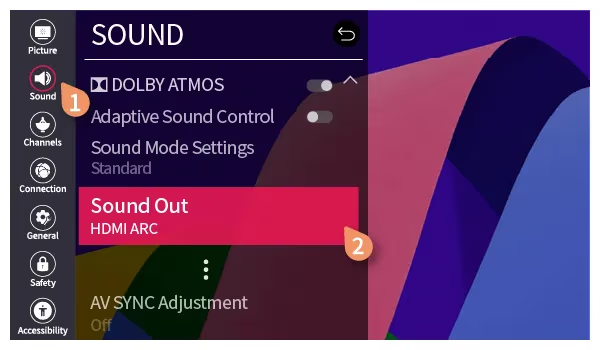
In LG TV Settings > Sound > Additional Settings:
- Set Sound Out to HDMI ARC
- Turn on SIMPLINK
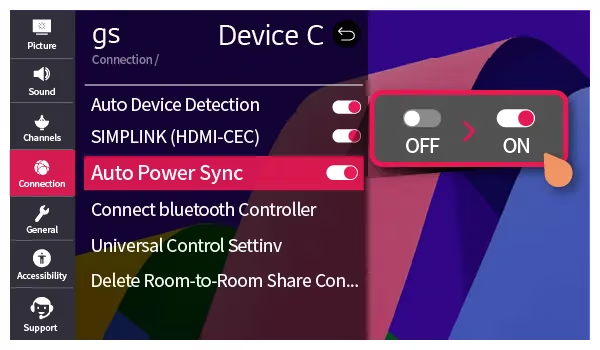
- In Vizio soundbar audio settings, select the HDMI ARC input
Your LG webOS TV will now transmit sound to the Vizio soundbar over HDMI.
#Connecting Via Optical/SPDIF Cable
-
Locate OPTICAL DIGITAL AUDIO OUT port on rear of LG TV
-
Connect optical cable from LG Optical port to OPTICAL IN on Vizio soundbar
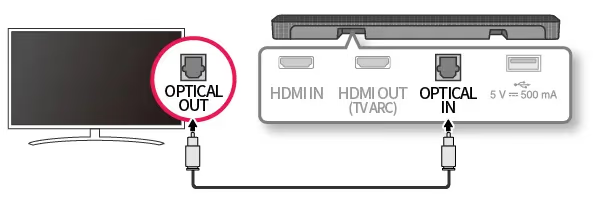 Optical digital audio connection between LG TV and Vizio soundbar
-
Power on LG TV then Vizio soundbar
-
In LG TV Settings > Sound:
- Set Sound Out to Optical
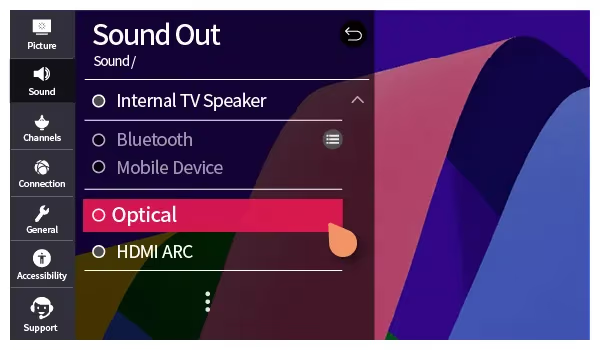
- Adjust Audio Out to PCM
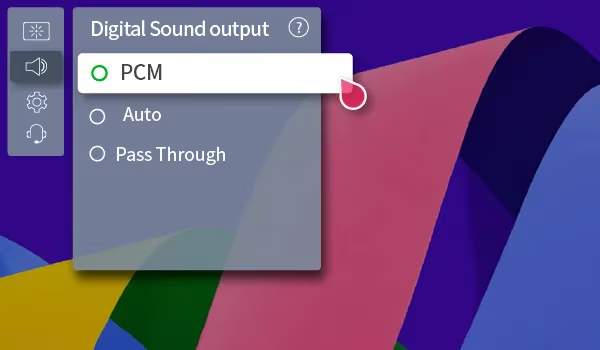
- In Vizio soundbar audio settings, choose Optical input
This optical audio connection will pass rich digital stereo sound from the LG TV to the Vizio soundbar.
#Optimizing Soundbar Performance with LG webOS TVs
Once connected via HDMI ARC or optical cables, there are a few settings to check on compatible LG webOS television models for the best Vizio soundbar integration:
HDMI & ARC Settings
Under Settings > Sound > Additional Settings:
-
Sound Out: HDMI ARC
-
SIMPLINK: On
-
Auto Power Sync: On
-
Additional Audio Settings:
AV Sync Adjustment: Bypass
-
eARC Support: Off
-
Digital Sound Out: Auto or PCM
Expert Audio Settings
Under Settings > Sound > Additional Settings > Advanced Settings:
-
Audio Format: Auto
-
DRC (Dynamic Range Control): Off
-
DTS Audio Processing: Pass Through
All Settings > General
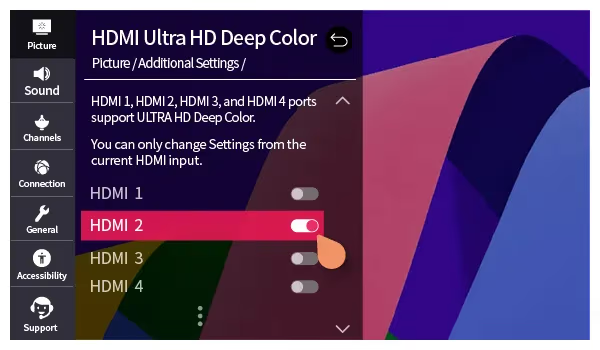
Ensure HDMI ULTRA HD Deep Color is enabled for the LG port connected to your Vizio soundbar.
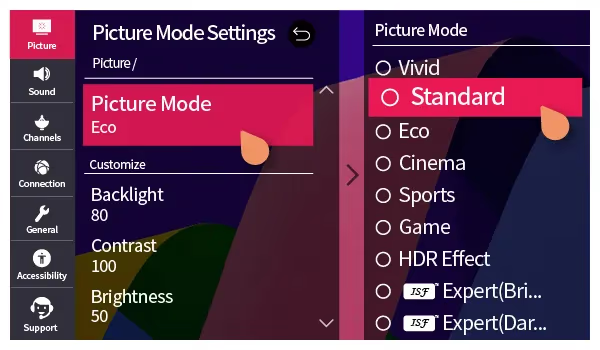
Picture Settings
Turn off Energy Saving picture modes which can affect audio sync. Use Standard or calibrated picture modes.
Channel Tuning & Settings
Select digital audio languages available over HDMI and Optical connections:
-
Primary Audio Language
-
Secondary Audio Language
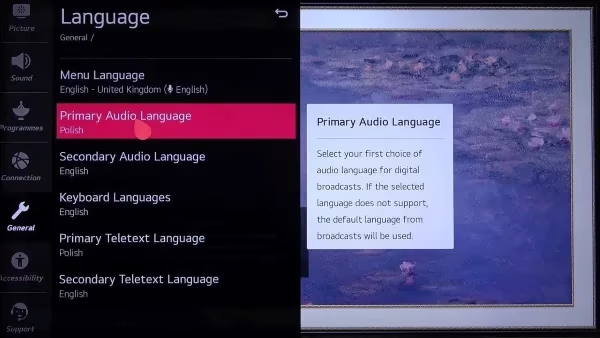
Finally, experiment with various sound modes on the Vizio soundbar when watching movies, TV shows, sports, and gaming. The best setting ultimately comes down to personal preference based on room acoustics and audio mix quality.
#How to Troubleshoot LG & Vizio Connectivity Issues
If you’ve followed the instructions but still have no sound or intermittent cut outs between your LG TV and Vizio soundbar, try these tips:
Perform Hardware Checks
-
Inspect all connections between ports
-
Substitute HDMI/optical cables to rule out defects
-
Reseat connections at both ends securely
-
Verify correct arc-enabled ports are used
-
Test soundbar with different audio source
Reset Devices
-
Power cycle TV, soundbar, router (if app controlled)
-
Factory reset the soundbar
-
Soft reset the LG webOS TV
Check Audio Settings
-
Toggle TV audio output between Internal > HDMI ARC > Optical
-
Disable SIMPLINK and retry automatic detection
-
Change digital audio format support (PCM, Bitstream, Pass Through)
-
Turn off HDMI CEC Control if issues occur when using devices connected to other HDMI ports
-
Rule out HDMI handshake issues by reconnecting input cables
Adjust Placement
-
Position devices closer together if relying on Bluetooth
-
Clear line of sight between IR remote and soundbar sensor
-
Place away from bright light sources that could interfere with infrared signals
-
Check manufacturer websites for latest TV and soundbar firmware
-
Install updates via Wi-Fi, USB, mobile app for bug fixes
Factory Reset and Re-Pair
-
Ultimately, factory reset both LG TV and Vizio model
-
Delete any saved pairing connections and re-establish from scratch
Thoroughly trying each troubleshooting step often resolves connectivity problems between Vizio and LG home theater equipment.
Much like the green screen problems above, LG OLED TVs also have their own common black screen bug. Find out why LG TV screens go black randomly and how to revive picture signaling.
#FAQs About Using Vizio Soundbars with LG TVs
#What is the best way to connect a Vizio soundbar to an LG TV?
Use the HDMI ARC ports for full integration including volume and power control of both devices through a single cable. HDMI ARC also supports higher-quality audio formats like Dolby Digital Plus. If your LG TV or Vizio soundbar lacks an ARC port, an optical/SPDIF cable is a reliable fallback that still delivers digital audio.
#Do you need HDMI for a Vizio soundbar to work with LG?
No. Vizio soundbars work with LG TVs over HDMI, optical, or Bluetooth connections. HDMI ARC is preferred because it carries Dolby Atmos and DTS:X metadata that optical cables cannot pass through. Optical still handles standard Dolby Digital 5.1 just fine for most content.
#Should audio output be bitstream or PCM from an LG TV?
Start with Audio Format set to Auto, which sends Dolby and DTS bitstreams when the content and soundbar both support them. If you notice audio dropouts or lip-sync drift, switch to PCM. Keep in mind PCM is limited to 2-channel stereo, so you lose surround sound.
#Why is there a delay between my LG TV and Vizio soundbar?
Audio lag usually comes from outdated firmware or mismatched settings. Update firmware on both devices first. Then enable SIMPLINK in LG settings, which coordinates timing over HDMI. If lag persists, set AV Sync Adjustment to Bypass under Sound > Additional Settings.
#Do I need a subwoofer with a Vizio soundbar for an LG TV?
Many Vizio soundbar bundles ship with a wireless subwoofer included. Standalone 2.0 and 2.1 models without a sub still produce decent bass for dialogue-heavy shows. For action movies and gaming, adding an external powered subwoofer makes a noticeable difference in low-end punch. Place it on a solid surface away from corners to reduce boomy reflections.
#Can any Vizio soundbar connect to an LG TV via Bluetooth?
Only newer Vizio models include Bluetooth. Older wired-only soundbars require HDMI or optical. Bluetooth pairing is convenient but adds roughly 100-200 ms of audio delay, which causes noticeable lip-sync issues during video playback. Stick with wired connections for watching TV and reserve Bluetooth for music streaming.
#Does HDMI eARC work between Vizio soundbars and LG TVs?
eARC (Enhanced Audio Return Channel) supports lossless Dolby TrueHD and DTS-HD Master Audio, but both your LG TV and Vizio soundbar must have eARC-labeled ports. Most Vizio models below the Elevate line use standard ARC only. Check your soundbar’s spec sheet before enabling eARC Support in LG settings, because turning it on with a non-eARC soundbar can cause audio dropouts.
#Will my LG TV remote control the Vizio soundbar volume?
Yes, if you connect via HDMI ARC and enable SIMPLINK (HDMI-CEC) on the LG TV. The LG remote then adjusts soundbar volume and mute without needing the Vizio remote. This does not work over optical or Bluetooth connections.
In rare cases, the LG Content Store platform which enables app downloads crashes. Get help resolving LG Content Store not working issues through rebooting, reinstalling, and software updates.
#Bottom Line
-
Vizio soundbars pair easily with LG TVs to add louder, clearer audio well-suited to music, movies, sports and gaming
-
Connect LG televisions and Vizio sound systems via user-friendly HDMI ARC or optical/SPDIF cables
-
HDMI ARC supports the highest resolution audio pass-through from the LG TV to soundbar
-
Optical/SPDIF cables provide reliable all-digital stereo sound transmission
-
Bluetooth also enables wireless pairing between smart LG sets and newer Vizio soundbars
-
Remember to change Sound Out and other audio settings on webOS televisions for proper Vizio integration
-
Troubleshoot connectivity issues by checking hardware, cables, configurations, placement and updating firmware
-
Adding a well-matched Vizio soundbar brings your LG viewing experience to life with deeper bass, crisper dialogue and a wider soundstage
We hope this guide covers everything required to successfully hook up a Vizio soundbar with an LG smart TV for premium home theater audio. Let us know if you have any other questions in the comments!