Watching YouTube TV on the big screen is great, but navigating channels, settings and streaming apps with a confusing remote can ruin the experience. Having the right remote makes all the difference.
This guide compares the top-rated remotes compatible with YouTube TV across various streaming platforms. We evaluate smart remotes with advanced features as well as more basic, affordable options to help you upgrade your home entertainment setup.
- Fire TV Cube Alexa Voice Remote is the top pick for hands-free YouTube TV control with built-in Alexa and 4 preset app buttons
- Logitech Harmony Elite controls up to 15 devices and lets you create one-touch Activities for your entire entertainment system
- Roku Voice Remote Pro has a built-in finder function that beeps when lost, plus hands-free voice commands for Roku streamers
- Samsung Smart Remote recharges through a built-in solar cell panel, eliminating the need for disposable batteries
- Budget options like the XRT136 start under $15 and still include dedicated YouTube and Netflix shortcut keys
#What Should You Look for in a YouTube TV Remote?
When choosing a remote to use with YouTube TV, here are the key factors to consider:
-
Dedicated YouTube TV Buttons: Remotes with pre-programmed YouTube TV buttons allow quick, one-touch access. This includes universal remotes as well as proprietary ones made for Roku, Fire TV, Apple TV and other streaming platforms.
-
Voice Control: Voice activated remotes like the Fire TV Alexa Voice Remote let you launch YouTube TV and navigate content with voice commands.
-
Programmable Buttons: Most smart universal remotes allow you to customize buttons for fast access to your favorite apps and channels like YouTube TV.
-
Smart Home Compatibility: Top-end universal remotes can switch on TVs, sound systems plus control lights, AC and more with programmed Activities.
-
Battery Life: Make sure any remote you choose has decent battery life, unless you opt for a rechargeable model.
Next up, we rank the 10 best YouTube TV compatible remotes across various streaming devices.
#1. Fire TV Cube Alexa Voice Remote
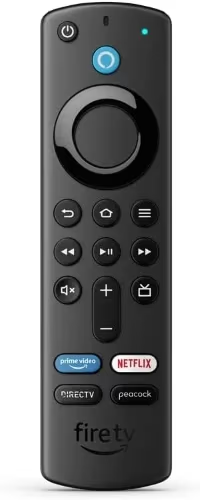
Best Voice Control
-
Voice launch YouTube TV with Alexa
-
Powerful streaming media player
-
Controls Fire TV + smart home devices
-
4 preset buttons including YouTube
-
Find content via voice search
-
Recharges via USB-C
If you want the ultimate hands-free YouTube TV viewing experience, the Fire TV Cube Alexa Voice Remote is your best bet.
With Amazon’s voice assistant built in, just ask Alexa to launch the YouTube TV app, play your favorite channels or search for new shows. You can even switch between YouTube TV, Netflix, Prime Video and more streaming apps via voice. If your Fire TV Stick keeps restarting, a dedicated remote like this one can also help isolate the issue.
The Alexa remote is a controller for the powerful Fire TV Cube streaming media player. It also handles voice control of compatible smart home devices like lights, thermostats and security cameras.
Four preset app buttons include one dedicated YouTube shortcut alongside Prime Video, Netflix and Disney+. The remote locates content with an Alexa voice search feature.
It recharges via USB-C when powered down. Choose from two color options.
Available at: Amazon
#2. Logitech Harmony Elite
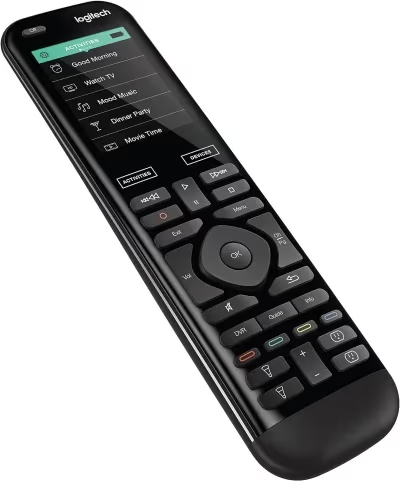
Best Overall
-
Top-rated smart universal remote
-
Fully customizable Activities
-
Voice controls Google Assistant
-
Switches TVs, lighting, music etc
-
Sleek full-color touchscreen
-
Easy Bluetooth setup process
The Logitech Harmony Elite allows you to create customized one-touch “Activities” to control YouTube TV along with the rest of your home entertainment system and smart devices.
Program buttons like “Watch YouTube TV” to automatically switch on your preferred streaming device, TV, AV receiver plus dim compatible lights, all in one tap. The LCD touchscreen and array of buttons also give you manual control of settings.
Configure personalized Activities via the Logitech app. The remote works with Google Assistant and Amazon Alexa for voice control too.
With support for up to 15 entertainment devices, this premium smart remote switches between TVs, game consoles, streaming platforms and more. It also connects Philips Hue, Nest and other smart home gear like robot vacuums.
Recharging happens via the included USB cable. Expect around 2 weeks of battery between charges.
Available at: Amazon
#3. SofaBaton X1
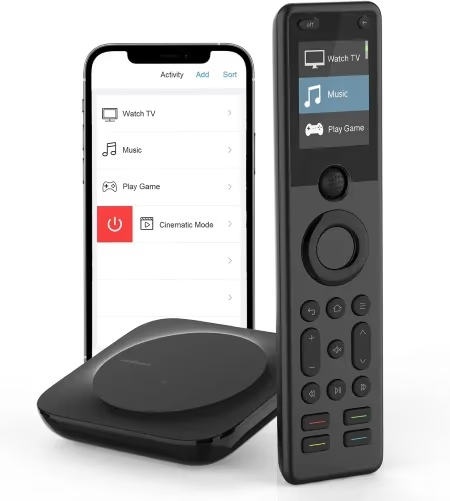
Best Hub-Based
-
Smart IR/Bluetooth universal remote
-
Pre-configured YouTube button
-
Centralized control via Hub
-
LCD screen interface
-
App and voice assistant support
-
Backlit keypad buttons
For full smartphone app controls combined with advanced universal remote functionality, consider the SofaBaton X1.
The SofaBaton Hub connects via Wi-Fi to create a centralized smart home ecosystem. This allows the remote to control entertainment gear plus Hue lights, AC units, robotic vacuums and more. Create custom one-touch Activities for your YouTube TV setup via app.
The responsive LCD color touchscreen provides a clear way to manage settings manually too. YouTube and Netflix hot keys offer quick access. Most buttons illuminate when pressed as well.
The remote handles voice commands for Google Assistant and Alexa compatible devices. Choose between black or silver style options. Recharges via USB cable.
Available at: Amazon
#4. Roku Voice Remote Pro
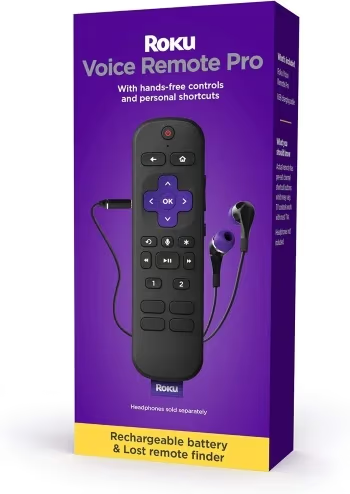
Best for Roku Users
-
Officially licensed Roku remote
-
Voice commands + touch controls
-
Headphone jack for private listening
-
Programmable shortcut buttons
-
USB-C charging; Good battery life
-
Includes finder function
The Roku Voice Remote Pro delivers an upgraded experience for avid YouTube TV viewers with Roku streaming devices. If your Roku remote is not working, this Pro version often resolves common pairing issues.
The remote allows hands-free voice commands via a built-in mic. Use voice search to find new shows or speak channel names and numbers to tune content quickly. It also supports voice launch for streaming apps like YouTube TV.
Touch sensitive navigation makes flipping between menus smooth, while two customizable shortcut buttons provide quick access to favorite channels or settings. Connect headphones to the jack for private listening.
Pressing a button makes the remote emit an audible tone so you can locate it when lost in couch cushions. Need more help finding it? Check out our guide on how to find a lost Roku remote. Recharges via included Premium USB cable.
Choose black or white colors to match your decor.
Available at: Amazon
#5. Samsung Smart Remote
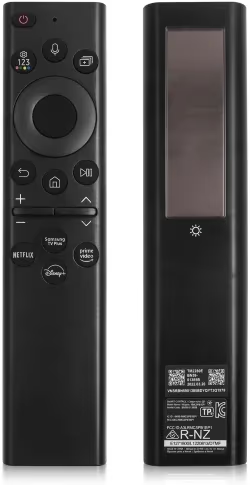
Best for Samsung TVs
-
Easy access for Samsung apps
-
Voice Assistant compatibility
-
Solar cell panel recharges
-
Motion activated backlight
-
Find lost remote via TV speaker
-
Clean, minimalist design
Owners of compatible Samsung Smart TVs should consider the Samsung Smart Remote for controlling YouTube TV and other apps. You can also pair it with Samsung TV universal remote codes if you need to control additional devices.
Dedicated buttons provide quick access to popular streaming platforms and Samsung’s own suite of apps. Enable voice assistant capabilities by pressing the mic button to search content libraries via speech on newest models.
A high-tech Motion Activated Backlight illuminates button icons when picked up in the dark. No batteries needed, as lifting the remote automatically recharges the built-in solar cell.
If you lose the remote, use the Locator function to make your TV speakers beep loudly until discovered. Or use Samsung’s SmartThings app to ring a lost smartphone instead.
Choose black or white colors to match your Samsung TV.
Available at: Amazon
#Which Remote Works Best for Apple TV?
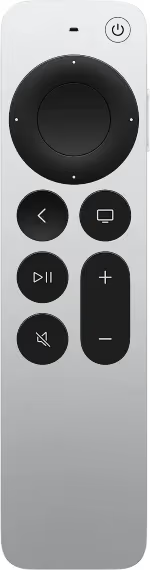
Best for Apple TV Users
-
Official Apple TV controller
-
Ask Siri to launch YouTube TV
-
Sleek, edge-to-edge touch surface
-
Navigation via touch
-
Find My app locates lost remote
-
Lightning recharging
The redesigned Apple Siri Remote makes navigating YouTube TV on Apple TV a breeze. Curious how it stacks up against Roku? See our Apple TV vs Roku comparison.
Optimized specifically for the Apple TV set-top box, simply ask Siri to launch YouTube TV or browse recommendations. You can even search for new shows via voice command.
A scroll-friendly circular touchpad makes quick navigation between menus and content possible. All buttons are positioned ergonomically for easy access. Running low on juice? Here is how to charge your Apple TV remote.
Apple’s Find My app lets you ping a lost remote to locate audibly, even if trapped beneath sofa cushions. Recharges via Lightning cable.
Available at: Amazon
#7. NVIDIA Shield Remote
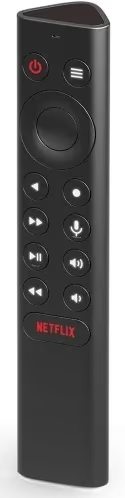
Best Streaming
-
GeForce Now and Android TV support
-
Built-in lost remote locator
-
Voice search capabilities
-
Ergonomic triangular design
-
Backlit buttons for night use
-
Spotify quick access button
Serious streamers who use NVIDIA’s line of media players should consider the Shield Remote for the best YouTube TV experience.
It allows direct access to NVIDIA’s library of AAA games via GeForce Now cloud streaming. Media playback happens reliably thanks to Android TV OS support too.
The uniquely contoured remote gives quick access to YouTube Music and Spotify. YouTube and Netflix hotkeys provide one press access as well. The remote also enables handy voice search functions.
When not in use, an audible locator helps find the remote if buried in your gaming chair or couch. Expect around 60 days of battery life before needing to recharge via USB cable.
Available at: Amazon
#8. LG Magic Remote
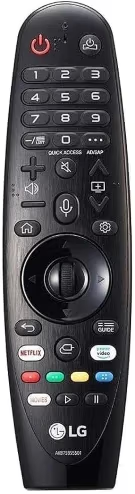
Best for LG TVs
-
Point, click, scroll navigation
-
Voice and motion controls
-
Quick access media buttons
-
Universal control of devices
-
Recharges via USB-C cable
-
Compatible 2000 – 2022 LG TVs
The LG Magic Remote uses motion gestures for fluid control of YouTube TV and other streaming apps on supported LG Smart TVs. If your LG TV remote is not working, the Magic Remote is a solid replacement.
Unlike traditional button-based controllers, the remote enables navigation by pointing and clicking icons on screen. You can also scroll smoothly through menus, video queues and text fields.
Hot keys offer quick access to popular streaming apps like YouTube, Prime Video and Netflix. Enable voice commands on compatible models for handsfree searching.
Control various connected devices like sound bars and smart lights using universal remote functionality. Recharges rapidly via USB-C when powered down completely.
Available at: Amazon
#9. XRT136 Universal Remote
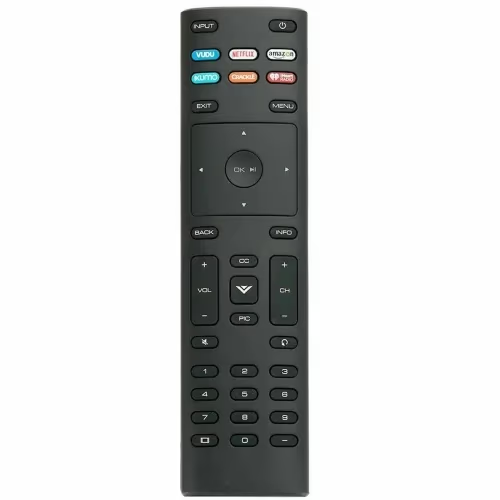
Best Budget
-
Affordable smart TV remote
-
Pre-mapped YouTube shortcut key
-
Straightforward plug ‘n play setup
-
Large ergonomic buttons
-
Controls 500K+ devices
-
2 AAA batteries
If you want expanded YouTube TV controls without a huge price tag, consider the XRT136 universal smart remote.
Preset shortcut buttons provide quick access to popular streaming apps like YouTube, Netflix and Prime Video. It also opens Spotify, Pandora and iHeartRadio with one touch.
Setup works by plugging the included RF dongle into your smart TV or streaming device. Large, clearly labeled buttons make navigating menus easy from any sofa position.
With support for over 500,000 home theater products, this handy remote is a great smart home starter too.
Available at: Amazon
#10. Philips HTL5160B Soundbar Remote
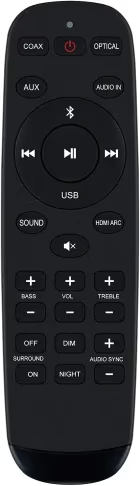
Best Soundbar
-
Large, ergonomic buttons
-
YouTube & Netflix dedicated keys
-
Improved volume control
-
No input lag when gaming
-
Minimalistic quick start guide
-
Auto power down
Want to consolidate your YouTube TV viewing experience into one compact controller? Then pair it with the Philips HTL1560B virtual surround soundbar.
This handy remote combines full YouTube TV navigation capabilities with granular command of your audio setup. Dedicated YouTube, Netflix and source input keys connect you to content quickly. Large, well-spaced buttons ensure clarity.
Set volume levels precisely with separate up/down keys that bypass the default ramping. Mute sound instantly as needed with one tap. No delays in simulated surround audio makes gameplay highly responsive too.
The remote powers down automatically to preserve battery when inactive. Includes a simplified quick start guide.
Available at: Amazon
Remote not responding? Check out fixes for Roku remote not working, Xfinity remote not working and AT&T TV remote not working.
#Bottom Line
Here are the key pointers when deciding which remote will work best with your specific home setup:
-
Opt for voice assistants like Alexa or Google Home integration for handsfree YouTube TV navigation.
-
Choose universal programmable remotes to fully customize Activities and access.
-
Dedicated shortcut buttons allow quick access to favorite apps like YouTube TV.
-
Ensure wide streaming device and Smart TV compatibility for flexible viewing.
-
Remotes with find my remote features help locate lost controllers via phone apps or loud locator alerts.
-
Consider battery life, recharging options and general ease of use when making your selection.
Premium options with advanced features provide ultimate convenience. But more affordable, basic remotes still get the YouTube TV navigation job done.
#Frequently Asked Questions
#Can I use my TV remote instead of buying a separate one for YouTube TV?
Yes, you can use your regular TV remote with YouTube TV if all your equipment is already set up on that one controller. However, switching inputs or re-pairing devices when flipping between regular live TV and YouTube TV streaming gets annoying fast. That is why many people opt for a separate, dedicated streaming remote.
#What type of remote is easiest to use with YouTube TV?
Voice-enabled smart remotes provide the most convenient way to launch YouTube TV and navigate content handsfree. Top options with built-in voice controls include Alexa remotes for Fire TV and Siri remotes designed for Apple TV setups. These let you search, pause and switch channels without pressing a single button.
#Can I control my Roku via phone app instead of buying a remote?
Roku has a free mobile app that provides full remote control functions over Wi-Fi. Most other streaming platforms also offer remote apps, including LG, Samsung and Android TV devices. Just make sure your streaming device and mobile phone are connected to the same wireless network for the app to detect your player.
#Do universal remotes work with YouTube TV on all streaming devices?
Most universal remotes support YouTube TV as long as your streaming device or smart TV has the YouTube TV app installed. IR-based universal remotes handle basic navigation, while Bluetooth and Wi-Fi models like the SofaBaton X1 add voice assistant support. Always check the remote’s compatibility list before purchasing.
#Why does my YouTube TV remote lag or respond slowly?
Remote lag usually comes from low battery, Bluetooth interference or an outdated streaming device firmware. Replace or recharge the batteries first, then move any wireless routers or other Bluetooth devices away from your streaming player. A firmware update on your Roku, Fire TV or Apple TV often fixes the remaining delay.
#How do I program a universal remote to work with YouTube TV?
The process varies by brand, but most universal remotes use a companion app to map buttons. Download the manufacturer’s app (Logitech, SofaBaton, etc.), select your streaming device from the database, and assign a dedicated button for YouTube TV. Some remotes also support learning mode, where you point your original remote at the universal one to copy IR signals.
#Is it worth buying a voice remote just for YouTube TV?
A voice remote saves noticeable time when searching across YouTube TV’s 100+ channel lineup. Instead of scrolling through an on-screen keyboard, you say the show name and get results in seconds. If you watch YouTube TV daily, the time savings add up quickly.
#Can I use one remote to control both my TV and YouTube TV streaming device?
Yes. Universal remotes like the Logitech Harmony Elite and SofaBaton X1 can control your TV power and volume alongside your streaming device’s navigation. Set up an Activity or macro so one button press turns on the TV, switches to the correct HDMI input and launches YouTube TV automatically.