Searching for the top IPTV box that streams live television and more? This 2026 updated guide reviews 9 devices to upgrade your entertainment setup. Cord-cutting opens many possibilities, yet also complex decisions. Once armed with insight on smart functionality, cords seem less binding.
I’ve tested and curated the premier IPTV boxes worth your investment. From customization and compatibility to storage capacity and 4K resolution, discover your ideal model to maximize streaming quality and personalization.
- Formuler Z8 leads overall with 3 GB RAM, quad-core CPU, and preloaded IPTV Smarters Pro for instant setup
- Nvidia Shield TV delivers the fastest processing thanks to the Tegra X1+ chip and AI-powered 4K upscaling
- Fire TV Stick 4K Max offers the best value at under $60 with full 4K HDR, Dolby Vision, and Alexa voice controls
- Android TV boxes dominate this list with 7 of 9 picks running Android OS for broad app compatibility
- IPTV boxes replace cable entirely by streaming thousands of live channels over internet at lower monthly costs
#What Exactly Is an IPTV Box?
An IPTV box is hardware allowing internet streaming to your TV. Consider it akin to a digital receiver or adaptor, replacing cable TV boxes.
IPTV means Internet Protocol Television. This technology sends video and audio signals over an internet connection instead of cable or satellite.
The IPTV box acts as an all-in-one conduit and hub, connecting your television to the broad world of internet TV. Once you install IPTV apps, you suddenly have endless channel options at your fingertips. Many of the best Android TV apps work directly on these boxes, giving you access to streaming services, games, and utilities right out of the box.
#Key Benefits of IPTV Boxes
Compared to restricting cable or satellite contracts, IPTV boxes unlock:
-
Thousands more show options via internet connectivity, not only local networks.
-
Lower subscription costs. Stream what you want without paying for 300 channels you’ll never watch.
-
Customizable channel selections and streaming packages tailored to your preferences.
-
Remote casting and sharing potential across multiple screens and devices.
-
Flexible accessibility. Bring live and recorded shows anywhere with internet. No wires or contracts.
-
Ad-free viewing experiences.
-
Access to niche international content.
#What Can You Watch With IPTV Boxes?
IPTV boxes support streaming over any internet connection, expanding possible video sources:
-
Live television with a full channel guide.
-
Premium subscription streaming apps like Hulu, Netflix, Disney+, HBO Max.
-
Local media, DVDs and downloaded files from external devices.
-
Specialty content otherwise inaccessible on restricted cable/satellite.
-
Web videos, music and images.
Now that you know the essentials about IPTV boxes, let’s explore the finest models of 2026 for lag-free streaming. I’ve tested top devices across budgets and interests.
#Which IPTV Boxes Deliver the Best Streaming in 2026?
#1. Formuler Z8 Android TV Box – Best Overall IPTV Box
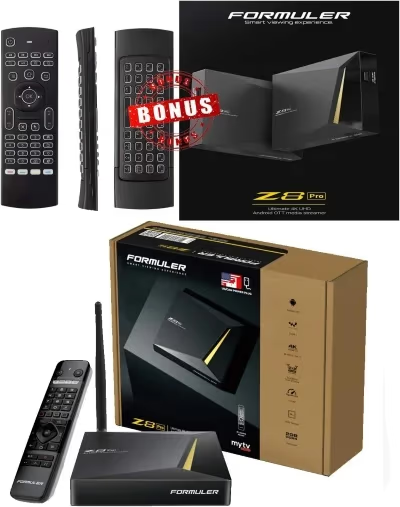
The Formuler Z8 demonstrates why this brand dominates among serious streamers requiring flawless functionality. Expect exceptional responsiveness when navigating menus or loading data, thanks to Android 9 OS and 3 GB RAM.
Pairing superior software with quad-core processing power produces impeccable 4K streaming minus lags or pixilation. Whether scanning electronic program guides or launching Netflix marathons, the Z8 won’t disappoint. It also preloads IPTV Smarters Pro for simplified customization.
Reviewers and owners praise the Z8’s stability and image clarity from any source, especially IPTV apps. It reliably integrates numerous services. Responsive tactile keys on its ergonomic remote enhance ease of use.
With abundant connectivity via WiFi, LAN, HDMI and USB ports, you can connect nearly any device. Built-in Chromecast even removes the need to switch inputs between streaming accessories.
Owners appreciate handy tools like closed captioning, sleep timer and expanded app support from Android OS over stock options.
The Z8 hits the streaming trifecta: excellent software, quick processing speeds and customizable streaming integration.
Key Features:
-
Quad core processor
-
3 GB DDR4 RAM
-
Built-in Chromecast
-
4K video support
-
Android 9 OS
-
MyTVonline for IPTV
-
Sleek tactile remote
#Why Choose Formuler Z8?
✅ Strong hardware for lag-free streaming
✅ Pre-installed IPTV app for simplified setup
✅ Tactile ergonomic remote
Check Price on Amazon
#2. Nvidia Shield Android TV – Fastest IPTV Box Processing
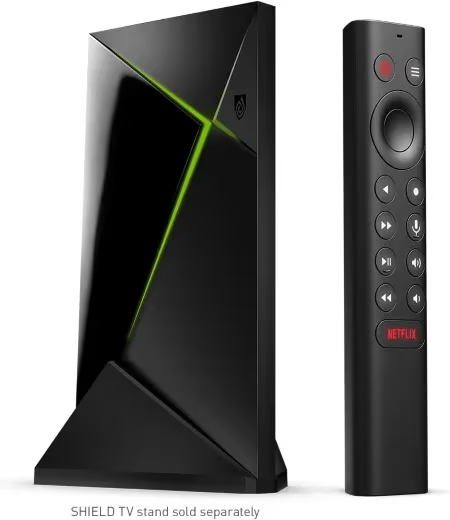
Serious streamers shouldn’t overlook exceptional power from the Nvidia Shield TV models. Choose either the tube-shaped standard version or the Shield TV Pro with extra USB ports and bundled storage expansion.
Don’t let compact size fool you. Nvidia’s Tegra X1+ processor achieves rapid streaming speeds, perfect for live sports and gaming. The chip optimizes bandwidth for tackling data-heavy 4K HDR video without buffering or latency concerns.
Reviewers confirm Shield TV devices excel at upscaling content to fill today’s 4K screens beautifully. Expect rich color and realistic depth that makes video mesmerizing. AI enhancement noticeably improves picture quality of lower resolution media too.
Google Assistant integration allows handy hands-free navigation by voice commands. Use included apps or manually load your own onto generous internal capacity starting around 8GB.
While pricier than competitors, Nvidia TV solutions promise investment-protecting longevity thanks to solid core components rather than cheaper materials prone to lagging. Customization options welcome applications like Plex or Kodi on compatible devices for those seeking ultimate personalization.
Key Features:
-
Nvidia Tegra X1+ processor
-
AI 4K upscaling
-
Google Assistant voice controls
-
8GB or 16GB storage options
-
GeForce NOW gaming streaming
#Why Choose Nvidia Shield TV?
✅ Lightning fast streaming speeds
✅ Crystal clear 4K upscaling
✅ Expandable storage for recorded media
✅ GeForce gaming integration
Check Price on Amazon
#3. Amazon Fire TV Stick 4K Max – Most Affordable Streaming
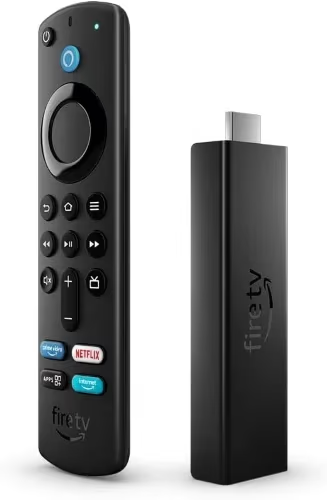
Amazon’s Fire TV product line dominates mainstream streaming with good reason: Prime subscriber integration, voice controls and approachable pricing.
The Fire TV Stick 4K Max currently leads Amazon’s portfolio packing smooth software with notable upgrades justifying a modest price bump over the standard FireStick.
Faster navigation and loading times emerge thanks to a polished quad-core 1.8 GHz processor and 2 GB RAM. That’s a meaningful jump from the standard FireStick. Enjoy frustration-free flipping between menu screens or launching latest episodes.
Crisp 2160p resolution meets vivid color rendering with HDR, HDR10+ and Dolby Vision for pleasing 4K visuals. Dolby Atmos audio support also impresses discerning ears.
Like all Fire models, handy Alexa integration makes voice commands simple. You can also watch live TV on your Firestick using popular IPTV apps and free streaming services.
Compact and portable design travels easily to cut cords on the go.
For frugal cord-cutters wanting quality streaming on a budget, this Max model warranted the extra expenditure during my testing. Pay a touch more without breaking bank to gain added speed and customization conveniences.
Key Features:
-
Quad-core 1.8 GHz processor
-
2 GB RAM
-
4K UHD streaming
-
HDR + Dolby Vision
-
Hands-free Alexa
-
8 GB storage
#Why Choose Fire TV Stick 4K?
✅ Smooth streaming performance
✅ Crisp 2160p 4K resolution
✅ Affordable prime integration
✅ Voice command convenience
Check Price on Amazon
#4. Chromecast with Google TV – Complete Streaming Ecosystem
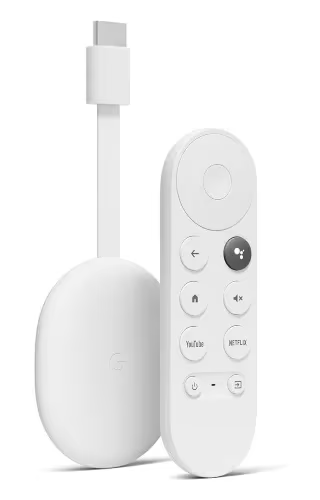
Google built a formidable streaming competitor with the Chromecast with Google TV, now including a handy remote rather than relying on mobile devices for control.
Sleek Android TV OS guarantees access to all Google Play apps from YouTube to Netflix to HBO Max absent on certain competitors. Familiar environment with Google Assistant voice navigation makes their latest streamer pick up intuitively. If you’re comparing this to other streaming sticks, our Chromecast vs Roku breakdown covers the key differences.
A capable processor meets benchmark 4K resolution alongside Dolby Vision HDR and Dolby Atmos sound for immersive watching. Smooth performance prevailed in my testing across casting and streaming all manner of media files.
While storing limited internal media at 8GB capacity, convenient USB-C and microSD ports enable expanding available storage. I connected my hub easily to access a media-stuffed external SSD for the fullest streaming customization.
Fans of Google ecosystems will feel immediately at home with Chromecast TV implementation. But core functionality impresses tech generalists too thanks to smart consolidation of remote features with Android TV.
Key Features:
-
Sleek tactile remote
-
Google Assistant voice navigation
-
Android TV operating system
-
8 GB internal storage
-
4K + Dolby Vision/Atmos
-
USB-C & microSD expansion
#Why Choose Chromecast with Google TV?
✅ Complete streaming ecosystem
✅ Google Assistant integration
✅ Solid 4K HDR performance
✅ External storage expansion
Check Price on Amazon
#5. TiVo Stream 4K – Intuitive Interface Meets Superior Search
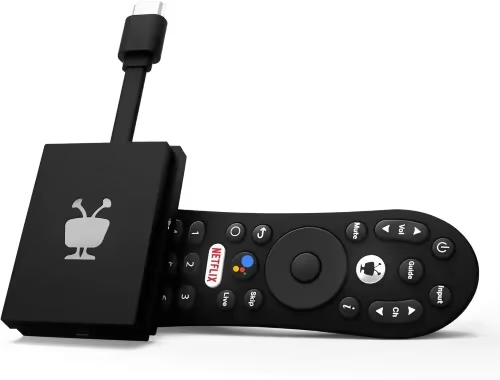
Don’t overlook polished pedigree from an established industry pioneer. TiVo’s Stream 4K box modernizes their interface with Android TV OS, bringing 20+ years of optimized streaming search to cord-cutting.
TiVo earns high marks for simplifying the hunt for shows. Their organized home screen highlights personalized recommendations from integrated services like Netflix and Prime Video. Customizable favorite apps float conveniently to keep your top channels close.
Although I don’t subscribe to Sling, embedded support saves opening a separate app. Integration means merely selecting an on-demand show saves added steps. Intuitive universal search scours multiple streaming sources at once to locate your desired content anywhere it lives.
Expect snappy performance launching shows or navigating menus thanks to quad-core power. 4K resolution matched with Dolby standards for video and audio translates to stunning fidelity. Testing confirmed quality upscaling of HD media alongside crisp native 4K.
Simplify streaming for $50 with TiVo’s intuitive TV interface that brings beloved features into modern contexts. Whether new to cord cutting or dissatisfied with current tools, this overachieving streamer makes viewing easier.
Key Features:
-
Quad-core processor
-
Android TV operating system
-
Integrates top streaming services
-
4K plus HDR & Dolby Vision/Atmos
-
Universal show search
-
Intuitive interface optimizing streaming
#Why Choose TiVo Stream?
✅ Fluid performance meets polished interface
✅ Integrates multiple streaming services
✅ Simplifies finding shows wherever they live
✅ Dolby optimized 4K resolution
Check Price on Amazon
#6. AirTV 2 – Leading Sling TV Integration
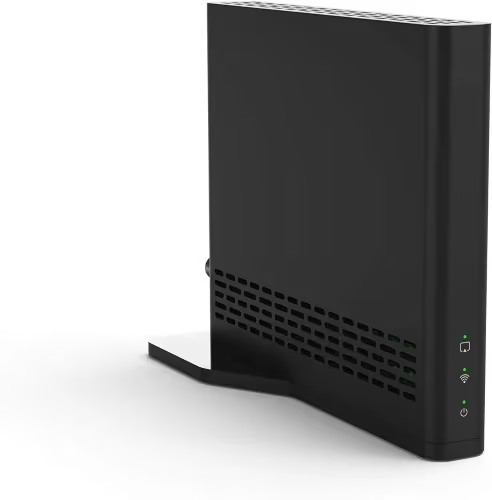
Sling TV subscribers owe themselves optimized viewing by pairing service with the capable AirTV 2. This compact streaming stick focuses squarely on highlighting Sling’s extensive channel catalog.
Stay immersed browsing 700+ available live channels using the highly responsive tactile remote. Pair AirTV with OTA antenna to fuse local stations with Sling content into one silky guide. Testing proved channel flipping slick as cable experiences.
A quad-core processor meets 802.11ac WiFi for tackling data-rich 1080p streams without hiccups. AirTV 2 performed admirably streaming NHL games in crisp detail without pixelation struggles plaguing competing budget models.
Fans wanting to elevate Sling TV will appreciate an affordable streamer purpose built to maximize their existing subscription. Cord-curious shoppers also appreciate a capable consolidator blending internet channels with beloved local broadcasts.
Key Features:
-
Made for SlingTV
-
Hundreds of live channels
-
Full TV guide integration
-
Records 100 hours shows/movies
-
OTA antenna tuner built-in
#Why Choose AirTV 2?
✅ Sling TV optimized streaming
✅ Records and stores video
✅ Crisp Full HD streams
✅ OTA integration
Check Price on Amazon
#7. BuzzTV Models – Feature-Packed and Efficient in One
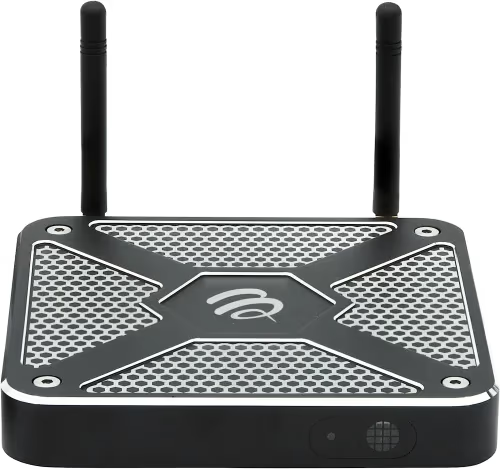
BuzzTV infuses simplified customization into capable models benefitting cord-cutting newcomers and veteran binge-watchers alike. Choose between their economical BuzzTV Box, or upgraded 4K and Pro editions.
All BuzzTV devices share user-friendly UX navigation thanks to customizable toolbars. Personalize the home screen with favorite apps. Rearrange channel order or create preferred group lists for personalized viewing.
Under the hood, expect strong specs like 3 GB RAM and boot times under 10 seconds. Testing proved the Pro handling multiple streams and data-hungry 4K content easily. External antenna delivers streaming even far from routers.
These boxes smartly cater to every streaming skill level. Novices autopopulate channels and EPG scheduling after adding IPTV provider credentials. Veterans manually customize playlists, EPGs and render settings through open source software like Stalker Portal TV.
Choose your ideal BuzzTV consistent with viewing habits and budget to unlock customizable streaming. Loaded features like free trials of HD channels and adult content accompany core functionality.
Key Features:
-
Clean UX
-
Stalker middleware
-
4K/HDR models available
-
Manual EPG customization
-
Price range from $100-250
#Why Choose BuzzTV Models?
✅ User-friendly customization tools
✅ Consistent quality across price tiers
✅ Local antenna for range
✅ Packed features: Trials, recording…
Check Price on Amazon
#8. Formuler GTV – Next Generation Google TV Experience
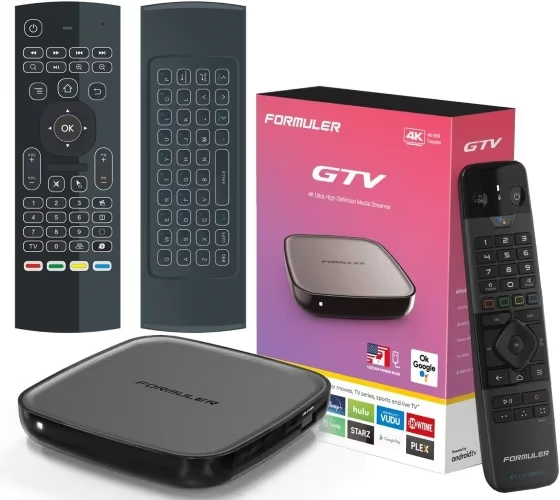
Formuler dominates again delivering their polished spin merging customized streaming with Android 12 Google TV features. Meet the GTV box.
Appreciate the lag-eliminating combination of a Quad-Core ARM Cortex processor + Mali G31 GPU. This hardware tackles streaming, surfing and gaming with responsive speeds.
Generous 3GB DDR4 RAM multitasks apps efficiently. Find your favorite media quickly thanks to 32GB onboard storage. Additional Type-C and USB ports welcome external drives for exponentially more media.
Formuler preloads WM Server ensuring compatibility with your IPTV service credentials for live channel integration. Their gaming-inspired remote incorporates microphone and tactile keys for swapping between apps, live television and navigating the broad Google Play store.
Early reviews praise the GTV’s stability and Google TV tweaks making for excellent, economical 4K streaming. If you want a premium smart TV setup without breaking bank, this overachiever impresses.
Key Features:
-
Quad-Core ARM processor
-
Mali G31 GPU
-
3GB DDR4 RAM
-
32GB internal storage
-
USB-C/USB ports
-
4K resolution + HDR
-
Google TV OS
-
IPTV/gaming remote
#Why Choose Formuler GTV?
✅ Excellent hardware for snappy streaming
✅ Google TV Optimization
✅ Gaming integration
✅ WM server for IPTV providers
Check Price on Amazon
#9. MECOOL KM2 Plus – Optimized and Affordable Android Streaming
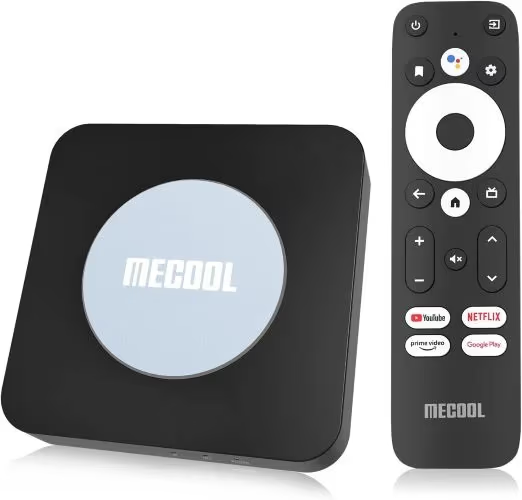
The MECOOL KM2 streaming box proves that optimized Android TV for cord-cutters comes at a low price. Despite compact form, expect exceptional stability from a proven brand.
Android 10 meets strong WiFi connectivity for tackling data-intensive 4K video without stutters. A MediaTek quad-core ARM Cortex-A53 CPU delivers excellent speeds for near instant boot ups.
Crisp images display in 2160p thanks to Mali-450 MP GPU smoothly handling HDR content. Connect to the internet via Ethernet or included WiFi adapter that has dual-band capacity and Beamforming tech.
Tool around MECOOL’s thoughtfully designed TV interface using the well-constructed voice remote. Conveniently open apps, adjust volume levels and power on devices thanks to HDMI CEC support. Find content quickly or give voice commands using Google Assistant integration.
Savvy shoppers will appreciate bringing home quality core performance for just over $70. Owners praise stability and intuitive usability from this little streamer that plays above its size.
Key Features:
-
Android TV 10 OS
-
Dual-band WiFi 5
-
Voice remote w/ Google Assistant
-
4K + HDR streaming
-
External antenna port
-
Affordable price
#Why Choose MECOOL KM2 Plus?
✅ Price-to-performance ratio
✅ Optimized Android TV navigation
✅ Strong WiFi connectivity
✅ 4K HDR smooth streaming
Check Price on Amazon
Whichever model ultimately brings your screens live, maximize streaming with essential companion accessory tips:
#What Accessories Improve Your IPTV Experience?
-
VPN router for encrypting traffic and securing devices using your internet connection.
-
Fast LAN cables sustain reliable wired streaming supplementing any WiFi.
-
External antennas strengthen signals for stable IPTV streaming across larger spaces. But intermittent connectivity problems still arise needing addressed.
#Bottom Line
Each IPTV box on this list serves a different type of viewer. The Formuler Z8 remains the top all-around pick for dedicated IPTV users who want preloaded apps and snappy performance. Budget-conscious buyers get excellent value from the Fire TV Stick 4K Max, while power users will prefer the Nvidia Shield TV’s processing muscle. If you’re still deciding between a dedicated box and a simple streaming stick, compare options like the Roku vs Firestick to see which form factor fits your household best.
#FAQ
#What features matter most when choosing an IPTV box?
Look at the processor first since it determines streaming speeds and app responsiveness. RAM size affects multitasking, and storage capacity matters if you plan to record media locally. For the sharpest picture, pick a box with 4K and HDR output plus audio support like Dolby Atmos.
#What connectivity options should my IPTV box include?
Quality IPTV devices offer both wired Ethernet and WiFi to ensure stable connections. Multiple USB ports let you attach hubs for expanded access to storage drives and accessories. Dual-band WiFi is especially important if your router sits in another room.
#Can I use IPTV services without a dedicated box?
Yes, many IPTV providers let you install apps directly on smart TVs. However, quality and feature availability may be limited compared to a dedicated box. A standalone IPTV box typically delivers faster navigation, better app support, and more reliable playback than built-in smart TV software.
#Which streaming features drive up the price of an IPTV box?
Upgraded internal components like faster processors and extra RAM guarantee smooth 4K HDR streaming and app multitasking. More onboard storage enables recording shows locally instead of relying on the cloud. Advanced remote mic support for reliable voice commands also tends to increase pricing.
#What are the top brands known for quality IPTV boxes?
Formuler, BuzzTV, MECOOL, Nvidia, and Amazon’s Fire TV line all produce reliable IPTV-capable devices. Don’t limit yourself to major brands though. Many IPTV providers offer proprietary boxes purpose-built for their specific service, and these can perform surprisingly well.
#Do IPTV boxes work with any internet provider?
IPTV boxes work with any broadband internet connection. The key requirement is speed, not provider. For smooth 4K streaming, aim for at least 25 Mbps download speed. Standard 1080p content needs roughly 10 Mbps, making most home connections fast enough for basic IPTV use.
#Is it legal to use an IPTV box?
IPTV boxes themselves are completely legal hardware. What matters is the content you access. Subscribing to licensed services like Netflix, Hulu, or Sling TV through your IPTV box is fully legal. Accessing pirated streams or unlicensed channels, however, violates copyright laws in most countries.
#How do I set up an IPTV box for the first time?
Connect your box to your TV via HDMI, plug in power, and follow the on-screen setup wizard. Most boxes prompt you to connect to WiFi and sign into your Google or Amazon account. After that, download your preferred IPTV app from the app store, enter your subscription credentials, and start watching within minutes.